
1. Introduzzjoni
This manual provides essential information for setting up, operating, and maintaining your Lenovo ThinkPad E15 Gen 2 Business Laptop. Please read this guide thoroughly to ensure proper use and to maximize the performance and longevity of your device. Keep this manual for future reference.
2. Kontenut tal-Pakkett
Ivverifika li l-oġġetti kollha huma preżenti fil-pakkett tal-prodott tiegħek. Jekk xi oġġett huwa nieqes jew bil-ħsara, ikkuntattja lill-bejjiegħ tiegħek.
- Lenovo ThinkPad E15 Gen 2 Laptop
- Adapter tal-Enerġija AC u Korda tal-Enerġija
- Battery (internal or external, depending on configuration)
- Gwida ta' Bidu Mgħaġġel (jekk inkluża)
3. Prodott Aktarview
Familiarize yourself with the key components and features of your ThinkPad E15 Gen 2 laptop.
3.1 Quddiem View
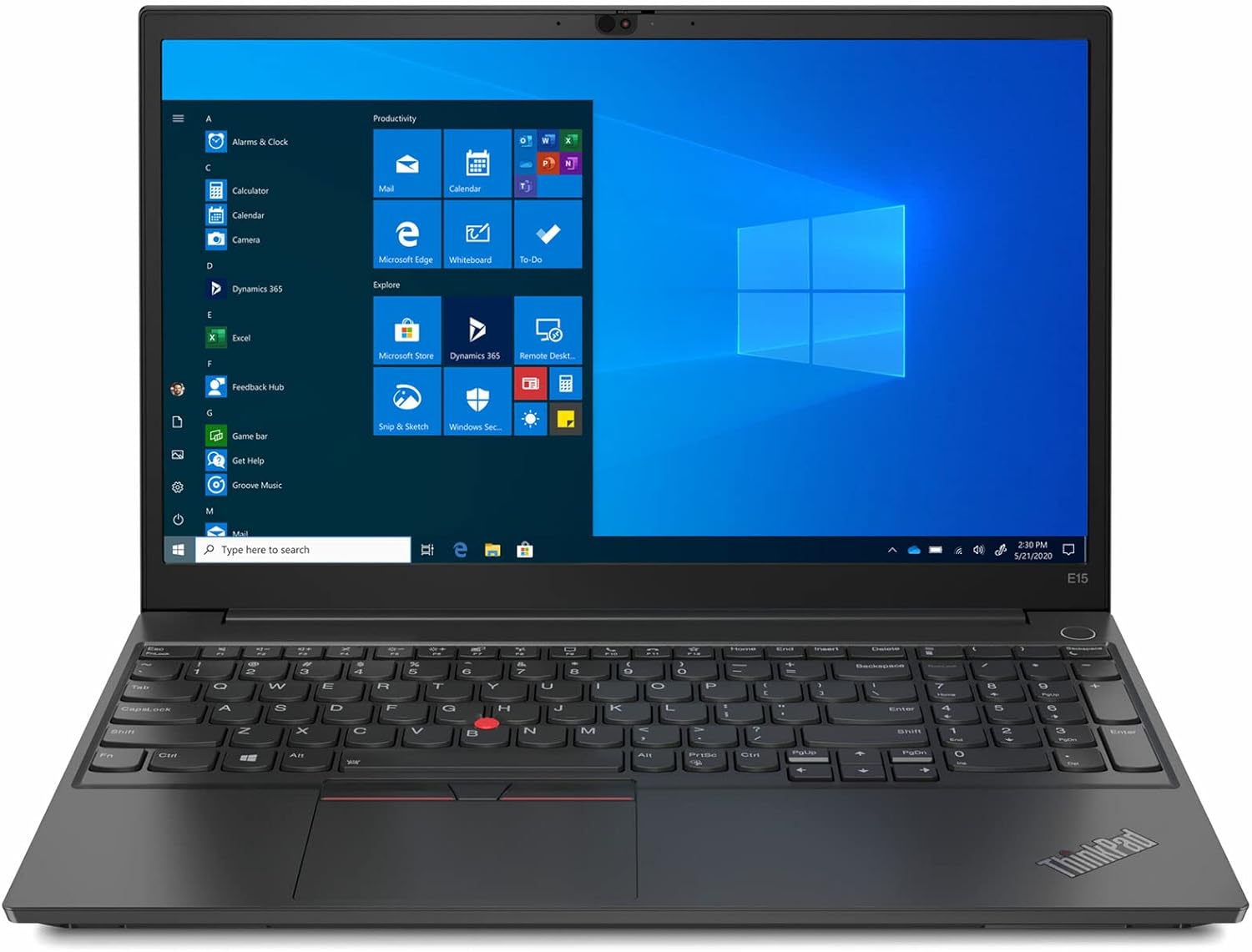
Figura 3.1: Quddiem view of the Lenovo ThinkPad E15 Gen 2 laptop, showcasing the 15.6-inch display and full-size keyboard with numeric keypad.
3.2 Portijiet tan-Naħa tax-Xellug

Figure 3.2: Left side of the laptop, typically featuring power input, USB-C (Thunderbolt 4), USB-A, HDMI, and audio jack.
3.3 Portijiet tan-Naħa tal-Lemin

Figure 3.3: Right side of the laptop, typically featuring additional USB-A ports and a Kensington Nano Security Slot.
3.4 Tastiera u Touchpad

Figure 3.4: Close-up of the keyboard, TrackPoint, and touchpad, highlighting the backlit keys and fingerprint reader.
4. Setup
4.1 Qawwa Inizjali
- Connect the AC power adapter to the laptop's power input port and then to a power outlet.
- Iftaħ l-għatu tal-laptop.
- Press the power button, usually located on the side or top-right of the keyboard deck.
- Follow the on-screen instructions to complete the Windows 11 Pro setup process.
4.2 Konnessjoni tal-Periferali
Your ThinkPad E15 Gen 2 supports various peripherals:
- Apparat USB: Connect USB mice, keyboards, external drives, or other accessories to the available USB-A or USB-C ports.
- Display Estern: Use the HDMI port or a Thunderbolt 4 enabled USB-C port with an appropriate adapter to connect an external monitor.
- Apparat Awdjo: Ipplaggja l-headphones jew l-ispikers esterni fil-jack combo tal-headphones/mic.
4.3 Ġestjoni tal-Enerġija
The laptop is equipped with an internal battery. For optimal performance, keep the laptop connected to the AC adapter when possible. Windows 11 Pro offers various power plans to balance performance and battery life, accessible via the Settings menu.
5. It-Tħaddim tal-Laptop Tiegħek
5.1 L-Użu tat-Tastiera u t-Touchpad
The ThinkPad E15 Gen 2 features a full-size backlit keyboard and a precision touchpad. The integrated TrackPoint provides an alternative navigation method.
- Tastiera backlit: Press Fn + Spacebar to cycle through backlight brightness levels (off, low, high).
- Ċwievet tal-Funzjoni: Use the Fn key in combination with F1-F12 for quick access to system functions like volume, brightness, and wireless toggles.
- Touchpad: Supports multi-touch gestures for scrolling, zooming, and more.
5.2 Qarrej tal-Marki tas-Swaba'
For enhanced security, your laptop includes a fingerprint reader. Set up your fingerprint for Windows Hello login in Windows Settings > Accounts > Sign-in options.
5.3 Karatteristiċi tal-Wiri
The 15.6-inch FHD IPS display offers wide viewing angles and vibrant colors. Adjust display settings (resolution, scaling, night light) through Windows Settings > System > Display.
5.4 Connecting to Networks (Wi-Fi 6E)
Your laptop supports Wi-Fi 6E for fast and reliable wireless connectivity. To connect to a Wi-Fi network:
- Ikklikkja l-ikona tal-Wi-Fi fit-taskbar.
- Agħżel in-netwerk mixtieq tiegħek mil-lista.
- Enter the network security key if prompted.
5.5 Using Thunderbolt 4 Ports
The Thunderbolt 4 USB Type-C ports provide versatile connectivity for data transfer, video output (up to 5K), and power delivery (up to 15W). These ports are compatible with USB-C devices and Thunderbolt accessories.
6. Manutenzjoni
6.1 Tindif
- Uża drapp ratba u mingħajr ħelu ftit dampNaddaf bl-ilma jew b'prodott tat-tindif tal-iskrin biex tnaddaf id-displej.
- Għat-tastiera u x-chassis, uża drapp artab. Evita kimiċi ħarxa jew materjali li joborxu.
- Kun żgur li l-laptop ikun mitfi u skonnettjat qabel ma tnaddaf.
6.2 Kura tal-Batterija
- Evita temperaturi estremi.
- Tneħħix il-batterija kompletament ta' spiss.
- Jekk se taħżen il-laptop għal perjodu estiż, kun żgur li l-batterija tkun iċċarġjata għal madwar 50-60%.
6.3 Ħażna
When not in use, store your laptop in a cool, dry place away from direct sunlight and extreme temperatures. Use a protective sleeve or bag to prevent scratches and dust accumulation.
7 Issolvi l-problemi
This section addresses common issues you might encounter with your ThinkPad E15 Gen 2 laptop.
| Problema | Soluzzjoni Possibbli |
|---|---|
| Il-laptop ma jixgħelx. | Ensure the AC adapter is securely connected and the power outlet is functional. Try a different outlet. If the battery is removable, ensure it is properly seated. |
| L-iskrin huwa vojt jew iswed. | Check display brightness (Fn + F5/F6). Ensure no external monitor is set as the primary display. Restart the laptop. |
| Problemi bil-konnessjoni tal-Wi-Fi. | Ensure Wi-Fi is enabled (Fn + F7 or through Windows settings). Restart your router/modem. Update Wi-Fi drivers. |
| It-tastiera jew it-touchpad ma jirrispondux. | Erġa' ibda l-laptop. Kun żgur li l-ebda apparat estern ma jkun qed jinterferixxi. Iċċekkja għal aġġornamenti tad-drajver fil-Maniġer tal-Apparati. |
| Is-sistema hija bil-mod jew ma tirrispondix. | Close unnecessary applications. Check Task Manager for high resource usage. Run a virus scan. Ensure Windows is updated. |
8. Speċifikazzjonijiet
Key technical specifications for the Lenovo ThinkPad E15 Gen 2 laptop.
| Karatteristika | Speċifikazzjoni |
|---|---|
| Mudell | Lenovo ThinkPad E15 Gen 2 |
| Wiri | 15.6 Inches FHD (1920 x 1080) IPS, Anti-Glare |
| Proċessur | Intel Core i7-1165G7 (sa 4.2 GHz) |
| Grafika | Grafika Intel Iris Xe integrata |
| RAM | 32 GB LPDDR4X |
| Ħażna | SSD NVMe M.2 ta' 1 TB |
| Sistema Operattiva | Windows 11 Pro |
| Konnettività bla fili | Wi-Fi 6E (802.11ax) |
| Portijiet | 2x USB-A 3.2 Gen 1, 2x USB Type-C Thunderbolt 4 (Power In, Data, Display), 1x HDMI 2.0, 1x Headphone/Mic Combo, 1x Kensington Nano Security Slot |
| Karatteristiċi Speċjali | Fingerprint Reader, Backlit Keyboard, FHD Webcam with ThinkShutter |
| Ħajja tal-batterija | Sa 10 siegħa (medja) |
| Dimensjonijiet (LxWxH) | 14.37 x 9.45 x 0.74 pulzieri |
| Piż | 3.75 liri |
9. Garanzija u Appoġġ
Your Lenovo ThinkPad E15 Gen 2 laptop comes with a standard manufacturer's warranty. For detailed warranty terms and conditions, please refer to the warranty information provided with your purchase or visit the official Lenovo support websit.
Għal assistenza teknika, downloads ta' sewwieqa, jew talbiet għal servizz, jekk jogħġbok żur is-sit tal-Appoġġ Lenovo website or contact their customer service. Have your product's serial number ready when contacting support.
Appoġġ Lenovo Websit: support.lenovo.com