
Introduzzjoni
This manual provides essential information for the installation, operation, and maintenance of your MACHINIST B75 Motherboard, which includes an integrated 256GB M.2 Solid State Drive. The B75 motherboard is designed for Intel LGA 1155 processors and offers a range of interfaces for building a personal computer system.
X'hemm fil-Kaxxa
Iċċekkja li l-oġġetti kollha elenkati hawn taħt huma inklużi fil-pakkett tiegħek.
- 1 x MACHINIST B75 Motherboard
- 1 x 256GB M.2 SSD (pre-installed on the motherboard)
- 1 x Kejbil SATA
- 1 x I/O Baffle
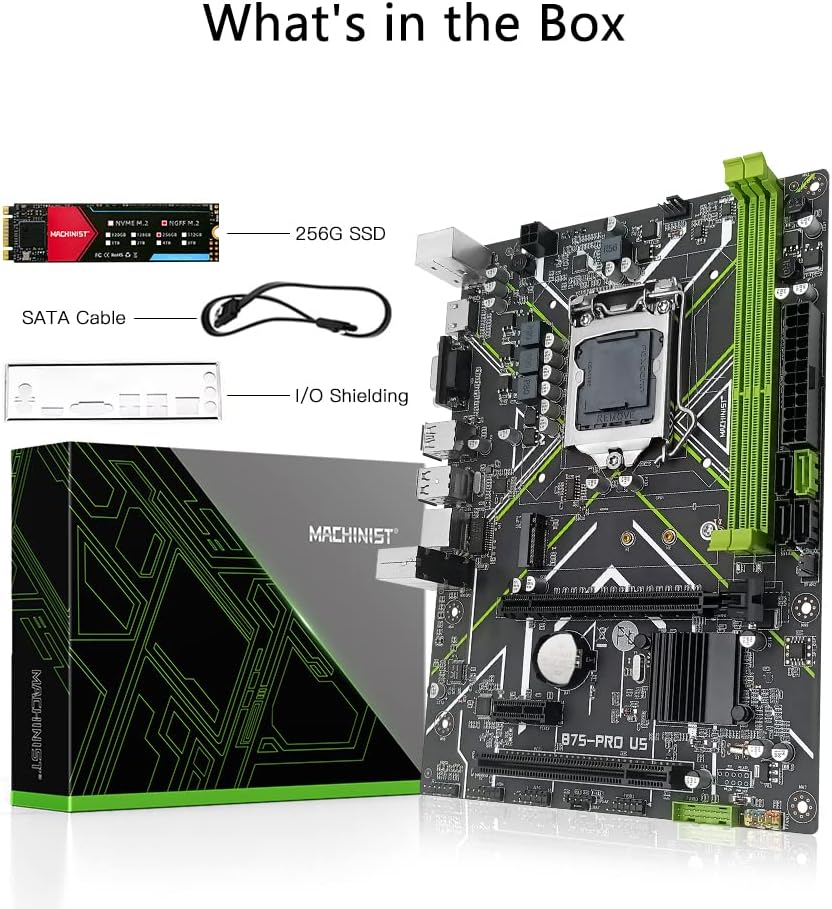
Immaġni: Package contents showing the MACHINIST B75 motherboard, a 256GB M.2 SSD, a SATA cable, and an I/O baffle.
Setup
1. Rekwiżiti tal-Provvista tal-Enerġija
A stable power supply is crucial for the proper functioning of this motherboard. Ensure your power supply unit (PSU) can provide sufficient power, with a minimum recommendation of a 500W brand power supply. Connect the 24-pin ATX power connector and the 4-pin CPU power connector from your PSU to the corresponding sockets on the motherboard.
2. Installazzjoni tas-CPU (LGA 1155)
- Iftaħ il-lieva tas-sokit tas-CPU fuq il-motherboard.
- Carefully align your Intel LGA 1155 processor with the socket, ensuring the gold triangle on the CPU matches the indicator on the socket.
- Poġġi s-CPU bil-mod fis-sokit mingħajr ma tisforzah.
- Agħlaq il-lieva tas-sokit biex twaħħal is-CPU.
- Installa l-cooler tas-CPU skont l-istruzzjonijiet tal-manifattur tiegħu.
3. Installazzjoni tal-Memorja (RAM)
The motherboard supports DDR3 desktop memory.
- Locate the two DDR3 DIMM slots on the motherboard.
- Iftaħ il-klipps fiż-żewġt itruf tas-slott tal-memorja.
- Allinja l-islott fuq il-modulu tal-memorja DDR3 maċ-ċavetta fl-islott tad-DIMM.
- Agħfas sew 'l isfel fuq iż-żewġt itruf tal-modulu tal-memorja sakemm il-klipps jidħlu f'posthom.
4. M.2 SSD
The 256GB M.2 SSD is pre-installed on the motherboard. This is a SATA M.2 (NGFF M.2) interface. If you need to install an additional M.2 drive or re-seat the existing one:
- Sib l-islot M.2 fuq il-motherboard.
- Daħħal l-M.2 SSD fl-islott f'angolu ta' 30 grad.
- Push the SSD down and secure it with the provided screw.

Immaġni: Illustration of the M.2 SATA interface on the motherboard, highlighting its location and the installation process for an M.2 SSD.
5. Expansion Cards (PCIe/PCI)
The motherboard features one PCI-E X16 slot for graphics cards, one PCI-E X1 slot, and one PCI slot for other expansion cards like sound cards or network cards.
- Align your expansion card with the appropriate slot (PCI-E X16, PCI-E X1, or PCI).
- Agħfas 'l isfel sew sakemm il-kard tkun daħlet kompletament fl-islott.
- Secure the card with a screw to the chassis.

Immaġni: Visual representation of the PCI-E X16, PCI-E X1, and PCI expansion slots on the MACHINIST B75 motherboard.
6. Storage Devices (SATA)
Connect your SATA hard drives or SSDs to the available SATA ports. The motherboard includes one SATAIII interface and three SATAII interfaces.
7. Konnessjonijiet tal-Panel ta' Quddiem
Connect the cables from your computer case's front panel (USB ports, audio jacks, power button, reset button, and LED indicators) to the corresponding headers on the motherboard. Refer to the motherboard layout for exact header locations.
Istruzzjonijiet Operattivi
1. Initial Boot and BIOS Access
To access the BIOS (Basic Input/Output System) settings, press the "Del" key repeatedly immediately after pressing the power button to turn on your computer. Do not wait for the operating system's startup logo to appear, as it will be too late.
2. Output tal-vidjo
The motherboard supports high-definition dual display output via VGA u HDMI interfaces. These integrated display outputs support 4K video and audio output, allowing for display functionality without a dedicated graphics card.

Immaġni: A monitor connected via HDMI, demonstrating the high-definition dual screen display support of the motherboard.
3. M.2 SSD Performance
The integrated 256GB M.2 SSD utilizes TLC NAND flash technology and a SATA III 6Gb/s transfer interface, providing sequential read speeds up to 500MB/s and write speeds up to 450MB/s. This enhances system responsiveness and application loading times.

Immaġni: A visual comparison highlighting the faster startup and online game loading speeds achieved with the M.2 SSD compared to a traditional HDD.
Manutenzjoni
1. Tindif Ġenerali
Regularly clean your computer's interior to prevent dust buildup, which can affect performance and component lifespan. Use compressed air to remove dust from fans, heatsinks, and motherboard components. Ensure the system is powered off and unplugged before cleaning.
2. Irrisettjar tas-CMOS
If you encounter system instability or issues related to BIOS settings, you may need to reset the CMOS (Complementary Metal-Oxide-Semiconductor) to factory defaults. This can typically be done by:
- Powering off the computer and unplugging it from the wall.
- Locating the CMOS battery (CR2032) on the motherboard and carefully removing it for 5-10 minutes.
- Reinserting the battery.
- Alternatively, some motherboards have a "Clear CMOS" jumper or button; refer to the motherboard layout for its location.
Issolvi l-problemi
1. No Display, No Boot, or No Picture
If the system does not display an image or fails to boot after installation:
- Irrestawra l-issettjar tal-fabbrika: Try restoring the motherboard to factory settings (e.g., by resetting CMOS as described in the Maintenance section).
- Iċċekkja l-Kuntatti: Use an eraser to gently wipe the metal contacts (golden fingers) of the memory modules, CPU, and any installed graphics cards. This can improve contact with the motherboard slots.
- Provvista tal-Enerġija: Ensure your power supply meets the minimum 500W requirement and all power cables are securely connected.
- Komponenti tas-Sedil: Verify that the CPU, RAM, and any expansion cards are correctly and fully seated in their respective slots.
2. M.2 SSD Capacity Display Discrepancy
The actual usable storage space displayed by your operating system may be slightly less than the total listed capacity (e.g., 256GB). This is normal and due to the decimal measurement system used to represent usable capacity by the SSD manufacturer versus the binary system used by operating systems.
3. Driver Issues
If you experience issues with network connectivity, sound, or other peripherals, ensure all necessary drivers are installed. Windows 10 typically handles most driver installations automatically. For manual driver installation, consider using a driver management tool like Driver Talent.
Speċifikazzjonijiet
| Chipset Prinċipali | Intel B75 |
| Socket tas-CPU | LGA 1155 |
| CPUs appoġġjati | Intel Core i3/i5/i7 (2nd/3rd Gen), Xeon E3 V2, Pentium series processors |
| Tip ta' Memorja | Memorja tad-Desktop DDR3 |
| Slots tal-Memorja | 2 x DDR3 DIMM |
| Kapaċità Massima tal-Memorja | 16GB |
| Veloċità tal-Arloġġ tal-Memorja | 1280/1333/1600/1866MHz (Supported) |
| Tip ta' Motherboard | Mikro-ATX |
| Dimensjoni tal-Motherboard | 240mm x 170mm |
| Slott tal-Karta tal-Grafika | 1 x PCI-E X16 |
| Slots ta 'Espansjoni | 1 x PCI-E X1, 1 x PCI |
| Interfejsijiet SATA | 1 x SATAIII, 3 x SATAII |
| M.2 Interface | 1 x NGFF M.2 (SATA M.2) |
| Portijiet USB (Wara) | 2x USB 3.0, 2x USB 2.0 |
| PS/2 Ports | 2 |
| Output tal-vidjo | VGA, HDMI |
| Konnetturi tal-Enerġija | 1 x 4-pin, 1 x 24-pin |
| Ċirkwit tal-Enerġija | Tliet fażijiet |
| Included SSD | 256GB M.2 SSD (SATA III, Read 500MB/s, Write 450MB/s) |
| Materjal tal-PCB | 6-saffi |
| Batterija | 1 x CR2032 (inkluż) |
| Piż tal-oġġett | 1.48 liri |
| Dimensjonijiet tal-Pakkett | 10.75 x 8.43 x 2.4 pulzieri |
Informazzjoni dwar Garanzija
Specific warranty terms and conditions may vary. Please refer to your purchase documentation, retailer, or the official MACHINIST website for detailed warranty information regarding your B75 Motherboard and included SSD.
Appoġġ
For further assistance, technical inquiries, or driver downloads, please consider the following resources:
- Downloads tas-Sewwieqa: For driver installation, Windows 10 typically provides automatic driver support. If manual installation is required, Driver Talent is a recommended tool.
- Mistoqsijiet Ġenerali: For product-specific questions not covered in this manual, please contact the seller or manufacturer directly.
- MACHINIST Store: Żur l-uffiċjal MACHINIST Store on Amazon for more product information and updates.