
1. Introduzzjoni
Grazzi tax-xiriasing the Muse M-308 BT Bluetooth Speaker. This manual provides essential information for the safe and correct use of your device. Please read it thoroughly before use and keep it for future reference.
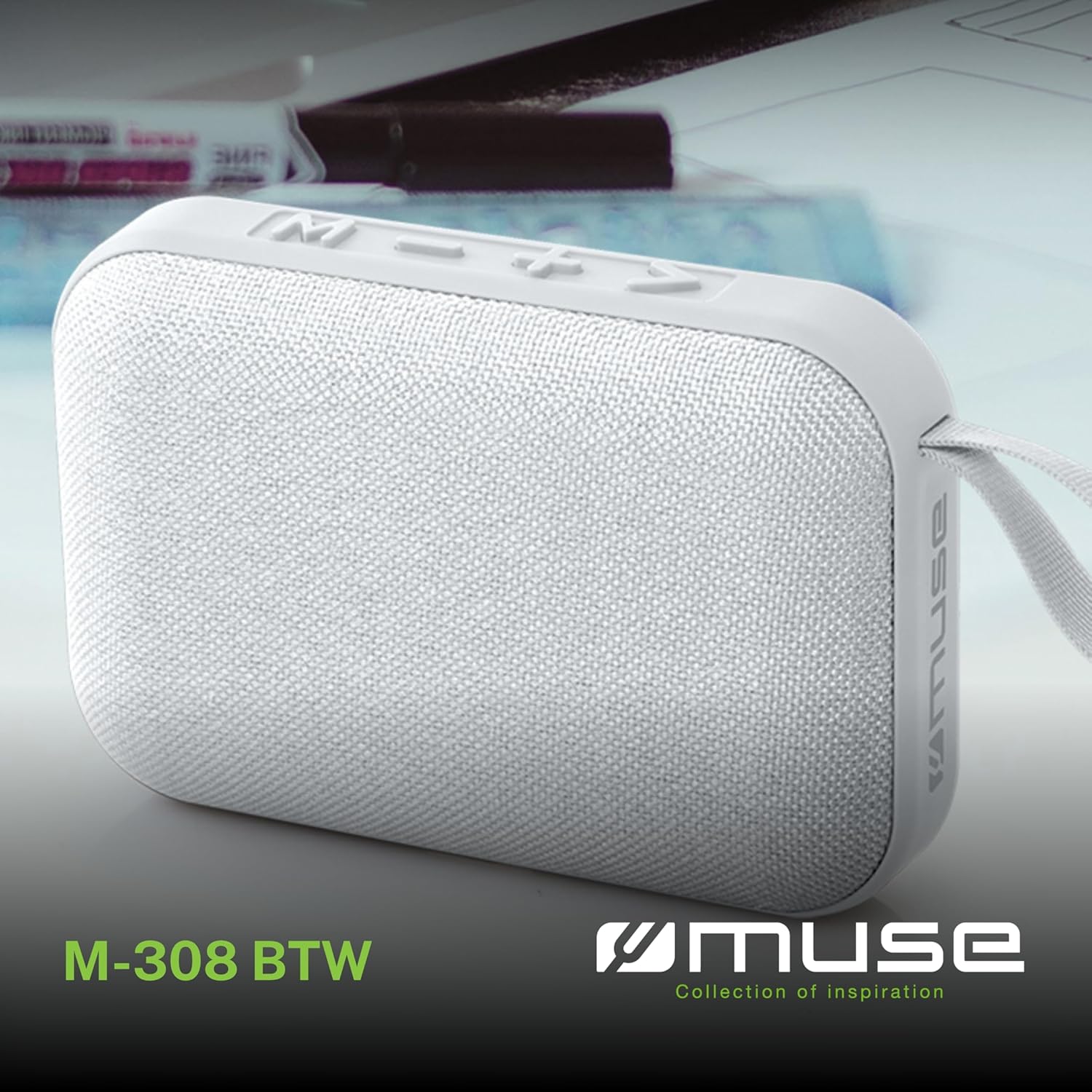
Stampa 1.1: Quddiem view of the Muse M-308 BT Bluetooth Speaker.
2. Karatteristiċi tal-prodott
- Konnettività Bluetooth: Ixxandar l-awdjo mingħajr fili minn apparati kompatibbli.
- Funzjoni mingħajr idejn: Integrated microphone for taking calls.
- Daqq tal-Midja: Supports music playback from USB and MicroSD (TF) cards.
- Tqabbil Stereo: Connect two M-308 BT speakers for enhanced stereo sound.
- Indikatur LED: Provides visual feedback for Bluetooth pairing and charging status.
- Kompatt u Ħfief: Designed for portability, weighing approximately 200g.
- Batterija Rikarikabbli Inkorporata: 1200mAh capacity for up to 10 hours of playback.
- Qawwa tal-Ħruġ: 5 Watts for clear audio.

Image 2.1: Key features of the Muse M-308 BT speaker.

Image 2.2: Additional functionalities of the Muse M-308 BT speaker.
3. Kontenut tal-Pakkett
Kun żgur li l-oġġetti kollha huma preżenti meta tiftaħ il-pakkett:
- Muse M-308 BT Bluetooth Speaker
- Cable tal-Iċċarġjar tal-USB
- Manwal għall-Utent (dan id-dokument)
4. Kontrolli u Konnessjonijiet
Iffamiljarizza ruħek mal-kontrolli u l-portijiet tal-konnessjoni tal-ispiker:

Image 4.1: Top panel with various connections.
- Port USB: Għad-daqq tal-mużika minn flash drive USB.
- Port mikro-USB: Għall-iċċarġjar tal-ispiker.
- Slott tal-Kard Mikro SD (TF): Għad-daqq tal-mużika minn kard Micro SD.
- Swiċċ mixgħul / mitfi: To power the speaker on or off.

Image 4.2: Side panel with control buttons.
- Buttuna M (Modalità): Press to switch between Bluetooth, USB, and Micro SD modes.
- - Button (Volume Down / Previous Track):
- Agħfas qasir: Naqqas il-volum.
- Long press: Go to the previous track.
- + Button (Volume Up / Next Track):
- Agħfas qasir: Żid il-volum.
- Long press: Go to the next track.
- > Button (Play / Pause / Call):
- Short press: Play or pause music.
- Short press (during incoming call): Answer call.
- Long press (during incoming call): Reject call.
- Short press (during call): End call.
5. Setup
5.1 Iċċarġjar tal-Ispeaker
- Qabbad il-kejbil tal-iċċarġjar USB fornut mal-port Micro-USB fuq l-ispiker.
- Qabbad it-tarf l-ieħor tal-kejbil USB ma' adapter tal-enerġija USB (mhux inkluż) jew mal-port USB tal-kompjuter.
- L-indikatur LED se jixgħel biex juri l-istatus tal-iċċarġjar. Se jintefa jew jibdel il-kulur meta jkun iċċarġjat kompletament.
5.2 Tixgħel/Jitfi
- Biex tixgħel, żżerżaq is-swiċċ ON/OFF għall-pożizzjoni 'ON'. Se tisma' sinjal li jinstema'.
- Biex titfi, żżerżaq is-swiċċ ON/OFF għall-pożizzjoni 'OFF'.
5.3 Tqabbil tal-Bluetooth
- Ensure the speaker is powered on and in Bluetooth mode (indicated by a flashing LED). If not, press the 'M' button to switch to Bluetooth mode.
- Ippermetti l-Bluetooth fuq l-ismartphone, it-tablet, jew apparat ieħor kompatibbli tiegħek.
- Fittex għal available Bluetooth devices and select "M-308 BT" from the list.
- Once paired, the LED indicator will stop flashing and remain solid, and you will hear a confirmation tone.
- The speaker will automatically connect to the last paired device when powered on, if it is within range.
5.4 Tqabbil Stereo (Funzjoni TWS)
To pair two M-308 BT speakers for true wireless stereo sound:
- Ensure both speakers are powered on and in Bluetooth pairing mode (LED flashing).
- On one of the speakers (this will be the primary speaker), double-press the 'M' button. The speaker will search for another M-308 BT speaker.
- Once connected, both speakers will emit a confirmation tone, and the LED on the primary speaker will flash slowly, while the LED on the secondary speaker will remain solid.
- Issa, qabbad it-tagħmir tiegħek mal-ispiker primarju permezz tal-Bluetooth kif deskritt fit-taqsima 5.3.
6. Istruzzjonijiet Operattivi
6.1 Daqq tal-Mużika
- Modalità Bluetooth: After successful pairing, start playing music on your connected device. The audio will stream through the speaker.
- Modalità USB/Mikro SD: Insert a USB flash drive or Micro SD card into the respective port. The speaker will automatically switch to the corresponding mode and begin playing music. If it doesn't, press the 'M' button to cycle through modes.
6.2 Kontroll tal-Volum
- Agħfas il-buttuna '+' biex iżżid il-volum.
- Agħfas il-buttuna '-' biex tnaqqas il-volum.
6.3 Navigazzjoni tat-Traċċa
- Agħfas fit-tul il-buttuna '+' biex taqbeż għat-trakka li jmiss.
- Long press the '-' button to go back to the previous track.
6.4 Sejħa mingħajr idejn
- When a call comes in, the music will pause. Press the '>' button to answer the call.
- To end a call, press the '>' button again.
- To reject an incoming call, long press the '>' button.
7. Manutenzjoni
- Żomm l-ispiker 'il bogħod minn temperaturi estremi, dawl tax-xemx dirett, u umdità.
- Do not expose the speaker to water or other liquids. This model is not water-resistant.
- Naddaf l-ispiker b'ċarruta ratba u niexfa. Tużax prodotti tat-tindif jew solventi li joborxu.
- Tippruvax tiżżarma jew issewwi l-ispiker int stess. Dan jannulla l-garanzija.
- When not in use for extended periods, charge the battery at least once every three months to maintain battery health.
8 Issolvi l-problemi
| Problema | Kawża Possibbli | Soluzzjoni |
|---|---|---|
| L-ispiker ma jixgħelx. | Il-batterija hija eżawrita. | Charge the speaker using the supplied USB cable. |
| Ma tistax tqabbad permezz tal-Bluetooth. | Bluetooth is not enabled on your device or speaker is not in pairing mode. Speaker is too far from the device. | Ensure Bluetooth is active on both devices. Make sure the speaker is in Bluetooth pairing mode (flashing LED). Move the speaker closer to your device (within 10 meters). |
| L-ebda ħoss. | Volume is too low. Speaker is not connected. Incorrect mode selected. | Increase the volume on both the speaker and your connected device. Re-pair the Bluetooth connection. Press the 'M' button to cycle through modes (Bluetooth, USB, Micro SD). |
| Music playback from Micro SD card is erratic or "screaming". | Korrotta files on Micro SD card. Incompatible file format. | Żgura l-awdjo files are in a compatible format (e.g., MP3). Try using a different Micro SD card or reformatting the current one and reloading files. |
| Speaker switches between modes (e.g., SD and BT) unexpectedly. | Interference or a temporary software glitch. | Power off the speaker, wait a few seconds, then power it back on. Ensure no other devices are causing interference. If the issue persists, try removing the Micro SD card if it's inserted. |
9. Speċifikazzjonijiet
| Isem tal-Mudell | M-308 BT |
| Brand | Muse |
| Teknoloġija tal-Konnettività | Bluetooth, bil-fili |
| Teknoloġija tal-Komunikazzjoni mingħajr Fili | Bluetooth |
| Qawwa tal-Ħruġ Massimu tal-Ispeaker | 5 Watts |
| Modalità tal-Ħruġ tal-Awdjo | Stereo |
| Tip ta' Kelliem | Speaker Bluetooth portabbli |
| Karatteristiċi Speċjali | Bluetooth |
| Apparati Kompatibbli | Smartphone, Pillola |
| Sors tal-Enerġija | Batterija |
| Ħajja tal-batterija | 10 Sigħat |
| Kapaċità tal-batterija | 1200 Milliampere-siegħa |
| Dimensjonijiet tal-Prodott (P x W x H) | 118D x 30B x 76H millimeters (11.8 x 3 x 7.6 cm) |
| Piż tal-oġġett | 200 Gramm |
| Materjal | Plastic rubber material |
| Is Water Resistant | Nru |
| Komponenti Inklużi | Cable tal-Iċċarġjar tal-USB |
Image 9.1: Dimensions of the Muse M-308 BT speaker.
10. Garanzija u Appoġġ
The Muse M-308 BT Bluetooth Speaker comes with a garanzija ta 'sena mid-data tax-xiri.
For technical support, warranty claims, or further assistance, please contact your retailer or visit the official MUSE websit għal informazzjoni ta' kuntatt.