
1. Prodott Aktarview
The Yamaha MG12X CV is a 12-input unpowered mixing console designed for professional audio applications. It features a rugged steel chassis, D-PRE discrete Class-A microphone preamplifiers, and built-in SPX digital effects with 24 programs. This mixer provides versatile channel options and pristine audio quality for various sound reinforcement and recording needs.
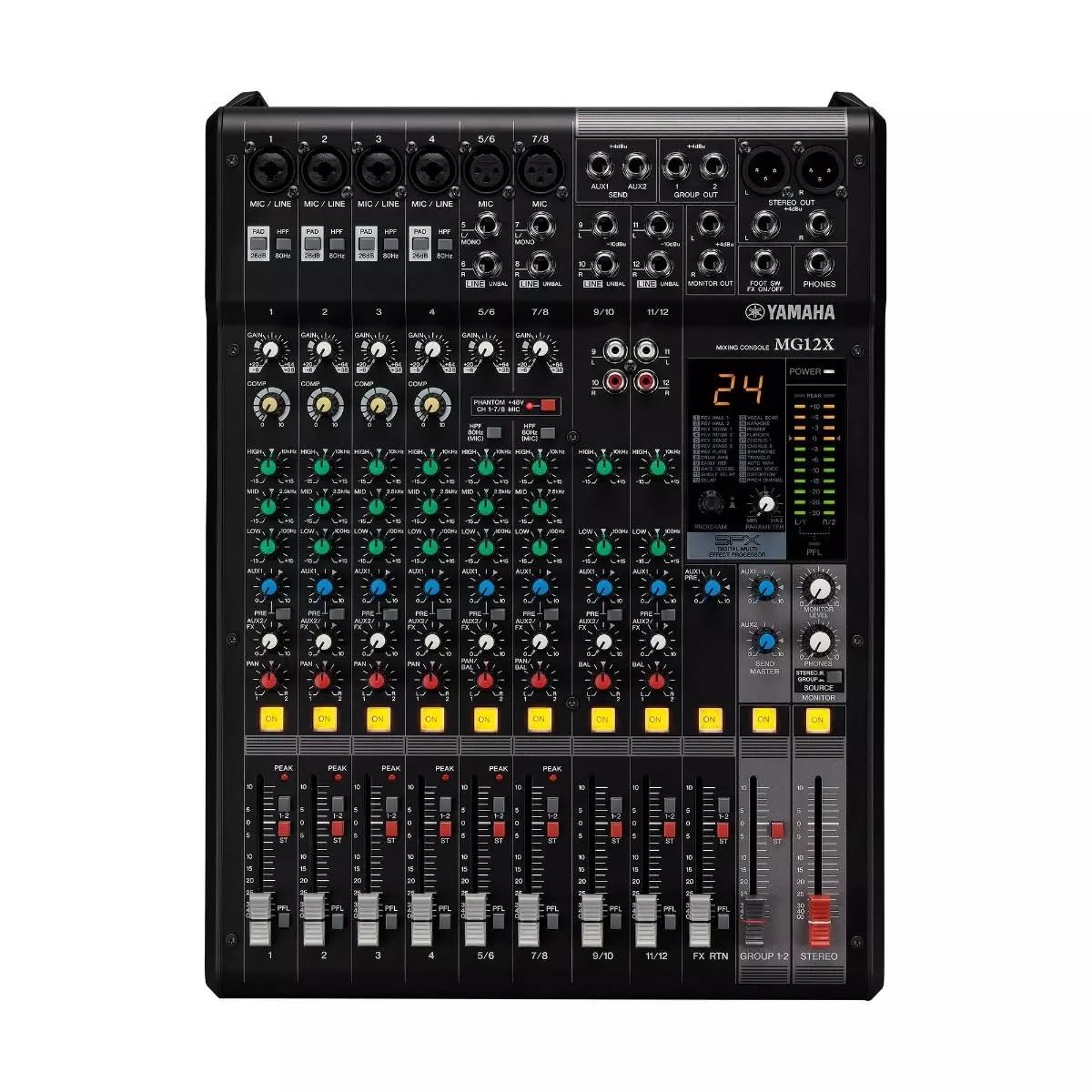
Figura 1: Minn fuq għal isfel view of the Yamaha MG12X CV 12-Input Mixer, showing all controls and input/output jacks.
Karatteristiċi ewlenin:
- 12-Input, 2-Bus Plus Stereo Mixer with Effects
- Rugged, powder-coated steel chassis for superior durability
- Pre-mikrofonu diskret tal-Klassi Aamps
- Built-in SPX digital effects with 24 programs
- Switchable +48V Phantom power
2. Gwida ta' Setup
Follow these steps to set up your Yamaha MG12X CV mixer:
- Spakkjar: Carefully remove the mixer from its packaging. Retain all packaging materials for future transport or storage.
- Pjazzament: Place the mixer on a stable, flat surface. Ensure adequate ventilation around the unit. The MG12X CV can also be rack-mounted using the optional RK-MG12 Rack Mount Kit.
- Konnessjoni tal-Enerġija: Connect the supplied AC power cord to the mixer's AC IN jack on the rear panel and then to a suitable power outlet. Do not power on the unit yet.
- Konnessjonijiet tad-dħul: Connect your microphones, instruments, and other audio sources to the appropriate input jacks (XLR, 1/4" Phone, RCA) on the mixer.
- Konnessjonijiet tal-Ħruġ: Connect your powered speakers, amplifiers, or recording devices to the mixer's XLR or Phone output jacks.
- Headphones: Qabbad il-headphones mal-jack PHONES għall-monitoraġġ.
- Qawwa Inizjali Mixgħula: Ensure all volume controls (GAIN, LEVEL, MASTER) are set to their minimum positions before powering on the mixer. Power on the mixer, then power on any connected amplifiers jew kelliema li jaħdmu bil-mutur.

Figure 2: Rear panel of the Yamaha MG12X CV Mixer, highlighting the power input and output connections.
3. Istruzzjonijiet Operattivi
This section provides basic operating guidelines for your MG12X CV mixer.
3.1. Gain Staging
- Aġġusta l- QIBDA knob for each input channel to achieve an optimal input level. The PEAK LED should flash only occasionally.
- For condenser microphones, activate the +48V PHANTOM power switch if required.
3.2. Ekwalizzazzjoni (EQ)
- Uża l- GĦOLJA, MID, u BAXXA EQ knobs on each channel to shape the tone of your audio source.
3.3. Effects (SPX)
- The MG12X CV features 24 built-in SPX digital effects. Use the PROGRAMM knob to select an effect.
- Aġġusta l- Ibgħat FX knob on each channel to send a desired amount of signal to the effects processor.
- The overall effect level is controlled by the RITORN FX level fader.
- A footswitch can be connected to the SIEQ SW input for hands-free effect muting.
3.4. Kompressjoni
- Four channels are equipped with a single-knob compressor. Turn the COMP knob clockwise to increase the compression amount.
3.5. Output Levels
- Adjust individual channel levels using the channel faders.
- Control the overall output level with the MASTER stereo fader.
- Monitor output levels using the LED meters.
4. Karatteristiċi u Kontrolli
The Yamaha MG12X CV mixer offers a comprehensive set of features and controls for precise audio mixing.
4.1. Input Channels
Each input channel (1-12) includes:
- XLR and 1/4" TRS inputs for microphones and line-level devices.
- GAIN control for input sensitivity adjustment.
- HIGH-PASS FILTER (HPF) switch to cut unwanted low frequencies.
- 3-band EQ (HIGH, MID, LOW) for tonal shaping.
- AUX send for external effects or monitoring.
- FX send for internal digital effects.
- PAN control for stereo positioning.
- Channel ON switch.
- PEAK LED indicator.
- Channel fader for level control.
Channels 1-4 also feature a COMP (compressor) knob.
4.2. Sezzjoni Prinċipali
The master section includes:
- MASTER stereo fader.
- PHONES level control.
- STEREO OUT (XLR/TRS) and MONITOR OUT (TRS) jacks.
- LED level meters.

Figura 3: Dettaljat view of the mixer's controls, including gain, EQ, and effects knobs.
5. Konnessjonijiet
The MG12X CV offers a variety of input and output connectors to integrate with your audio system.
5.1. Input Connectors
- MIC/LINE (XLR/TRS Combo Jacks): Channels 1-4 for microphones and line-level signals.
- LINE (TRS Jacks): Channels 5/6, 7/8, 9/10, 11/12 for stereo line-level signals.
- RCA Pin Jacks: Channels 9/10, 11/12 for stereo line-level signals.
5.2. Konnetturi tal-Output
- ĦRUĠ STEREO (XLR/TRS): Main stereo output for connecting to power ampLiifikaturi jew tagħmir ta' reġistrazzjoni.
- MONITOR OUT (TRS): Output for connecting to monitor speakers.
- PHONES (Stereo Phone Jack): Għall-konnessjoni tal-headphones.
- AUX SEND (TRS): Output for external effects or monitor mixes.
- FX SEND (TRS): Output for sending signal to external effects processors.

Figura 4: Ġenb view of the mixer, illustrating its compact and durable construction.
6. Manutenzjoni
Manutenzjoni xierqa tiżgura l-lonġevità u l-prestazzjoni ottimali tal-mixer tiegħek.
- Tindif: Use a soft, dry cloth to clean the exterior of the mixer. Avoid abrasive cleaners or solvents.
- Protezzjoni mit-Trab: Żomm il-mixer mgħotti meta ma tkunx qed tużah biex tevita li jakkumula t-trab, speċjalment fuq il-faders u l-kmiem.
- Ventilazzjoni: Ensure ventilation openings are clear and unobstructed to prevent overheating.
- Ġestjoni tal-Kejbil: Organize cables neatly to prevent strain on connectors and accidental disconnections.
7 Issolvi l-problemi
If you encounter issues with your MG12X CV, refer to the following common troubleshooting tips:
- Ebda Ħsejjes:
- Iċċekkja l-konnessjonijiet kollha tal-enerġija u kun żgur li l-mixer huwa mixgħul.
- Verify that input sources are connected correctly and active.
- Ensure channel GAIN, LEVEL faders, and MASTER fader are not at minimum.
- Iċċekkja l-ispiker/ampkonnessjonijiet u enerġija tal-lifer.
- Ħoss Mgħawġ:
- Reduce input GAIN if the PEAK LED is constantly lit.
- Check for proper impedance matching between sources and inputs.
- Ensure connected devices are not overdriving the mixer's inputs or outputs.
- L-ebda Effetti:
- Verify that an effect program is selected.
- Check the FX SEND knob on the channel and the FX RETURN fader are turned up.
- Ensure no footswitch is muting the effects.
8. Speċifikazzjonijiet
| Mudell | MG12X CV |
| Brand | Yamaha |
| Channels Input | 12 |
| Mikrofonu Preamps | Discrete Class-A D-PRE |
| Effetti Inkorporati | SPX Digital Effects (24 Programs) |
| Kompressjoni | 4 channels with 1-knob compressor |
| Qawwa Phantom | +48V (jinbidel) |
| Output Connector Types | XLR, TRS |
| Sors tal-Enerġija | Corded Elettriku |
| Piż tal-oġġett | 12.8 Liri |
| UPC | 889025142687 |
9. Garanzija u Appoġġ
The Yamaha MG12X CV comes with a Garanzija tal-manifattur ta 'sena. Yamaha Corporation of America is committed to the quality and craftsmanship of its products. The limited warranty applies only to products purchased from authorized Yamaha retailers within the fifty United States (including the District of Columbia) and used in this area.
For detailed warranty information and support, please refer to the official Yamaha website or contact an authorized Yamaha service center. Authorized retailers are equipped with sales and service support materials and training not readily available to non-authorized retailers.
10. Vidjows tal-Prodott
Watch the official product overview video for the Yamaha MG Series Mixing Consoles:
Vidjo 1: Serje ta' Konsols tat-Taħlit Yamaha MG FuqviewDan il-filmat jipprovdi ħarsa ġenerali lejnview of the MG series, including key features and applications.