
1. Introduzzjoni
This manual provides essential information for the safe and efficient use of your Getac V110 Rugged Convertible Laptop/Tablet PC. Please read this manual thoroughly before operating the device and retain it for future reference. The Getac V110 is designed for durability and performance in challenging environments, offering versatility as both a laptop and a tablet.
2. Informazzjoni dwar is-Sigurtà
Osserva l-prekawzjonijiet ta' sigurtà li ġejjin biex tevita ħsara lill-apparat jew korriment lilek innifsek:
- Tesponix l-apparat għal temperaturi estremi, dawl tax-xemx dirett, jew umdità eċċessiva.
- Use only Getac-approved power adapters and accessories.
- Evita li twaqqa' l-apparat jew li tissottomettih għal impatti qawwija, minkejja d-disinn robust tiegħu.
- Tippruvax tiżżarma jew issewwi l-apparat int stess. Irreferi għal persunal tas-servizz kwalifikat.
- Żomm il-fetħiet tal-ventilazzjoni ċari biex tevita sħana żejda.
3. Fiżiku Żejjedview
The Getac V110 is a versatile device designed for rugged use. It features a convertible design, allowing it to function as both a traditional laptop and a tablet. Key components include a durable chassis, an 11.6-inch touchscreen display, a full-sized keyboard, and various ports for connectivity.

Figura 3.1: Sploda view illustrating the internal structure and ruggedized layers of the Getac V110.
3.1. Tastiera u Touchpad
The device includes a backlit keyboard for typing in various lighting conditions and a precision touchpad for navigation.
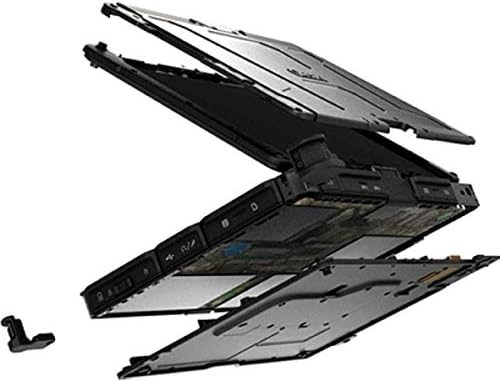
Figura 3.2: Minn fuq għal isfel view of the Getac V110 keyboard and integrated touchpad.
3.2. Convertible Design
The V110 can be easily converted between laptop and tablet modes by rotating the screen. This flexibility allows for optimal use in different scenarios.

Figure 3.3: The Getac V110 configured in laptop mode, displaying the screen and keyboard.

Figure 3.4: The Getac V110 in tablet mode, showcasing the touchscreen interface.
4. Setup
4.1. L-Ewwel Tixgħil
- Qabbad l-adapter tal-enerġija mal-apparat u żbokk tad-dawl.
- Press the power button located on the side or front of the device.
- Follow the on-screen prompts to complete the initial Windows 8.1 setup, including language, region, and user account creation.
4.2. Konnettività tan-Netwerk
The Getac V110 supports both Wi-Fi and Ethernet for internet access.
- Wi-Fi: Access the network settings in Windows 8.1, select your desired Wi-Fi network, and enter the password if required.
- Ethernet: Connect an Ethernet cable from your network router or switch to the Ethernet port on the device.
4.3. Tqabbil tal-Bluetooth
Biex tikkonnettja tagħmir Bluetooth:
- Kun żgur li l-apparat Bluetooth ikun fil-modalità ta 'tqabbil.
- On the Getac V110, navigate to PC Settings > PC and devices > Bluetooth.
- Turn Bluetooth on and select the device from the list to pair.
5. It-tħaddim tal-Apparat
5.1. Tibdil bejn il-Modalitajiet tal-Laptop u tat-Tablet
To convert the device:
- Gently rotate the screen 180 degrees clockwise or counter-clockwise.
- Fold the screen back over the keyboard to enter tablet mode.
- Unfold the screen and rotate it back to the original position for laptop mode.
5.2. Touchscreen Użu
The 11.6-inch LED touchscreen supports multi-touch gestures. Use your fingers or a compatible stylus for navigation, selection, and input.
5.3. Ġestjoni tal-Enerġija
To conserve battery life, adjust power settings in Windows 8.1. You can configure sleep mode, display brightness, and other power-saving options.
- Modalità Sleep: Agħfas fil-qosor il-buttuna tal-qawwa biex tpoġġi l-apparat fil-modalità sleep.
- Itfi: Go to the Charms bar (swipe from right edge or move mouse to top-right corner), select Settings > Power > Shut down.
- Ibda mill-ġdid: Go to the Charms bar, select Settings > Power > Restart.
6. Manutenzjoni
6.1. Tindif tal-Apparat
Regular cleaning helps maintain performance and appearance.
- Uża drapp ratba u mingħajr ħelu ftit dampened with water or a mild, non-abrasive cleaner for the screen and exterior.
- Evita li tisprejja likwidi direttament fuq l-apparat.
- Tużax kimiċi ħarxa, solventi, jew materjali li joborxu.
6.2. Kura tal-batterija
Biex timmassimizza l-ħajja tal-batterija:
- Evita li tiċċarġja l-batterija kompletament ta' spiss.
- Aħżen l-apparat f'post frisk u niexef jekk ma jintużax għal perjodi twal.
- If the device has removable batteries, ensure they are properly seated.
6.3. Aġġornamenti tas-Software
Regularly check for and install operating system and driver updates to ensure optimal performance and security. Access Windows Update through PC Settings.
7 Issolvi l-problemi
This section addresses common issues you might encounter with your Getac V110.
7.1. L-Apparat Ma Jixgħelx
- Kun żgur li l-adapter tal-enerġija huwa konness sew u li s-sokit jaħdem.
- Check if the battery is charged. If not, allow it to charge for at least 30 minutes before attempting to power on again.
- If the battery is removable, ensure it is correctly installed.
7.2. Kwistjonijiet ta' Konnettività tal-Wi-Fi
- Ivverifika li l-Wi-Fi huwa attivat fis-settings tal-Windows.
- Restart your router and the Getac V110.
- Ensure you are within range of the Wi-Fi network and have the correct password.
- Iċċekkja għal sewwieqa tal-Wi-Fi aġġornati.
7.3. L-iskrin tat-touchscreen ma jirrispondix
- Ibda mill-ġdid l-apparat.
- Kun żgur li l-iskrin ikun nadif u ħieles mill-fdalijiet.
- Check for any recent software updates or driver issues.
7.4. Prestazzjoni bil-mod
- Agħlaq l-applikazzjonijiet bla bżonn li jkunu qed jaħdmu fl-isfond.
- Iċċekkja l-ispazju tal-ħażna disponibbli.
- Mexxi skenn tal-virus.
- Kun żgur li l-Windows u s-sewwieqa huma aġġornati.
8. Speċifikazzjonijiet
| Karatteristika | Dettall |
|---|---|
| Brand | Getac |
| Numru tal-Mudell | V110 |
| Proċessur | Intel Core i5-6300U (2.6 GHz) |
| Memorja RAM | 8 GB DDR4 SDRAM |
| Kapaċità tal-Ħżin | 128 GB |
| Daqs tal-Iskrin | 11.6 Pulzier |
| Riżoluzzjoni tal-Wiri | 1366 x 768 pixel |
| Tip ta 'Wiri | LED |
| Input tal-Interface tal-Bniedem | Touchscreen |
| Sistema Operattiva | Windows 8.1 |
| Koproċessur tal-Grafika | Intel HD Graphics 520 |
| Teknoloġija tal-Konnettività | Bluetooth, Ethernet, HDMI, USB, Wi-Fi |
| Piż tal-oġġett | 4.4 Liri |
| Item Dimensions (L x W x Th) | 11.99" x 18.9" x 3.9" |
| Tip taċ-Ċellula tal-Batterija | Lithium Ion (23 Watt Hours) |
9. Informazzjoni dwar Garanzija
The Getac V110 Rugged Convertible Laptop/Tablet PC comes with a Garanzija limitata ta '90 jum. This warranty covers manufacturing defects and malfunctions under normal use. It does not cover damage caused by misuse, accidents, unauthorized repairs, or modifications. Please retain your proof of purchase for warranty claims.
For detailed terms and conditions, refer to the warranty documentation provided with your device or contact Getac customer support.
10. Appoġġ
If you require further assistance or encounter issues not covered in this manual, please contact Getac customer support. You can typically find support contact information on the manufacturer's official website or within the device's pre-installed documentation.
When contacting support, please have your device's model number (V110) and serial number ready.