
1. Introduzzjoni
Il-Lenovo 510 FHD Webcam is designed to provide high-definition video and clear audio for teleconferencing, streaming, and video calls. This manual outlines the product's features, setup, operation, and maintenance to ensure optimal performance.
2. Informazzjoni dwar is-Sigurtà
Please read and follow all safety instructions to prevent damage to the device or personal injury.
- Tesponix il- webcam għall-ilma jew umdità eċċessiva.
- Evita li twaqqa’ jew tissuġġetta l- webcam għal impatti qawwija.
- Do not attempt to disassemble or repair the webcam yourself. Contact qualified service personnel.
- Żomm il- webcam away from heat sources and direct sunlight.
3. Kontenut tal-Pakkett
Ivverifika li l-oġġetti kollha huma preżenti fil-pakkett:
- Lenovo 510 FHD Webcam
- Kejbil USB-C għal USB-A (1.8 metri)
- Dokumentazzjoni (Gwida ta' Bidu Mgħaġġel, Informazzjoni dwar il-Garanzija)
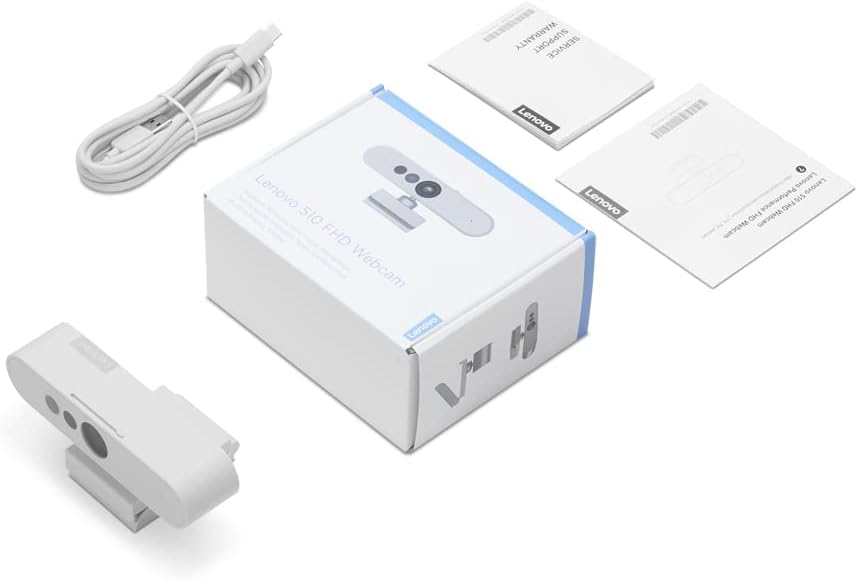
Figura 3.1: Kontenut tal-Pakkett
4. Prodott Aktarview
Il-Lenovo 510 FHD Webcam features a sleek design with integrated components for enhanced functionality.

Figura 4.1: Webcam Components
- Lenti RGB: Captures 1080p Full HD video.
- IR Lens & IR LED: Used for Windows Hello facial recognition.
- Mikrofoni Doppju: Integrat għal qbid awdjo ċar.
- Built-in Shutter: Provides physical privacy control.
- Universal Clip Mount: Attaches securely to laptops, monitors, or tripods.
- Port USB-C: Għall-konnessjoni tal- webcam to your device.
5. Istruzzjonijiet ta' Setup
Setting up your Lenovo 510 FHD Webcam huwa proċess sempliċi plug-and-play.
- Immuntar tal- Webcam:
- Open the universal clip mount.
- Poġġi l- webcam on top of your laptop screen or monitor, ensuring it is stable.
- Alternatively, attach the webcam to a tripod using the integrated tripod mount.

Figura 5.1: Immuntar tal- Webcam
- Konnessjoni mat-Tagħmir Tiegħek:
- Connect the USB-C end of the provided cable to the webcam's USB-C port.
- Connect the USB-A end of the cable to an available USB 2.0 port on your computer (Windows or Mac).
- Il- webcam is UVC-compliant, meaning it is plug-and-play and does not require additional driver installation for most operating systems.

Figura 5.2: Konnessjoni tal- Webcam
6. Istruzzjonijiet Operattivi
Utilize the full capabilities of your Lenovo 510 FHD Webcam with these operating guidelines.
6.1 Karatteristiċi tal-Vidjo u l-Awdjo
- Vidjow ta' Definizzjoni Għolja: Il- webcam delivers crisp 1080p Full HD video at 30 frames per second, suitable for various communication needs.
- Wide-Angolu View: A 95-degree wide-angle lens captures more of your environment, ideal for group calls or showcasing a broader background.
- Żum diġitali: Use the 4X digital zoom feature within your video conferencing software to focus on specific areas.
- Rotazzjoni 360°: Il- webcam head can rotate 360 degrees, allowing you to easily adjust the camera angle without repositioning the entire unit.
- Mikrofoni Doppju: Integrated stereo microphones pick up clear audio from up to 2 meters away, ensuring your voice is heard during calls.

Figure 6.1: Video and Audio Capabilities
6.2 Shutter tal-Privatezza
For enhanced privacy, the webcam includes a physical sliding privacy shutter.
- To block the camera lens, slide the shutter to the closed position.
- To open the camera lens, slide the shutter to the open position.
6.3 Windows Hello Facial Recognition
Il-Lenovo 510 FHD Webcam supports Windows Hello for secure and convenient login.
- Ensure your computer is running a compatible version of Windows.
- Navigate to your Windows settings and configure Windows Hello facial recognition.
- Once set up, you can log in to your device using facial recognition.

Figure 6.2: Windows Hello in Action
7. Manutenzjoni
Manutenzjoni xierqa tiżgura l-lonġevità u l-prestazzjoni ottimali tiegħek webcam.
- Tindif tal-Lenti: Uża drapp artab u mingħajr suf biex timsaħ bil-mod il-lenti tal-kamera. Evita materjali li joborxu jew kimiċi ħarxa.
- Tindif tal-ġisem: Imsaħ il- webcam body with a dry, soft cloth.
- Ħażna: Meta ma tkunx qed tużah, aħżen webcam in a cool, dry place, away from dust and extreme temperatures.
8 Issolvi l-problemi
Jekk tiltaqa' ma' problemi bil- webcam, irreferi għas-soluzzjonijiet komuni li ġejjin:
| Problema | Kawża Possibbli | Soluzzjoni |
|---|---|---|
| Webcam mhux misjuba | Loose USB connection, incompatible port, driver issue. | Ensure the USB cable is securely connected. Try a different USB port. Restart your computer. Check device manager for driver updates. |
| Kwalità ta 'immaġni fqira | Insufficient lighting, dirty lens, software settings. | Ensure adequate lighting in your environment. Clean the camera lens. Adjust video settings within your application (e.g., brightness, contrast). |
| L-ebda awdjo mill-mikrofonu | Microphone muted, incorrect audio input selected. | Check if the microphone is muted in your operating system or application. Select the Lenovo 510 FHD Webcam as the default audio input device. |
| Windows Hello not working | Incorrect setup, environmental factors. | Ensure Windows Hello is properly configured in settings. Verify sufficient lighting and that your face is clearly visible to the camera. |
9. Speċifikazzjonijiet
| Karatteristika | Dettall |
|---|---|
| Numru tal-Mudell | GXC1D66063 |
| Riżoluzzjoni tal-Qbid tal-Vidjo | Full HD ta '1080p |
| Frame Rata | 30 frejm kull sekonda |
| Qasam ta View | 95 grad |
| Zoom Diġitali | 4X |
| Rotazzjoni | 360 degrees Pan & Tilt |
| Mikrofoni | Dual, Integrated Stereo |
| Konnettività | USB 2.0 (USB-C on webcam, USB-A on computer) |
| Tul tal-Cable | 1.8-il metru |
| Karatteristika tal-Privatezza | Sliding Privacy Shutter |
| Rikonoxximent tal-wiċċ | Windows Hello 4.1 compatible |
| Dimensjonijiet tal-Prodott | 5.5 x 4.5 x 2.4 pulzieri |
| Piż tal-oġġett | 0.5 uqija |
| Kulur | Abjad |
Figura 9.1: Webcam Dimensjonijiet
10. Garanzija u Appoġġ
Lenovo provides a standard limited warranty for this product. For detailed warranty terms and conditions, please refer to the documentation included in your package or visit the official Lenovo support websit.
For technical assistance, driver downloads, or further inquiries, please contact Lenovo customer support.