
1. Introduzzjoni
Thank you for choosing the FOREVER Setty Webcam. This manual provides essential information for setting up, operating, and maintaining your webcam. Designed for remote work, conferences, online teaching, and video calls, this webcam offers clear image quality, an integrated microphone, and versatile 360-degree rotation.
2. X'hemm fil-Kaxxa
- GĦAL DEJJEM Setty Webcam
- Cable USB
- Cable Awdjo

Image 2.1: FOREVER Setty Webcam and its retail packaging, showing the webcam, USB cable, and audio cable.
3. Istruzzjonijiet ta' Setup
3.1 Konnessjoni tal- Webcam
- Pożizzjonament: The Setty webcam features an adjustable clip. You can securely attach it to any type of screen (PC monitor, laptop, TV) or place it stably on a desk, monitor stand, TV cabinet, or a circular lamp bi tripod.
- Konnessjoni USB: Qabbad il- webcam directly to your computer using the provided USB cable. The computer will automatically detect the webcam without requiring additional drivers. The 140 cm cable length allows for flexible placement.
- Konnessjoni tal-Awdjo: If your computer does not automatically detect the microphone or you prefer a separate audio input, connect the audio cable from the webcam to your computer's microphone input.

Image 3.1: The FOREVER Setty Webcam showing its integrated clip and the attached USB and audio cables, ready for connection to a computer.

Image 3.2: The FOREVER Setty Webcam securely mounted on top of a laptop screen, demonstrating its adjustable clip mechanism.
4. It-tħaddim tal- Webcam
4.1 Image and Video Quality
The Setty webcam features a CMOS sensor that delivers a clear image with a constant high resolution of 16 MPX. The dynamic resolution is 640 x 480 pixels. This ensures good visual quality for various applications.
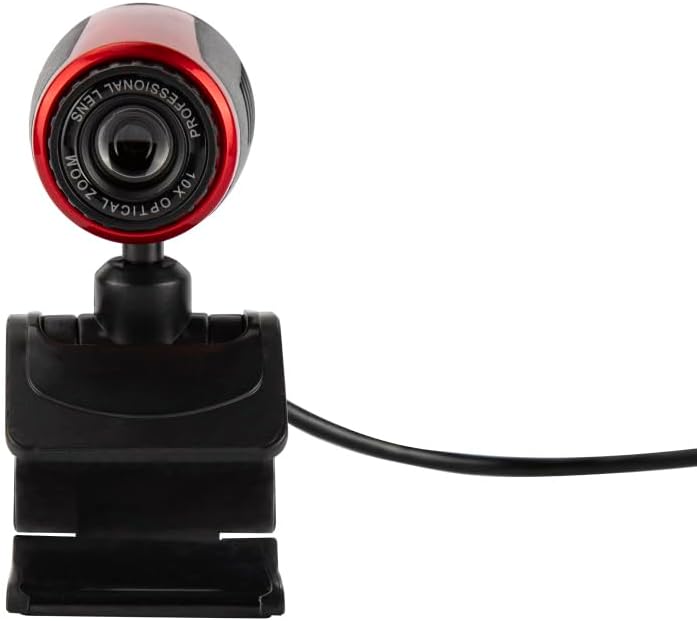
Image 4.1: A close-up front view of the FOREVER Setty Webcam, highlighting the lens and its compact design.
4.2 Integrated Microphone
Il- webcam includes an integrated microphone for clear and fluid video communications. This allows for natural audio recording, making it suitable for online classes, business meetings, and connecting with family and friends. You can also use the camera with wireless headsets, gaming headsets, or computer speakers.
4.3 Rotazzjoni ta' 360 Grad
Il- webcam's design allows for 360-degree rotation, enabling you to adjust the angle as needed. The stable clip ensures the camera remains in your desired position without damaging your screen.

Immaġni 4.2: Naħa A view of the FOREVER Setty Webcam, illustrating its adjustable stand and the ability to change the camera's angle.
4.4 Firxa Wiesgħa ta' Applikazzjonijiet
The Setty Webcam is compatible with various operating systems, including Windows (Win10/Vista/Win7), Mac, and Android TV. It provides excellent video quality for popular communication platforms such as Skype, WhatsApp, Facetime, Zoom, Teams, Facebook, YouTube, and Twitch.
5. Manutenzjoni
Biex tiżgura l-aħjar prestazzjoni u l-lonġevità tiegħek webcam, segwi dawn il-linji gwida tal-manutenzjoni:
- Tindif: Imsaħ bil-mod il-lenti u l-qafas tal- webcam with a soft, dry, lint-free cloth. Avoid using harsh chemicals or abrasive materials that could scratch the lens or damage the surface.
- Ħażna: Meta ma tkunx qed tużah, aħżen webcam f'post frisk u niexef 'il bogħod mix-xemx diretta u temperaturi estremi.
- Kura tal-Cable: Avoid bending or twisting the USB and audio cables excessively to prevent internal damage.
6 Issolvi l-problemi
If you encounter issues with your FOREVER Setty Webcam, ipprova s-soluzzjonijiet li ġejjin:
- WebKamera Mhux Rilevata:
- Kun żgur li l-kejbil tal-USB huwa konness sew maż-żewġ webil-kamera u l-kompjuter tiegħek.
- Ipprova qabbad il- webcam ma' port USB differenti fuq il-kompjuter tiegħek.
- Ibda mill-ġdid il-kompjuter tiegħek.
- Check your computer's device manager (Windows) or System Information (Mac) to see if the webIl-kamera hija elenkata.
- Ebda Immaġni/Kwalità Fqira tal-Immaġni:
- Kun żgur li l-lenti hija nadifa u ħielsa mit-trab jew mit-tbajja’.
- Check the lighting conditions in your environment. Adequate lighting is crucial for good image quality.
- Ivverifika li t-tajba webIl-kamera hija magħżula fis-settings tal-applikazzjoni tal-video conferencing tiegħek.
- Microphone Not Working/Poor Audio Quality:
- Ensure the audio cable (if used) is properly connected.
- Check your computer's sound settings to ensure the webcam's microphone is selected as the input device and its volume is not muted.
- Verify the microphone settings within your video conferencing application.
7. Speċifikazzjonijiet
| Karatteristika | Dettall |
|---|---|
| Brand | GĦAL DEJJEM |
| Numru tal-Mudell | 5900495902092 |
| Kulur | Iswed |
| Dimensjonijiet tal-Prodott (L x W x H) | 3.2 x 3.1 x 3.2 ċm |
| Piż tal-oġġett | 90 gramma |
| Teknoloġija tal-Konnettività | USB |
| Riżoluzzjoni Għadha Effettiva | 16 Megapixels |
| Riżoluzzjoni tal-vidjo | 480p |
| Teknoloġija tas-Sensor tal-Immaġni | CMOS |
| Tul Fokali Massimu | 3.5 Millimetru |
| Apertura Max | 2.8 f |
| Zoom Diġitali | 3.6 x |
| Tip ta 'Focus | Focus Manwal |
| Karatteristiċi Speċjali | Adjustable, Wireless (Note: 'Wireless' might be a mistranslation or refer to compatibility with wireless headsets, as the primary connection is USB) |
| Apparati Kompatibbli | Laptop, Kompjuter Personali, Pillola |
8. Garanzija u Appoġġ
For warranty information and technical support, please refer to the documentation provided with your purchase or contact FOREVER customer service. Keep your proof of purchase for any warranty claims.