
Xtorm XP300U
Xtorm XP300U Portable Power Station 300W - User Manual
Model: XP300U
Introduzzjoni
Thank you for choosing the Xtorm XP300U Portable Power Station. This device is designed to provide reliable and portable power for various applications, from home use to outdoor camping. With a 300W output and multiple charging options, it ensures your devices stay powered wherever you are. This manual provides essential information on the safe operation, setup, maintenance, and troubleshooting of your power station.
Informazzjoni dwar is-Sigurtà
Please read all safety warnings and instructions before using this product to ensure safe operation and prevent damage. Keep this manual for future reference.
- Tiżżarmax, issewwiex, jew timmodifikax l-unità. L-immuntar mill-ġdid mhux korrett jista' jikkawża nar jew korriment.
- Tesponix l-unità għan-nar jew temperaturi għoljin ('il fuq minn 60°C/140°F).
- Tużax jew taħżinx l-unità fid-dawl tax-xemx dirett jew f'ambjenti sħan.
- Do not use or store the unit in a bathroom or in areas exposed to water or moisture.
- Do not drop, hit, or subject the unit to strong impacts.
- Żomm fejn ma jintlaħaqx mit-tfal.
- Use only the original or certified charging cables and adapters.
- Ensure proper ventilation during use and charging. Do not cover the unit.
- In case of leakage from the battery, do not allow the liquid to come into contact with skin or eyes. If contact occurs, wash with plenty of water and seek medical advice.

Image: Safety features of the Xtorm XP300U, highlighting Pure Sine Wave, Short Circuit Protection, Temperature Control, Overcharge Protection, APM Chip, A-Class Batteries, and High Efficiency.
Kontenut tal-Pakkett
Jekk jogħġbok iċċekkja l-kontenut tal-pakkett malli tiftaħ. Jekk xi oġġetti huma nieqsa jew bil-ħsara, ikkuntattja lill-bejjiegħ tiegħek.
- Xtorm XP300U Portable Power Station
- Ċarġer tal-ħajt AC
- Cable Ċarġer tal-Karozza
- MC4 to DC Cable (for solar panel connection, solar panel not included)
- Manwal għall-Utent

Image: The Xtorm XP300U Portable Power Station displayed with its included accessories: AC wall charger, car charger cable, and MC4 to DC cable.
Prodott Overview
Familiarize yourself with the different parts of your Xtorm XP300U Power Station.
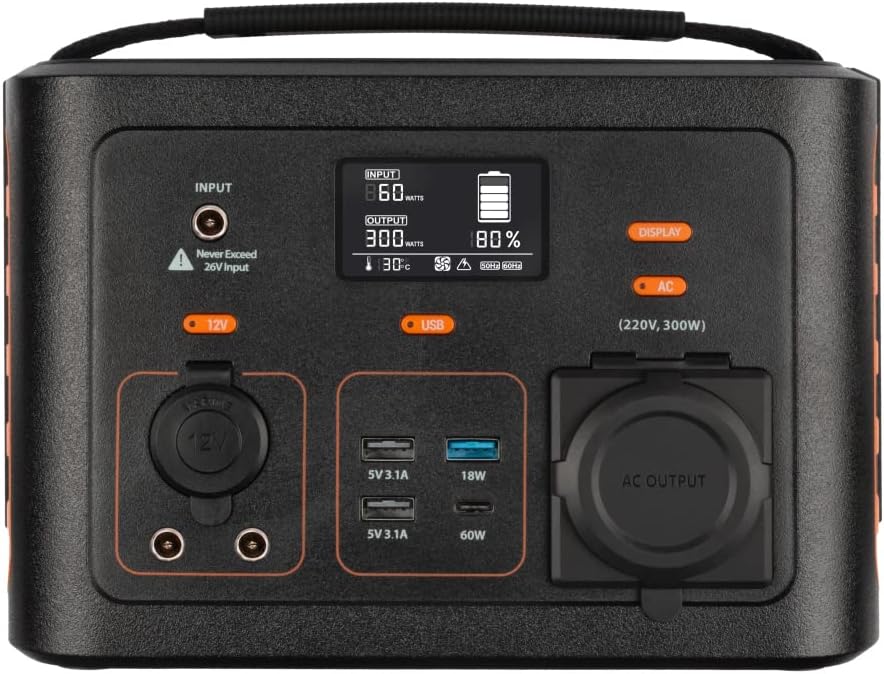
Immaġni: Close-up view of the Xtorm XP300U's front panel, showing the digital display, input port, 12V DC output, USB-A and USB-C ports, and AC output socket.
Karatteristiċi tal-Panew ta 'quddiem:
- Display LCD: Juri l-livell tal-batterija, il-qawwa tad-dħul/ħruġ, u l-indikaturi tal-istatus.
- Port tad-Dħul: Għall-iċċarġjar tal-power station permezz ta' adapter AC, ċarġer tal-karozza, jew pannell solari.
- 12V DC Output: Għall-provvista tal-enerġija lil apparati ta' 12V.
- Portijiet USB-A: Multiple USB-A outputs for charging various devices (e.g., 5V 3.1A, 18W Quick Charge).
- Port USB-C PD: High-speed USB-C Power Delivery output (up to 60W).
- Sokit tal-Ħruġ AC: Standard AC outlet for powering household appliances (220V, 300W).
- Buttuni tal-Kontroll: Buttons for turning on/off specific outputs (e.g., AC, DC, USB).

Immaġni: Fuq view of the Xtorm XP300U, highlighting its integrated carrying handle for portability.

Immaġni: Wara view of the Xtorm XP300U, featuring the Xtorm brand logo and "Portable Power Station 300" text.
Setup
Before first use, it is recommended to fully charge your Xtorm XP300U Power Station.
- Ippakkja: Oħroġ bir-reqqa l-power station u l-aċċessorji kollha mill-imballaġġ.
- Initial Charge (AC Wall Charger):
- Connect the AC wall charger to the input port on the power station.
- Ipplaggja l-ċarġer tal-ħajt AC f'sokit standard tal-ħajt.
- The LCD display will show the charging status. Charge until the battery indicator shows 100%.
- Pjazzament: Place the power station on a stable, flat surface in a well-ventilated area, away from direct sunlight or heat sources.
Istruzzjonijiet Operattivi
The Xtorm XP300U offers multiple ways to charge and power your devices.
Iċċarġjar tal-Power Station:
The XP300U can be recharged using four different methods:
Image: Visual representation of the four charging methods for the Xtorm XP300U: via wall socket, USB-C PD, solar panel (not included), and 12V car charger.
- Via Wall Socket (AC Charger): Connect the included AC wall charger to the input port and a wall outlet.
- Via USB-C PD: Use a compatible USB-C Power Delivery charger (not included) to charge the unit via its USB-C port.
- Via Solar Panel: Connect a compatible solar panel (not included) to the input port using the provided MC4 to DC cable. Ensure the solar panel is placed in direct sunlight for optimal charging.
- Via 12V Car Charger: Connect the included car charger cable to the input port and your vehicle's 12V cigarette lighter socket.
The LCD display will show the input wattage and battery charge status during charging. You can use the outputs even while the power station is charging (pass-through charging).
Using the Outputs:
The XP300U provides various output ports to power different types of devices.

Image: The Xtorm XP300U demonstrating its universal compatibility with icons representing various devices and output types: 1x AC 300W/220V, 1x USB-C PD 60W, 2x DC 5.5mm 60W, 2x USB QC3.0 18W, 1x USB 18W, and 1x 12V Car 120W.
- AC Output (220V, 300W):
- Press the "AC" button to activate the AC output. The AC indicator on the display will light up.
- Plug your device's power cord into the AC outlet.
- Kun żgur li l-konsum tal-enerġija tat-tagħmir tiegħek ma jaqbiżx il-300W.
- Press the "AC" button again to turn off the AC output when not in use.
- Ħruġ DC (12V):
- Press the "12V" button to activate the DC output. The DC indicator will light up.
- Connect your 12V device to the DC port.
- Press the "12V" button again to turn off the DC output.
- USB Outputs (USB-A, USB-C PD):
- The USB outputs are typically always active when the unit is on.
- Connect your USB-powered devices to the appropriate USB-A or USB-C PD ports.
- The display will show the output wattage for connected devices.
The power station can provide power for extended periods, depending on the connected devices' power consumption.

Immaġni: Eżamples of device runtimes with the Xtorm XP300U: 17.5 hours for a 10W LED light, 5.5 hours for a 30W small TV, 4 hours for a 40W small coolbox, and 6 hours for a 40W small coolbox (via 12V carplug output).
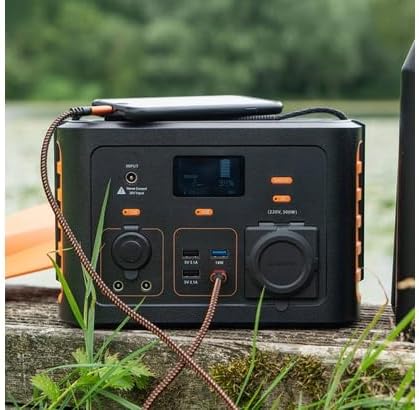
Image: The Xtorm XP300U Portable Power Station being used outdoors on a wooden surface, charging a smartphone, demonstrating its portability and utility in various environments.
Manutenzjoni
Proper maintenance ensures the longevity and optimal performance of your power station.
- Tindif: Uża drapp artab u niexef biex tnaddaf il-barra tal-unità. Tużax prodotti tat-tindif jew solventi li joborxu.
- Ħażna:
- Aħżen l-power station f'post frisk u niexef, 'il bogħod mix-xemx diretta u minn temperaturi estremi.
- Għal ħażna fit-tul, iċċarġja l-unità sa madwar 50-80% kull 3-6 xhur biex iżżomm il-batterija f'saħħitha.
- Avoid storing in environments with high humidity.
- Kura tal-batterija: Do not fully discharge the battery frequently, as this can reduce its lifespan. Recharge promptly when the battery level is low.
Issolvi l-problemi
If you encounter issues with your Xtorm XP300U, refer to the following common problems and solutions.
| Problema | Kawża Possibbli | Soluzzjoni |
|---|---|---|
| L-unità ma tixgħelx. | Il-batterija hija skarikata kompletament. | Connect the power station to an AC wall outlet and charge it for at least 30 minutes. |
| L-output tal-AC mhux qed jaħdem. | AC output not activated; device exceeds 300W; overheating. | Press the "AC" button to activate. Check device wattage. Allow unit to cool down if overheated. |
| Il-portijiet USB mhux qed jiċċarġjaw. | Device not compatible; cable faulty. | Ensure device is compatible. Try a different USB cable. |
| Iċċarġjar bil-mod. | Using a low-power charger; environmental factors (e.g., cloudy for solar). | Use the original AC charger or a higher wattage USB-C PD charger. Optimize solar panel placement. |
If the problem persists, please contact Xtorm customer support.
Speċifikazzjonijiet
Detailed technical specifications for the Xtorm XP300U Portable Power Station.
| Karatteristika | Dettall |
|---|---|
| Isem tal-Mudell | XP300U |
| Brand | Xtorm |
| Qawwa tal-Ħruġ | 300 Watts (AC) |
| Input Voltage | 12 Volts (DC) |
| Sors tal-Enerġija | AC Wall, USB-C PD, Solar, Car Charger |
| Użi Rakkomandati | Home, Camping |
| Piż | 3300 Gramma (3.3 kg) |
| Kulur | Oranġjo |
| Komponenti Inklużi | 1 package (Power Station, AC Charger, Car Charger, MC4 to DC Cable) |

Image: Dimensions of the Xtorm XP300U Portable Power Station (240mm x 154mm x 142mm) and its weight (3.3 kg), highlighting its convenient travel size.
Garanzija u Appoġġ
Xtorm products come with a standard warranty. Please refer to the warranty card included in your package or visit the official Xtorm websit għal termini u kundizzjonijiet dettaljati tal-garanzija.
For technical support, troubleshooting assistance, or warranty claims, please contact Xtorm customer service:
- Websit: www.xtorm.eu (Check for support contact information)
- Email: Refer to the Xtorm websit għal indirizzi tal-email ta' appoġġ speċifiċi.
- Telefon: Refer to the Xtorm websit għal numri tat-telefon ta' appoġġ reġjonali.
When contacting support, please have your product model (XP300U) and purchase details ready.
Ask a question about this manual
Ask about setup, troubleshooting, compatibility, parts, safety, or missing instructions. Manuals+ will review the question and use this page’s manual context to help answer it.