
AOLION WGXB004005
AOLION Stereo Headset Adapter User Manual
Model: WGXB004005
Introduzzjoni
The AOLION Stereo Headset Adapter is designed to enhance your gaming experience on Xbox One controllers. This adapter allows you to connect most wired stereo gaming headsets with a 3.5mm audio jack (CTIA plug standard) directly to your Xbox controller, providing convenient control over game sound and voice chat.
Kontenut tal-Pakkett
- 1 × AOLION Stereo Headset Adapter
- 1 × User's Manual
Prodott Overview
The adapter features intuitive controls for managing your audio experience during gameplay.

Figura 1: Quddiem view of the headset adapter showing control buttons.
- Game Balance Button: Adjusts the balance towards game audio.
- Chat Balance Button: Adjusts the balance towards voice chat audio.
- Buttuna Mute tal-Mikrofonu: Toggles microphone on/off.
- Buttuna 'l fuq il-volum: Increases overall volume.
- Buttuna 'l isfel fil-volum: Decreases overall volume.
- Jack Awdjo 3.5mm: For connecting your stereo gaming headset.
- Konnettur USB: For connecting to the Xbox controller.
Kompatibilità
This headset adapter is compatible with a wide range of Xbox One controllers and stereo gaming headsets:
- Xbox Controllers: Xbox One, Xbox One S, Xbox One X, Xbox Elite Wireless Controller Series 1, Xbox Elite Wireless Controller Series 2, Xbox Series S, and Xbox Series X Controllers.
- Kuffji tal-widna: Most wired stereo gaming headsets featuring a 3.5mm audio jack (using the CTIA plug standard).

Figure 2: The adapter is compatible with multiple Xbox controller models.

Figure 3: The adapter supports standard 3.5mm CTIA headsets.
Setup
Setting up your AOLION Stereo Headset Adapter is a simple plug-and-play process.
- Connect the Adapter to the Controller: Align the USB connector of the headset adapter with the expansion port at the bottom of your Xbox controller. Gently push until it clicks securely into place.
- Qabbad il-Headset tiegħek: Plug your wired stereo gaming headset's 3.5mm audio jack into the corresponding port on the bottom of the headset adapter.
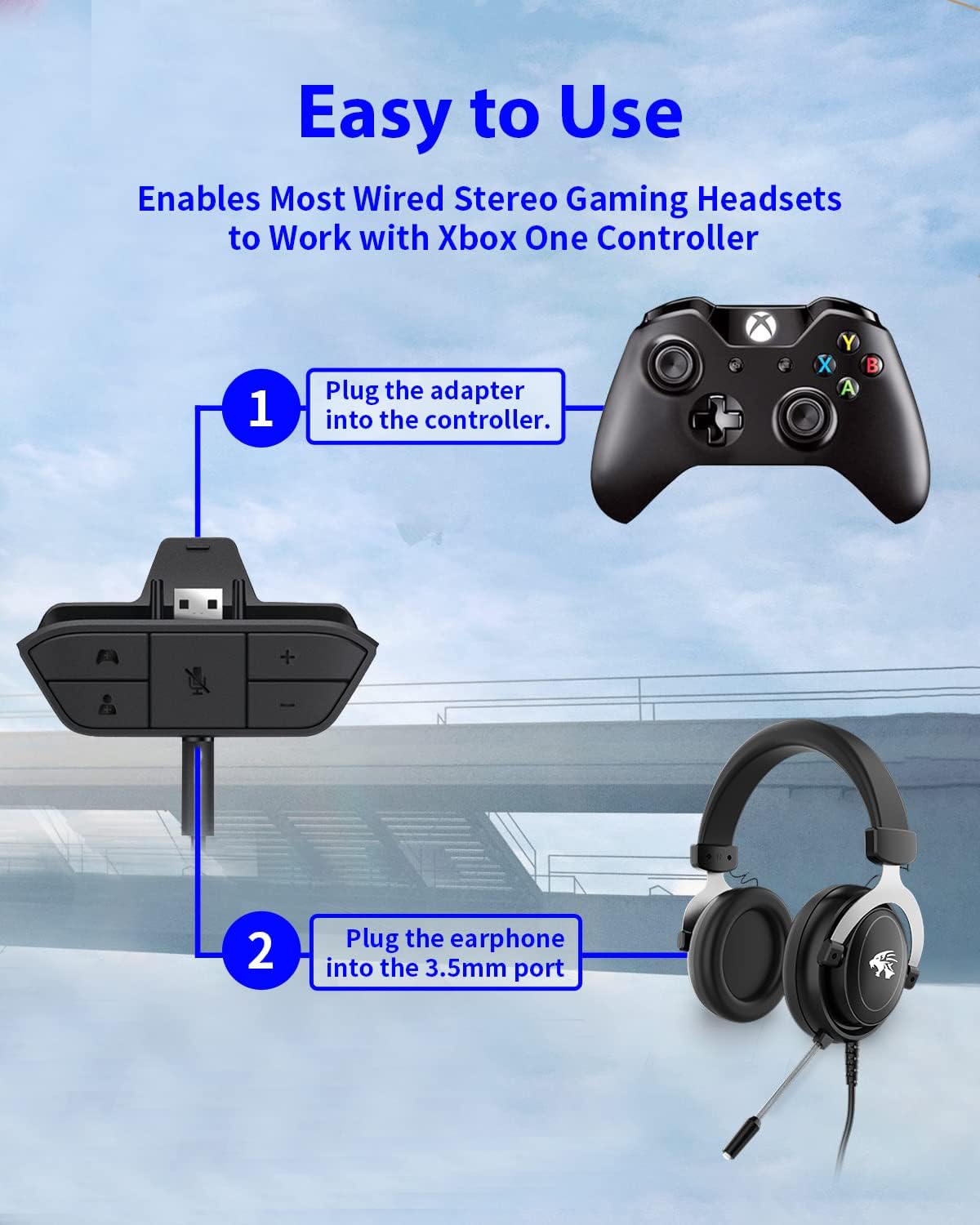
Figure 4: Step-by-step connection guide for the headset adapter.
Video 1: Demonstration of connecting the headset adapter to an Xbox controller.
Nota Importanti: For optimal performance and to resolve potential audio issues, it is recommended to update your Xbox controller's firmware after connecting the adapter. This can typically be done through your Xbox console's settings (Settings > Devices & connections > Accessories > Select your controller > ... > Controller settings > Update firmware).
Istruzzjonijiet Operattivi
Once connected, use the buttons on the adapter to control your audio:
- Volum 'il fuq/Niżżel (+/-): Press the '+' button to increase the overall volume of both game and chat audio. Press the '-' button to decrease it.
- Microphone Mute (Microphone Icon): Press this button to mute or unmute your microphone. An indicator light (if present) or on-screen notification may confirm the mute status.
- Game/Chat Balance (Controller Icon / Person Icon):
- Agħfas il- Ikona tal-Kontrollur button to increase game audio volume and decrease chat audio volume.
- Agħfas il- Ikona tal-Persuna button to increase chat audio volume and decrease game audio volume.
Figura 5: Dettaljat view of the adapter's control buttons.
Manutenzjoni
To ensure the longevity and optimal performance of your headset adapter, follow these simple maintenance guidelines:
- Keep the adapter clean and free from dust and debris. Use a soft, dry cloth for cleaning.
- Evita li tesponi l-adapter għal temperaturi estremi, umdità, jew dawl tax-xemx dirett.
- Tippruvax tiżżarma jew issewwi l-adapter int stess, għax dan jannulla l-garanzija.
- Aħżen l-adapter f'post sigur meta ma tkunx qed tużah biex tevita ħsara fiżika.
Issolvi l-problemi
If you encounter issues with your AOLION Stereo Headset Adapter, please refer to the following common solutions:
| Problema | Kawża / Soluzzjoni Possibbli |
|---|---|
| No audio or poor audio quality (buzzing, peaking) |
|
| Mikrofonu mhux qed jaħdem |
|
| Game/Chat balance not working |
|
Jekk il-problema tippersisti wara li tipprova dawn il-passi, jekk jogħġbok ikkuntattja l-appoġġ għall-klijenti.
Speċifikazzjonijiet
| Karatteristika | Dettall |
|---|---|
| Numru tal-Mudell | WGXB004005 |
| Brand | AOLION |
| Dimensjonijiet tal-Prodott (L x W x H) | 3.15 x 1.57 x 0.79 pulzieri (8 x 4 x 2 ċm) |
| Kulur | Iswed |
| Tip ta' Konnettur | Auxiliary (3.5mm CTIA standard) |
| Apparati Kompatibbli | Xbox One, One S, One X, Elite 1, Elite 2, Series S, Series X Controllers; 3.5mm CTIA Stereo Headsets |
Garanzija u Appoġġ
AOLION stands behind the quality of its products. This Stereo Headset Adapter comes with:
- Garanzija ta' 60 Jum ta' Money Back: If you are not entirely satisfied with your purchase within 60 days, you may be eligible for a full refund.
- Garanzija ta' 24-il Xahar: We provide a 24-month warranty against manufacturing defects from the date of purchase.
For any questions, concerns, or warranty claims, please contact us through Amazon. We are committed to responding to your inquiries within 12 hours to ensure your complete satisfaction.
Ask a question about this manual
Ask about setup, troubleshooting, compatibility, parts, safety, or missing instructions. Manuals+ will review the question and use this page’s manual context to help answer it.