
Introduzzjoni
Thank you for choosing the MageGee GT860 96-Key Wired RGB Backlit Gaming Keyboard. This keyboard is designed for both gaming and daily use, featuring a compact layout, ergonomic design, and customizable RGB backlighting. This manual will guide you through the setup, operation, and maintenance of your new keyboard to ensure optimal performance and user experience.
Kontenut tal-Pakkett
- MageGee GT860 96-Key Wired RGB Backlit Gaming Keyboard
- Manwal għall-Utent
Prodott Overview
Layout tat-Tastiera
The MageGee GT860 features a 92% compact layout, retaining essential keys while offering a space-saving design. It includes a full numeric keypad and function keys.

Image: The MageGee GT860 keyboard showcasing its 96-key layout with RGB backlighting and black and yellow keycaps.

Immaġni: Dettaljata view of the standard 96-key layout with full RGB backlighting, highlighting the compact yet functional design.
Karatteristiċi Ewlenin
- Disinn Kompatt ta' 92%: Offers a balance between full functionality and a space-saving design.
- Membrana b'Ħoss Mekkaniku: Utilizes advanced imitation mechanical technology for a tactile typing experience.
- Disinn Ergonomiku: Key layout is engineered for comfortable use during extended periods, reducing fatigue.
- Dawl ta' wara RGB: Features multiple lighting modes and colors, with adjustable brightness and breathing speed.
- Plug and Play: No drivers required for basic functionality.
- Kompatibilità Wiesgħa: Supports Windows 10, 8, 7, XP, VISTA, and Mac OS.
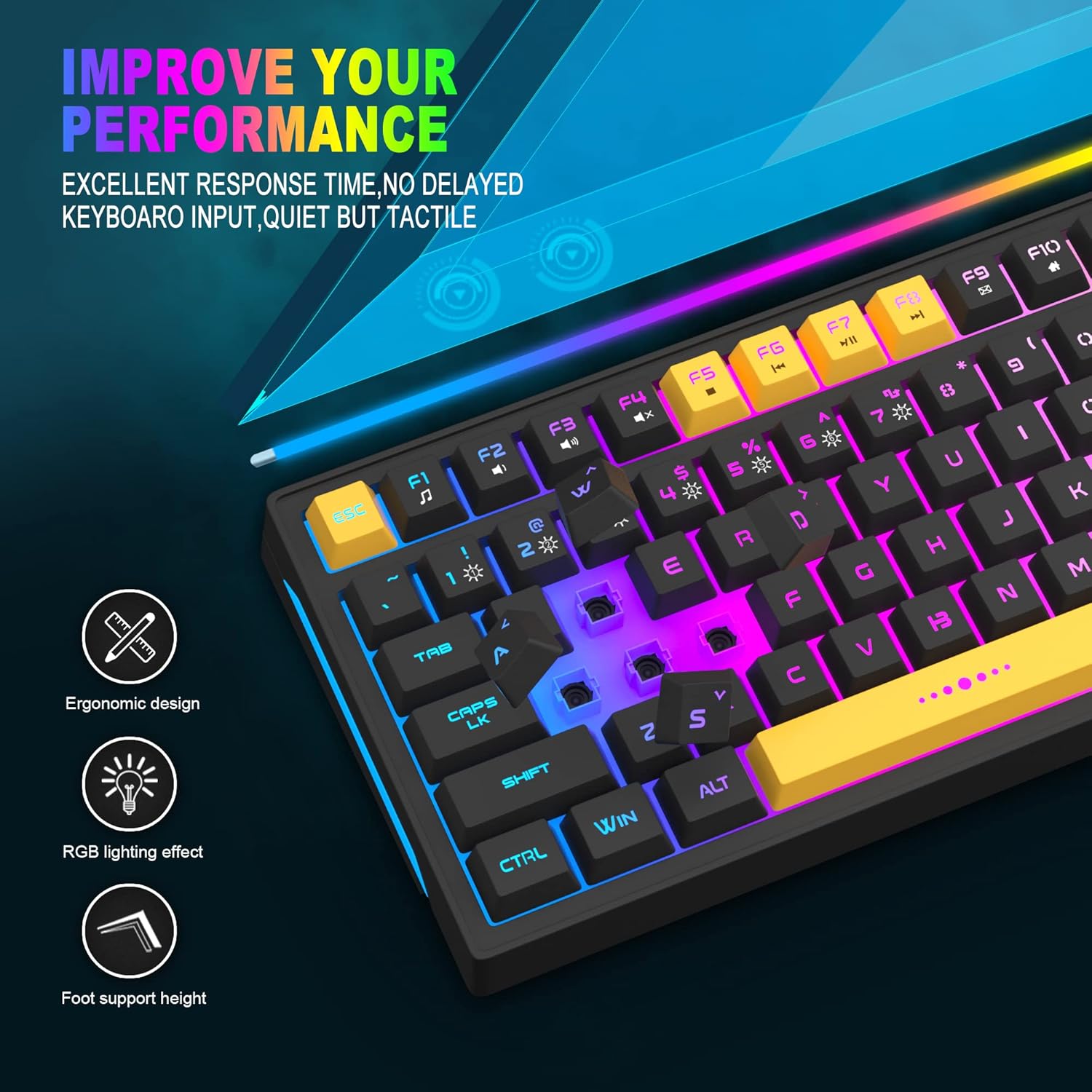
Image: Close-up showing the ergonomic design and RGB lighting effect of the keyboard, emphasizing comfort and visual appeal.

Immaġni: Naħa waħda view of the keyboard illustrating its thoughtful ergonomic design with a 7-degree tilt for improved typing posture.
Setup Istruzzjonijiet
- Unpack the keyboard and ensure all package contents are present.
- Connect the USB cable from the keyboard to an available USB port on your computer.
- The keyboard is plug-and-play and should be automatically recognized by your operating system (Windows, Mac OS). No additional drivers are typically required for basic functionality.
- Once connected, the RGB backlighting will illuminate, indicating the keyboard is powered on and ready for use.
Istruzzjonijiet Operattivi
Kontroll tad-Dawl ta' Wara RGB
The MageGee GT860 keyboard features customizable RGB backlighting with various modes and effects.
- Nibdlu l-Modi tad-Dawl: Agħfas il- FN key combined with keys 1 permezz 6 to cycle through different RGB lighting effects and colors.
- Aġġusta tal-luminożità: Use specific key combinations (refer to keyboard legends or experiment with FN + Arrow keys if not explicitly labeled) to increase or decrease backlight brightness.
- Adjusting Breathing Speed: Some modes allow adjustment of the breathing or animation speed.

Image: The keyboard displaying various RGB backlit lighting modes, illustrating the range of color options available.

Image: A dynamic view tal-wirja tat-tastieraasing its 18 RGB LED light effects, highlighting the vibrant backlighting.
Ċwievet Multimedia u tal-Funzjoni
The keyboard includes dedicated function keys (F1-F12) that can be accessed by pressing the FN ċavetta simultanjament mal-F-key mixtieqa.
| Kombinazzjoni taċ-ċavetta | Funzjoni |
|---|---|
| FN + F1 | Media Player |
| FN + F2 | Volum 'l isfel |
| FN + F3 | Volum Up |
| FN + F4 | Mute |
| FN + F5 | Track Preċedenti |
| FN + F6 | Track li jmiss |
| FN + F7 | Play/Pawsa |
| FN + F8 | Waqqaf |
| FN + F9 | |
| FN + F10 | Home Page |
| FN + F11 | Skrollja Lock |
| FN + F12 | Kalkulatur |

Image: Diagram illustrating the various multimedia and function key combinations using the FN key (FN + F1-F12).
Manutenzjoni
To ensure the longevity and optimal performance of your MageGee GT860 keyboard, follow these maintenance guidelines:
- Tindif: Regularly clean the keyboard with a soft, dry cloth. For deeper cleaning, use compressed air to remove dust and debris from between the keys. A slightly damp cloth (not wet) can be used for keycap surfaces.
- Evita Likwidi: Txerridx likwidi fuq it-tastiera. Jekk isseħħ xi tixrid, skonnettja t-tastiera mill-kompjuter tiegħek immedjatament u ħalliha tinxef kompletament qabel ma terġa' tqabbadha.
- Ħażna: Aħżen it-tastiera f'post frisk u niexef 'il bogħod mix-xemx diretta u minn temperaturi estremi meta ma tkunx qed tużaha għal perjodi twal.
- Kura tal-Cable: Evita li tgħawweġ jew iddawwar il-kejbil USB b'mod eċċessiv biex tevita ħsara interna.

Immaġni: Close-up view of the keyboard with some keycaps removed, showing the underlying switches. This illustrates the internal structure for cleaning purposes.
Issolvi l-problemi
If you encounter issues with your MageGee GT860 keyboard, please refer to the following common troubleshooting steps:
- It-Tastiera Mhux Tirrispondi:
- Ensure the USB cable is securely connected to both the keyboard and your computer's USB port.
- Ipprova qabbad it-tastiera ma' port USB differenti fuq il-kompjuter tiegħek.
- Ittestja t-tastiera fuq kompjuter ieħor biex tiddetermina jekk il-problema hijiex fit-tastiera jew fis-sistema tiegħek.
- Id-Dawl ta' Wara Mhux Jaħdem jew Mhux Korrett:
- Ivverifika li t-tastiera hija konnessa sew u qed tirċievi l-enerġija.
- Cycle through the RGB lighting modes using FN + 1-6 to ensure a mode is selected.
- Aġġusta s-settings tal-luminożità.
- Ċwievet Mhux Reġistrazzjoni:
- Clean the affected keys to remove any debris that might be obstructing the switch.
- Ensure no software conflicts are present (e.g., other keyboard drivers or gaming software).
- Imġieba Mhux Mistennija:
- Ibda mill-ġdid il-kompjuter tiegħek.
- If the issue persists, contact MageGee customer support for further assistance.
Speċifikazzjonijiet
| Karatteristika | Dettall |
|---|---|
| Brand | MageGee |
| Mudell | GT860 |
| Tqassim | 96 Ċwievet (92% Kompatti) |
| Konnettività | USB bil-fili |
| Backlighting | RGB Backlit (Multiple modes) |
| Tip taċ-ċavetta | Membrane with Mechanical Feeling |
| Ergonomija | Disinn Ergonomiku |
| OS kompatibbli | Windows 10, 8, 7, XP, VISTA, Mac OS |
| Dimensjonijiet tal-Prodott | 35.56 x 10.16 x 5.08 ċm (14 x 4 x 2 pulzieri) |
| Piż | 744 g (1.64 lbs) |
| Voltage | 5 Volts |
| Kulur | Isfar Iswed |
Garanzija u Appoġġ
For warranty information or technical support, please refer to the documentation provided with your purchase or contact MageGee customer service directly. Contact details can typically be found on the manufacturer's official webis-sit jew fuq l-imballaġġ tal-prodott.
Jekk jogħġbok żomm il-prova tax-xiri tiegħek għal kwalunkwe talba ta' garanzija.