
ThermoPro IC369-BL-2
ThermoPro TM02 Digital Kitchen Timer Manwal ta' Istruzzjoni
Model: IC369-BL-2 | Brand: ThermoPro
Introduzzjoni
The ThermoPro TM02 Digital Kitchen Timer is designed for precise time management in various settings, including cooking, baking, studying, and general household tasks. It features a unique dual countdown/count-up function, a large backlit LCD display for easy readability, adjustable alarm volume, and versatile placement options.
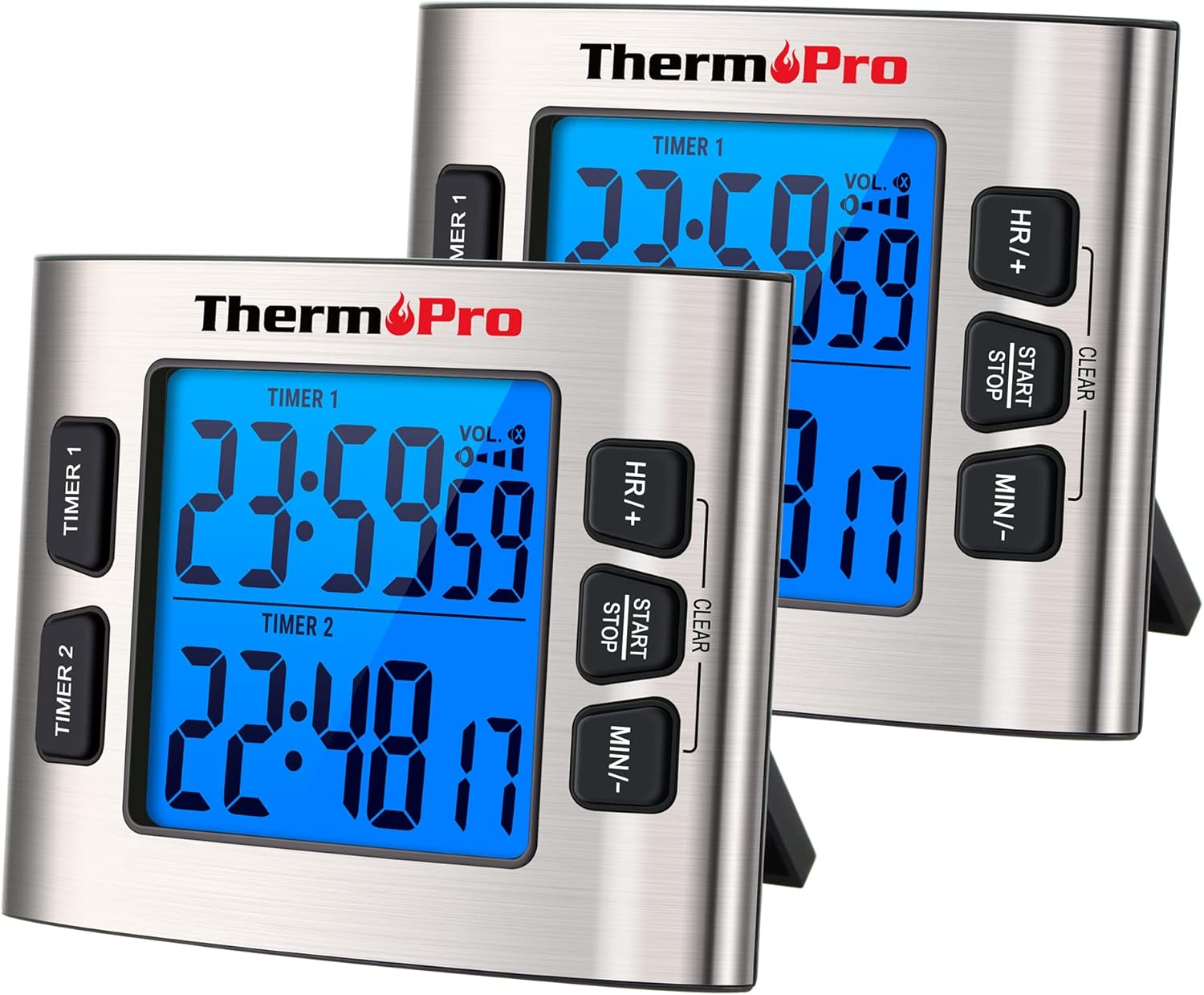
Figure 1: Two ThermoPro TM02 Digital Kitchen Timers. Each timer features a large backlit display, dual timer functionality, and control buttons for setting hours, minutes, and starting/stopping the timer. The timers are shown with their integrated stands extended.
Setup
Installazzjoni tal-batterija
The ThermoPro TM02 timer requires batteries for operation. Locate the battery compartment on the back of the unit. Insert the required batteries, ensuring correct polarity (+/-) as indicated inside the compartment. Close the battery compartment securely.
Għażliet ta 'Pjazzament
The timer offers multiple placement options for convenience:
- Sostenn manjetiku: The timer features strong embedded magnets with anti-slip pads, allowing it to be securely attached to metallic surfaces such as refrigerators or oven doors without scratching.
- Stand tal-mejda: An integrated foldable stand on the back of the unit allows the timer to be placed upright on any flat surface, such as a kitchen counter or desk.

Figure 2: The ThermoPro TM02 timer demonstrating its magnetic attachment to a refrigerator and its use with the tabletop stand on a counter.
Istruzzjonijiet Operattivi
Fuqview tal-Kontrolli
The ThermoPro TM02 timer features a clear LCD display and intuitive buttons for operation:
- TIMER 1 / TIMER 2 Buttons: Selects which of the two independent timers to set or view.
- HR/+ Button: Adjusts hours or increases value.
- MIN/- Button: Adjusts minutes or decreases value.
- Buttuna START/STOP: Starts or stops the selected timer. Also used to clear the timer.
- VOL. Button: Jaġġusta l-volum tal-allarm.
- CLOCK/TIMER Switch: Located on the side/back, switches between Timer mode and Clock mode.
Setting and Using the Timers (Countdown/Count-Up)
The TM02 features two independent timers, Timer 1 and Timer 2, which can operate simultaneously as countdown or count-up timers.
- Switch to Timer Mode: Ensure the CLOCK/TIMER switch on the side/back of the unit is set to "TIMER".
- Select a Timer: Agħfas il- TIMER 1 or TIMER 2 button to select the desired timer. The selected timer's display will become active.
- Issettja l-Ħin tal-Countdown:
- Agħfas HR/+ biex tissettja s-sigħat.
- Agħfas MIN/- biex tissettja l-minuti.
- To clear the set time, press and hold the BIDU/WAQQF buttuna.
- Start Timer: Agħfas il- BIDU/WAQQF button to begin the countdown. The timer will beep and flash when it reaches zero.
- Funzjoni ta' Għadd: Jekk tagħfas BIDU/WAQQF without setting a time, the timer will begin counting up from 00:00.
- Pause / Resume: Agħfas BIDU/WAQQF during operation to pause the timer. Press again to resume.
- Waqqaf Allarm: When the alarm sounds, press any button to stop it. The timer will automatically reset to the last set time for quick re-use.

Figure 3: The dual timer functionality of the ThermoPro TM02, illustrating simultaneous count-up and countdown operations for different tasks.

Figure 4: Step-by-step guide for setting and starting the timers, including switching to timer mode and clearing the display.
Aġġusta tal-Volum tal-Allarm
The TM02 offers four volume modes to suit different environments:
- Għoli: For noisy environments like a busy kitchen.
- Medju: Standard volume for general use.
- Baxx: For quiet settings.
- Siekta: The alarm will not sound, but the digits on the display will flash to indicate time is up. Ideal for studying or meetings.
Agħfas il- VOL. button repeatedly to cycle through the volume modes.

Figure 5: Illustration of the volume control feature, showing the timer's adaptability for both loud and silent environments.
Using Calendar Clock Mode
The TM02 can also function as a calendar clock, displaying the current time, month, date, and year.
- Switch to Clock Mode: Ensure the CLOCK/TIMER switch on the side/back of the unit is set to "CLOCK".
- Issettja l-Ħin u d-Data:
- In Clock mode, press and hold the BIDU/WAQQF buttuna biex tidħol fil-modalità tas-settings.
- Użu HR/+ u MIN/- to adjust the values (Year, Month, Date, Hour, Minute).
- Agħfas BIDU/WAQQF biex tikkonferma kull setting u tgħaddi għal dak li jmiss.
- To switch between 12-hour and 24-hour format, short press BIDU/WAQQF when setting the hour.
- Ħruġ mill-Modalità tas-Settings: The timer will automatically exit setting mode after a few seconds of inactivity, or you can press the CLOCK/TIMER switch to "TIMER" and then back to "CLOCK".

Figure 6: The ThermoPro TM02 operating in Calendar Clock Mode, showing the display of time and date information.
Manutenzjoni
Tindif
To clean the ThermoPro TM02 timer, wipe it with a soft, damp cloth. Do not immerse the unit in water or use abrasive cleaners, as this can damage the electronic components and the stainless steel casing.
Sostituzzjoni tal-batterija
When the display dims or the timer functions become erratic, it is time to replace the batteries. Follow the battery installation steps outlined in the Setup section.
Ħażna
Aħżen it-tajmer f'post frisk u niexef meta ma tkunx qed tużah għal perjodi twal. Neħħi l-batteriji jekk taħżnu għal diversi xhur biex tevita t-tnixxija.

Figure 7: The durable stainless steel casing of the ThermoPro TM02, designed for longevity and easy cleaning.
Issolvi l-problemi
| Problema | Kawża Possibbli | Soluzzjoni |
|---|---|---|
| Id-displej huwa mudlam jew vojt. | Batteriji baxxi jew mejta. | Ibdel il-batteriji b'oħrajn ġodda, filwaqt li tiżgura polarità korretta. |
| L-allarm mhux qed idoqq. | Timer is in Silent mode. | Agħfas il- VOL. button to cycle through volume modes until an audible level is selected. Check for flashing digits. |
| It-tajmer mhux jirrispondi għall-ippressar tal-buttuni. | Unit may be frozen or batteries are critically low. | Remove and reinsert batteries to reset the unit. If issue persists, replace batteries. |
| Magnetic backing not holding securely. | Surface is not metallic or is uneven. | Ensure the surface is flat and made of a magnetic material. Use the tabletop stand if magnetic attachment is not feasible. |
Speċifikazzjonijiet
- Mudell: IC369-BL-2
- Materjal: Stainless Steel
- Kulur: Fidda
- Daqs tal-iskrin: 2.6 Pulzier
- Piż tal-oġġett: 0.26 Kilogrammi (9.2 uqija)
- Dimensjonijiet tal-pakkett: 4.45 x 3.5 x 2.28 pulzieri
- Numru ta' tajmers: 2
- Medda tal-arloġġ: Up to 23 hours, 59 minutes, 59 seconds (for countdown/count-up)
- Alarm Volume Modes: High, Medium, Low, Silent
- Sors tal-Enerġija: Batteries (type not specified in input)
- Karatteristiċi: Dual Timer, Countdown/Count-up, Calendar Clock Mode, Backlit LCD, Magnetic Backing, Tabletop Stand
Garanzija u Appoġġ
For warranty information, product registration, or technical support, please visit the official ThermoPro website or contact their customer service. Details are typically provided in the product packaging or on the manufacturer's websit.
Official ThermoPro Store: Visit ThermoPro Store on Amazon
Ask a question about this manual
Ask about setup, troubleshooting, compatibility, parts, safety, or missing instructions. Manuals+ will review the question and use this page’s manual context to help answer it.