
Bowost F3J
Bowost Wireless Bluetooth Earbuds User Manual
Model: F3J
Introduzzjoni
Thank you for choosing Bowost Wireless Bluetooth Earbuds, Model F3J. These earbuds are designed to provide a superior audio experience with advanced features such as Bluetooth 5.1 connectivity, IP7 waterproofing, and intuitive touch controls. This manual will guide you through the setup, operation, and maintenance of your new earbuds to ensure optimal performance and longevity.
Prodott Overview
Kontenut tal-Pakkett
Qabel ma tibda, jekk jogħġbok kun żgur li l-oġġetti kollha huma preżenti fil-pakkett:
- Bowost Wireless Bluetooth Earbuds (Left and Right)
- Kawża tal-Iċċarġjar
- Cable tal-Iċċarġjar tal-USB tat-Tip-Ċ
- Daqsijiet Multipli ta' Ear Tips (Żgħar, Medji, Kbar)
- Manwal għall-Utent

Image: All components included in the Bowost Wireless Bluetooth Earbuds package.
Karatteristiċi Ewlenin
- Kwalità tal-Ħoss Superjuri: Equipped with 10mm professional speaker units and composite vibration diaphragms for crisp highs, rich mids, and powerful deep bass.
- Bluetooth Avvanzat 5.1: Ensures faster, more stable signal transmission with low latency for an uninterrupted listening experience.
- Klassifikazzjoni IP7 li ma jgħaddix ilma minnha: Designed with high-quality waterproof materials and multi-process sealing, effectively protecting internal components from water, rain, and sweat.
- Ħajja Estiża tal-Batterija: Up to 6 hours of playback on a single charge, with the charging case providing an additional 40 hours of battery life.
- Convenient Type-C Fast Charging: A quick 10-minute charge provides 1 hour of playback.
- Kontroll tat-Touch Intuwittiv: Manage music playback, calls, and voice assistant activation with simple taps on the earbuds.
- Display tal-batterija LED: The charging case features an LED indicator to show the battery level of both the case and the earbuds.
- Disinn Ergonomiku: 120° ergonomic fit ensures comfort and stability, ideal for various activities including sports.

Image: The Bowost Wireless Bluetooth Earbuds with their charging case, highlighting the compact design.

Image: Visual summary of the main features of the Bowost Wireless Earbuds.

Image: Illustration of the ergonomic design and included ear tip sizes for a comfortable fit.
Setup
Iċċarġjar tal-Earbuds u l-Każ
For first-time use, fully charge the earbuds and the charging case. The charging case features an LED digital display that shows the battery percentagtal-kaxxa u l-istatus tal-iċċarġjar individwali tal-earbuds.
- Place the earbuds into the charging case. Ensure they are correctly seated; the earbuds will light up to indicate charging.
- Qabbad il-kejbil tal-iċċarġjar USB Type-C mal-port tal-iċċarġjar fuq il-kaxxa u t-tarf l-ieħor ma' sors ta' enerġija USB (eż., adapter tal-ħajt, port USB tal-kompjuter).
- The LED display on the charging case will show the current battery level and charging progress.
- Ladarba tkun iċċarġjata kompletament, skonnettja l-kejbil tal-iċċarġjar.
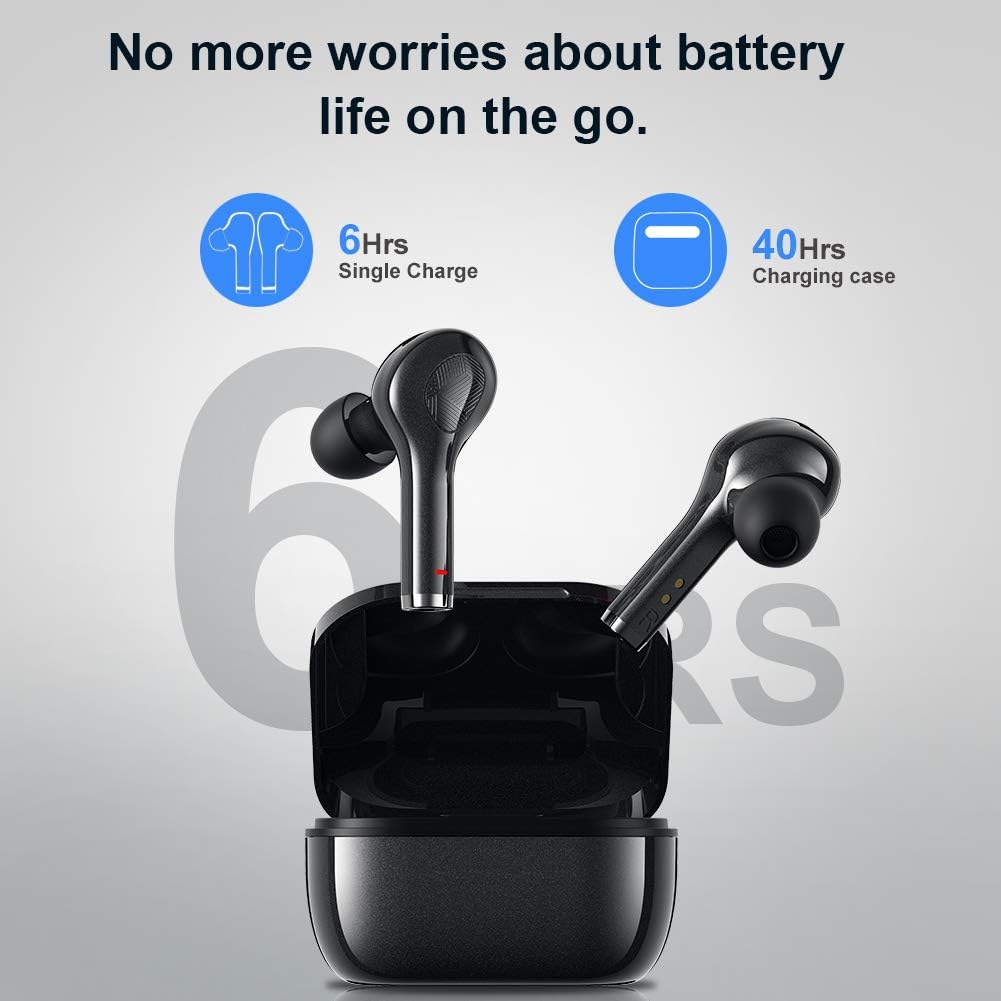
Image: Battery life indication for the earbuds and charging case.
Tqabbil mat-Tagħmir Tiegħek (Tqabbil f'Pass Wieħed)
Il-earbuds għandhom tqabbil awtomatiku għall-konvenjenza.
- Kun żgur li l-Bluetooth tat-tagħmir tiegħek huwa mixgħul.
- Iftaħ il-kaxxa tal-iċċarġjar u neħħi ż-żewġ earbuds. Dawn jinxtegħlu awtomatikament u jidħlu fil-modalità ta' tqabbil.
- On your device, search for Bluetooth devices and select "F3J" from the list.
- Ladarba tkun konness, tisma' ton ta' konferma, u l-earbuds ikunu lesti għall-użu.
- After the initial pairing, the earbuds will automatically connect to the last paired device when removed from the case.
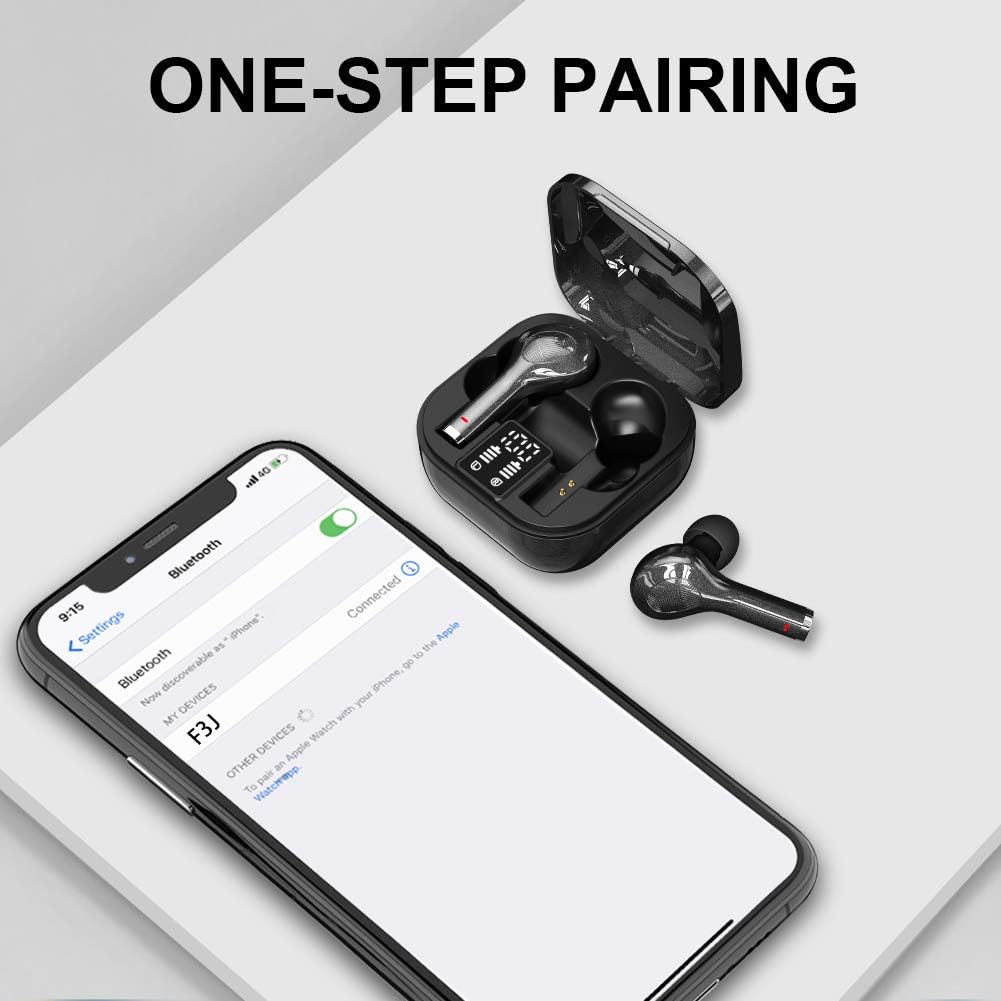
Image: The one-step pairing process shown with a smartphone's Bluetooth settings.

Image: Visual representation of the automatic pairing sequence.
Istruzzjonijiet Operattivi
The Bowost earbuds feature intuitive touch controls for easy management of audio and calls.
Funzjonijiet ta 'Kontroll Touch
| Azzjoni | Earbud tax-Xellug | Earbud tal-lemin |
|---|---|---|
| Ilgħab/Pawża Mużika | Tektek Uniku | Tektek Uniku |
| Track li jmiss | N/A | Tektek Doppju |
| Track Preċedenti | Tektek Doppju | N/A |
| Volum Up | N/A | Tektek triplu |
| Volum 'l isfel | Tektek triplu | N/A |
| Tweġiba/Tmiem Sejħa | Tektek Uniku | Tektek Uniku |
| Irrifjuta Sejħa | Pressa twila (2s) | Pressa twila (2s) |
| Attiva l-Assistent tal-Vuċi (Siri/Google Assistant) | Pressa twila (3s) | Pressa twila (3s) |
| Qawwa mixgħul/mitfi | Pressa twila (5s) | Pressa twila (5s) |
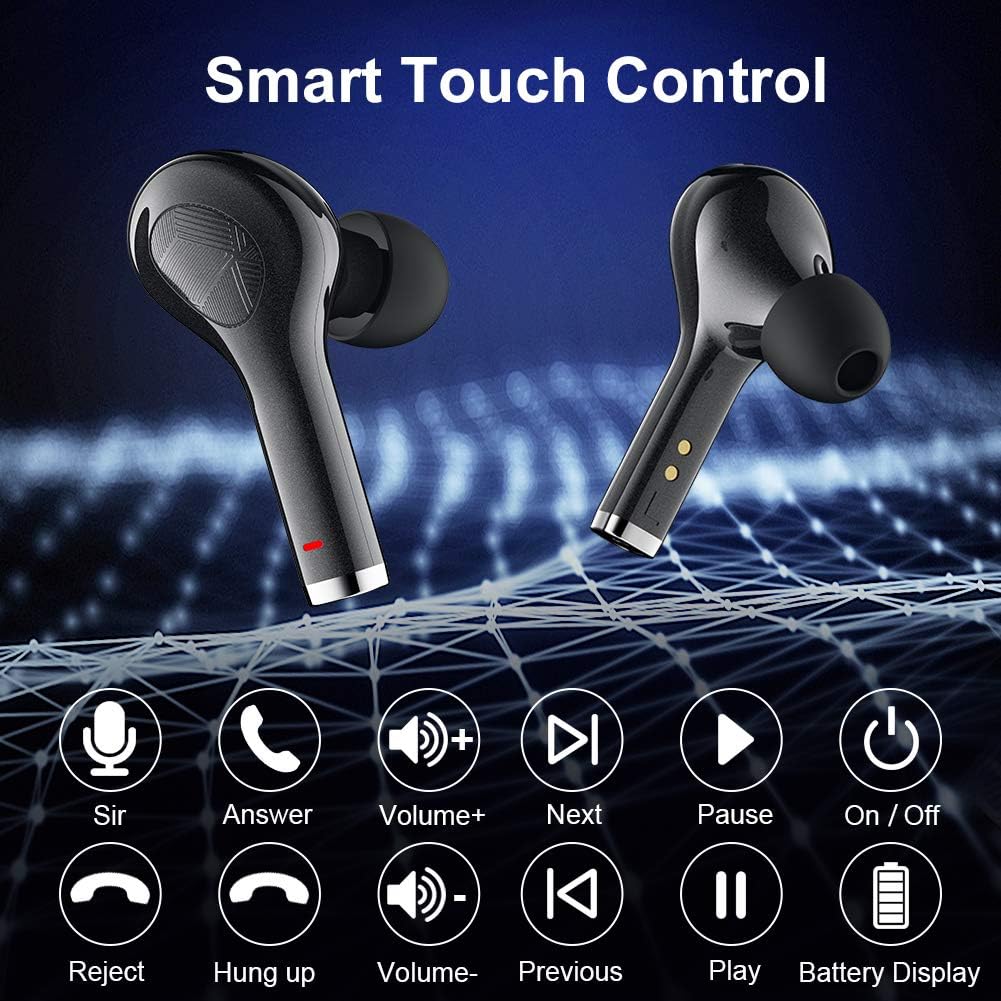
Image: Visual guide to the smart touch control functions.

Immaġni: Dettaljata view of the touch control area on the earbud.
Manutenzjoni
Water Resistance (IP7 Rating)
The earbuds are rated IP7 waterproof, meaning they can withstand immersion in water up to 1 meter for 30 minutes. This makes them suitable for workouts, running in light rain, and other activities where they might be exposed to sweat or splashes. However, they are not designed for swimming or prolonged submersion.
- Do not expose the charging case to water, as it is not waterproof.
- After exposure to water or sweat, ensure the earbuds are completely dry before placing them back into the charging case to prevent damage to the charging contacts.

Image: The earbuds demonstrating their IPX7 waterproof capability.

Image: Close-up of the earbuds showing water resistance.
Tindif u Ħażna
- Naddaf il-earbuds u l-kaxxa tal-iċċarġjar regolarment b'ċarruta ratba, niexfa u mingħajr suf.
- Neħħi l-ponot tal-widnejn u naddafhom b'sapun ħafif u ilma, imbagħad nixxefhom sew qabel ma terġa' twaħħalhom.
- Uża swab tal-qoton jew pinzell żgħir u artab biex tnaddaf bil-mod il-kuntatti tal-iċċarġjar kemm fuq il-earbuds kif ukoll ġewwa l-kaxxa.
- Aħżen il-earbuds fil-każ tal-iċċarġjar tagħhom meta ma tkunx qed tuża biex tipproteġihom u żżommhom iċċarġjati.
- Evita temperaturi estremi u dawl tax-xemx dirett.
Issolvi l-problemi
If you encounter any issues with your Bowost Wireless Bluetooth Earbuds, please refer to the following common solutions:
Il-Earbuds Mhux Qed Jiġu Pairing jew Konnessi
- Iċċekkja l-batterija: Ensure both earbuds and the charging case have sufficient battery charge.
- Erġa 'par:
- Itfi l-Bluetooth fuq it-tagħmir tiegħek.
- Place both earbuds back into the charging case, close the lid, and wait a few seconds.
- Neħħi l-earbuds mill-każ.
- Turn on Bluetooth on your device and search for "F3J" to reconnect.
- Clear Bluetooth History: On your device, forget or unpair "F3J" from your Bluetooth device list, then repeat the pairing process.
- Distanza: Ensure the earbuds are within the effective Bluetooth range (typically 10 meters) of your device.
Earbud wieħed biss jaħdem
- Iċċekkja l-batterija: Kun żgur li ż-żewġ earbuds huma ċċarġjati.
- Irrisettja l-Earbuds: Place both earbuds back into the charging case. Close the lid, then open it again. This often resets the connection between the two earbuds.
- Kuntatti Nadif: Clean the charging contacts on both earbuds and inside the case to ensure proper connection and charging.
Volum Baxx jew Kwalità tal-Ħoss Fqira
- Aġġusta Volum: Increase the volume on both your device and using the earbud touch controls.
- Tajbin mal-ponta tal-widna: Ensure you are using the correct size ear tips for a secure and comfortable seal in your ear canal. A poor seal can significantly affect sound quality and bass.
- Earbuds Nodfa: Check for any earwax or debris blocking the earbud nozzles and clean them gently.
- Interferenza: Move away from other electronic devices that might cause wireless interference.

Image: Highlighting the deep bass and Hi-Fi stereo sound quality.

Image: Visual representation of the Hi-Fi stereo sound quality.
Speċifikazzjonijiet
| Karatteristika | Dettall |
|---|---|
| Numru tal-Mudell | F3J |
| Brand | Bowost |
| Konnettività | Bluetooth 5.1 (Bla fili) |
| Tip ta' Earbud | In-Ear (Intra-aural) |
| Reżistenza għall-Ilma | IP7 Waterproof |
| Ħin ta' Daqq ta' Ċarġ Uniku | Sa 6 sigħat |
| Ħin Totali tal-Logħob (bil-Kaxxa) | Sa 40 sigħat |
| Port tal-Iċċarġjar | USB Tip-Ċ |
| Tip ta' Kontroll | Touch Control (Volume, Track, Calls, Voice Assistant) |
| Mikrofonu | Built-in (Bi-directional) |
| Tip ta 'batterija | Jonju tal-litju (rikarikabbli) |
| Piż | Approximately 4 Grams (per earbud) |
| Materjal | Plastik |
| Apparati Kompatibbli | Bluetooth-enabled mobile phones, tablets, laptops (iOS, Android, etc.) |
Garanzija u Appoġġ
Bowost provides the following support for your product:
- Rifużjoni Sħiħa ta' 30 Jum: Jekk m'intix sodisfatt bix-xiri tiegħek, tista' tkun eliġibbli għal rifużjoni sħiħa fi żmien 30 jum.
- Garanzija ta' Tiswija ta' 24-il Xahar: The product is covered by a 24-month warranty for repairs against manufacturing defects.
- 24-Hour Quick Response: For any inquiries or support needs, expect a quick response within 24 hours.
Please retain your proof of purchase for warranty claims. For further assistance, refer to the contact information provided with your product packaging or visit the official Bowost support websit.
Ask a question about this manual
Ask about setup, troubleshooting, compatibility, parts, safety, or missing instructions. Manuals+ will review the question and use this page’s manual context to help answer it.