
Introduzzjoni
This manual provides detailed instructions for the safe and efficient use of your LDNIO Bluetooth FM Transmitter for Car, Model C705Q. This device allows you to stream audio from your smartphone to your car's FM radio, make hands-free calls, and charge multiple devices simultaneously.

Image: The LDNIO Bluetooth FM Transmitter, Model C705Q, plugged into a car's cigarette lighter socket, displaying an FM frequency.
Prodott Overview
The LDNIO C705Q is a versatile car accessory designed to enhance your in-car audio and charging experience. It features Bluetooth 5.0 for stable connections, an FM transmitter for audio streaming, and multiple fast-charging ports.
Karatteristiċi ewlenin:
- Bluetooth 5.0: Provides a stable and fast wireless connection for audio streaming and hands-free calls.
- Transmiter FM: Broadcasts audio to your car's radio on a selected FM frequency.
- Portijiet multipli tal-iċċarġjar: Includes a USB-C port with PD (Power Delivery) and two USB-A ports with QC 3.0 (Quick Charge) for rapid charging of compatible devices.
- Sejħat mingħajr idejn: Built-in microphone with CVC noise suppression technology for clear calls.
- Wiri LED: Shows FM frequency and car battery voltage.
- Daqq tad-Diska U: Supports music playback directly from a USB flash drive.
- Kompatibilità Universali: Works with 12V-24V vehicles and a wide range of smartphones and audio players.
- Protezzjonijiet tas-Sigurtà: Built-in over-kurrent, over-voltage, over-temperatura, u protezzjoni ta ' ċirkwit qasir.
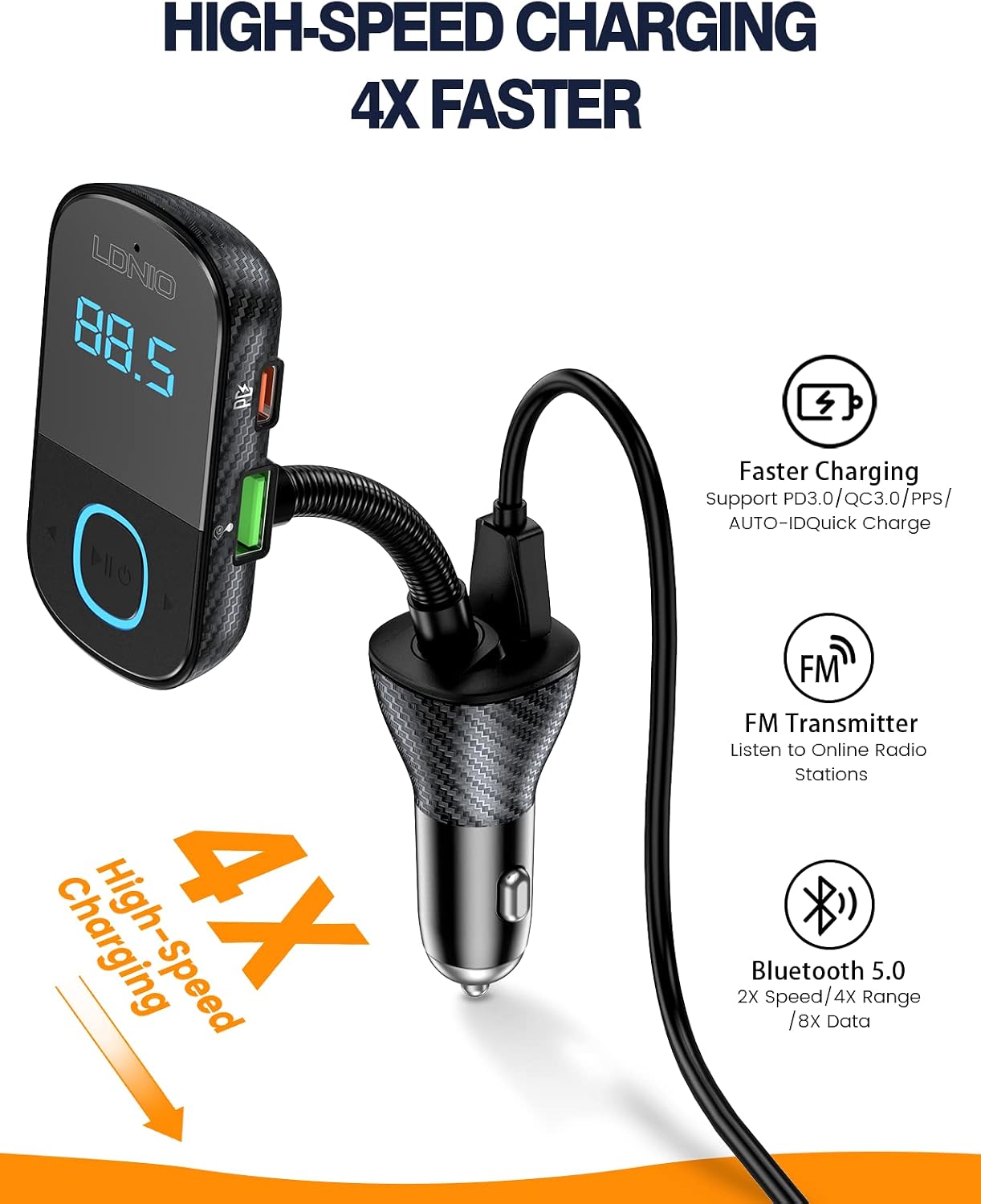
Image: The LDNIO C705Q device highlighting its USB-C (PD), USB-1 (QC3.0), and USB-2 (QC3.0) charging ports.

Image: An illustration depicting the integrated Bluetooth 5.0 chip within the device, ensuring enhanced connectivity.
Setup Istruzzjonijiet
- Daħħal fis-Socket tal-Karozza: Plug the LDNIO C705Q into your car's 12V-24V cigarette lighter socket. The LED display will light up, showing the current car battery voltage for a few seconds, then switch to display the FM frequency.
- Sintonizza r-Radju tal-Karozza: Tune your car's FM radio to an empty frequency (one with no strong broadcast signal).
- Issettja l-Frekwenza tat-Trasmettitur: Adjust the FM frequency on the LDNIO C705Q to match the empty frequency on your car radio. Use the frequency adjustment buttons on the device.
- Par Bluetooth: On your smartphone, enable Bluetooth and search for available devices. Select "LDNIO C705Q" (or similar name) from the list to pair. Once paired, a voice prompt will confirm the connection.

Image: The LDNIO C705Q plugged into a car's power outlet, displaying an FM frequency of 87.5, ready for setup.
Istruzzjonijiet Operattivi
Daqq tal-awdjo:
- Streaming Bluetooth: After successful Bluetooth pairing, open your phone's music player or audio app. Audio will be transmitted wirelessly to the C705Q and then to your car's speakers via the selected FM frequency.
- Daqq tad-Diska U: Insert a USB flash drive containing MP3/WAV/FLAC/APE/WMA audio files into the designated USB port. The device will automatically detect and play music from the U-Disk.
Sejħat mingħajr idejn:
- Twieġeb Sejħiet: When an incoming call is received, the device will automatically switch to hands-free mode. Press the multi-function button (usually marked with a phone icon or play/pause) once to answer the call.
- Sejħiet li Jispiċċaw: Press the multi-function button once to end an ongoing call.
- Ċaħda ta 'Sejħiet: Long-press the multi-function button to reject an incoming call.
- Tisselezzjona mill-ġdid: Agħfas darbtejn il-buttuna multi-funzjoni biex terġa' ċċempel l-aħħar numru.

Image: The LDNIO C705Q demonstrating its hands-free calling feature, with a smartphone screen showing an incoming call.
Apparat li jiċċarġja:
Connect your devices using appropriate USB cables to the available charging ports:
- USB-C (PD) Port: For fast charging PD-compatible devices.
- USB-A (QC 3.0) Ports: For fast charging QC 3.0 compatible devices.
- The device supports simultaneous charging of multiple devices.
Batterija tal-Karozza Voltage Display:
Upon plugging in, the device displays your car's battery voltage. This feature helps monitor your car battery's health:
- Below 12V: Jindika volum baxxtage, suggesting a potential battery issue.
- 12V-14.8V: Vol operattiv normalitage.
- Above 14.8V: Tindika vol għolitage, which may suggest an alternator issue.

Image: The LED display showing car battery voltage, with visual indicators for low, normal, and high voltage livelli.
Manutenzjoni
- Tindif: Use a soft, dry cloth to clean the device. Do not use liquids or abrasive cleaners.
- Ħażna: When not in use for extended periods, unplug the device from the car socket and store it in a cool, dry place.
- Evita Kundizzjonijiet Estremi: Tesponix l-apparat għal temperaturi estremi, dawl tax-xemx dirett, jew umdità eċċessiva.
Issolvi l-problemi
- Ebda Qawwa:
- Kun żgur li l-apparat huwa mdaħħal sew fis-sokit tal-lajter tas-sigaretti tal-karozza.
- Check if the car's cigarette lighter fuse is intact.
- Kwalità tal-Awdjo Statika jew Fqira:
- Find a clearer, unused FM frequency on your car radio and match the transmitter's frequency to it.
- Ensure the volume on your phone and car stereo is set appropriately.
- Itlaq minn żoni b'interferenza qawwija tar-radju.
- Skonnettjar Bluetooth:
- Ensure your phone's Bluetooth is enabled and within range.
- Try unpairing and re-pairing the device with your phone.
- Restart both the device (by unplugging and replugging) and your phone.
- Iċċarġjar Mhux Taħdem:
- Verify that the charging cable is properly connected to both the device and your phone.
- Ensure your cable is not damaged and supports charging.
- Check if your device requires a specific charging protocol (PD/QC 3.0) and use the corresponding port.
- Kwistjonijiet ta' Sejħiet Ħieles bl-idejn:
- Kun żgur li l-mikrofonu mhux ostakolat.
- Adjust the volume on your car stereo and phone during a call.
Speċifikazzjonijiet
| Mudell | C705Q |
| Input Voltage | DC 12V-24V |
| Verżjoni Bluetooth | 5.0 |
| Distanza ta' Trażmissjoni FM | 0-16.4 Ft (0-5 meters) |
| Distanza ta 'Konnessjoni Bluetooth | 0-32.8 Ft (0-10 meters) |
| Appoġġ għall-Format Awdjo | MP3/WAV/FLAC/APE/WMA |
| Portijiet tal-Iċċarġjar | 1x USB-C (PD), 2x USB-A (QC 3.0) |
| Qawwa tal-Ħruġ Totali | 43W (Mass) |
| Karatteristiċi Speċjali | Built-In Microphone, Fast Charging, Noise Cancellation, LED Display |
| Materjal | Plastik |

Image: Visual representation of the multi-protection features integrated into the LDNIO C705Q for safe operation.
Garanzija u Appoġġ
Specific warranty information for the LDNIO Bluetooth FM Transmitter Model C705Q is typically provided at the point of purchase or within the product packaging. Please refer to your purchase receipt or contact the retailer for details regarding warranty coverage.
For technical support or further assistance, please contact LDNIO customer service through their official webis-sit jew l-informazzjoni ta' kuntatt ipprovduta mal-prodott tiegħek.