
Sovol SV04
Sovol SV04 3D Printer Instruction Manual
Mudell: SV04
1. Introduzzjoni
The Sovol SV04 is an advanced 3D printer featuring an Independent Dual Extruder (IDEX) system, designed for versatility and high-quality printing. It offers a large build volume of 300x300x400mm, enabling the creation of substantial models. Key features include automatic bed leveling for consistent first layers, a 32-bit TMC2209 silent mainboard for quiet operation, and a flexible magnetic print bed for easy print removal. This manual provides essential information for assembly, operation, and maintenance to ensure optimal performance of your SV04 3D printer.

Figura 1: Aktarview of Sovol SV04 3D Printer key features.
2. Informazzjoni dwar is-Sigurtà
Please read all safety instructions carefully before operating the Sovol SV04 3D Printer. Failure to follow these instructions may result in injury or damage to the printer.
- Sigurtà Elettrika: Kun żgur li l-istampatur huwa konness ma' sokit tal-elettriku ertjat. Tħaddimx b'idejn imxarrbin jew f'temperatura għolja.amp conditions. Disconnect power before performing any maintenance or assembly.
- Uċuħ sħan: The print nozzle and heated bed reach high temperatures during operation. Avoid touching these components to prevent burns. Allow components to cool before handling.
- Partijiet li jiċċaqilqu: Keep hands, hair, and loose clothing away from moving parts during operation to prevent entanglement.
- Ventilazzjoni: Operate the printer in a well-ventilated area, especially when printing with materials that may emit fumes.
- Immaniġġjar tal-Filament: Use appropriate filament for your printer. Store filament in a dry environment to prevent moisture absorption.
- Tfal u Pets: Żomm il-printer fejn ma jintlaħaqx mit-tfal u l-annimali domestiċi. Hija meħtieġa s-superviżjoni ta' adult jekk ikun hemm tfal preżenti.
3. Kontenut tal-Pakkett
Ivverifika li l-komponenti kollha huma preżenti fil-pakkett qabel ma tipproċedi bl-assemblaġġ.
- Sovol SV04 3D Printer (partially assembled)
- Independent Dual Extruders (pre-installed)
- Flexible Magnetic Print Bed
- Skrin tattili LCD ta' 4.3 pulzieri
- Filament Spool Holders
- Kejbil tal-Enerġija
- Cable USB
- SD Card (includes test models and software)
- Tool Kit (wrenches, screwdrivers, pliers, nozzle cleaning needle, etc.)
- Sample Filament
- Manwal għall-Utent (dan id-dokument)
4. Assemblea
The Sovol SV04 features a modular design for quick and straightforward assembly. Most major components are pre-assembled.
- Spakkjar: Neħħi l-komponenti kollha mill-imballaġġ bir-reqqa. Iċċekkja għal kwalunkwe ħsara waqt it-trasport.
- Base and Gantry Assembly: Attach the gantry frame to the printer base using the provided screws. Ensure all connections are secure.
- Extruder Installation: The independent dual extruders are typically pre-installed. Verify they are securely mounted on the X-axis.
- Detenturi tal-Rukkell tal-Filament: Mount the filament spool holders onto the top bar of the gantry.
- Konnessjonijiet tal-Wiring: Connect all cables according to the included wiring diagram. Pay close attention to the extruder, limit switch, and motor connections.
- Flexible Print Bed: Place the flexible magnetic print bed onto the heated bed platform.
5. Setup Inizjali
Before your first print, perform the following initial setup steps.
5.1. Aġġornament tal-Firmware
It is highly recommended to download and install the latest firmware for the SV04 from the official Sovol website. This ensures you have the most up-to-date features and bug fixes.
5.2. Automatic Bed Leveling
The SV04 is equipped with an automatic bed leveling sensor to ensure optimal nozzle-to-bed distance across the entire print surface.
- Navigate to the 'Leveling' menu on the LCD touchscreen.
- Select 'Auto Level' to initiate the automatic bed leveling process. The sensor will probe multiple points on the print bed.
- After auto-leveling, perform a Z-offset calibration if necessary to fine-tune the first layer adhesion.

Figure 2: Automatic bed leveling in progress.
5.3. Extruder Calibration
For optimal dual-color or dual-material printing, ensure both extruders are properly calibrated for alignment and extrusion.
- Refer to the included SD card for calibration models and detailed instructions on adjusting X and Y offsets for the second extruder.
- Adjust E-steps for each extruder to ensure accurate filament extrusion.
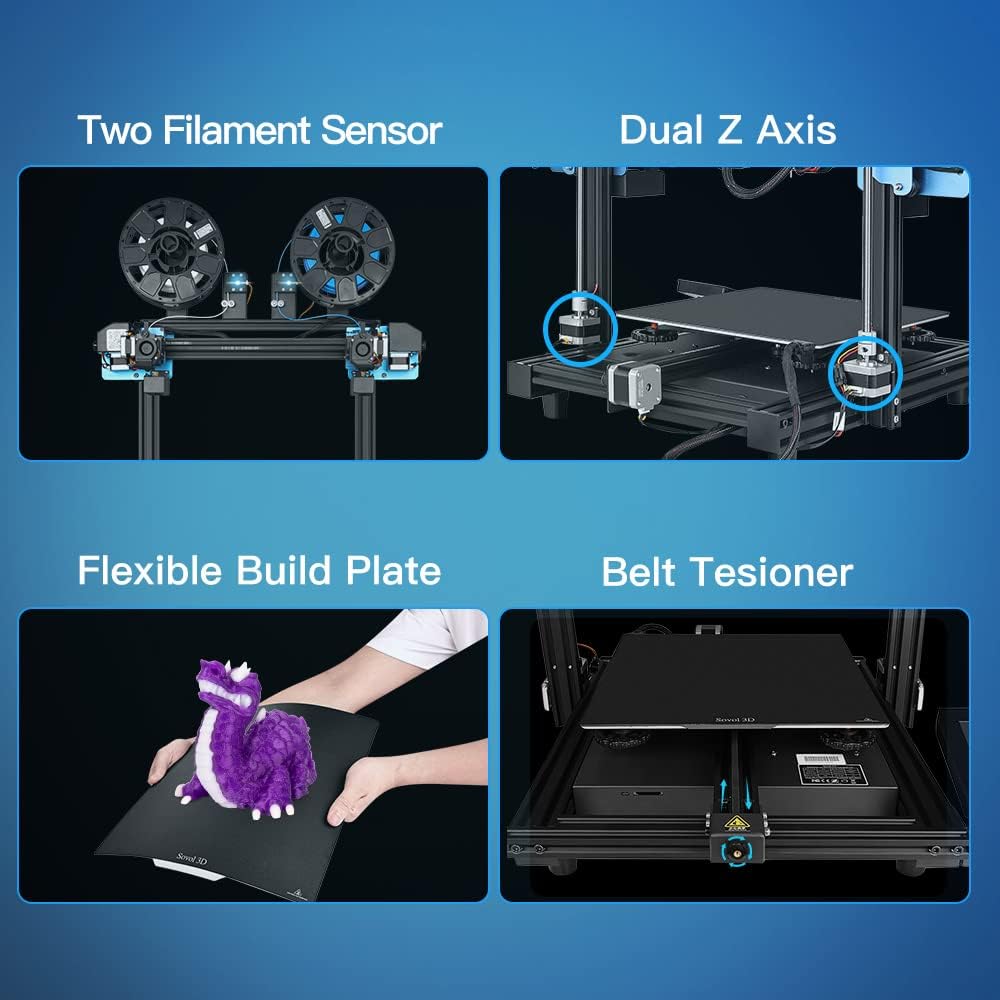
Figure 3: Key components including filament sensors and dual Z-axis.
6. Istruzzjonijiet Operattivi
This section covers basic operation, including filament loading and utilizing the various printing modes.
6.1. Tagħbija tal-Filament
The SV04 supports a wide range of filaments, including PLA, ABS, PETG, TPU, PC, PA, Wood, ASA, and PVA.
- Place the filament spool onto the spool holder.
- Feed the filament through the filament sensor and into the extruder's input hole.
- Heat the nozzle to the appropriate temperature for your filament type.
- Manually push the filament until it extrudes smoothly from the nozzle.

Figure 4: Filament loading for dual extruders.
6.2. Printing Modes
The independent dual extruders allow for four distinct printing modes:
- Modalità Unika: Uses one extruder to print a single model.
- Modalità Doppja: Prints a single model using two different colors or materials.
- Modalità mera: Prints two mirrored copies of a model simultaneously.
- Modalità Duplikata: Prints two identical copies of a model simultaneously.

Figure 5: The four different printing modes.
6.3. Using the LCD Touchscreen
The 4.3-inch LCD touchscreen provides an intuitive interface for controlling the printer.
- Navigate through menus using touch gestures.
- Access print files mill-karta SD.
- Monitor print progress, temperature, and other parameters.
- Adjust settings such as print speed, fan speed, and filament change options.

Figure 6: The 4.3-inch LCD touchscreen interface.
6.4. Resume Printing Function
The SV04 features a resume printing function, allowing you to continue a print from the last layer after a power outage jew interruzzjoni.

Figure 7: Resume printing capability.
7. Manutenzjoni
Manutenzjoni regolari tiżgura l-lonġevità u l-prestazzjoni konsistenti tal-istampatur 3D tiegħek.
- Print Bed Cleaning: Clean the flexible magnetic print bed with isopropyl alcohol after each print to ensure good adhesion for subsequent prints.
- Manutenzjoni taż-żennuna: Periodically check nozzles for clogs. Use the provided cleaning needle to clear any blockages. Replace worn-out nozzles as needed.
- Tensjoni taċ-ċinturin: Inspect the X, Y, and Z axis belts for proper tension. Adjust the belt tensioners if belts appear loose to prevent print quality issues.
- Lubrikazzjoni: Apply a small amount of lubricant to the Z-axis lead screws periodically.
- Aġġornamenti tal-Firmware: Regularly check the Sovol website for new firmware versions and update as recommended.
8 Issolvi l-problemi
Din it-taqsima tindirizza kwistjonijiet komuni li tista' tiltaqa' magħhom waqt l-operazzjoni.
| Problema | Kawża Possibbli | Soluzzjoni |
|---|---|---|
| Adeżjoni Fqira tal-Ewwel Saff | Bed not level, incorrect Z-offset, dirty print surface, incorrect bed temperature. | Perform auto-leveling and Z-offset calibration. Clean the print bed. Adjust bed temperature in slicer settings. |
| Filament Mhux Estruż | Clogged nozzle, tangled filament, incorrect temperature, extruder gear slip. | Clear nozzle with cleaning needle. Untangle filament. Check nozzle temperature. Adjust extruder tension. |
| Nibdlu s-Saff | Loose belts, print head hitting print, excessive print speed. | Check and tighten belts. Ensure print is securely adhered to the bed. Reduce print speed. |
| Operazzjoni Storbjuża | Loose components, fan noise. | Check all screws and connections. While the mainboard is silent, some fans may produce noise; ensure they are clear of obstructions. |
| Filament Sensor Errors | Filament not inserted correctly, sensor malfunction, incorrect wiring. | Ensure filament is properly seated. Check sensor connections. If issues persist, the sensor may need replacement. |
9. Speċifikazzjonijiet
Technical specifications for the Sovol SV04 3D Printer.
| Karatteristika | Dettall |
|---|---|
| Manifattur | Sovol |
| Numru tal-Mudell | SV04 |
| Dimensjonijiet tal-Prodott | 73 x 70 x 30 ċm |
| Piż tal-oġġett | 15 Kilogrammi |
| Tip ta' estrużur | Independent Dual Direct Drive Extruder (IDEX) |
| Ibni Volum | 300 x 300 x 400 mm |
| Mainboard | 32-bit TMC2209 Silent Mainboard |
| Livellar tas-sodda | Automatic Bed Leveling Sensor |
| Stampa Wiċċ | Flexible Magnetic Print Bed |
| Konnettività | Karta SD |
| Filamenti Appoġġjati | PLA, ABS, PETG, TPU, PC, PA, Wood, ASA, PVA |

Figure 8: Large build volume of the SV04.
10. Garanzija u Appoġġ
Sovol provides customer support and warranty services for the SV04 3D Printer.
- Informazzjoni dwar il-garanzija: Please refer to the warranty card included with your product or visit the official Sovol websit għal termini u kundizzjonijiet dettaljati tal-garanzija.
- Appoġġ Tekniku: For technical assistance, troubleshooting beyond this manual, or spare parts, please contact Sovol customer support through their official webis-sit jew l-informazzjoni ta' kuntatt ipprovduta fl-imballaġġ tal-prodott tiegħek.
Ask a question about this manual
Ask about setup, troubleshooting, compatibility, parts, safety, or missing instructions. Manuals+ will review the question and use this page’s manual context to help answer it.