Introduzzjoni
This manual provides instructions for the setup, operation, and maintenance of your Generic replacement AT&T S10-S3 U-Verse Remote Control. This remote is designed to function as a direct replacement for the original AT&T U-Verse S10-S3 remote, offering multi-functional control over your digital DVR, TV, and cable box.
Prodott Overview
The S10-S3 remote control is an infrared (IR) device featuring 45 buttons for comprehensive control. It is designed for compatibility with AT&T U-Verse receivers and various televisions. Its ergonomic design ensures comfortable handling and ease of use.

Stampa 1: Quddiem view of the AT&T S10-S3 replacement remote control, showing all buttons and the AT&T logo.
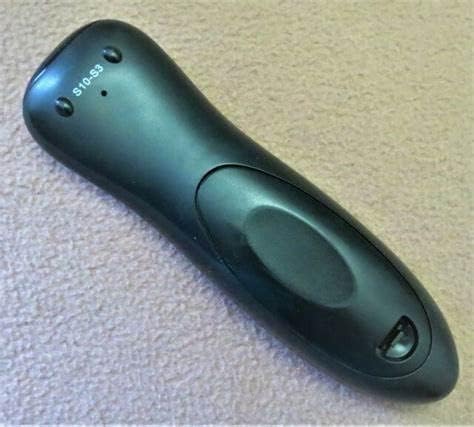
Immaġni 2: Wara view of the AT&T S10-S3 replacement remote control, displaying the model number S10-S3.
Setup
1. Installazzjoni tal-batterija
The remote requires two (2) AA batteries for operation. These batteries are typically included with the remote.
- Sib l-għatu tal-kompartiment tal-batterija fuq wara tal-kontroll remot.
- Żerżaq l-għatu 'l isfel jew agħfas il-lukkett biex tiftaħu.
- Daħħal żewġ batteriji AA, waqt li tiżgura li t-terminali pożittivi (+) u negattivi (-) ikunu allinjati sew mal-marki ġewwa l-kompartiment.
- Erġa' poġġi l-għatu tal-kompartiment tal-batterija, billi żżerżaqha lura f'postha sakemm tikklikkja sew.
2. Compatibility and Programming
This remote is designed as a replacement for AT&T U-Verse S10-S3 remotes. While it may work out of the box for basic U-Verse receiver functions, programming may be required for full control of your television or other devices.
- Ivverifika l-Kompatibbiltà: Before attempting programming, ensure your equipment is compatible. This remote is known to replace silver U-Verse remotes. If unsure, please consult AT&T technical support or the original device's user manual.
- Programming for TV Control: To control your television's power, volume, and input, you may need to program the remote with your TV's specific code. Refer to your television's user manual or the AT&T U-Verse remote programming guide for detailed instructions and codes.
- Programming for Other Devices: If you intend to control other devices (e.g., DVD player, audio receiver), consult the AT&T U-Verse remote programming guide for multi-device setup.
Important: For specific programming steps, it is highly recommended to refer to the official AT&T U-Verse remote control programming instructions or contact AT&T technical support.
Istruzzjonijiet Operattivi
The S10-S3 remote operates using infrared (IR) technology, requiring a clear line of sight between the remote and the device you wish to control. The effective operating range is up to 30 feet (approximately 9 meters).
Funzjonijiet Bażiċi:
- Qawwa: Agħfas il- QAWWA button to turn your U-Verse receiver and/or TV on or off.
- Kanal 'l fuq/'l isfel: Uża l- CH +/- buttuni biex jibdlu l-kanali.
- Volum 'il fuq/Niżżel: Uża l- VOL +/- buttuni biex taġġusta l-volum.
- Siekta: Agħfas il- MUTE buttuna biex issikket l-awdjo.
- Kuxxinett tan-Numru: Use the numeric buttons (0-9) to directly enter channel numbers.
- Menu: Access the U-Verse main menu.
- Gwida: Uri l-gwida tal-programm.
- DVR Controls: Buttuni bħal REKORD, PLAY, PAWŻA, STOP, REWIND, u RAPID QUDDIEM control DVR functions.
- Navigazzjoni: Use the directional arrow buttons and the OK buttuna biex tinnaviga l-menus u tagħżel l-għażliet.
Ensure there are no obstructions between the remote's IR emitter and the device's IR receiver for optimal performance.
Manutenzjoni
Sostituzzjoni tal-batterija:
When the remote's performance degrades or it stops responding, it is likely time to replace the batteries. Follow the battery installation steps outlined in the "Setup" section.
- Always replace both AA batteries at the same time.
- Tħallatx batteriji qodma u ġodda, jew tipi differenti ta 'batteriji.
- Armi l-batteriji użati b'mod responsabbli skont ir-regolamenti lokali.
Tindif:
Biex tnaddaf il-kontroll mill-bogħod:
- Imsaħ il-wiċċ b'ċarruta ratba u niexfa.
- Għal ħmieġ iebes, neħħi ftitampmt id-drapp bl-ilma jew cleaner ħafif u li ma jobrox.
- Evita li tuża kimiċi ħarxa, solventi, jew materjali li joborxu, għax dawn jistgħu jagħmlu ħsara lill-finitura jew lill-komponenti interni tar-remote.
- Ensure no liquid enters the remote's openings.
Issolvi l-problemi
Jekk tiltaqa' ma' problemi bil-kontroll remot tiegħek, ipprova l-passi li ġejjin għas-soluzzjoni tal-problemi:
- Remote Mhux Jirrispondi:
- Check the batteries. Ensure they are inserted correctly and are not depleted. Replace them if necessary.
- Ensure there is a clear line of sight between the remote and the device. Remove any obstructions.
- Make sure you are within the operating range (up to 30 feet).
- Point the remote directly at the device's IR receiver.
- Remote Controls U-Verse Receiver but Not TV (or vice-versa):
- The remote may not be programmed correctly for the specific device. Refer to the "Compatibility and Programming" section and your device's manual for programming instructions.
- Ensure you are pressing the correct device mode button (if applicable) before attempting to control a specific device.
- Specific Buttons Not Working (e.g., Mute, Volume):
- This often indicates a programming issue for that specific function or device. Re-attempt programming for your TV or audio device.
- Ensure the remote is in the correct mode for the device you are trying to control.
- Remote Stopped Working Entirely After Some Time:
- First, replace the batteries with fresh ones.
- If the issue persists, and the remote is still within its return period, consider contacting the seller.
- Kwistjonijiet ta' Kompatibbiltà:
- If the remote does not work with your AT&T U-Verse receiver or TV despite following all programming steps, it might not be fully compatible with your specific model. Contact AT&T technical support for guidance on compatible remote models.
Speċifikazzjonijiet
| Isem tal-Mudell | S10-S3 |
| Brand | Generic (Replacement for AT&T) |
| Teknoloġija tal-Konnettività | Infra-aħmar (IR) |
| Apparati Kompatibbli | AT&T U-Verse Receivers, Television |
| Maximum Number of Supported Devices | 4 (Universal functionality) |
| Sors tal-Enerġija | 2 x Batteriji AA |
| Medda Massimu | 30 Pied (madwar 9 metru) |
| Kwantità tal-Buttuni | 45 |
| Kulur | Iswed |
| Piż tal-oġġett | 6 Uqija (madwar 170 grammi) |
Garanzija u Appoġġ
Informazzjoni dwar il-garanzija: Specific warranty details for this Generic replacement remote control should be obtained directly from the retailer or seller from whom the product was purchased. Please retain your proof of purchase for any warranty claims.
Appoġġ Tekniku: For assistance with programming, compatibility, or advanced features related to your AT&T U-Verse service and equipment, please contact AT&T Technical Support. For issues specific to the remote control itself, such as defects or malfunctions, please contact the product seller.


