
Introduzzjoni
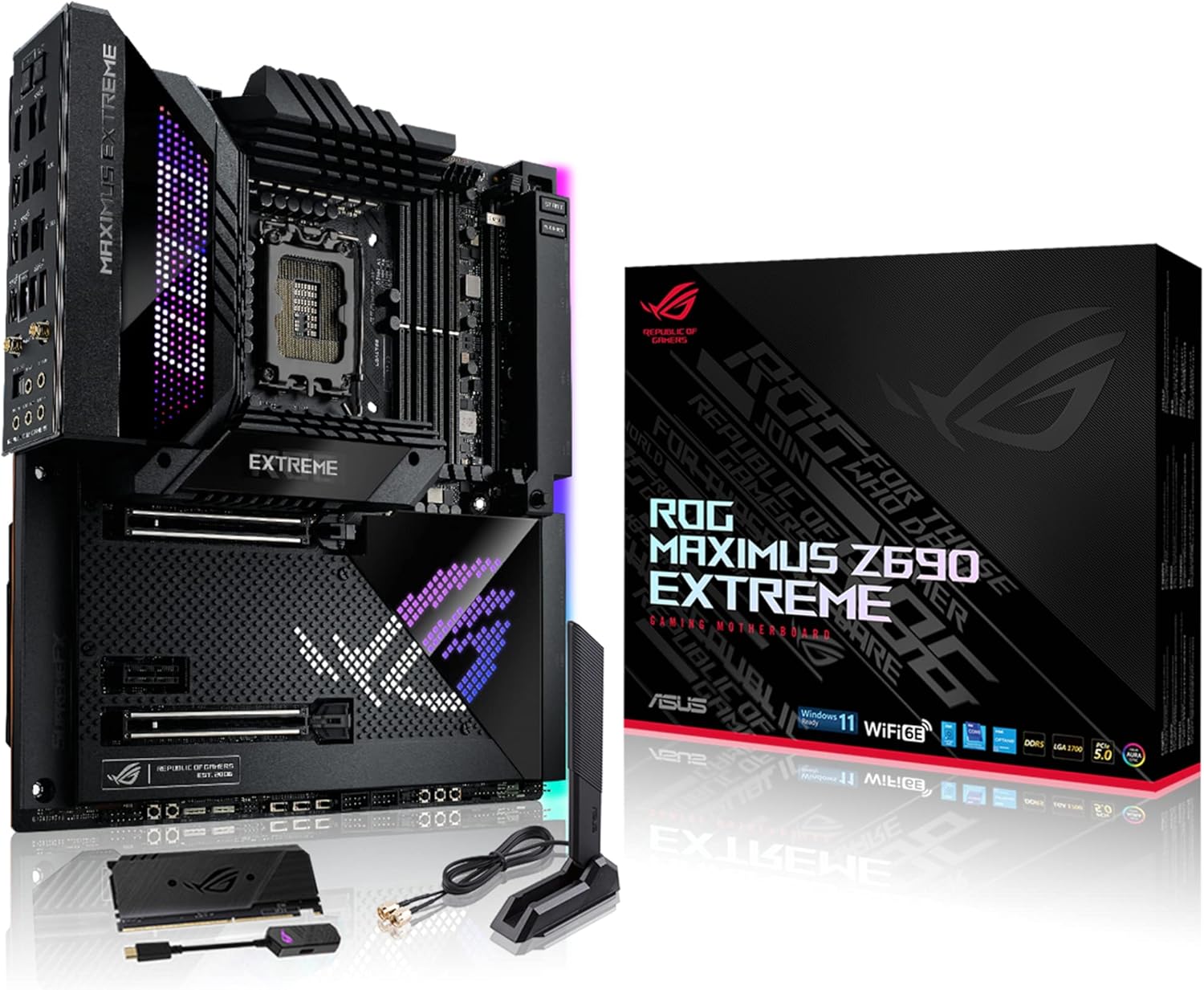
The ASUS ROG Maximus Z690 Extreme WiFi 6E is an EATX gaming motherboard designed for 12th Gen Intel Core processors. It supports PCIe 5.0 and DDR5 memory, offering advanced features for high-performance computing and gaming.
Il-karatteristiċi ewlenin jinkludu:
- Sokit tal-Intel LGA 1700: Lest għall-proċessuri Intel Core tat-12-il Ġenerazzjoni u Windows 11, li jappoġġja PCIe 5.0 u DDR5.
- Kontroll Intelliġenti: ASUS-exclusive tools including AI Overclocking, AI Cooling, AI Networking, and Two-Way AI Noise-Cancelation for easy configuration.
- Soluzzjoni ta' Enerġija Robusta: 24+1 qawwa f'timtages rated for 105 A, ProCool II power connectors, MicroFine alloy chokes, and premium metallic capacitors.
- Disinn Termali Ottimizzat: Cold forged heatsink, enlarged VRM heatsinks plus integrated aluminum I/O cover, high-conductivity thermal pad, penta M.2 heatsinks, and dual with embedded backplates and ROG Water-Cooling Zone.
- High Performance Networking: Onboard Wi-Fi 6E, Marvell AQtion 10Gb, Intel 2.5Gb Ethernet, and ASUS LANGuard.
Setup
Kontenut tal-Pakkett
Before beginning installation, verify all components are present in the package. The following items are typically included:
- ASUS ROG Maximus Z690 Extreme Motherboard
- ROG DIMM.2 module
- Manwal għall-Utent
- Stikers ROG
- Konnettur Q
- USB drive with utilities and drivers
- ROG keychain
- ROG fan control box
- ROG True Voltician
- ROG Clavis
- ROG graphic card holder
- WiFi 6E antenna
- Dual function screwdriver
- 4 x 2-in-1 SATA cables

Installazzjoni tal-Motherboard
The motherboard is an Extended ATX (EATX) form factor, measuring 30.5cm x 27.7cm. Ensure your PC case supports this size. Install the motherboard into the chassis, securing it with appropriate screws. Connect the power supply unit (PSU) cables, including the 24-pin main power connector and the ProCool II CPU power connectors.
Processor and Memory Installation
Install your 12th Gen Intel Core processor into the LGA 1700 socket. This motherboard supports DDR5 RAM. Insert DDR5 memory modules into the four DIMM slots, ensuring they are properly seated. For optimal performance, refer to the motherboard manual for recommended memory configurations and population order.
Storage and Expansion
The motherboard features five M.2 slots for high-speed storage, including one PCIe 5.0 x4 slot and two PCIe 4.0 x4 slots. Additionally, the bundled ROG DIMM.2 module provides two M.2 22110 PCIe 4.0 slots. Install your M.2 SSDs into the desired slots. The board also includes two PCIe 5.0 x16 SafeSlots for graphics cards.

Operazzjoni
Intelligent Control Features
The motherboard integrates ASUS-exclusive intelligent control tools to optimize system performance:
- Overclocking tal-AI: Automatically tunes CPU frequencies for maximum performance based on system conditions.
- Tkessiħ bl-AI: Manages fan speeds and system temperatures for optimal thermal performance and acoustics.
- Netwerking tal-AI: Prioritizes network traffic for gaming and critical applications, reducing lag.
- Two-Way AI Noise-Cancelation: Enhances audio clarity by filtering out background noise from both incoming and outgoing audio streams.
Konnettività
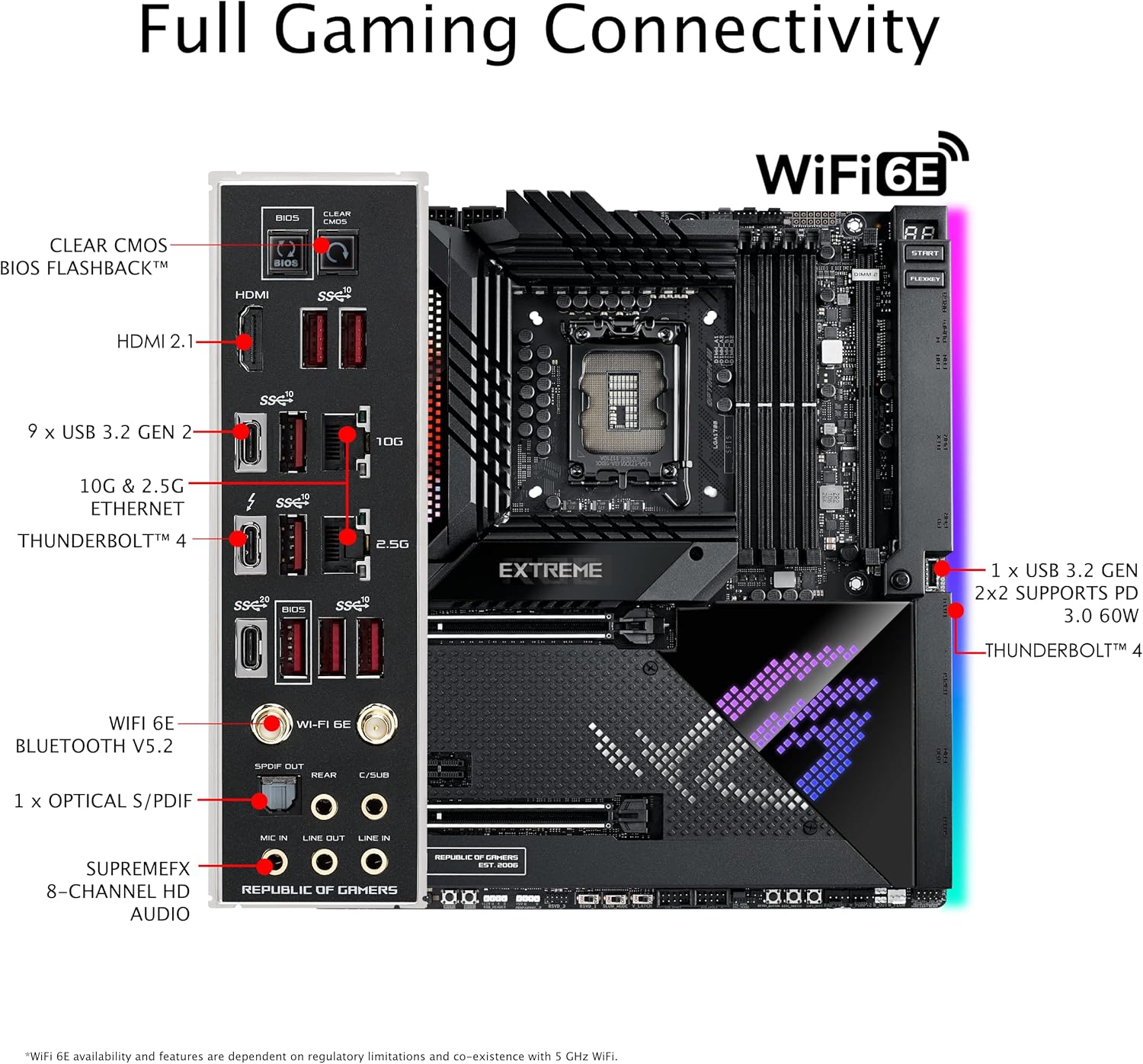
The rear I/O panel provides extensive connectivity options:
- Netwerking: Onboard Wi-Fi 6E, Marvell AQtion 10Gb Ethernet, and Intel 2.5Gb Ethernet.
- Portijiet USB: Multiple USB 3.2 Gen 2 ports, including one USB 3.2 Gen 2x2 port with Power Delivery 3.0 (60W support).
- Thunderbolt 4: Two Thunderbolt 4 ports for high-speed data transfer and display connectivity.
- Awdjo: SupremeFX 8-Channel HD Audio with S/PDIF Out, Mic In, Line In, and Line Out.
- Wiri: HDMI 2.1 port.
LiveDash OLED and AniMatrix LED Display
The motherboard features a 2-inch LiveDash OLED display that provides real-time system information, such as CPU temperature, frequency, and fan speeds. The AniMatrix LED Display offers customizable lighting effects and animations.

Manutenzjoni
Ġestjoni Termali
The motherboard is equipped with an optimized thermal design to ensure stable operation:
- Cold Forged Heatsink: Efficiently dissipates heat from critical components.
- Enlarged VRM Heatsinks: Covers the voltage regulator modules to maintain stable power delivery.
- Integrated Aluminum I/O Cover: Contributes to heat dissipation and aesthetic appeal.
- High-Conductivity Thermal Pad: Ensures efficient heat transfer.
- Penta M.2 Heatsinks: Dedicated cooling for all M.2 SSDs.
- ROG Water-Cooling Zone: Provides dedicated headers for custom liquid cooling loops.

Tindif Ġenerali
Regularly clean your PC case and motherboard to prevent dust buildup, which can impede airflow and lead to overheating. Use compressed air to remove dust from heatsinks, fans, and other components. Ensure the system is powered off and unplugged before cleaning.
Issolvi l-problemi
Q-Error Code Display
The motherboard features a Q-Error Code display that provides numerical codes to indicate system status or identify issues during boot-up. Consult the detailed motherboard manual for a comprehensive list of Q-Codes and their corresponding troubleshooting steps.
Memory Stability Issues
If you experience system instability or failure to boot after installing memory, particularly when using XMP profiles or populating all DIMM slots, consider the following:
- Aġġornament tal-BIOS: Ensure your motherboard BIOS is updated to the latest version, as updates often include memory compatibility improvements.
- XMP Profile: Try disabling the XMP (Extreme Memory Profile) in the BIOS to run memory at default JEDEC speeds. If stable, gradually increase memory frequency and timings manually.
- Memory Population: Test with a single memory stick in the recommended primary slot. If stable, add modules one by one to identify a faulty stick or slot.
- Voltage Aġġustament: Slightly increasing DRAM voltage (VDIMM) or System Agent (VCCSA) voltage in the BIOS may improve stability for high-speed memory, but proceed with caution and small increments.
AniMatrix LED Display Malfunctions
If the AniMatrix LED display or other RGB lighting components are not functioning correctly or crash, try the following:
- Software Reinstallation: Reinstall or update the ASUS Armoury Crate software, which controls RGB lighting.
- Settings tal-BIOS: Check BIOS settings related to RGB lighting to ensure they are enabled and configured correctly.
- Ċiklu tal-Enerġija: A full system power cycle (shut down, unplug, wait 30 seconds, plug in, restart) can sometimes resolve temporary software glitches.
General Boot Issues
If the system fails to POST (Power-On Self-Test) or boot:
- Erġa' poġġi l-Komponenti: Ensure all components, including CPU, RAM, graphics card, and power cables, are securely seated.
- CMOS ċar: Use the Clear CMOS button on the rear I/O panel or the jumper on the motherboard to reset BIOS settings to default.
- Test with Minimum Components: Remove all non-essential components (e.g., extra storage drives, expansion cards) and attempt to boot with only the CPU, one RAM stick, and the graphics card.
Speċifikazzjonijiet
| Karatteristika | Dettall |
|---|---|
| Brand | ASUS |
| Isem tal-Mudell | ROG Maximus Z690 Extreme |
| Socket tas-CPU | LGA 1700 |
| Proċessuri Kompatibbli | 12th Gen Intel Core processors (e.g., Core i5, Core i9) |
| Teknoloġija tal-Memorja RAM | DDR5 |
| Veloċità tal-Memorja | Up to 2133 MHz (base), higher with overclocking |
| Maximum RAM Size | 64 GB |
| Tip ta' Ċipset | Intel Z690 |
| Fattur tal-Formola | Extended ATX (30.5cm x 27.7cm) |
| Tip bla fili | Wi-Fi 6E (802.11ax), Bluetooth V5.2 |
| Ethernet | Marvell AQtion 10Gb, Intel 2.5Gb |
| PCIe Slots | 2 x PCIe 5.0 x16 SafeSlots |
| M.2 Slots | 5 (1x PCIe 5.0 x4, 2x PCIe 4.0 x4, 2x PCIe 4.0 x4 via DIMM.2) |
| Portijiet Thunderbolt | 2 x Thunderbolt 4 |
| Portijiet USB 2.0 | 8 (intestaturi interni) |
| Dimensjonijiet tal-Prodott | 12.01 x 10.91 x 1.93 pulzieri |
| Piż tal-oġġett | 2.2 liri |
| Pjattaforma | Windows 11 |
Garanzija u Appoġġ
For detailed warranty information, please refer to the warranty card included in your product packaging or visit the official ASUS support website. ASUS provides technical support and resources for product assistance.
If you encounter issues that cannot be resolved using the troubleshooting steps provided, please contact ASUS customer support. Have your product model and serial number ready for efficient service.
You can find additional support and driver downloads on the Appoġġ ASUS Websit.