
1. Introduzzjoni
The VOLTCRAFT TK-1000 is a versatile calibrator designed for precise measurement and simulation of temperature and voltage. It supports a wide range of thermocouple and Resistance Temperature Detector (RTD) types, making it suitable for various professional measurement applications. This manual provides essential information for the safe and effective use of your device.
Karatteristiċi ewlenin:
- High output and measurement precision (up to 0.05% steps).
- Measures and simulates nine different thermocouple types (J, K, T, E, R, S, B, Wre325, Wre526).
- Measures and simulates four different RTD types (Pt100, Pt10, Cu50, Cu100).
- Step and ramp functions for quick linearity detection.
- Adjustable LCD backlight for clear readability in various lighting conditions.
- Memory function for frequently used settings.
- Temperature display in °C and °F.
- Funzjoni ta' mitfi awtomatiku biex tikkonserva l-ħajja tal-batterija.
2. Informazzjoni dwar is-Sigurtà
Dejjem osserva l-prekawzjonijiet ta’ sigurtà li ġejjin biex tevita xokk elettriku, korriment, jew ħsara lill-apparat:
- Tiftaħx l-apparat casing unless explicitly instructed for battery replacement.
- Ensure test leads are removed before opening the battery compartment.
- Use only the specified battery type (9V 6LR61).
- Tħaddimx l-apparat fl-imxarrab jew damp kundizzjonijiet.
- Evita li tesponi l-apparat għal temperaturi estremi jew dawl tax-xemx dirett.
- If the device appears damaged, do not use it.
3. Setup
3.1. Installazzjoni tal-batterija
The VOLTCRAFT TK-1000 requires one 9V 6LR61 battery for operation. The battery is supplied with the device.
- Ensure the device is powered off and all test leads are disconnected.
- Sib l-għatu tal-kompartiment tal-batterija fuq wara tal-apparat.
- Use a suitable screwdriver to loosen the screw securing the battery compartment cover.
- Neħħi b'attenzjoni l-għatu.
- Daħħal il-batterija ta' 9V, waqt li tosserva l-polarità korretta (+/-).
- Ibdel l-għatu tal-kompartiment tal-batterija u issikka l-kamin.
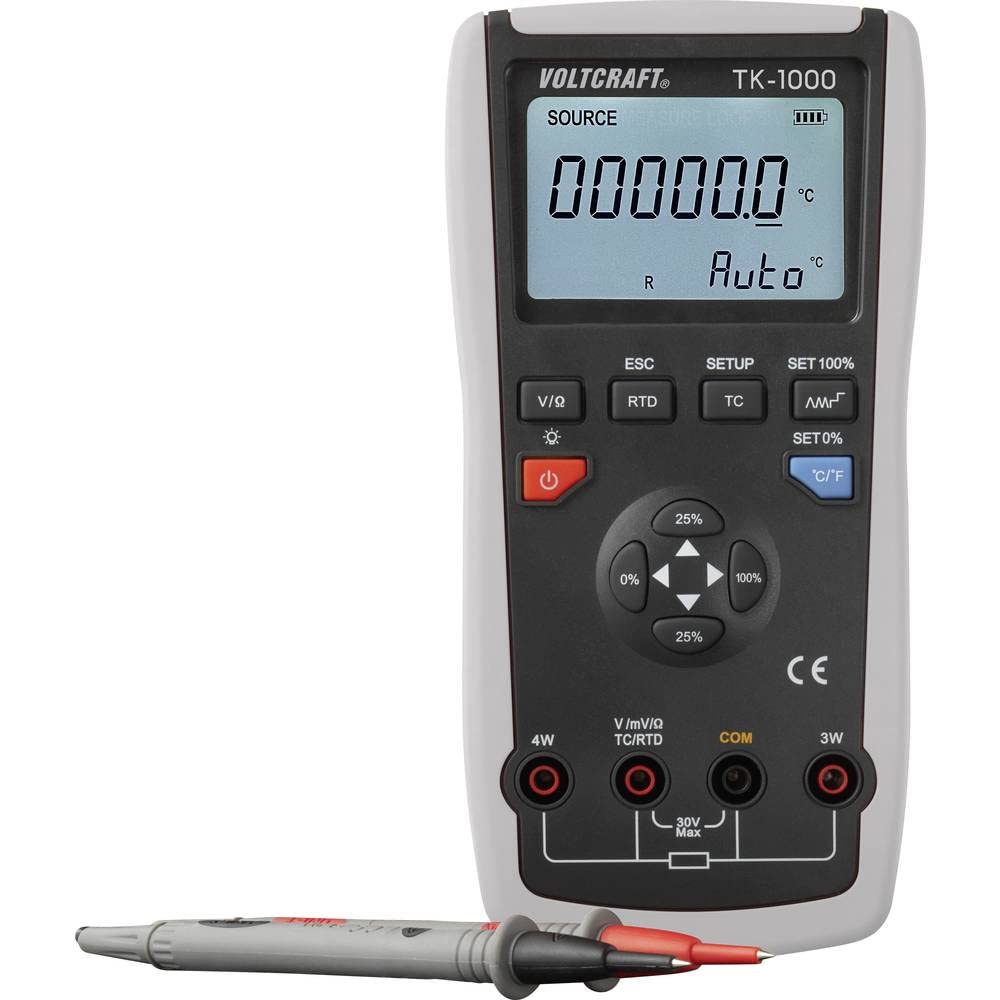
Figura 3.1: Wara view of the calibrator with the battery compartment open, showing where the 9V battery should be inserted.

Figura 3.2: Wara view of the calibrator with a 9V battery correctly installed in its compartment.
3.2. Konnessjoni tal-wajers tat-test
The calibrator comes with a pair of test leads and crocodile clips for various measurement and simulation tasks.
- Identify the input jacks on the front panel of the device. These include 4W, V/mV/Ω/TC/RTD, COM, and 3W.
- Għal voltage, current, or resistance measurements/simulations, connect the red test lead to the V/mV/Ω/TC/RTD jack and the black test lead to the COM jack.
- For 4-wire RTD measurements, connect the appropriate leads to the 4W and COM jacks.
- For 3-wire RTD measurements, connect the appropriate leads to the 3W and COM jacks.
- Kun żgur li l-konnessjonijiet kollha huma siguri qabel l-operazzjoni.

Figura 3.3: Quddiem view of the calibrator, highlighting the display, control buttons, and input terminals for test lead connections.
4. Istruzzjonijiet Operattivi
4.1. Power On/Off
Agħfas il- Qawwa button (usually marked with a circle and a vertical line) to turn the device on or off. The device features an automatic power-off function to save battery life if inactive for an extended period.
4.2. Għażla tal-Mod
The TK-1000 can measure and simulate various signals. Use the dedicated buttons to select the desired mode:
- V/I/Ω: Għal voltage, current, and resistance measurements/simulations.
- RTD: For Resistance Temperature Detector (Pt100, Pt10, Cu50, Cu100) measurements/simulations.
- TC: For Thermocouple (J, K, T, E, R, S, B, Wre325, Wre526) measurements/simulations.
4.3. Setting Values and Units
Once a mode is selected, use the navigation buttons (e.g., arrow keys, percentage buttons 0%, 25%, 100%) to adjust the output or simulation value. The C / F button allows you to switch between Celsius (°C) and Fahrenheit (°F) for temperature readings.
4.4. Aġġustament tad-dawl ta 'wara
The LCD backlight can be adjusted for optimal visibility. Press the Dawl ta' wara button (often indicated by a sun icon) to cycle through different brightness levels or to turn the backlight on/off.
4.5. Step and Ramp Funzjonijiet
The TK-1000 includes step and ramp functions for linearity detection. Refer to the on-screen prompts or specific function buttons (if available) to activate and configure these features. These functions allow the calibrator to automatically increment or sweep through a range of values.
4.6. Is-Settings tas-Salvataġġ
The device allows you to memorize frequently used settings for convenience. Consult the device's display and menu options for instructions on how to save and recall custom configurations.
5. Manutenzjoni
5.1. Sostituzzjoni tal-batterija
When the low battery indicator appears on the display, replace the 9V battery as described in Section 3.1. Prompt battery replacement ensures continuous and accurate operation.
5.2. Tindif
Biex tnaddaf l-apparat, imsaħ il-barra b'ċarruta ratba u damp drapp. Tużax prodotti tat-tindif jew solventi li joborxu, għax dawn jistgħu jagħmlu ħsara lis-casing or display. Ensure the device is powered off and disconnected from all leads before cleaning.
5.3. Ħażna
When not in use for extended periods, store the calibrator in its protective carrying case in a cool, dry place. Remove the battery if storing for several months to prevent leakage and potential damage to the device.
6 Issolvi l-problemi
This section addresses common issues you might encounter with the VOLTCRAFT TK-1000.
6.1. L-Apparat Ma Jixgħelx
- Iċċekkja l-batterija: Ensure the 9V battery is correctly installed and not depleted. Replace if necessary.
- Polarità tal-batterija: Verify that the battery is inserted with the correct polarity.
6.2. Inaccurate Readings/Simulations
- Iċċekkja l-Konnessjonijiet: Ensure all test leads and probes are securely connected to the correct input jacks.
- Modalità Korretta: Verify that the correct measurement/simulation mode (TC, RTD, V/I/Ω) is selected for your application.
- Tip ta' Sonda: For temperature measurements, ensure the correct thermocouple or RTD type is selected in the device settings.
- Fatturi Ambjentali: Extreme temperatures or electromagnetic interference can affect accuracy. Operate in a stable environment.
6.3. Kwistjonijiet tal-Wiri
- Ebda Wiri/Wiri Mdawwal: Check battery level. Adjust backlight brightness.
- Garbled Display: Try powering the device off and on again. If the issue persists, contact support.
7. Speċifikazzjonijiet
| Karatteristika | Speċifikazzjoni |
|---|---|
| Mudell | VOLTCRAFT TK-1000 (VC-11769560) |
| Measurement/Simulation Types | 9 Thermocouple types (J, K, T, E, R, S, B, Wre325, Wre526), 4 RTD types (Pt100, Pt10, Cu50, Cu100) |
| Preċiżjoni | Up to 0.05% steps |
| Għadd tal-Wiri | 200,000 |
| Provvista tal-Enerġija | 1x 9V 6LR61 battery |
| Dimensjonijiet (L x W x H) | 19.3 x 9.6 x 4.7 ċm (7.6 x 3.8 x 1.85 pulzieri) |
| Piż | 370 gramma (0.82 lbs) |
| Funzjonijiet | Step, Ramp, Memory for settings, Auto power-off, LCD backlight adjustment |
8. Garanzija u Appoġġ
Informazzjoni dwar il-garanzija: Specific warranty details for the VOLTCRAFT TK-1000 are typically provided with your purchase documentation or can be found on the official VOLTCRAFT websit. Jekk jogħġbok żomm il-prova tax-xiri tiegħek għal talbiet ta' garanzija.
Appoġġ għall-Klijent: For technical assistance, troubleshooting beyond this manual, or service inquiries, please contact VOLTCRAFT customer support. Contact information can usually be found on the product packaging, the VOLTCRAFT webis-sit, jew permezz tal-bejjiegħ bl-imnut tiegħek.