
AOSHIDA RC-15A
Topping RC-15A Remote Control User Manual
Model: RC-15A
Brand: AOSHIDA
1. Introduzzjoni
This manual provides detailed instructions for the proper use and maintenance of your Topping RC-15A Remote Control. The RC-15A is designed to provide convenient wireless control over various Topping Digital-to-Analog Converters (DACs) and Headphone Amplifiers, enhancing your audio experience.
Jekk jogħġbok aqra dan il-manwal bir-reqqa qabel ma tħaddem l-apparat biex tiżgura prestazzjoni ottimali u lonġevità.
2. Prodott Aktarview
The Topping RC-15A is a compact infrared remote control. It features a range of buttons for power, volume adjustment, input selection, and other specific functions depending on the connected Topping device.
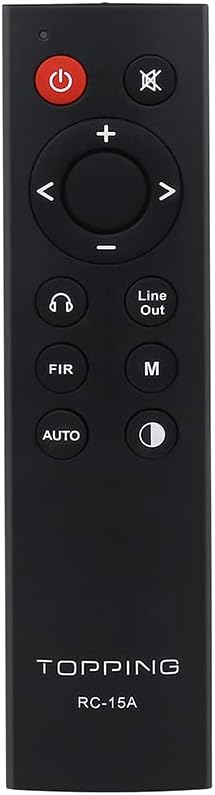
Figura 2.1: Quddiem view of the RC-15A remote control, displaying the button layout including power, mute, volume up/down, navigation, input selection, and mode buttons.
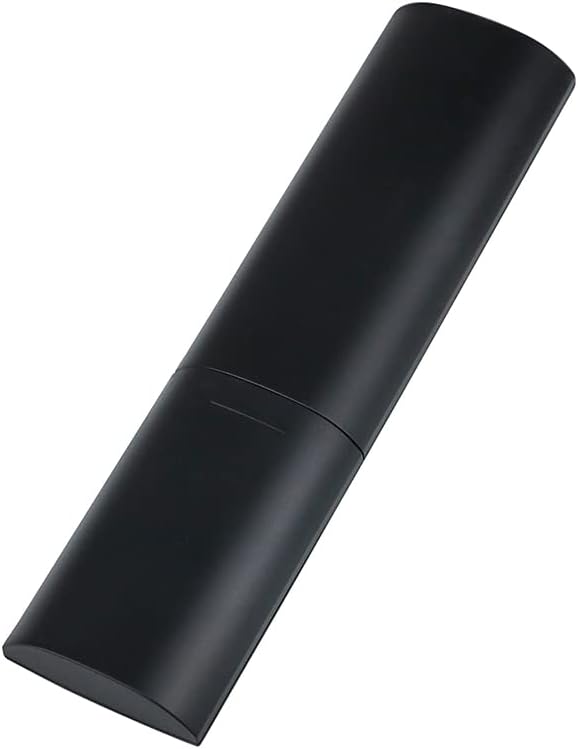
Figura 2.2: Ġenb u wara view of the RC-15A remote control, highlighting its sleek, black casing and ergonomic design.
Funzjonijiet tal-buttuna:
- Buttuna tal-Qawwa (●): Turns the connected Topping device on or off.
- Buttuna Mute (✕): Issikket jew jaqleb il-mugħ tal-output tal-awdjo.
- Volum 'il fuq/Niżżel (+/-): Iżżid jew inaqqas il-livell tal-volum.
- Navigation Buttons (◀ ▶ ▲ ▼): Used for menu navigation or input selection, depending on the device.
- Headphone Output Button (♫): Switches to headphone output mode (if supported by the device).
- Line Out Button: Switches to line output mode (if supported by the device).
- FIR Button: Function varies by device, often related to filter settings.
- Buttuna M: Mode or Menu button, function varies by device.
- Buttuna AUTO: Automatic input selection or mode (function varies by device).
- Display Brightness Button (☽): Adjusts the display brightness of the connected device.
3. Setup
Installazzjoni tal-batterija:
The RC-15A remote control requires batteries for operation. Batteries are not included and must be purchased separately. It typically uses two AAA batteries (Lithium recommended for longer life).
- Sib il-kompartiment tal-batterija fuq wara tal-kontroll remot.
- Żerżaq l-għatu tal-batterija 'l isfel jew fid-direzzjoni indikata minn vleġġa biex tiftaħu.
- Daħħal żewġ batteriji AAA, waqt li tiżgura li t-terminali pożittivi (+) u negattivi (-) ikunu allinjati sew mal-marki ġewwa l-kompartiment.
- Agħlaq l-għatu tal-batterija billi tiżżerżaqha lura f'postha sakemm tikklikkja sew.
Nota: Neħħi l-batteriji jekk il-kontroll remot ma jkunx se jintuża għal perjodu estiż biex tevita t-tnixxija u l-ħsara.
4. Istruzzjonijiet Operattivi
The RC-15A remote control operates via infrared (IR) signals. Ensure there is a clear line of sight between the remote control and the IR receiver on your Topping device.
Apparati Kompatibbli:
The RC-15A is pre-programmed to work with a range of Topping DACs and audio devices, including but not limited to:
- Topping E30, E30 II, E50, E70, E70V
- Topping DX3 Pro, DX3 Pro+, DX5, DX5 Lite, DX7 Pro, DX7 Pro+
- Topping D30 Pro, D50s, D90se, D90
Operazzjoni Bażika:
- Power On/Off: Point the remote at your Topping device and press the Qawwa buttuna.
- Kontroll tal-Volum: Uża l- + buttuna biex iżżid il-volum u l- - buttuna biex tnaqqas il-volum.
- Siekta: Agħfas il- Mute buttuna biex tissikket temporanjament l-awdjo. Agħfas mill-ġdid biex tneħħi l-istorbju.
- Għażla tal-Input: Use the navigation buttons (left/right arrows) or dedicated input buttons (if available on your device) to cycle through available inputs.
- Navigazzjoni fil-menu: For devices with on-screen menus, use the navigation arrows (up/down/left/right) and potentially the 'M' or 'AUTO' button for selection or confirmation. Refer to your specific Topping device's manual for detailed menu operations.
Importanti: The specific functions of some buttons (e.g., FIR, M, AUTO, Headphone Output, Line Out) may vary depending on the model and firmware version of your Topping DAC or amplifier. Always consult the user manual of your specific Topping audio device for detailed compatibility and functionality.
5. Manutenzjoni
Proper maintenance ensures the longevity and reliable operation of your RC-15A remote control.
- Tindif: Wipe the remote control with a soft, dry cloth. Do not use abrasive cleaners, waxes, or solvents as they may damage the finish or internal components.
- Sostituzzjoni tal-batterija: Replace batteries when the remote's range decreases or it becomes unresponsive. Always replace all batteries at the same time with new ones of the same type.
- Ħażna: Aħżen il-kontroll mill-bogħod f'post frisk u niexef 'il bogħod mid-dawl tax-xemx dirett u temperaturi estremi.
- Evita Qtar: Ipproteġi r-remote minn xokkijiet fiżiċi u waqgħat, li jistgħu jagħmlu ħsara liċ-ċirkwiti interni.
6 Issolvi l-problemi
If you encounter issues with your RC-15A remote control, try the following troubleshooting steps:
| Problema | Kawża Possibbli | Soluzzjoni |
|---|---|---|
| Ir-remote mhux qed jirrispondi. | Batteriji mejta jew baxxi. | Ibdel il-batteriji b'oħrajn ġodda. |
| Ir-remote mhux qed jirrispondi. | No clear line of sight to device. | Ensure no obstructions between remote and device's IR receiver. Point directly at the device. |
| Il-firxa remota hija fqira. | Batteriji dgħajfa. | Ibdel il-batteriji. |
| Buttuna speċifika mhux qed taħdem. | Buttuna mwaħħla jew bil-ħsara. | Gently press the button multiple times. If still unresponsive, the remote may be faulty. |
| Jaħdem mill-bogħod għal xi funzjonijiet imma mhux għal oħrajn. | Function not supported by your specific Topping device model. | Refer to the user manual of your Topping DAC/amplifier to confirm supported remote functions. |
7. Speċifikazzjonijiet
| Karatteristika | Dettall |
|---|---|
| Mudell | RC-15A |
| Brand | AOSHIDA (Manufacturer: TOPPING) |
| Teknoloġija tal-Konnettività | Infra-aħmar (IR) |
| Karatteristiċi Speċjali | Pre-programmed for Topping devices |
| Apparati Kompatibbli | Topping E30, E30 II, E50, E70, E70V, DX3 Pro, DX3 Pro+, DX5, DX5 Lite, DX7 Pro, DX7 Pro+, D30 Pro, D50s, D90se, D90 |
| Batteriji Meħtieġa | Iva (2 x AAA, mhux inklużi) |
| Dimensjonijiet (Approx.) | 21.6 x 11.7 x 9.1 ċm (Dimensjonijiet tal-Pakkett) |
| Piż (Approx.) | 40 g |
8. Garanzija u Appoġġ
Information regarding the specific warranty period and support contact for the Topping RC-15A remote control is typically provided with the original purchase of your Topping audio device or on the manufacturer's official websit.
For technical support, warranty claims, or further inquiries, please refer to the documentation included with your Topping DAC/amplifier or visit the official Topping or AOSHIDA websit.
Ask a question about this manual
Ask about setup, troubleshooting, compatibility, parts, safety, or missing instructions. Manuals+ will review the question and use this page’s manual context to help answer it.