
1. Introduzzjoni
This manual provides essential information for the safe and efficient use of your Aligator A675 Senior Double SIM 2G Mobile Phone. Please read it carefully before using the device and keep it for future reference. The Aligator A675 is designed for ease of use, featuring large buttons and a clear display, making it ideal for senior users.
2. Kontenut tal-Pakkett
Kun żgur li l-oġġetti kollha huma preżenti fil-pakkett:
- Aligator A675 Mobile Phone
- Batterija
- Ċarġer tal
- Manwal għall-Utent (dan id-dokument)
Jekk xi oġġetti huma nieqsa jew bil-ħsara, jekk jogħġbok ikkuntattja lill-bejjiegħ tiegħek.
3. Device Overview
Familiarize yourself with the key components of your Aligator A675 phone.

Stampa 3.1: Quddiem u lura view of the Aligator A675 mobile phone. The front shows the display, keypad, and navigation buttons. The back features the speaker and camera module.
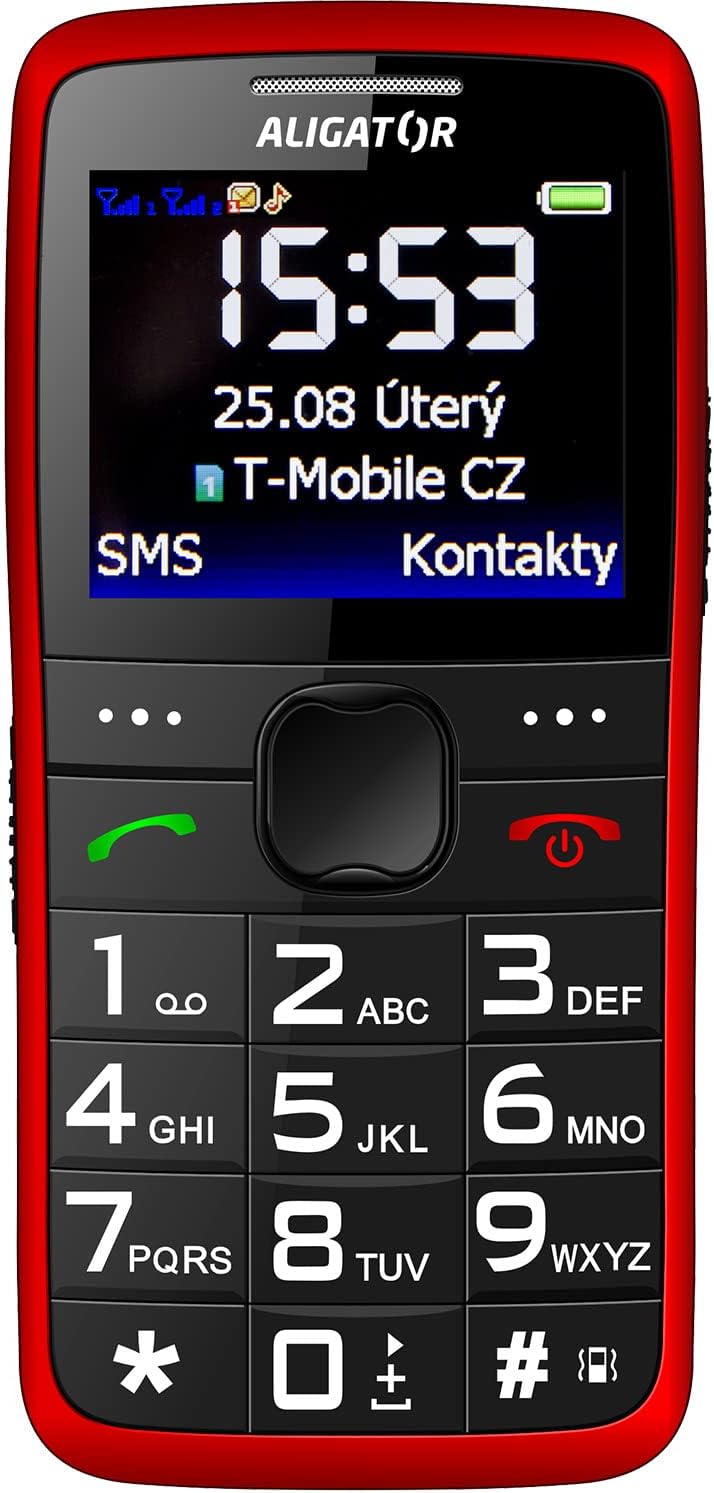
Stampa 3.2: Quddiem dettaljat view of the Aligator A675 mobile phone, highlighting the large display, clear numeric keypad, and dedicated call/end buttons.
3.1 Quddiem View
- Wiri: Shows time, date, network status, battery level, and menu options.
- Ċavetta tan-Navigazzjoni: Użat biex tiskrollja fil-menus u l-għażliet.
- Buttuna tas-Sejħa (Aħdar): Jibda t-telefonati u jwieġeb it-telefonati li deħlin.
- Buttuna tat-Tmiem/tal-Enerġija (Ħamra): Ittemm is-sejħiet, terġa' lura għall-iskrin ewlieni, u tixgħel/titfi t-telefon.
- Tastiera: Numeric keys (0-9), asterisk (*), and hash (#) for dialing and text input.
3.2 Lura View
- Lawdspiker: For ringtones and hands-free calls.
- Kamera: Għal teħid ta' ritratti bażiċi.
- Buttuna SOS: A dedicated button for emergency calls/SMS (refer to section 5.4 for setup).
4. Setup
Follow these steps to prepare your phone for first use.
4.1 Daħħal il-Kards tas-SIM
- Neħħi l-għatu ta' wara tat-telefon billi tiftaħu bil-mod mill-islott.
- If the battery is inserted, remove it.
- Locate the SIM card slots. The Aligator A675 supports two SIM cards (Dual SIM).
- Carefully insert your 2G GSM SIM card(s) into the designated slot(s) with the gold contacts facing down, ensuring they are correctly oriented.
- Ensure the SIM cards are securely in place.
4.2 Daħħal il-batterija
- Allinja l-kuntatti tal-batterija mal-kuntatti fil-kompartiment tal-batterija tat-telefon.
- Gently press the battery into place until it fits snugly.
- Erġa' poġġi l-għatu ta' wara, waqt li tiżgura li jikklikkja f'postu.
4.3 Iċċarġjar tat-Telefon
- Connect the charger cable to the charging port on the phone (usually located at the bottom).
- Ipplaggja l-ċarġer fi żbokk tad-dawl.
- L-ikona tal-batterija fuq id-displej tindika l-istatus tal-iċċarġjar.
- Allow the phone to charge completely before first use. This typically takes a few hours.
5. It-Tħaddim tat-Telefon
Basic functions and features of your Aligator A675.
5.1 Tixgħel/Jitfi
- Biex Tixgħel: Agħfas u żomm il- End/Power Button (red button) until the screen lights up.
- Biex Tifi: Agħfas u żomm il- End/Power Button until the power-off options appear, then confirm.
5.2 Tagħmel u Riċeviment Sejħiet
- Biex Tagħmel Sejħa: Daħħal in-numru tat-telefon billi tuża t-tastiera u agħfas il-buttuna Buttuna tas-Sejħa (buttuna ħadra).
- Biex Twieġeb Sejħa: Agħfas il- Buttuna tas-Sejħa meta jdoqq it-telefon.
- Biex Intemm Sejħa: Agħfas il- End/Power Button.
5.3 Tibgħat u Tirċievi SMS
- Navigate to the 'Messages' menu using the navigation key.
- Select 'Write Message' to compose a new SMS.
- Daħħal in-numru tar-riċevitur jew agħżel mill-kuntatti.
- Type your message using the keypad. Press the appropriate key multiple times for different letters (e.g., '2' for A, B, C).
- Agħżel 'Ibgħat'.
- Incoming messages will be displayed on the screen and stored in the 'Inbox'.
5.4 Funzjoni SOS
The SOS function allows you to quickly contact pre-set emergency numbers.
- Setting Up SOS Numbers: Go to 'Settings' > 'SOS Settings'. Add up to 5 emergency contact numbers.
- Attivazzjoni tal-SOS: Agħfas u żomm il- Buttuna SOS on the back of the phone for a few seconds.
- The phone will automatically send an emergency SMS to the pre-set numbers and then start dialing them one by one until a call is answered.
5.5 Kuntatti
- Żieda ta' Kuntatt: Go to 'Contacts' > 'Add New'. Enter the name and phone number, then save.
- Tiftix għal Kuntatt: Go to 'Contacts' and use the navigation key to scroll or type the first letters of the name.
6. Manutenzjoni u Kura
Proper care ensures the longevity of your Aligator A675 phone.
- Tindif: Uża drapp artab u niexef biex tnaddaf il-wiċċ tat-telefon. Evita prodotti tat-tindif likwidi jew materjali li joborxu.
- Kura tal-batterija: Do not expose the battery to extreme temperatures. Avoid fully discharging the battery frequently.
- Ħażna: Aħżen it-telefon f'post frisk u niexef 'il bogħod mix-xemx diretta u mill-umdità.
- Reżistenza għall-Ilma: This phone is not water-resistant. Avoid contact with liquids.
7 Issolvi l-problemi
Kwistjonijiet komuni u s-soluzzjonijiet tagħhom.
| Problema | Kawża Possibbli | Soluzzjoni |
|---|---|---|
| It-telefon ma jixgħelx | Batterija baxxa; Il-batterija mhux imdaħħla sew | Charge the battery; Reinsert the battery correctly |
| Ma nistax nagħmel/nirċievi telefonati | No network signal; SIM card not inserted; SIM card not activated | Move to an area with better signal; Reinsert SIM card; Contact your network provider |
| L-ebda ħoss waqt is-sejħiet | Volume too low; Speaker blocked | Increase call volume; Check if speaker is obstructed |
| Il-funzjoni SOS mhux qed taħdem | SOS numbers not set; No network signal | Set up SOS numbers in settings; Ensure network coverage |
Jekk il-problema tippersisti, jekk jogħġbok ikkuntattja l-appoġġ għall-klijenti.
8. Speċifikazzjonijiet
Key technical details of the Aligator A675.
- Ditta: ALIGATOR
- Mudell: A675
- Trasportatur bla fili: Jinfetaħ
- Teknoloġija tan-Netwerk bla Fili: GSM (2G)
- Daqs tal-iskrin: 3 pulzieri
- Input tal-Interface tal-Bniedem: Tastiera
- Appoġġ tas-SIM: SIM doppju
9. Garanzija u Appoġġ
Your Aligator A675 phone is covered by a standard manufacturer's warranty. Please refer to the warranty card included in your package for specific terms and conditions, including the warranty period and coverage details.
For technical support, service, or warranty claims, please contact your retailer or the official Aligator customer service. Contact information can typically be found on the manufacturer's webis-sit jew fuq l-imballaġġ.
Żomm il-prova tax-xiri tiegħek (irċevuta jew fattura) għax tkun meħtieġa għal kwalunkwe servizz ta' garanzija.