
ASUS GS-AX3000
Manwal tal-Utent tar-Router tal-Logħob ASUS ROG Strix GS-AX3000 WiFi 6
Model: GS-AX3000 | Brand: ASUS
Prodott Overview
The ASUS ROG Strix GS-AX3000 is a high-performance WiFi 6 gaming router designed to provide fast and stable network connections for gaming and general use. It features advanced technologies to optimize network performance and enhance security.

Figure 1: ASUS ROG Strix GS-AX3000 WiFi 6 Gaming Router
Karatteristiċi ewlenin:
- New-generation WiFi 6: Ultrafast speeds up to 3000 Mbps with 160 MHz WiFi 6 channels.
- Fully optimized gaming: Mobile Game Mode, dedicated Gaming Port, and Gear Accelerator for optimized gaming on mobile, console or PC.
- Fużjoni tal-VPN: Run a VPN and an ordinary internet connection simultaneously for maximum speed.
- Instant Guard: Secure public WiFi connections globally with a single click.
- Commercial-grade Security: AiProtection Pro, powered by Trend Micro, protects your home network.
- Easy Extendable Network: Seamless roaming with any AiMesh-compatible router.
Kontenut tal-Pakkett
Qabel ma tipproċedi bis-setup, jekk jogħġbok kun żgur li l-oġġetti kollha elenkati hawn taħt huma preżenti fil-pakkett tiegħek:
- GS-AX3000 Router
- Kejbil RJ-45
- Adapter tal-enerġija
- Karta tal-garanzija
- Gwida tal-bidu ta 'malajr
Gwida ta' Setup
1. Konnessjonijiet tal-Hardware
Segwi dawn il-passi biex tikkonnettja r-router tiegħek:
- Qabbad l-adapter tal-enerġija mar-router Port tal-enerġija (DC-IN). u plaggha fi żbokk tad-dawl.
- Connect one end of the RJ-45 cable to your modem's Ethernet port and the other end to the router's Port WAN.
- For wired devices, connect an Ethernet cable from your computer or gaming console to any of the router's LAN Ports (LAN 1-3). Il- Gaming Port (LAN 1) is recommended for primary gaming devices.
- Agħfas il- Swiċċ tal-Qawwa biex tixgħel ir-router.

Figura 2: Wara view of the GS-AX3000 router showing all ports and buttons.
2. Konfigurazzjoni Inizjali
Once the hardware is connected, configure your router using the ASUSWRT web interface:
- Iftaħ a web browser on a computer connected to the router (either wired or wirelessly using the default Wi-Fi name and password found on the router's label).
- Tip http://router.asus.com or http://192.168.50.1 fil-bar tal-indirizzi u agħfas Enter.
- Follow the on-screen instructions of the Quick Internet Setup (QIS) wizard to set up your internet connection, Wi-Fi network name (SSID), and password.
- It is highly recommended to change the default login username and password for the router's administration page for security purposes.
Istruzzjonijiet Operattivi
Karatteristiċi tal-Logħob
The ROG Strix GS-AX3000 is optimized for gaming performance:
- Gaming Port (LAN 1): Connect your primary gaming device (PC, console) to this port for prioritized network traffic.
- Modalità tal-Logħob Mobbli: Activate this feature via the ASUS Router app to prioritize mobile gaming traffic.
- Gear Accelerator: Uża l- web interface to prioritize specific devices for gaming.

Figure 3: Accelerate Your Gaming Device with the GS-AX3000.
Network Security and Privacy
Enhance your network security and privacy with these built-in features:
- AiProtection Pro: Provides commercial-grade network security, including intrusion prevention, malicious site blocking, and infected device detection. Access and configure this feature through the ASUSWRT interface.
- Fużjoni tal-VPN: Allows you to run a VPN connection alongside a regular internet connection. This is useful for specific applications that require VPN while others use direct internet access.
- Instant Guard: Create a secure VPN connection to your home network when you are away, protecting your data on public Wi-Fi. This feature is accessible via the ASUS Router mobile app.

Figura 4: Aktarview of security and privacy features.
Sistema AiMesh
The GS-AX3000 is AiMesh compatible, allowing you to create a whole-home mesh Wi-Fi system by adding other AiMesh-compatible ASUS routers. This extends Wi-Fi coverage and eliminates dead zones.
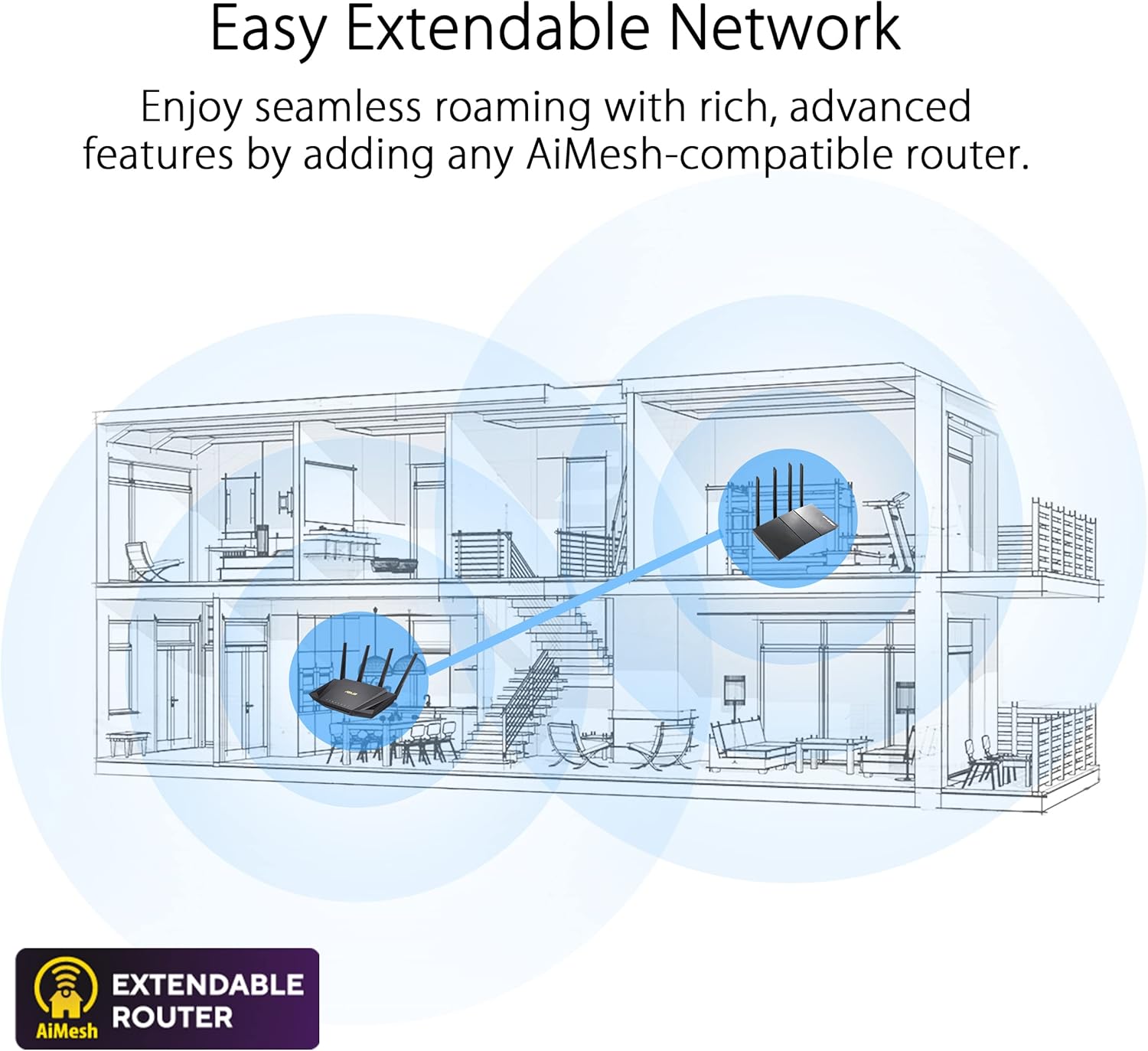
Figure 5: AiMesh system extending network coverage.
Manutenzjoni
Regular maintenance ensures optimal performance and security for your router:
- Aġġornamenti tal-Firmware: Periodically check for and install the latest firmware updates via the ASUSWRT interface. Firmware updates often include performance improvements, bug fixes, and security enhancements.
- Reboot Regolari: Rebooting the router every few days or once a week can help clear its memory and resolve minor performance issues.
- Tindif Fiżiku: Keep the router free from dust. Use a soft, dry cloth to clean the exterior. Ensure ventilation holes are not obstructed to prevent overheating.
- Ġestjoni tal-Password: Regularly change your Wi-Fi and router administration passwords to strong, unique combinations.
Issolvi l-problemi
Din it-taqsima tindirizza kwistjonijiet komuni li tista' tiltaqa' magħhom:
| Problema | Kawża Possibbli | Soluzzjoni |
|---|---|---|
| Ebda Konnessjoni tal-Internet | Incorrect cable connections, modem issue, ISP outage. |
|
| Veloċità baxxa tal-Wi-Fi | Interference, too many devices, outdated firmware, router placement. |
|
| Ma nistax naċċessa l-Paġna tas-Settings tar-Router | Indirizz IP mhux korrett, problema tan-netwerk, cache tal-browser. |
|
| Skonnettjar tal-Wi-Fi | Channel interference, signal strength, device compatibility. |
|
For more detailed troubleshooting, refer to the online support resources or contact ASUS customer support.
Speċifikazzjonijiet
| Karatteristika | Dettall |
|---|---|
| Brand | ASUS |
| Serje | ROG STRIX |
| Numru tal-Mudell | GS-AX3000 |
| Tip bla fili | 802.11ax (WiFi 6) |
| Klassi ta' Banda ta' Frekwenza | Doppju-Band |
| Frekwenza | 160 MHz |
| Sistema Operattiva | ASUSWRT |
| Piż tal-oġġett | 1.55 liri |
| Dimensjonijiet tal-Prodott (LxWxH) | 10.56 x 7.08 x 6.53 pulzieri |
| Kulur | ISWED |
| Voltage | 240 Volts (AC) |
| Karatteristiċi Speċjali | AiMesh, QoS, WPS |
| Teknoloġija tal-Konnettività | Bluetooth, Wi-Fi, Ethernet |
Garanzija u Appoġġ
Informazzjoni dwar Garanzija
This product comes with a warranty. Please refer to the included Karta tal-garanzija in your package for detailed terms and conditions, including warranty period and coverage.
Ċaħda Legali
Ir-rata attwali tat-trażmissjoni tad-dejta u l-kopertura tal-WiFi se jvarjaw mill-kundizzjonijiet tan-netwerk u l-fatturi ambjentali, inkluż il-volum tat-traffiku tan-netwerk, il-materjal tal-bini u l-kostruzzjoni, u l-overhead tan-netwerk, li jirriżulta f'rata attwali tat-trażmissjoni tad-dejta u kopertura mingħajr fili aktar baxxa.
Appoġġ għall-Klijent
For technical assistance, product inquiries, or warranty claims, please contact ASUS customer support. You can find contact information on the ASUS official webis-sit jew fil-gwida ta' bidu rapidu inkluża mal-prodott tiegħek.
Online resources and FAQs are also available on the ASUS support website to help you with common issues and advanced configurations.
Ask a question about this manual
Ask about setup, troubleshooting, compatibility, parts, safety, or missing instructions. Manuals+ will review the question and use this page’s manual context to help answer it.