
Introduzzjoni
Thank you for choosing the Borofone BR15 Portable Bluetooth Speaker. This manual provides essential information for the safe and efficient use of your device. Please read it thoroughly before operating the speaker and keep it for future reference.
Prodott Overview
The Borofone BR15 is a versatile portable Bluetooth speaker designed for various environments, including sports activities. It features Bluetooth 5.0 connectivity, a durable plastic build, and water resistance.
Karatteristiċi ewlenin:
- Bluetooth 5.0: Jiżgura konnessjoni mingħajr fili stabbli u effiċjenti.
- Disinn li ma jgħaddix ilma minnu: Provides protection against water splashes, suitable for outdoor use.
- Modi ta' Daqq multipli: Supports Bluetooth, FM Radio, TF Card, USB Disk, and TWS (True Wireless Stereo).
- Portabbli u Durabbli: Compact size with a robust plastic construction.
- Ħajja twila tal-batterija: 1200 mAh battery offers up to 2.5 hours of music or talk time.
Komponenti tal-Ispeaker:
Familiarize yourself with the speaker's layout:
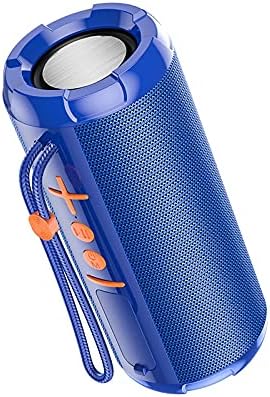
Stampa 1: Quddiem view of the Borofone BR15 speaker, showing the control panel with power, volume, and mode buttons.

Immaġni 2: Ġenb view of the Borofone BR15 speaker, highlighting its cylindrical design and the Borofone branding.
- Buttuna tal-Qawwa: Jixgħel/jitfi l-ispiker.
- Buttuna tal-Volum 'il Fuq/Trakka li Jmiss: Iżżid il-volum jew taqbeż għat-trakka li jmiss.
- Buttuna għat-Tnaqqis tal-Volum/Trakka Preċedenti: Inaqqas il-volum jew imur għat-trakka ta' qabel.
- Buttuna Play/Pause: Controls music playback and answers/ends calls.
- Buttuna tal-Modalità: Switches between Bluetooth, FM Radio, TF Card, and USB Disk modes.
- Port tal-Iċċarġjar: Għall-konnessjoni tal-kejbil tal-iċċarġjar.
- Slott tal-Karta TF: For inserting a MicroSD card.
- Port USB: For connecting a USB flash drive.
Setup
1. Iċċarġjar tal-Ispeaker:
- Qabbad il-kejbil tal-iċċarġjar ipprovdut mal-port tal-iċċarġjar tal-ispiker.
- Qabbad it-tarf l-ieħor tal-kejbil ma' adapter tal-enerġija USB (mhux inkluż) jew mal-port USB tal-kompjuter.
- The charging indicator light will illuminate. Charging takes approximately 2 hours.
- Ladarba jkun iċċarġjat kompletament, id-dawl indikatur jinbidel jew jintefa. Skonnettja l-kejbil tal-iċċarġjar.
2. Tixgħel/Jitfi:
- To power on, press and hold the Power button for a few seconds until you hear an audible prompt.
- Biex titfi, agħfas u żomm il-buttuna tal-Power mill-ġdid sakemm l-ispiker jintefa.
3. Tqabbil tal-Bluetooth:
- Ensure the speaker is powered on and in Bluetooth mode (indicated by a flashing LED or audible prompt). If not, press the Mode button to switch to Bluetooth.
- Ippermetti l-Bluetooth fuq l-ismartphone, it-tablet, jew apparat ieħor kompatibbli tiegħek.
- Fittex għal "BR15" in the list of available Bluetooth devices.
- Select "BR15" to connect. Once paired, you will hear a confirmation sound, and the LED indicator will stop flashing.
- L-ispiker jerġa' jikkonnettja awtomatikament mal-aħħar apparat imqabbad meta jinxtegħel, jekk il-Bluetooth tal-apparat ikun attiv u fil-firxa tiegħu.
Istruzzjonijiet Operattivi
Daqq tal-mużika:
- Play/Pawsa: Agħfas il-buttuna Play/Pause darba.
- Track li jmiss: Agħfas u żomm il-buttuna Volume Up.
- Track preċedenti: Agħfas u żomm il-buttuna Volum Down.
- Volum 'il fuq: Agħfas fil-qosor il-buttuna Volume Up.
- Volum 'l isfel: Agħfas fil-qosor il-buttuna Volum 'l isfel.
Call Handling (in Bluetooth mode):
- Irrispondi Sejħa: Agħfas il-buttuna Play/Pause darba.
- Tmiem Sejħa: Agħfas il-buttuna Play/Pause darba waqt telefonata.
- Irrifjuta Sejħa: Agħfas u żomm il-buttuna Play/Pause.
Bdil tal-Modalità:
Press the Mode button repeatedly to cycle through available modes:
- Modalità Bluetooth: Għal streaming tal-awdjo mingħajr fili.
- Modalità tar-Radju FM: Automatically scans and plays FM stations.
- Modalità TF Card: Jilgħab l-awdjo files from a MicroSD card (insert card before selecting mode).
- Modalità tad-Diska USB: Jilgħab l-awdjo files from a USB flash drive (insert drive before selecting mode).
- Modalità TWS (Stereo Wireless Veru): Connects two BR15 speakers for stereo sound. (Instructions for TWS pairing are typically separate and more detailed, but I'll keep it brief here as the JSON doesn't provide specifics).
Manutenzjoni
- Tindif: Use a soft, dry cloth to wipe the speaker. Do not use abrasive cleaners or solvents.
- Reżistenza għall-Ilma: The speaker is waterproof, but it is not designed for submersion. Ensure the charging port cover is securely closed to maintain water resistance. Avoid exposing it to strong jets of water.
- Ħażna: Aħżen l-ispiker f'post frisk u niexef 'il bogħod mix-xemx diretta u minn temperaturi estremi.
- Kura tal-batterija: Biex ittawwal il-ħajja tal-batterija, iċċarġja l-ispiker kompletament qabel l-ewwel użu u mill-inqas darba kull tliet xhur jekk ma tużahx regolarment.
Issolvi l-problemi
| Problema | Soluzzjoni |
|---|---|
| L-ispiker ma jixgħelx. | Kun żgur li l-batterija hija ċċarġjata. Qabbad l-ispiker ma' sors ta' enerġija u erġa' pprova. |
| Ma tistax tqabbad permezz tal-Bluetooth. |
|
| L-ebda ħoss jew volum baxx. |
|
| Ir-riċeviment tar-Radju FM huwa fqir. | Move the speaker to an open area, away from obstructions or interference. Some speakers use the charging cable as an antenna; try connecting it. |
Speċifikazzjonijiet
| Isem tal-Mudell: | BR15 |
| Ditta: | Borofone |
| Verżjoni Bluetooth: | 5.0 |
| Ċippa Bluetooth: | Jerry JL |
| Kapaċità tal-batterija: | 1200 mAh |
| Ħin tal-Iċċarġjar: | Madwar sagħtejn |
| Music/Talk Time: | Sa 2.5 sigħat |
| Unità tal-Ispeaker: | 45mm x 2 |
| Output tal-Enerġija: | 5W x 2 |
| Dimensjonijiet (L x W x H): | 162 x 70 x 70 mm |
| Materjal: | Plastik |
| Li ma jgħaddix ilma minnha: | Iva |
| Konnettività: | Bluetooth |
| Sors tal-Enerġija: | Mħaddma bil-batterija |
| Modalità tal-Ħruġ tal-Awdjo: | Stereo |
| Tip ta 'Immuntar: | Mejda |
| Apparati Kompatibbli: | Laptop, Smartphone, Tablet |
| Modi appoġġjati: | Bluetooth, FM Radio, TF Card, USB Disk, TWS |
Garanzija u Appoġġ
For warranty information and technical support, please refer to the warranty card included with your product or visit the official Borofone websit. Żomm l-irċevuta tax-xiri tiegħek bħala prova tax-xiri.
If you encounter any issues not covered in this manual, please contact Borofone customer service for assistance.