
1. Introduzzjoni
Thank you for choosing the BOROFONE BR15 Portable Bluetooth Speaker. This manual provides essential information for setting up, operating, and maintaining your speaker. Please read it carefully before use to ensure optimal performance and longevity of your device. The BR15 is a versatile portable speaker designed for various audio playback needs, featuring Bluetooth connectivity, FM radio, and support for TF cards and USB drives.
2. Prodott Aktarview
The BOROFONE BR15 is a compact and robust portable Bluetooth speaker. It features a camouflage green design and is built for on-the-go use.
Karatteristiċi ewlenin:
- Bluetooth 5.0: For stable and efficient wireless connection.
- Kapaċità tal-batterija: 1200mAh, providing approximately 2.5 hours of music playback or talk time.
- Qawwa tal-Ħruġ: 5W x 2, delivering clear audio.
- Reżistenti għall-Ilma: Designed to withstand splashes.
- Modi ta' Daqq multipli: Supports Bluetooth, FM radio, TF card, and USB disk playback.
- Funzjoni TWS: Allows connection of two BR15 speakers for stereo sound.
Komponenti tal-Ispeaker:
Familiarize yourself with the speaker's physical components and controls.
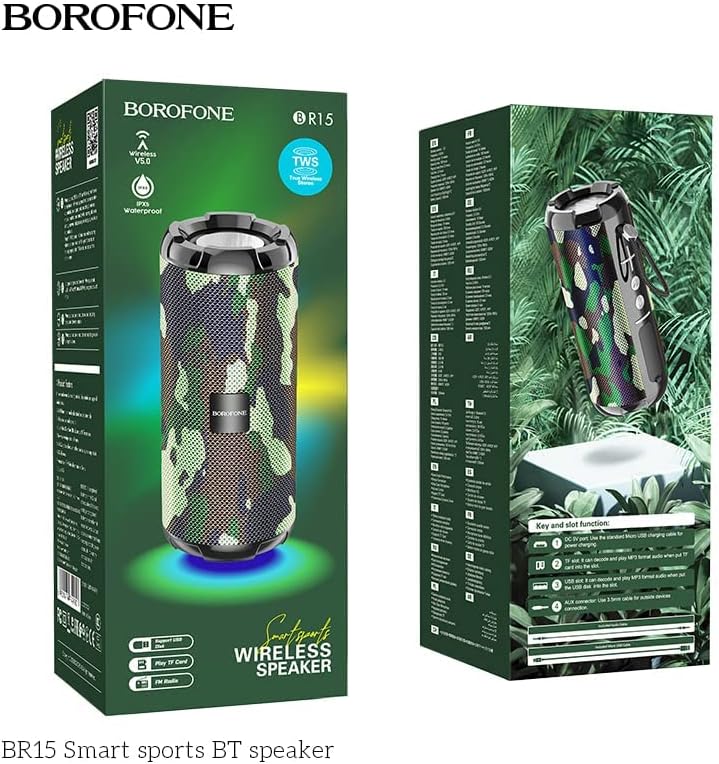
Image: The BOROFONE BR15 speaker packaging, illustrating the various buttons and ports for user reference.
The packaging image above highlights the 'Key and slot function' area, which typically includes:
- Buttuna tal-Qawwa: To turn the speaker on or off.
- Buttuna tal-Modalità (M): To switch between Bluetooth, FM radio, TF card, and USB disk modes.
- Buttuna tal-Volum 'il Fuq/Trakka li Jmiss (+): Agħfas qasir għat-trakka li jmiss, agħfas twil biex tgħolli l-volum.
- Buttuna għat-Tnaqqis tal-Volum/Trakka Preċedenti (-): Agħfas qasir għat-trakka ta' qabel, agħfas twil biex tnaqqas il-volum.
- Buttuna Play/Pause: To play or pause audio, answer/end calls.
- Port tal-Iċċarġjar: Port USB għall-iċċarġjar tal-ispiker.
- Slott tal-Karta TF: For playing music directly from a MicroSD card.
- Port USB: For playing music directly from a USB flash drive.
- Port tal-AUX-in: Għall-konnessjoni ta' apparati awdjo esterni permezz ta' kejbil awdjo ta' 3.5mm.
3. Setup
3.1 Iċċarġjar tal-Ispeaker
- Qabbad il-kejbil tal-iċċarġjar USB ipprovdut mal-port tal-iċċarġjar tal-ispiker.
- Qabbad it-tarf l-ieħor tal-kejbil ma' adapter tal-enerġija USB (mhux inkluż) jew mal-port USB tal-kompjuter.
- Id-dawl indikatur tal-iċċarġjar jixgħel, tipikament aħmar, waqt l-iċċarġjar.
- Charging takes approximately 2 hours. The indicator light will turn off or change color (e.g., blue) when fully charged.
3.2 Tixgħel/Jitfi
- Biex Tixgħel: Agħfas u żomm il-buttuna tal-Qawwa għal ftit sekondi sakemm tisma' sinjal li jinstema' jew tara dawl indikatur.
- Biex Tifi: Agħfas u żomm il-buttuna tal-Qawwa mill-ġdid għal ftit sekondi sakemm tisma' sinjal li jinstema' jew id-dawl indikatur jintefa.
4. Istruzzjonijiet Operattivi
4.1 Tqabbil tal-Bluetooth
- Ensure the speaker is powered on and in Bluetooth mode (indicated by a flashing blue LED and an audible prompt). If not, press the 'M' (Mode) button to switch to Bluetooth mode.
- Fuq l-ismartphone jew it-tablet tiegħek, ippermetti l-Bluetooth u fittex it-tagħmir disponibbli.
- Select "BOROFONE BR15" from the list of devices.
- Once paired, the speaker will emit an audible confirmation, and the blue LED will stop flashing and remain solid.
- Issa tista' ddoqq l-awdjo mit-tagħmir tiegħek permezz tal-ispiker.
4.2 Playing Music from TF Card/USB Disk
- Insert a TF card (MicroSD) or USB flash drive with MP3 audio files into the respective slot on the speaker.
- The speaker will automatically detect the storage device and switch to the corresponding playback mode. If not, press the 'M' (Mode) button to cycle through modes until you reach TF card or USB disk mode.
- Use the Play/Pause, Next Track (+), and Previous Track (-) buttons to control playback.
4.3 Modalità tar-Radju FM
- Press the 'M' (Mode) button repeatedly until you hear the FM radio prompt.
- Biex tiskennja awtomatikament u ssalva l-istazzjonijiet disponibbli, agħfas u żomm il-buttuna Play/Pause. L-ispiker se jiskennja u jaħżen l-istazzjonijiet awtomatikament.
- Use the Next Track (+) and Previous Track (-) buttons to switch between saved stations.
Funzjoni 4.4 TWS (Stereo Veru Mingħajr Fili)
The TWS function allows you to connect two BOROFONE BR15 speakers together for a true stereo sound experience.
- Ensure both BR15 speakers are powered off.
- Power on both speakers. They should both be in Bluetooth pairing mode.
- On one of the speakers, double-press the Play/Pause button. The speaker will attempt to connect to the other BR15 speaker.
- Once successfully paired, you will hear an audible confirmation. The main speaker's LED will flash, and the secondary speaker's LED will be solid.
- Now, connect your smartphone or tablet to the main speaker via Bluetooth as described in section 4.1.
- L-awdjo issa se jindaqq b'mod stereo miż-żewġ kelliema.
4.5 Kontroll tal-Volum
- Żid il-Volum: Agħfas fit-tul il-buttuna '+'.
- Naqqas il-Volum: Agħfas fit-tul il-buttuna '-'.
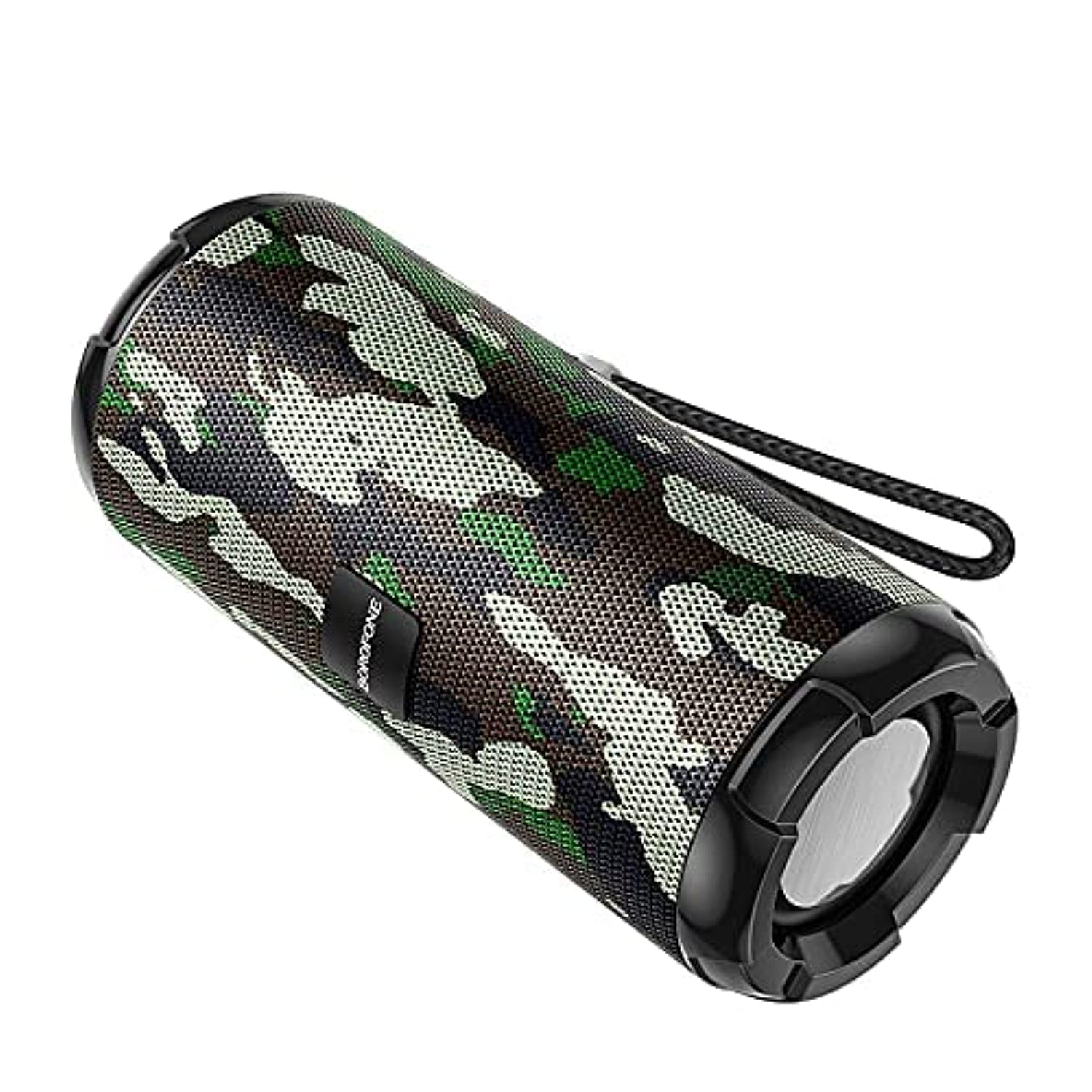
Image: The BOROFONE BR15 Portable Bluetooth Speaker, showcasing its camouflage green finish and cylindrical design.
5. Manutenzjoni
5.1 Tindif
- Dejjem itfi l-ispiker qabel ma tnaddaf.
- Use a soft, dry, lint-free cloth to wipe the exterior of the speaker.
- Do not use abrasive cleaners, alcohol, benzene, or other chemical solvents, as these may damage the surface or internal components.
5.2 Ħażna
- Aħżen l-ispiker f'post frisk u niexef 'il bogħod mix-xemx diretta u minn temperaturi estremi.
- Jekk taħżinha għal perjodu estiż, iċċarġja l-batterija sa madwar 50% kull ftit xhur biex iżżommha f'saħħitha.
5.3 Kura tal-Batterija
- Evita li tiċċarġja l-batterija kompletament ta' spiss.
- Tesponix l-ispiker għal temperaturi 'l fuq minn 60°C (140°F) jew taħt -10°C (14°F).
- Uża biss il-kejbil tal-iċċarġjar provdut jew wieħed ekwivalenti ċċertifikat.
6 Issolvi l-problemi
| Problema | Kawża Possibbli | Soluzzjoni |
|---|---|---|
| L-ispiker ma jixgħelx. | Batterija baxxa. | Iċċarġja l-ispiker għal mill-inqas 30 minuta. |
| Ma tistax tqabbad permezz tal-Bluetooth. | Speaker not in pairing mode; Bluetooth disabled on device; speaker too far. | Ensure speaker is in Bluetooth mode (flashing LED). Enable Bluetooth on your device. Move speaker closer to your device (within 10 meters). |
| L-ebda ħoss. | Volum baxx wisq; mod mhux korrett; apparat mhux qed idoqq. | Increase speaker and device volume. Check if the speaker is in the correct mode (Bluetooth, TF, USB, FM). Ensure audio is playing on your connected device. |
| Ir-riċeviment tar-radju FM huwa fqir. | Sinjal dgħajjef. | Move the speaker to an open area or closer to a window. |
| It-tqabbil tat-TWS ifalli. | Speakers too far apart; one speaker already paired. | Ensure both speakers are close to each other. Disconnect any existing Bluetooth connections from both speakers before attempting TWS pairing. |
7. Speċifikazzjonijiet
| Karatteristika | Speċifikazzjoni |
|---|---|
| Isem tal-Mudell | BR15 |
| Verżjoni Bluetooth | 5.0 |
| Ċippa | Jerry |
| Kapaċità tal-batterija | 1200mAh |
| Ħin tal-Iċċarġjar | Madwar sagħtejn |
| Mużika / Ħin għat-Taħdit | Madwar sagħtejn |
| Unità tal-Ispeaker | 45mm x 2 |
| Qawwa tal-Ħruġ | 5W x 2 |
| Dimensjonijiet (L x W x H) | 162mm x 70mm x 70mm (6.38 x 2.76 x 2.76 pulzieri) |
| Piż | Mhux speċifikat |
| Materjal | Plastik |
| Kulur | Camouflage Green |
| Reżistenza għall-Ilma | Iva |
| Konnettività | Bluetooth, TF Card, USB Disk, FM Radio, AUX-in, TWS |
| Apparati Kompatibbli | Smartphone, Pillola |

Image: The BOROFONE BR15 Portable Bluetooth Speaker positioned outdoors, highlighting its portability and design.
8. Garanzija u Appoġġ
BOROFONE products are designed and manufactured to the highest quality standards. For information regarding warranty coverage, please refer to the warranty card included with your purchase or visit the official BOROFONE website. If you encounter any issues or require technical assistance, please contact BOROFONE customer support through their official channels.
No official product videos were provided for this model.