
Introduzzjoni
Thank you for choosing the Audizio SB85 Soundbar with Subwoofer. This manual provides essential information for the safe and correct operation of your new audio system. Please read it thoroughly before use and retain it for future reference. The SB85 is designed to enhance your television's audio, providing a rich, immersive sound experience for movies, games, and music, complete with a dedicated subwoofer for powerful bass.
Istruzzjonijiet tas-Sigurtà
- Aqra l-istruzzjonijiet kollha bir-reqqa qabel ma tħaddem l-apparat.
- Keep the unit away from water, moisture, and heat sources.
- Timblokka l-ebda fetħiet tal-ventilazzjoni.
- Uża biss aċċessorji/aċċessorji speċifikati mill-manifattur.
- Spluggja l-apparat waqt maltempati tas-sajjetti jew meta ma jintużax għal perjodi twal.
- Irreferi l-manutenzjoni kollha lil persunal tas-servizz kwalifikat.
- Do not expose the battery (if applicable) to excessive heat such as sunshine, fire, or the like.
Kontenut tal-Pakkett
Kun żgur li l-oġġetti kollha huma preżenti fil-kaxxa:
- Audizio SB85 Soundbar
- Subwoofer bil-fili
- Kontroll mill-bogħod
- Kejbil Ottiku (Toslink)
- Cable AUX
- Adapter tal-Enerġija
- Manwal għall-Utent
Prodott Overview
The Audizio SB85 system consists of a soundbar and a separate wired subwoofer, designed to deliver a powerful and clear audio experience.
Karatteristiċi tal-Soundbar
- Integrated 150W speaker system with 4 speakers (2x 2cm range, 2x 2cm tweeter).
- Front LED display for status indication.
- Control buttons on the side panel.
- Multiple input options: HDMI (ARC), USB, Line In (AUX), Coaxial, Optical.
- Bluetooth 5.0 għal streaming awdjo mingħajr fili.

Image: Close-up of the Audizio SB85 Soundbar's control panel and its remote control, highlighting Bluetooth 5.0 and ease of use.

Immaġni: Interna view of the Audizio SB85 Soundbar's full-range speaker, emphasizing its 150W speaker system for an immersive audio experience.
Karatteristiċi tas-subwoofer
- 5.25-inch wired subwoofer for enhanced bass response.

Image: Close-up of the Audizio SB85 wired subwoofer, designed to amplify bass frequencies.
Setup
1 Tqegħid
Place the soundbar centrally below your television. The subwoofer can be placed on the floor near the soundbar, ideally in a corner for optimal bass reflection, but ensure it is not obstructed.

Image: Audizio SB85 Soundbar and Subwoofer setup in a living room, demonstrating room-filling sound and clean design.

Image: Audizio SB85 Soundbar placed below a television, illustrating its universal compatibility with any TV.
2. Konnessjoni mal-Enerġija
Connect the power adapter to the DC IN port on the soundbar and then plug it into a wall outlet (230 Vac/50 Hz).
3. Tqabbad is-Subwoofer
Connect the wired subwoofer to the dedicated subwoofer output port on the soundbar.
4. Konnessjoni ma' Sorsi tal-Awdjo
The SB85 offers several connection options:
- HDMI (ARC): For the best audio quality and control, connect an HDMI cable from the HDMI (ARC) port on the soundbar to the HDMI ARC port on your TV. This allows the TV to send audio to the soundbar and often enables TV remote control of the soundbar's volume.
- Ottiċi (Toslink): Connect the included optical cable from the OPTICAL port on the soundbar to the Optical Digital Audio Out port on your TV or other audio source.
- Line In (AUX): Use the included AUX cable to connect the LINE IN port on the soundbar to the headphone jack or audio output of your device (e.g., smartphone, MP3 player).
- Koassjali: Connect a coaxial cable (not included) from the COAXIAL port on the soundbar to the Coaxial Digital Audio Out port on your TV or other audio source.
- USB: Insert a USB flash drive into the USB port for MP3 playback.
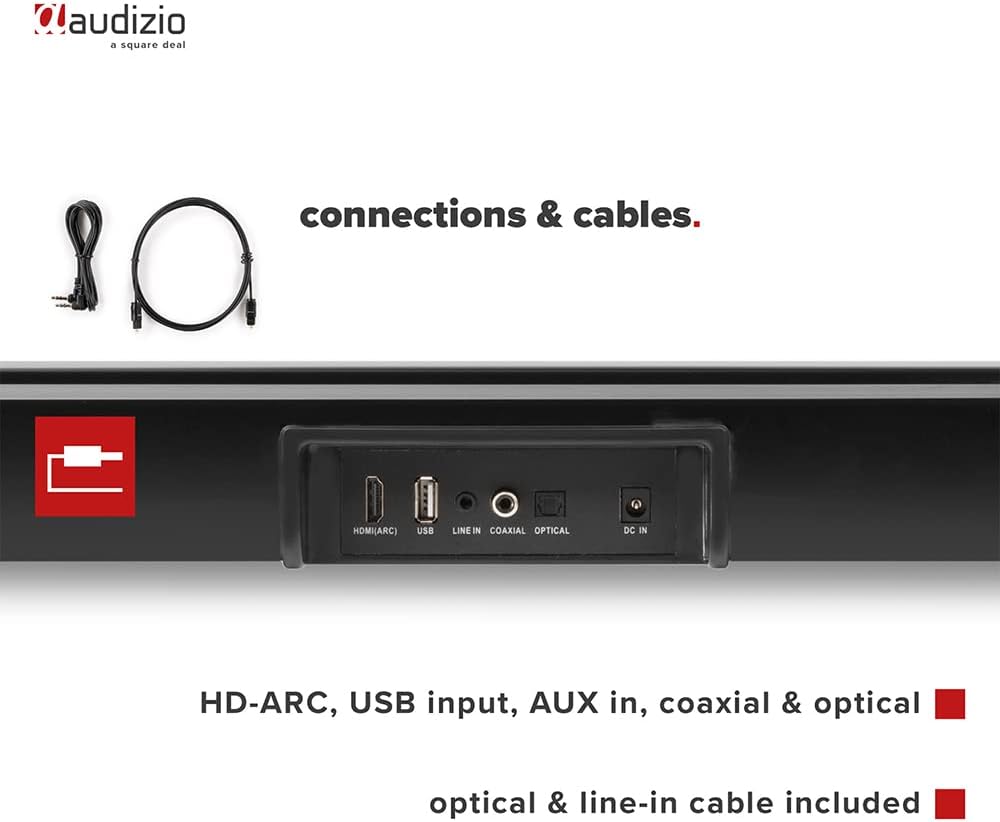
Immaġni: Wara view of the Audizio SB85 Soundbar showing various connection ports: HDMI (ARC), USB, Line In, Coaxial, and Optical. Includes optical and line-in cables.
Istruzzjonijiet Operattivi
1. Power On/Off
Agħfas il-buttuna tal-Power fuq is-soundbar jew ir-remote control biex tixgħel jew titfi l-unità.
2. Għażla tas-Sors tal-Input
Press the 'MODE' button on the soundbar or the remote control repeatedly to cycle through the available input sources: HDMI (ARC), Optical, Coaxial, AUX, USB, and Bluetooth. The selected input will be shown on the front LED display.
3. Kontroll tal-Volum
Use the 'VOL+' and 'VOL-' buttons on the soundbar or the remote control to adjust the volume. The 'MUTE' button on the remote control will temporarily silence the audio.
4. Tqabbil tal-Bluetooth
- Switch the soundbar to Bluetooth mode using the 'MODE' button. The LED display will show 'BT'.
- Fuq l-ismartphone jew it-tablet tiegħek, ippermetti l-Bluetooth u fittex it-tagħmir disponibbli.
- Select 'Audizio SB85' from the list of devices.
- Once paired, the soundbar will indicate a successful connection, and you can stream audio wirelessly.
5. Daqq USB
Daħħal flash drive USB li fih awdjo MP3 files into the USB port. The soundbar will automatically switch to USB mode and begin playing the music. Use the remote control to navigate tracks (play/pause, next/previous).
6. Funzjonijiet ta 'Kontroll mill-bogħod
The remote control provides full functionality for the soundbar, including power, mode selection, volume, mute, and playback controls for USB and Bluetooth modes.
Manutenzjoni
Tindif
Wipe the soundbar and subwoofer surfaces with a soft, dry cloth. Do not use abrasive cleaners, waxes, or solvents as they may damage the finish. Ensure the device is unplugged before cleaning.
Ħażna
Jekk taħżen l-unità għal perjodu estiż, aqlagħha mill-plagg tal-elettriku u aħżenha f'post frisk u niexef, 'il bogħod mix-xemx diretta u minn temperaturi estremi.
Issolvi l-problemi
| Problema | Kawża Possibbli | Soluzzjoni |
|---|---|---|
| Ebda qawwa | Kejbil tal-enerġija mhux imqabbad; Sokit tal-enerġija difettuż | Iċċekkja l-konnessjoni tal-kejbil tal-enerġija; Ipprova sokit differenti. |
| L-ebda ħoss | Incorrect input selected; Volume too low; Mute activated; Cable connection loose | Select correct input source; Increase volume; Deactivate mute; Check all audio cable connections. |
| Il-Bluetooth mhux qed jgħaqqad | Soundbar not in Bluetooth mode; Device too far; Device already connected to another unit | Switch soundbar to BT mode; Move device closer; Disconnect from other devices and try again. |
| Il-kontroll mill-bogħod ma jaħdimx | Batteriji eżawriti; Ostruzzjoni bejn ir-remote u s-soundbar | Ibdel il-batteriji; Neħħi kwalunkwe ostaklu. |
Speċifikazzjonijiet
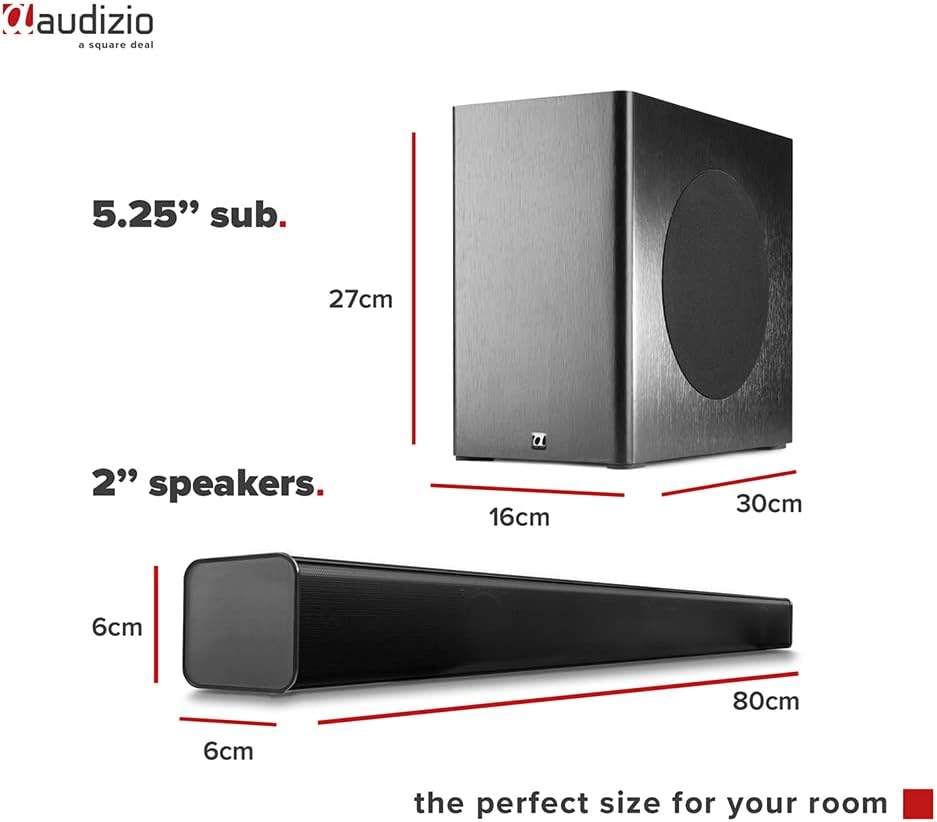
Image: Diagram showing the dimensions of the Audizio SB85 Soundbar and its subwoofer.
- Output tal-Enerġija: 150W (Mass)
- Konfigurazzjoni tal-Ispeaker: 4 speakers (2x 2cm range, 2x 2cm tweeter)
- Daqs tas-Subwoofer: 5.25 pulzieri
- Medda ta' Frekwenzi: 50 Hz - 16,000 Hz
- Max SPL: 125 dB
- Konnettività: Bluetooth 5.0, HDMI (ARC), USB, Line In (AUX), Coaxial, Optical
- Modalità tal-Ħruġ tal-Awdjo: Stereo
- Apparati Kompatibbli: MP3 Player, Smartphone, TV
- Sors tal-Enerġija: 230 Vac/50 Hz (via electric cable)
- Dimensjonijiet tas-Soundbar (T x W x H): 80 x 6 x 6 ċm
- Dimensjonijiet tas-Subwoofer (T x W x G): 16 x 30 x 27 ċm
- Piż Totali: 3.9 kg
- Numru tal-Mudell: 100.292
Garanzija u Appoġġ
Għal informazzjoni dwar il-garanzija jew appoġġ tekniku, jekk jogħġbok irreferi għad-dokumentazzjoni pprovduta fil-ħin tax-xiri jew ikkuntattja lill-bejjiegħ tiegħek. Żomm il-prova tax-xiri tiegħek għal kwalunkwe talba ta' garanzija.