
1. Introduzzjoni
This manual provides detailed instructions for the installation, operation, and maintenance of the Huanyang 1.5KW 2HP Variable Frequency Drive (VFD) Inverter. This VFD is designed for precise motor speed control in various applications, including lathes, mills, car hoists, pumps, and conveyors. It supports both single-phase and three-phase input, providing a three-phase output for motor control. The VFD utilizes Sine Wave Pulse Width Modulation (SPWM) for its control system, ensuring excellent performance and efficiency.
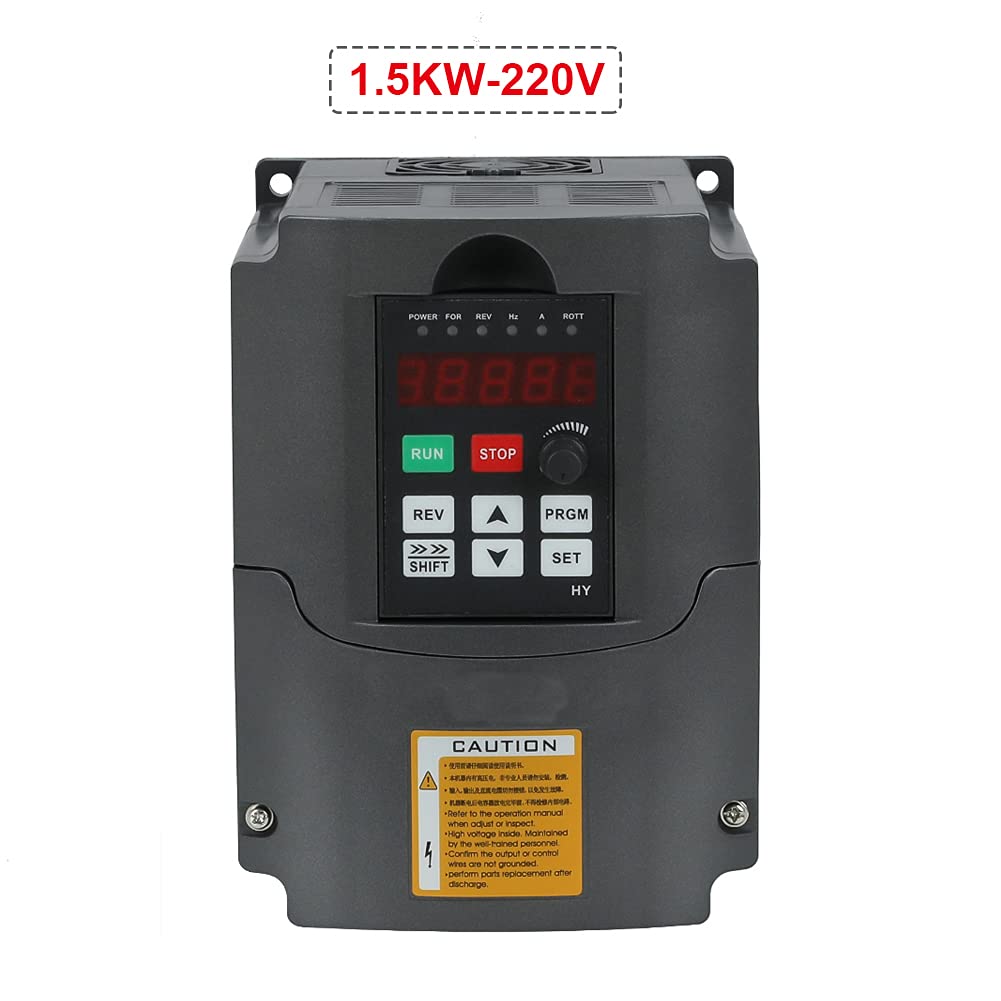
Figure 1: Huanyang 1.5KW 2HP Variable Frequency Drive Inverter.
2. Informazzjoni dwar is-Sigurtà
TWISSIJA: Improper installation or operation can lead to serious injury or death. Read this manual thoroughly before installation and operation. Only qualified personnel should install, operate, and maintain this equipment.
- Always disconnect power before performing any wiring, inspection, or maintenance.
- Ensure proper grounding of the VFD and the motor.
- Do not touch electrical components when power is applied. High voltage is present even after power is disconnected; wait for capacitors to discharge.
- Ivverifika l-input voltage matches the VFD's specifications (220V).
- Install the VFD in a clean, dry, and well-ventilated environment, away from direct sunlight, corrosive gases, and excessive vibration.
- Uża gauges tal-wajer xierqa għall-konnessjonijiet tal-enerġija biex tevita sħana żejda.
- Kun żgur li l-konnessjonijiet kollha huma siguri u iżolati kif suppost.
- Refer to local electrical codes and regulations for installation requirements.
3. Prodott Aktarview
3.1 Karatteristiċi ewlenin
- Fażi tad-Dħul: Supports 1-phase or 3-phase 220V input.
- Fażi ta' Output: 3-phase 220V output.
- Sistema ta' Kontroll: Sine Wave PWM (SPWM) for precise motor control.
- PLC Function: Easy PLC function for 16-segment speed and inverter control.
- Operazzjoni kwieta: Carrier frequency adjustable up to 16KHz for soundless working.
- Anti-jamming Capability: Extremely strong anti-jamming performance.
- Low Speed Torque: 0.5Hz-150% low output rated torque.
- AVR Technique: Auto Voltage Regulation (AVR) ensures stable load capability.
- Error Protection: Perfect error protection and short circuit starting protection.
- Komunikazzjoni: RS485 communication port with standard international MODBUS protocol.
3.2 Komponenti u Interfaċċja

Figure 2: Front panel with display and control buttons, showing internal access.
The VFD features a user-friendly control panel with a digital display and various buttons for operation and parameter setting. The main control buttons include RUN, STOP, REV (Reverse), SHIFT, UP, DOWN, PRGM (Program), and SET.

Figura 3: Dettaljat view of the VFD's terminal block for power and control wiring.
The terminal block provides connections for input power (R, S, T for 3-phase or L1, L2 for single-phase), output to the motor (U, V, W), and various control signals. This model is equipped with two rows of terminals for comprehensive control options.
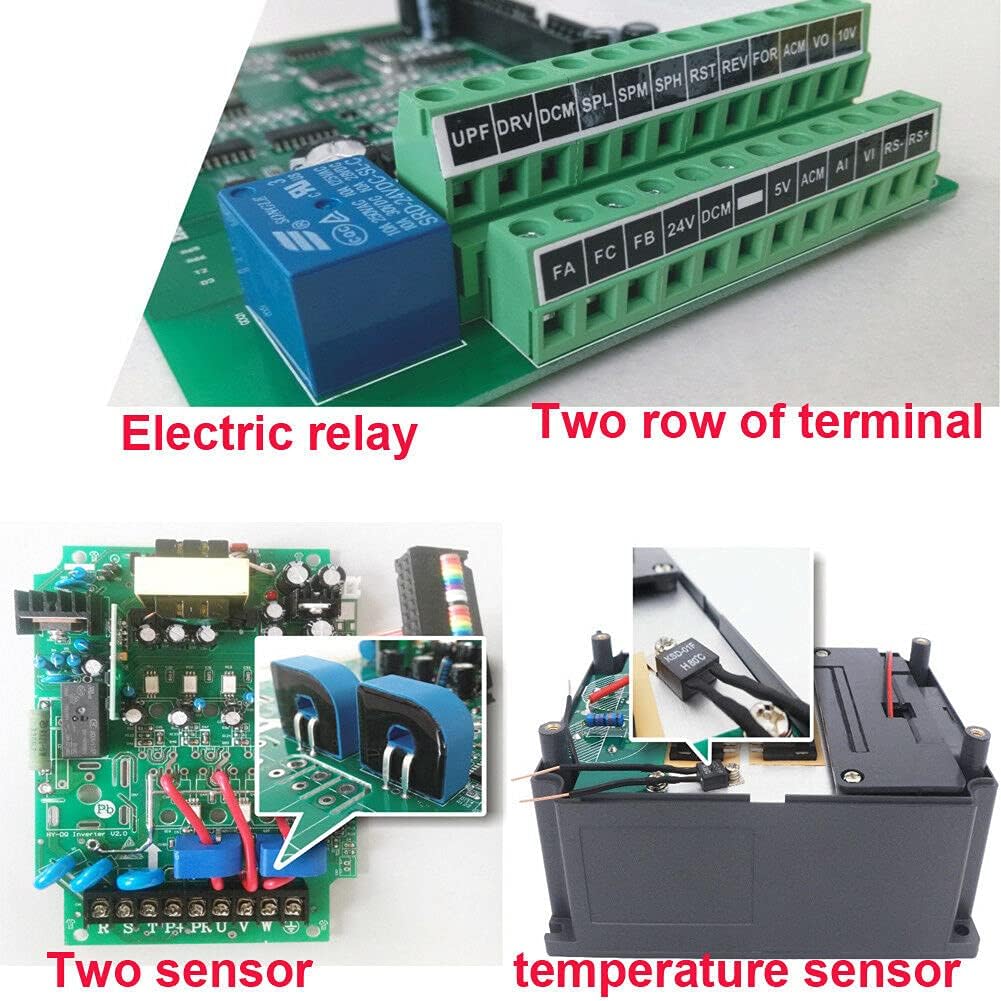
Figura 4: Intern view highlighting the electric relay and two sensors, contributing to enhanced functionality and protection.
Internally, the VFD incorporates robust components such as an electric relay and two sensors, which contribute to its reliable operation and protective features. It also features bigger capacitors and transformers for improved performance and stability compared to some other models.
4. Speċifikazzjonijiet
| Karatteristika | Valur |
|---|---|
| Numru tal-Mudell | USTS15220V-D-AMZ |
| Klassifikazzjoni tal-Qawwa | 1.5KW (2HP) |
| Input Voltage | 220 Volts (Single or 3 Phase) |
| Ħruġ Voltage | 220 Volts (3 Phase) |
| Klassifikazzjoni kurrenti | 7A |
| Metodu ta' Kontroll | Sine Wave PWM (SPWM) |
| Port tal-Komunikazzjoni | RS485 (MODBUS) |
| Frekwenza tat-Trasportatur | Adjustable up to 16KHz |
| Piż tal-oġġett | 3.99 liri |
| Dimensjonijiet tal-Pakkett | 9.5 x 9.4 x 7.6 pulzieri |
| Kulur | Iswed |

Figure 5: Approximate dimensions of the VFD unit.
5. Konfigurazzjoni u Installazzjoni
5.1 Immuntar
Mount the VFD vertically on a stable, non-flammable surface in an area with adequate ventilation. Ensure sufficient clearance around the unit for heat dissipation. Avoid mounting in direct sunlight or areas with excessive dust, moisture, or corrosive substances. Use appropriate fasteners to secure the unit firmly.

Figura 6: Ġenb view of the VFD, showing ventilation grilles for proper airflow.
5.2 Konnessjonijiet tal-Wiring
All wiring must be performed by a qualified electrician in accordance with local and national electrical codes. Ensure power is disconnected before making any connections.
- Qawwa tad-Dħul (220V): Connect the incoming AC power to the input terminals (R, S, T for 3-phase or L1, L2 for single-phase). This VFD supports both single-phase and three-phase 220V input.
- Output tal-Mutur: Connect the three-phase motor leads to the output terminals (U, V, W). Ensure correct phase sequence for desired motor rotation.
- L-ertjar: Connect the ground terminal of the VFD to a reliable earth ground. The motor frame must also be properly grounded.
- Terminali tal-Kontroll: Utilize the control terminals for external control signals such as start/stop commands, speed reference (e.g., potentiometer, 0-10V, 4-20mA), and fault indications. Refer to the detailed wiring diagram in the full product manual for specific terminal assignments.
- Komunikazzjoni RS485: If using MODBUS communication, connect the RS485 A and B lines to the designated terminals.
Note: Always refer to the wiring diagram provided with your specific VFD unit for precise terminal identification and connection instructions.
6. Istruzzjonijiet Operattivi
6.1 Operazzjoni Bażika
- Qawwa Mixgħul: After ensuring all connections are secure and safe, apply power to the VFD. The digital display will illuminate.
- Ibda l-Mutur: Agħfas il- ĠEJR button on the control panel to start the motor.
- Waqqaf il-Mutur: Agħfas il- STOP buttuna biex twaqqaf il-mutur.
- Reverse Direction: Agħfas il- REV button to change the motor's rotation direction.
6.2 Kontroll tal-Veloċità
Motor speed can be controlled via the built-in potentiometer, external analog signals (e.g., 0-10V, 4-20mA), or digital inputs, depending on parameter settings.
- Potenzjometru: Rotate the potentiometer knob on the control panel to adjust the output frequency and thus the motor speed.
- External Analog Input: If configured, an external voltage or current signal connected to the AI terminals can control the speed.
- Inputs Diġitali: Pre-set speeds can be selected using digital input terminals, often used with the PLC function.
6.3 Settings tal-Parametru
The VFD has numerous parameters that can be adjusted to customize its operation for specific applications. These parameters control motor characteristics, acceleration/deceleration times, control modes, and protective functions.
- Idħol fil-Modalità tal-Programm: Agħfas il- PRGM button to enter the parameter setting mode.
- Parametri tan-Navigazzjoni: Uża l- UP u 'L isfel arrow buttons to scroll through parameter groups and individual parameters.
- Agħżel il-Parametru: Agħfas SET biex tagħżel parametru għall-editjar.
- Aġġusta l-Valur: Uża l- UP u 'L isfel buttons to change the parameter value. The SHIFT button can be used to move the cursor for digit selection.
- Ħlief Valur: Agħfas SET għal darb'oħra biex issalva l-valur il-ġdid.
- Ħruġ mill-Modalità tal-Programm: Agħfas PRGM to exit the parameter setting mode and return to the main display.
Consult the comprehensive parameter list in the full product manual for detailed descriptions and recommended settings for each parameter.
6.4 Funzjonijiet Avvanzati
- PLC Function: The VFD includes an easy PLC function that allows for programming up to 16 segments of speed and inverter control, enabling complex automated sequences without an external PLC.
- Komunikazzjoni RS485: The built-in RS485 port supports the standard MODBUS protocol, allowing the VFD to be integrated into a larger control system for remote monitoring and control.
7. Manutenzjoni
Regular maintenance ensures the longevity and reliable operation of your VFD. Always disconnect power and wait for capacitors to discharge before performing any maintenance.
- Tindif: Periodically clean the VFD's exterior and ventilation openings to prevent dust accumulation, which can hinder cooling. Use a soft, dry cloth. Do not use liquid cleaners.
- Spezzjoni: Spezzjona regolarment il-konnessjonijiet tal-wajers għal issikkar u sinjali ta’ xedd jew ħsara. Iċċekkja għal xi ħsejjes jew irwejjaħ mhux tas-soltu waqt it-tħaddim.
- Kontroll Ambjentali: Ensure the operating environment remains within specified temperature and humidity ranges and is free from excessive dust or corrosive elements.
- Verifika tal-Fann: Verify that the cooling fan operates freely and is not obstructed.
8 Issolvi l-problemi
This section provides general guidance for common issues. For detailed error codes and advanced troubleshooting, refer to the complete product manual.
| Problema | Kawża Possibbli | Soluzzjoni |
|---|---|---|
| Il-VFD ma jixgħelx | No input power; Blown fuse; Wiring error | Check power supply; Inspect fuses; Verify input wiring. |
| Il-mutur ma jaħdimx | STOP button pressed; Fault condition; Incorrect parameters; Motor wiring error | Press RUN; Check display for fault codes and clear; Verify motor parameters and wiring. |
| Motor runs at incorrect speed | Incorrect speed reference; Parameter settings incorrect | Adjust potentiometer or external signal; Check frequency and motor parameters. |
| Ħtija ta' kurrent żejjed | Motor overload; Short circuit in motor wiring; Rapid acceleration/deceleration | Reduce load; Check motor wiring; Increase acceleration/deceleration times. |
| Overvoltage/Undervoltage tort | Unstable input power; Regenerative braking | Iċċekkja l-input voltage stability; Consider braking resistor if regenerative braking is an issue. |
9. Garanzija u Appoġġ
For specific warranty terms, conditions, and technical support, please refer to the documentation provided at the time of purchase or contact the manufacturer, Huanyang, directly. Warranty coverage typically includes defects in materials and workmanship under normal use. Keep your purchase receipt as proof of purchase.
Contact information for support can usually be found on the product packaging, the manufacturer's official webis-sit, jew permezz tan-negozjant awtorizzat tiegħek.