
Introduzzjoni
This manual provides detailed instructions for the installation, operation, and maintenance of your Podofo 7-inch 2-DIN Car Stereo. Please read this manual thoroughly before using the product to ensure proper function and to prevent damage. Keep this manual for future reference.
Prodott Overview
Kontrolli tal-Panew ta' Quddiem
The front panel features a 7-inch HD capacitive touchscreen and various physical controls for easy operation.

Immaġni: Front Panel Layout. This image displays the front panel of the car stereo, highlighting the microphone (MIC), previous track button (PREV), power/mode button (ON/OFF), next track button (NEXT), volume control (VOL+/-), TF card slot (TF), AUX input (AUX), reset button (RES), and USB port (USB).
- MIC: Integrated microphone for hands-free calling.
- PREV (<<): Agħfas qasir għat-trakka/stazzjon preċedenti; agħfas twil għal rewind malajr.
- ON/OFF (O/M): Short press to change mode; long press to power on/off.
- NEXT (>>): Agħfas qasir għat-trakka/stazzjon li jmiss; agħfas twil biex tavvanza malajr.
- VOL +/-: Rotary knob to adjust volume. Press to mute/unmute.
- TF: MicroSD card slot for media playback.
- AUX: Input awżiljarju ta' 3.5mm għal apparati awdjo esterni.
- RES: Buttuna tar-reset (uża oġġett irqiq biex tagħfas).
- USB: USB port for media playback and Mirror Link connection.
Dimensjonijiet tal-Prodott
The unit is designed for standard 2-DIN installation slots. Please verify your vehicle's console dimensions before installation.

Immaġni: Product Dimensions. This image shows the car stereo with its dimensions: 178mm (width), 103mm (height), and 63mm (depth).
- Wisa': 178 mm
- Għoli: 103 mm
- Fond: 63 mm
Komponenti Inklużi
The package includes the main car stereo unit and essential accessories for installation and operation.

Immaġni: Included Components. This image displays the main car stereo unit, a remote control, two wiring harnesses, and a user manual.
- Podofo 7-inch 2-DIN Car Stereo Unit
- Kontroll mill-bogħod
- Xedd tal-Wiring tal-Enerġija
- Xedd tal-Wiring tal-Ispeaker
- Rear Camera (if included in package)
- Manwal għall-Utent
Setup u Installazzjoni
Proper installation is crucial for the performance and safety of your car stereo. If you are unsure about any steps, consult a professional installer.
Dijagramma tal-Wiring
Irreferi għad-dijagramma li ġejja għal konnessjonijiet tal-wajers korretti. Kun żgur li l-konnessjonijiet kollha huma sikuri biex tevita problemi elettriċi.

Immaġni: Detailed Wiring Diagram. This diagram illustrates connections for speakers (front/rear, left/right), parking sensor control, reverse camera input (CVBSIN), 12V constant power (Yellow), ground (Black), 12V ignition switch (Red), small light line (Green), power antenna/amplifier turn-on (Blue), and steering wheel control line (Brown).
- Konnessjonijiet tal-Enerġija:
- Yellow (B+): Connect to 12V constant power supply. This provides continuous power to retain settings.
- Aħmar (ACC): Connect to 12V ignition switch power. This powers the unit on/off with the vehicle's ignition.
- Iswed (Art): Qabbad mal-art tax-chassis tal-vettura.
- Konnessjonijiet tal-Ispeaker: Connect the corresponding speaker wires (Purple, Gray, White, Green) to your vehicle's speakers. Ensure correct polarity.
- Rear Camera Input (CVBSIN): Connect the video output from the rear camera to this input.
- Reverse Trigger (Pink): Connect to the vehicle's reverse light circuit. This automatically switches to the rear camera view meta tirriversja.
- Steering Wheel Control (Brown): Connect to your vehicle's steering wheel control wires. Refer to the "Steering Wheel Control" section for programming.
- Antenna tal-Enerġija/Amplifier Turn-on (Blue): Connect to the power antenna or external amplifier trigger wire.
Nota Importanti: The yellow wire (B+) must be connected to a constant 12V power source to prevent loss of settings and radio presets when the vehicle is turned off. If settings are not saved, check this connection.
Istruzzjonijiet Operattivi
Operazzjonijiet Bażiċi
- Qawwa ON/OFF: Agħfas fit-tul il- O/M buttuna fuq il-pannell ta ’quddiem.
- Għażla tal-Modalità: Agħfas qasir il- O/M button to cycle through available modes (Radio, USB, TF, AUX, Bluetooth, Mirror Link).
- Aġġustament tal-Volum: Dawwar il- VOL +/- knob. Press the knob to mute or unmute audio.
- Irrisettja: If the unit malfunctions, gently press the RES button with a pointed object. This will restore factory settings.
Funzjoni Bluetooth
Connect your mobile device via Bluetooth for hands-free calling and audio streaming.

Immaġni: Bluetooth Interface. This image shows the car stereo display in Bluetooth mode, with a dial pad for making calls and icons for music playback and phonebook access. A smartphone is also shown connecting to the stereo.
- Ippermetti Bluetooth fuq it-tagħmir mobbli tiegħek.
- On the car stereo, select the Bluetooth mode.
- Fittex għal available devices on your phone and select "PODOFO" or a similar name.
- Ikkonferma t-tqabbil fuq iż-żewġ apparati.
- Ladarba tkun konness, tista' tagħmel/tirċievi telefonati u ddoqq il-mużika mingħajr fili.
Radju FM
Access your favorite radio stations with automatic search and preset storage.
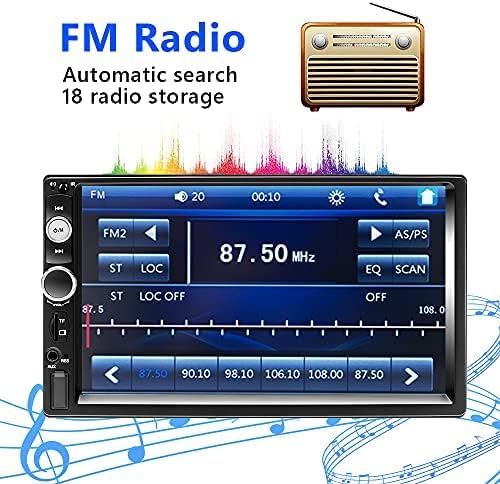
Immaġni: FM Radio Screen. This image displays the car stereo's FM radio interface, showing frequency tuning, preset buttons (FM1, FM2, AS/PS), and station display (87.50 MHz).
- Tiftix Awtomatiku: Agħfas il- AS/PS button to automatically scan and save up to 18 stations.
- Irfinar Manwali: Uża l- PREV or LI JMISS buttons to manually tune frequencies.
- Stazzjonijiet issettjati minn qabel: Touch the numbered buttons on the screen to select a saved station.
Funzjoni ta' Link tal-Mera
Display your smartphone screen directly on the car stereo's display.
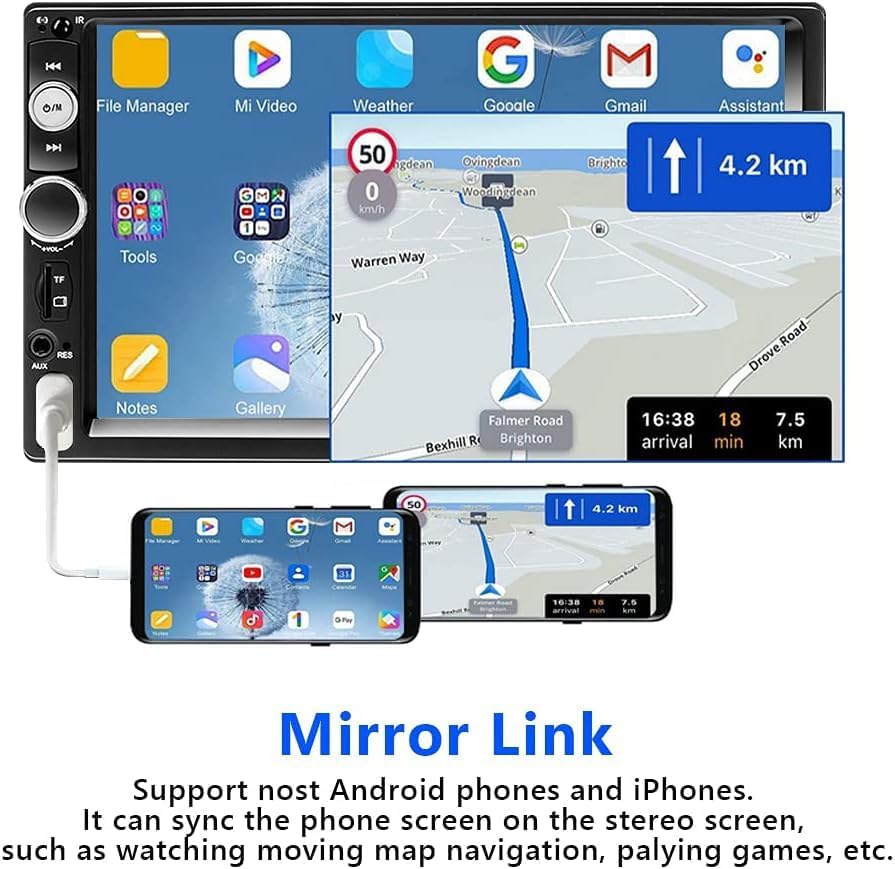
Immaġni: Mirror Link Display. This image shows a smartphone connected via USB to the car stereo, with the phone's screen content (including navigation and app icons) mirrored onto the larger stereo display.
- Connect your Android phone (version 1.1 and earlier) or iPhone (series 5-8, iOS 13.4 and later) to the USB port using a high-quality USB cable.
- Select the "Mirror Link" mode on the car stereo.
- Segwi l-istruzzjonijiet fuq l-iskrin kemm fuq it-telefon tiegħek kif ukoll fuq l-istereo biex tistabbilixxi l-konnessjoni.
- Ladarba tkun konness, l-iskrin tat-telefon tiegħek se jiġi rifless, u b'hekk tkun tista' view navigation, videos, or other apps.
Kontroll tal-Istering Wheel (SWC)
Program your vehicle's steering wheel buttons to control the car stereo.

Immaġni: Steering Wheel Control. This image shows a person's hands on a car steering wheel, with a remote control attached, demonstrating how to control the car stereo using steering wheel buttons.
- Ensure the steering wheel control wires are correctly connected to the stereo (refer to the wiring diagram).
- Access the "Steering Wheel Control Learning" menu in the stereo's settings.
- Follow the on-screen instructions to assign functions to your steering wheel buttons. Typically, this involves pressing a function on the stereo's screen and then pressing the corresponding button on your steering wheel.
Rear Camera Function
Il-kamera ta' wara inkluża tipprovdi immaġni ċara view meta tirriversja.
- When the vehicle is shifted into reverse gear, the stereo automatically displays the rear camera feed.
- The camera provides a 170-degree viewing angle and features 12 LED lights for improved visibility in low-light conditions.
Daqq Multimedia
The unit supports various media sources for audio and video playback.

Immaġni: Multimedia Playback Icons. This image shows icons representing various media input options: U Disk (USB), TF (MicroSD card), AUX, and BT (Bluetooth).
- USB: Insert a USB drive into the USB port for audio and video playback.
- Karta TF: Insert a MicroSD card into the TF slot for audio and video playback.
- AUX: Connect external audio devices (e.g., MP3 players) to the 3.5mm AUX input.
- Supported formats include AVI, WMV, MOV, MKV for video, and MP3, WAV, WMA for audio.
Manutenzjoni
- Tindif tal-Iskrin: Use a soft, dry cloth to wipe the touchscreen. Avoid abrasive cleaners or solvents.
- Tindif Ġenerali: Żomm l-unità ħielsa mit-trab u l-fdalijiet. Uża pinzell artab jew arja kkompressata għal żoni diffiċli biex jintlaħqu.
- Evita Likwidi: Tesponix l-unità għall-ilma jew likwidi oħra.
- Temperatura: Ħaddem l-unità fil-firxiet ta' temperatura rakkomandati. Temperaturi estremi jistgħu jaffettwaw il-prestazzjoni u l-ħajja.
Issolvi l-problemi
| Problema | Kawża Possibbli | Soluzzjoni |
|---|---|---|
| L-unità ma tixgħelx. | Ebda provvista tal-enerġija; wajers mhux korretti. | Check the Yellow (B+) and Red (ACC) power wires for proper connection to 12V sources. Ensure the Black (Ground) wire is securely connected. |
| Settings and radio presets are lost after turning off the car. | Yellow (B+) wire not connected to constant 12V power. | Ensure the Yellow (B+) wire is connected to a constant 12V power source, not an ignition-switched source. |
| L-ebda ħoss mill-kelliema. | Speaker wires incorrectly connected; volume too low; unit muted. | Check all speaker wire connections for correct polarity. Increase volume. Press the volume knob to unmute. |
| Il-konnessjoni Bluetooth tfalli jew mhix stabbli. | Device not in pairing mode; interference; outdated phone OS. | Ensure Bluetooth is enabled on both devices. Try re-pairing. Move closer to the unit. Update phone's operating system if necessary (especially for Mirror Link). |
| Il-Mirror Link mhux qed jaħdem. | Incorrect USB cable; incompatible phone OS; app issues. | Use a high-quality USB cable. Ensure your phone's OS is compatible (Android 1.1 and earlier, iPhone iOS 13.4 and later). Try restarting both devices. |
| Il-kamera ta' wara ma turiex. | Camera not connected; reverse trigger wire not connected. | Check the CVBSIN connection for the camera. Ensure the Pink (Reverse Trigger) wire is connected to the vehicle's reverse light circuit. |
| Touchscreen ma jirrispondix. | Problema temporanju tas-softwer. | Agħfas il- RES buttuna biex tirrisettja l-unità. |
Speċifikazzjonijiet
| Karatteristika | Dettall |
|---|---|
| Brand | Podofo |
| Numru tal-Mudell | 1365669031 |
| Wiri | Touchscreen Kapaċittiv HD ta' 7 pulzieri |
| Teknoloġija tal-Konnettività | AUX, Bluetooth, USB |
| Teknoloġija bla fili | Bluetooth |
| Apparati Kompatibbli | Smartphone, Pillola |
| Tip ta' Kontrollur | Android, iOS (for Mirror Link) |
| Metodu ta' Kontroll | App, Touch |
| Qawwa tal-Ħruġ | 60 Watts (per channel, 4 channels) |
| Kanali tal-Awdjo | 4.0 Surround Sound Configuration |
| Formati Awdjo Appoġġjati | MP3, WAV, WMA |
| Formati tal-Vidjo Appoġġjati | AVI, WMV, MOV, MKV |
| Dimensjonijiet (D x W x H) | 6.3 ċm x 17.8 ċm x 6.3 ċm |
| Piż | 797 Gramm |
| Internet Applications | Browser, Netflix, YouTube (via Mirror Link) |
Garanzija u Appoġġ
For warranty information, please refer to the documentation provided at the time of purchase or contact your retailer. For technical support, please reach out to Podofo customer service through their official channels or the retailer where the product was purchased.
Always provide your product model number (1365669031) and purchase details when seeking support.