
Introduzzjoni
The Keychron K1 SE is an 87-key ultra-slim wireless mechanical keyboard designed for enhanced productivity and a superior tactile typing experience. It features RGB LED backlighting, hot-swappable low-profile Gateron mechanical switches, and broad compatibility with Mac and Windows operating systems. This manual provides detailed instructions for setting up, operating, maintaining, and troubleshooting your Keychron K1 SE keyboard.

Fuqview of the Keychron K1 SE keyboard highlighting its key features: wireless/wired connectivity, 87 keys, hot-swappable low-profile Gateron switches, Mac & Windows compatibility, and RGB backlighting.
Setup
Kontenut tal-Pakkett
- Keychron K1 SE Keyboard
- Keycap Puller
- USB-C għal USB-A Cable
- Extra Keycaps for Mac and Windows operating systems
Konnessjoni Inizjali
The Keychron K1 SE supports both wireless (Bluetooth) and wired (USB-C) connections.
Konnessjoni bil-fili
- Locate the toggle switch on the side of the keyboard labeled "Bluetooth OFF Cable".
- Slide the switch to the "Cable" position.
- Connect the provided USB-C cable to the keyboard and the USB-A end to your computer.
- It-tastiera tiġi rikonoxxuta awtomatikament mis-sistema tiegħek.
Konnessjoni bla fili (Bluetooth)
- Locate the toggle switch on the side of the keyboard labeled "Bluetooth OFF Cable".
- Slide the switch to the "Bluetooth" position.
- Fuq il-kompjuter jew l-apparat tiegħek, attiva l-Bluetooth u fittex apparati ġodda.
- The keyboard will appear as "Keychron K1 SE". Select it to pair.
- If prompted, enter the pairing code displayed on your screen using the keyboard and press Enter.
- The K1 SE can connect to up to 3 devices simultaneously. To switch between paired devices, press fn+1, fn+2, jew fn+3.

The side of the Keychron K1 SE keyboard features two toggle switches: one for selecting between Wireless (Bluetooth) and Wired (USB-C) modes, and another for switching between Mac/iOS and Windows/Android layouts.

The Keychron K1 SE can connect to up to three devices, including desktops, tablets, and smartphones, and is compatible with both Mac and Windows operating systems.
Operating System Layout Switch
The keyboard includes a dedicated switch to optimize its layout for either Mac/iOS or Windows/Android operating systems. Use the toggle switch labeled "Win/Android Mac/iOS" on the side of the keyboard to select the appropriate layout. Extra keycaps for both Windows and Mac are included in the box for customization.
Aġġustament tal-Għoli tat-Tastiera
The K1 SE features two levels of adjustable rubber feet, allowing you to set the keyboard at a comfortable typing angle (6° or 9°). Extend or retract the feet as desired.

The Keychron K1 SE is engineered with two adjustable feet levels, providing ergonomic typing support at angles of 6 or 9 degrees.
Istruzzjonijiet Operattivi
Ċwievet Multimedia u tal-Funzjoni
The K1 SE provides access to essential multimedia and function keys through combinations with the Fn key. Refer to the keycap legends for specific functions (e.g., brightness, media control, volume).
RGB LED Backlight Control
The keyboard features a charming RGB backlight with various patterns and intensity levels.
- To cycle through different RGB lighting effects, press the ċavetta tal-bozza tad-dawl (usually located near F12).
- To adjust backlight brightness, press Fn + F5 (tnaqqis) jew Fn + F6 (żieda).

The Keychron K1 SE features vibrant RGB LED backlighting, offering a range of colors and effects to personalize your typing experience.
Status tal-batterija
To check the current battery charge level, press Fn+B. The backlight will briefly indicate the battery status.
Bluetooth Power Saving
By default, the keyboard may enter a power-saving mode after a period of inactivity. If you experience a delay in wake-up time, you can disable Bluetooth power saving by pressing and holding Fn + S + O għal 4 sekondi.
Manutenzjoni
Tindif tat-Tastiera
Biex tnaddaf it-tastiera tiegħek, imsaħ bil-mod il-keycaps u x-chassis b'ċarruta ratba u damp cloth. For deeper cleaning, you may remove the keycaps using the provided keycap puller. Avoid using harsh chemicals or abrasive materials.
Swiċċijiet li Jissostitwixxu bis-Sħana
The Keychron K1 SE features hot-swappable switches, allowing you to easily change switches without soldering. This is useful for customizing your typing feel or replacing a faulty switch.
- Ensure the keyboard is disconnected or powered off.
- Uża l-puller tal-keycap provdut biex tneħħi bir-reqqa l-keycap mixtieq.
- Use a switch puller (not included, but often comes with switch sets) to gently pull the switch straight up from the keyboard plate.
- Allinja l-pinnijiet tas-swiċċ il-ġdid mat-toqob fuq il-PCB u agħfas sew f'postu sakemm tikklikkja.
- Ibdel il-għatu taċ-ċwievet.

The Keychron K1 SE features hot-swappable low-profile Gateron mechanical switches, allowing for easy removal and replacement of individual switches without soldering.
Issolvi l-problemi
Kwistjonijiet ta' Konnettività
- It-tastiera mhux qed tikkonnettja permezz tal-Bluetooth: Ensure the keyboard's toggle switch is set to "Bluetooth". Check if Bluetooth is enabled on your device. Try re-pairing the keyboard. Ensure no other devices are interfering with the Bluetooth signal.
- Lag or disconnections in Bluetooth mode: Try disabling Bluetooth power saving (Fn + S + O for 4 seconds). Ensure the keyboard is within range of your device.
- Il-konnessjoni bil-fili ma taħdimx: Ensure the keyboard's toggle switch is set to "Cable". Try a different USB-C cable or USB port on your computer.
Qawwa u Iċċarġjar
- Keyboard not turning on: Ensure the battery is charged. Connect the keyboard via USB-C cable to charge it.
- Il-batterija mhix qed tiċċarġja: Try a different USB-C cable and power source. Ensure the cable is securely connected.
Funzjonalità Ewlenija
- Iċ-ċwievet ma jirrispondux: Check if the keyboard is properly connected (wired or Bluetooth). If it's a specific key, consider hot-swapping the switch for a new one.
- Incorrect key output (Mac/Windows): Ensure the operating system toggle switch on the side of the keyboard is set to the correct position for your system.
Speċifikazzjonijiet
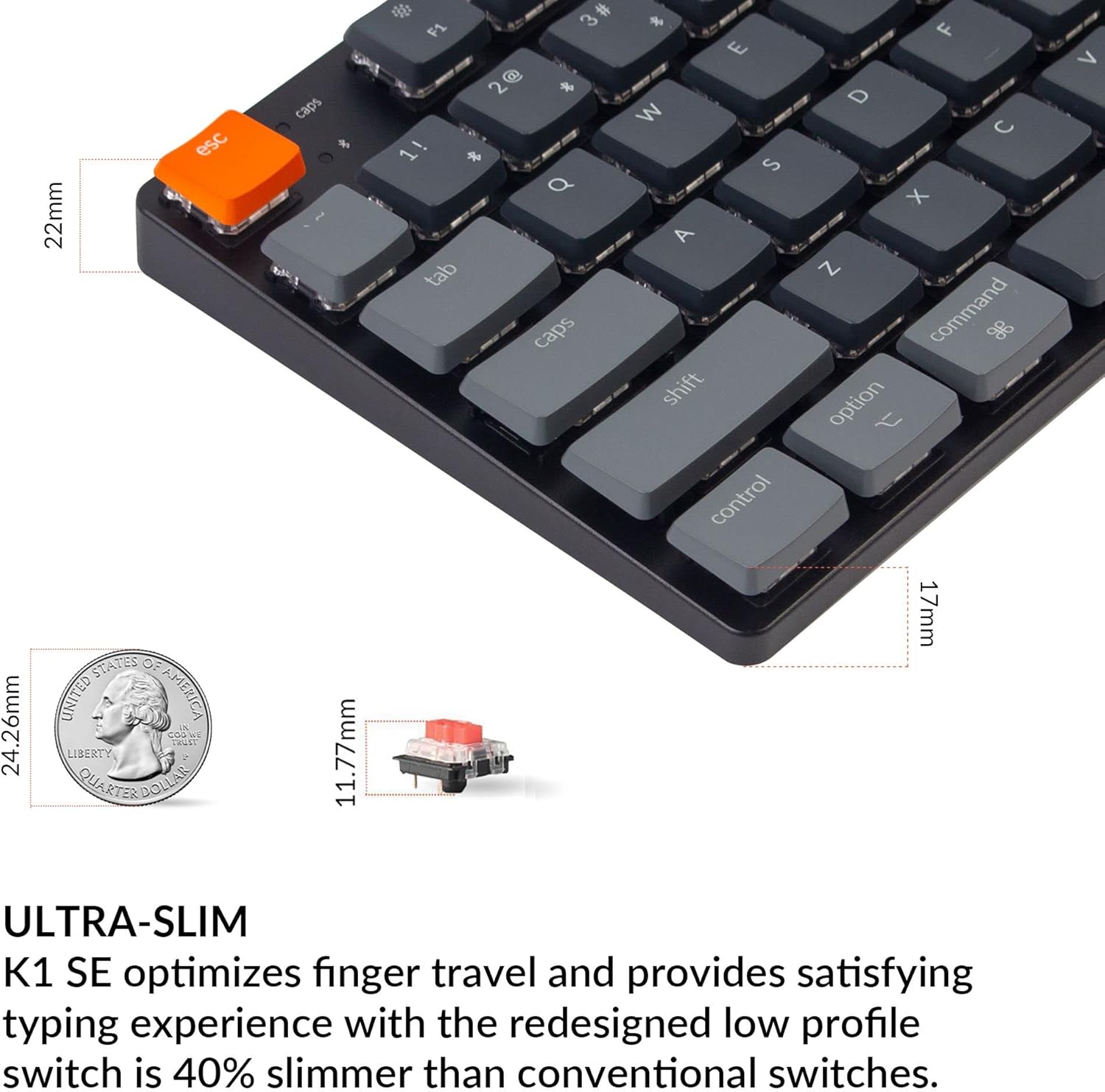
The Keychron K1 SE features an ultra-slim design, optimizing finger travel and providing a satisfying typing experience with its low-profile Gateron mechanical switches, which are 40% slimmer than conventional switches.
| Karatteristika | Dettall |
|---|---|
| Mudell | K1SE-H1 |
| Ċwievet | 87 (Disinn TKL) |
| Tip ta' Swiċċ | Baxx-Profile Gateron Mechanical Red Switch |
| Actuation Force (Red Switch) | 50±15gf |
| Pre-travel (Red Switch) | 1.5±0.5mm |
| Total Travel (Red Switch) | 2.5±0.25mm |
| Switch Behavior (Red Switch) | Lineari |
| Sound Level (Red Switch) | Kwiet |
| Konnettività | Bluetooth 5.1, USB-C bil-wajer |
| Dawl ta' wara | LED RGB |
| Batterija | 1 Lithium Ion (inkluż) |
| Dimensjonijiet (L x W x H) | 14.45 x 6.22 x 1.57 pulzieri |
| Piż tal-oġġett | 2.03 liri |
| Kompatibilità | Mac, Windows, iOS, Android, Chromebook, Linux, Gaming Consoles |