
1. Introduzzjoni
Grazzi tax-xiriasing the Vivlex Multi-Effects Pedal DAP-2. This versatile pedal combines three essential effects—Echo, Ensemble (Chorus), and Overdrive—into a single, compact unit, designed for electric guitar and bass. Crafted with a durable zinc alloy chassis, the DAP-2 offers robust performance and a user-friendly interface. This manual provides detailed instructions on setup, operation, maintenance, and troubleshooting to help you get the most out of your new pedal.

Figure 1.1: Vivlex DAP-2 Multi-Effects Pedal. This image shows the top view of the pedal, highlighting its three main effect sections: Echo, Ensemble, and Overdrive, along with their respective control knobs and footswitches.
2. Prekawzjonijiet tas-Sigurtà
To ensure safe operation and prevent damage to the product, please observe the following precautions:
- The power adapter is not included. Always use a 9V DC (center negative) power adapter.
- Disconnect the DC adapter when the product is not in use or during thunderstorms.
- Do not attempt to disassemble or modify the pedal yourself. Unauthorized modifications can lead to malfunction and void the warranty.
- Always turn off the power to all equipment before connecting or disconnecting the pedal. This helps prevent damage to the pedal and other connected devices.
- Radios and televisions placed near the pedal may cause reception interference. Use the product at an appropriate distance from such devices.
- To prevent deformation, discoloration, or other damage to the product, do not expose the unit to the following conditions:
- Dawl tax-xemx dirett
- Heat sources (e.g., radiators, stoves)
- Kampi manjetiċi qawwija
- High humidity or extreme temperatures
3. Karatteristiċi ewlenin
The Vivlex DAP-2 Multi-Effects Pedal offers a comprehensive set of features for guitar and bass players:
- 3-in-1 Multi-Effect Pedal: Integrates Echo, Ensemble (Chorus), and Overdrive effects in a single unit.
- Kostruzzjoni Durabbli: Features a stable and solid zinc alloy chassis, ensuring longevity and reliability.
- Disinn kompatt: Small, lightweight, and exquisitely designed for portability and ease of use on any pedalboard.
- Indikatur LED: An integrated LED indicator clearly displays the operational status of the pedal.
- Echo Module: Utilizes an analog signal path to deliver warm and vintage delay sounds. Includes two distinct modes: Mod u Normali.
- Ensemble Module: Allows for precise adjustment of integrated Rata u Fond knobs to enhance clean tones or add body to driven sounds.
- Overdrive Module: Equipped with classic Ton, Gwadan, u Livell controls. Offers two modes, Għoli u Baxx, providing access to classic tube amp sounds and powerful crunch tones.
- Rekwiżit ta' Enerġija: Operates on a standard 9V DC (center negative) power supply (not included).
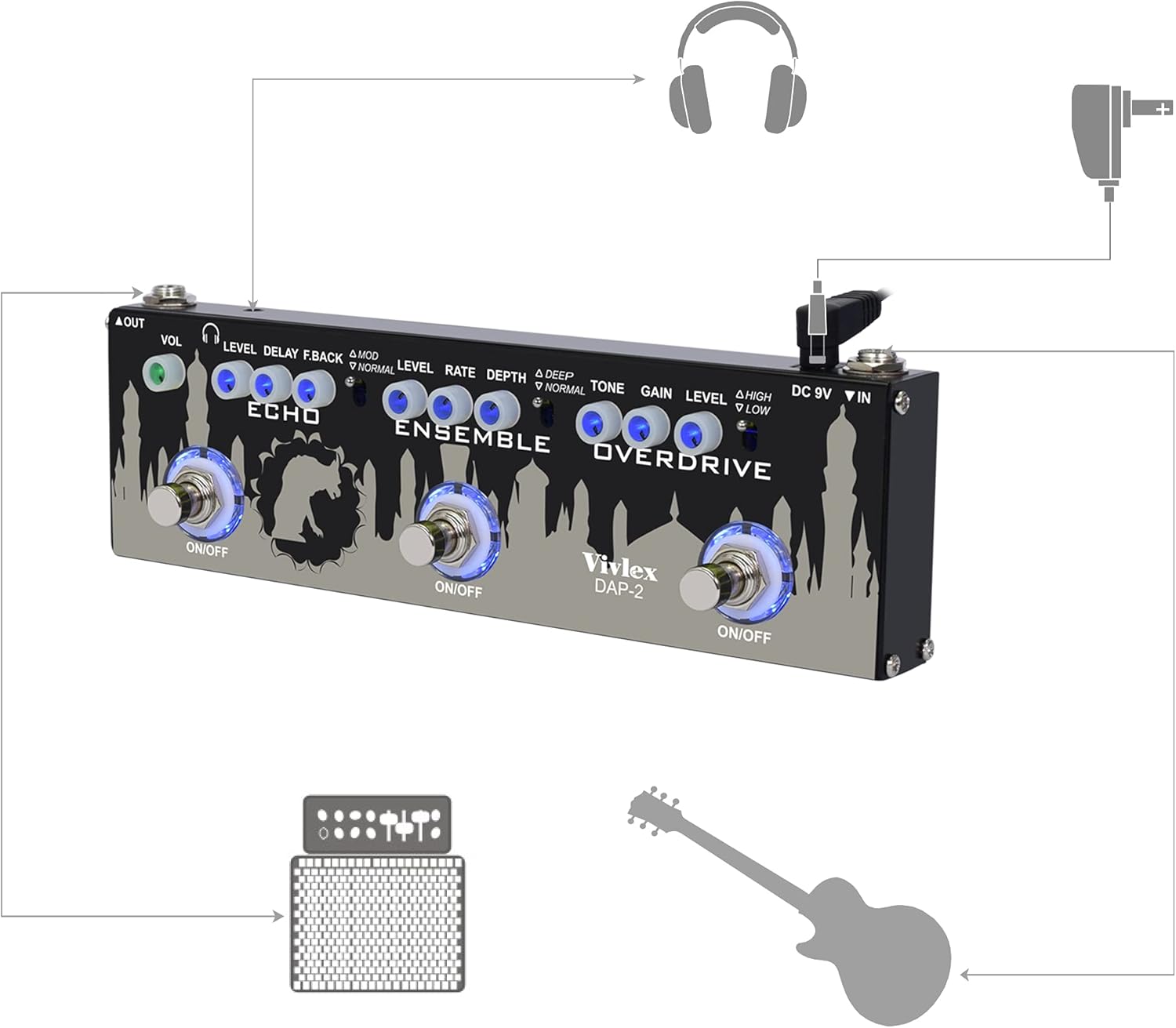
Figura 3.1: Aktarview of the Echo, Ensemble, and Overdrive modules. This image visually represents the core functionality of each effect, highlighting their distinct characteristics: Echo for analog delay, Ensemble for BBD-style chorus, and Overdrive for classic tube amp kriżi.
4. Setup
Follow these steps to set up your Vivlex DAP-2 Multi-Effects Pedal:
- Konnessjoni tal-Enerġija: Connect a 9V DC (center negative) power adapter (not included) to the "DC 9V IN" jack on the right side of the pedal. Ensure the power adapter meets the specified voltage u rekwiżiti ta' polarità.
- Input tal-Istrument: Connect your electric guitar or bass to the "IN" jack on the right side of the pedal using a standard 1/4-inch instrument cable.
- Output għal AmpLikifikatur/Taħlit: Connect the "OUT" jack on the left side of the pedal to your amplifier, audio interface, or mixer using another 1/4-inch instrument cable.
- Headphone Output (Optional): For silent practice, connect headphones to the 3.5mm headphone jack located on the top panel.
- Qawwa Mixgħul: Once all connections are secure, power on your amplifier and then the pedal. The LED indicators on the footswitches will illuminate when the respective effects are active.
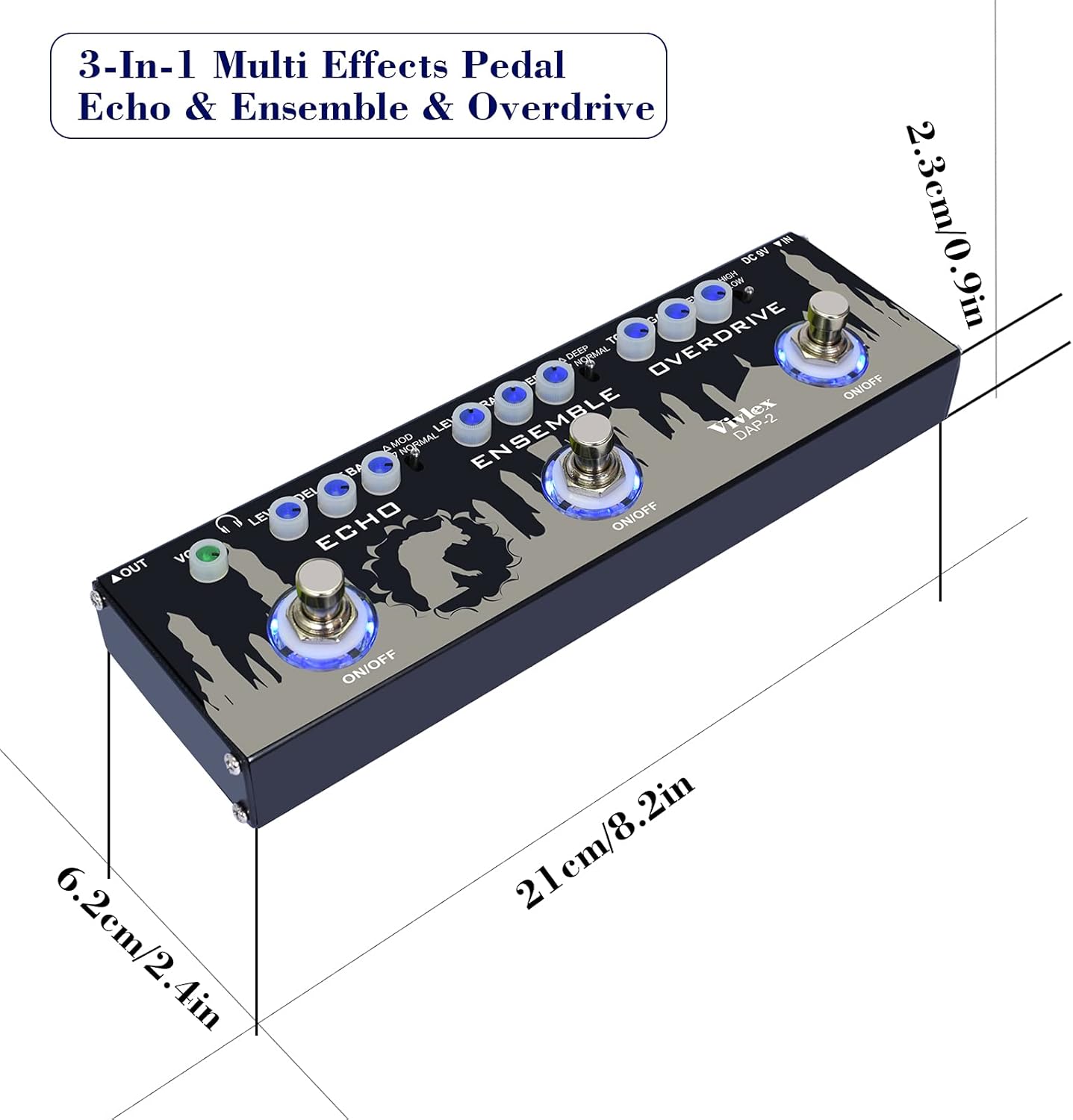
Figure 4.1: Connection Diagram for Vivlex DAP-2. This diagram illustrates how to connect the pedal to a guitar, amplifier, headphones, and power supply, showing the input, output, and power jacks.
5. Operazzjoni
The Vivlex DAP-2 features three independent effect modules, each with its own footswitch and controls. Press the corresponding footswitch to activate or bypass an effect. The LED above each footswitch indicates its active status.
5.1. Echo Module
The Echo module provides warm, vintage delay effects.
- LIVELL: Controls the volume of the delayed signal. Turn clockwise to increase the echo volume.
- DEWMIEN: Adjusts the delay time, from short slap-back echoes to long, ambient repeats.
- F.BACK (Feedback): Determines the number of repeats. Higher settings result in more repeats.
- MOD/NORMAL Switch: Toggles between two delay modes:
- MOD: Adds a subtle modulation to the delay repeats, creating a richer, more ethereal sound.
- NORMALI: Provides a standard, unmodulated delay.
5.2. Ensemble Module (Chorus)
The Ensemble module adds depth and richness to your tone, creating classic chorus effects.
- LIVELL: Controls the overall output volume of the Ensemble effect.
- RATA: Adjusts the speed of the chorus modulation. Higher settings result in a faster, more swirling effect.
- PROFOND: Controls the intensity or depth of the chorus effect. Higher settings create a more pronounced, thicker sound.
- DEEP/NORMAL Switch: Toggles between two chorus modes:
- PROFONDA: Provides a more intense and profound chorus effect.
- NORMALI: Offers a standard, subtle chorus effect.
5.3. Overdrive Module
The Overdrive module delivers classic tube amp sounds and powerful crunch tones.
- TON: Shapes the tonal character of the overdrive. Turn clockwise for brighter tones, counter-clockwise for warmer tones.
- QLIGĦ: Controls the amount of distortion. Higher settings produce more saturated and aggressive overdrive.
- LIVELL: Adjusts the overall output volume of the Overdrive effect.
- HIGH/LOW Switch: Toggles between two overdrive modes:
- GĦOLJA: Provides a higher gain setting for more aggressive and saturated overdrive.
- BAXX: Offers a lower gain setting for a more subtle, bluesy crunch.

Figura 5.1: Angolat view of the Vivlex DAP-2 pedal, showcasing the layout of the control knobs and footswitches for each effect module (Echo, Ensemble, Overdrive).
6. Manutenzjoni
Proper maintenance will ensure the longevity and optimal performance of your Vivlex DAP-2 pedal:
- Tindif: Use a soft, dry cloth to clean the pedal's surface. Do not use abrasive cleaners, waxes, or solvents, as they may damage the finish.
- Ħażna: When not in use for extended periods, store the pedal in a cool, dry place away from direct sunlight, extreme temperatures, and high humidity.
- Skonnettjar tal-Enerġija: Always disconnect the power adapter when the pedal is not in use to prevent unnecessary power consumption and potential damage from power surges.
- Ġestjoni tal-Kejbil: Ensure all cables are properly routed and not under strain to prevent damage to the jacks and cables themselves.
7 Issolvi l-problemi
If you encounter issues with your Vivlex DAP-2 pedal, refer to the following common problems and solutions:
| Problema | Kawża Possibbli | Soluzzjoni |
|---|---|---|
| L-ebda ħoss jew sinjal dgħajjef. |
|
|
| Ħoss jew tħaxwix mhux mixtieq. |
|
|
| L-effett mhux interessanti. |
|
|
8. Speċifikazzjonijiet
Detailed specifications for the Vivlex DAP-2 Multi-Effects Pedal:
| Karatteristika | Dettall |
|---|---|
| Brand | Vivlex |
| Mudell | DAP-2 |
| Kulur | Dark Gray / Multi-effects |
| Materjal | Liga taż-żingu |
| Effetti | Echo, Ensemble (Chorus), Overdrive |
| Provvista tal-Enerġija | 9V DC (center negative, adapter not included) |
| Input Interface | 1/4 inch Audio Jack (IN) |
| Output Interface | 1/4 inch Audio Jack (OUT) |
| Interface tal-headphone | 3.5mm Jack |
| Dimensjonijiet tal-Prodott (L x W x H) | 21 x 6.2 x 2.3 ċm (8.2 x 2.4 x 0.9 pulzieri) |
| Piż tal-oġġett | 500 g (1.1 lbs) |
| Format tas-Sinjal | Digital (internal processing) |
| Kontrolli | Knobs for Level, Delay, F.Back, Rate, Depth, Tone, Gain; Switches for Mod/Normal, Deep/Normal, High/Low |
8.1. Kontenut tal-Pakkett
- 1 x Vivlex Multi-Effects Pedal DAP-2
- 1 x Manwal għall-Utent

Figure 8.1: Dimensions of the Vivlex DAP-2 pedal. This image provides a visual representation of the pedal's length, width, and height in both centimeters and inches.
9. Garanzija u Appoġġ
Vivlex is committed to providing high-quality products and customer satisfaction. While specific warranty details are not provided in this manual, Vivlex products typically come with a manufacturer's warranty covering defects in materials and workmanship under normal use.
For warranty claims, technical support, or any inquiries regarding your Vivlex DAP-2 pedal, please contact Vivlex customer service through the retailer where you purchased the product or visit the official Vivlex websit għal informazzjoni ta' kuntatt.
Jekk jogħġbok żomm il-prova tax-xiri tiegħek għal kwalunkwe servizz relatat mal-garanzija.