
MageGee Typewriter Mechanical Gaming Keyboard
MageGee Typewriter Mechanical Gaming Keyboard User Manual
Model: Typewriter Mechanical Gaming Keyboard
Introduzzjoni
This manual provides instructions for the MageGee Typewriter Mechanical Gaming Keyboard. It covers setup, operation, maintenance, and troubleshooting to ensure optimal performance and longevity of your device. Please read this manual thoroughly before using the keyboard.
Kontenut tal-Pakkett
- MageGee Typewriter Mechanical Gaming Keyboard
- Serħan tal-polz manjetiku
- Cable USB
- Manwal għall-Utent (dan id-dokument)
Setup
1. Tqabbad it-Tastiera
- Locate the USB cable provided with your keyboard.
- Connect the USB Type-A end of the cable to an available USB port on your computer (PC, Laptop, or Mac).
- Connect the other end of the USB cable to the port on the keyboard.
- The keyboard is plug-and-play; no additional drivers or software are required for basic functionality. Your operating system should automatically detect and configure the device.
2. Twaħħil tal-Appoġġ għall-Polz
If your model includes a magnetic wrist rest, align it with the front edge of the keyboard. The magnets will help secure it in place, providing ergonomic support during use.
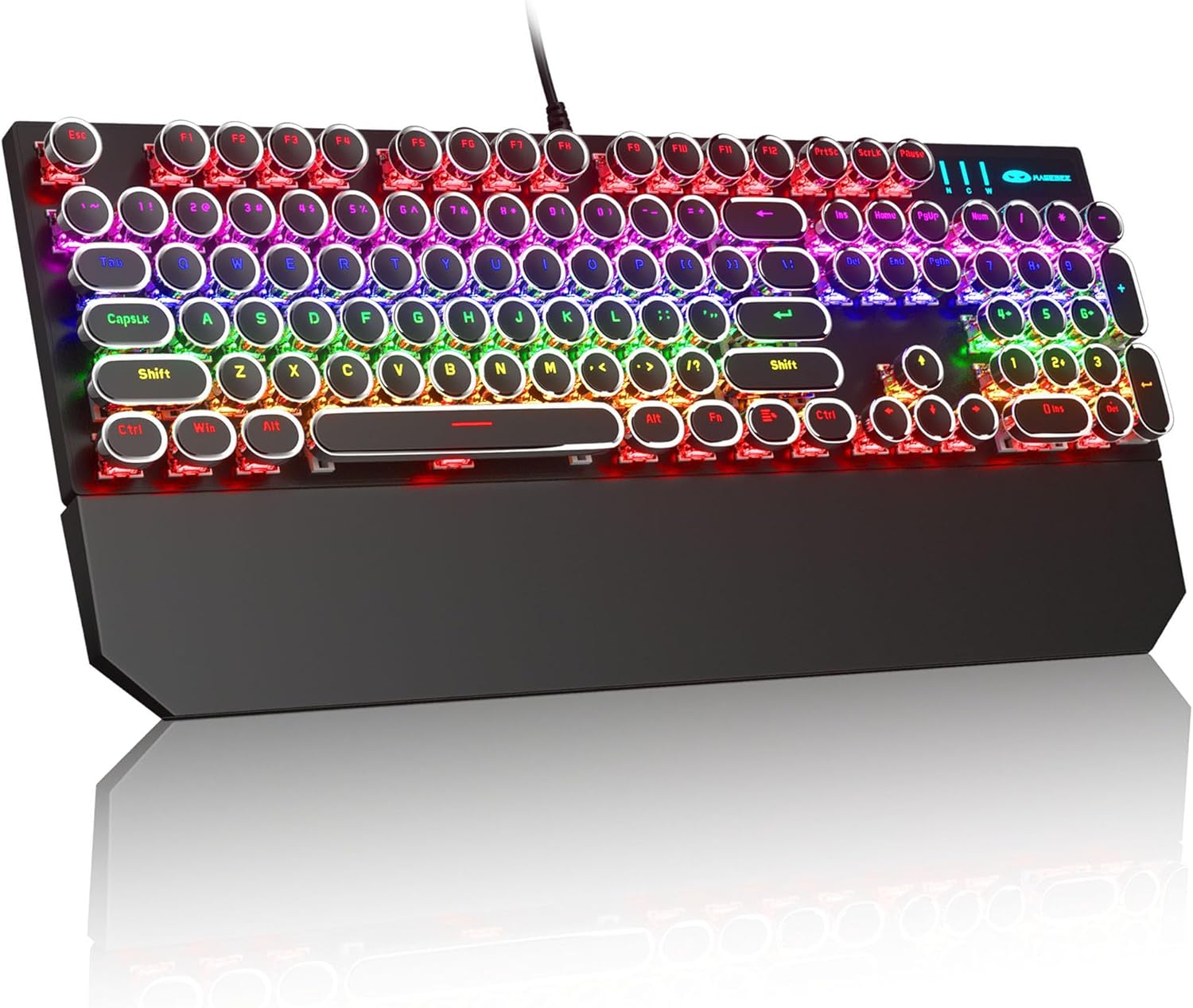
Image: The MageGee Typewriter Mechanical Gaming Keyboard connected via USB, with its magnetic wrist rest attached. The keyboard features retro round keycaps and vibrant RGB backlighting.
Istruzzjonijiet Operattivi
Layout tat-Tastiera
The MageGee Typewriter Mechanical Gaming Keyboard features a full-size 104-key layout, including a numeric keypad and dedicated function keys (F1-F12).

Immaġni: Ritratt minn fuq view of the keyboard, highlighting the full 104-key layout and the LED backlighting effect.
Kontroll tad-dawl ta' wara
The keyboard features multiple RGB rainbow backlit modes. Use the following key combinations to adjust the lighting effects:
- Fn + Ins: Cycle through various backlight modes.
- Fn + Dar: Aġġusta l-luminożità tad-dawl ta' wara.
- Fn + PgUpŻid il-veloċità tad-dawl ta' wara.
- Fn + PgDn: Naqqas il-veloċità tad-dawl ta' wara.
- Fn + Del: Change backlight color (if applicable to the current mode).
- Fn + Tmiem: Turn backlight on/off.

Immaġni: Close-up view of the keyboard's keys, illustrating the RGB backlighting and the visible blue mechanical switches beneath the round keycaps.
Ċwievet Multimedia u tal-Funzjoni
The F1-F12 keys can be used in conjunction with the Fn key to access multimedia and system functions. Specific functions may vary slightly depending on your operating system.
| Kombinazzjoni taċ-ċavetta | Funzjoni |
|---|---|
| Fn + F1 | Media Player |
| Fn + F2 | Volum 'l isfel |
| Fn + F3 | Volum Up |
| Fn + F4 | Mute |
| Fn + F5 | Waqqaf |
| Fn + F6 | Track Preċedenti |
| Fn + F7 | Play/Pawsa |
| Fn + F8 | Track li jmiss |
| Fn + F9 | |
| Fn + F10 | Web Browser |
| Fn + F11 | Il-Kompjuter Tiegħi |
| Fn + F12 | Kalkulatur |
Manutenzjoni
Tindif tat-Tastiera
- Skonnettja t-tastiera mill-kompjuter tiegħek qabel ma tnaddafha.
- Uża drapp ratba u mingħajr ħelu ftit dampImlaħlaħ bl-ilma jew b'soluzzjoni ħafifa tat-tindif biex timsaħ il-keycaps u l-wiċċ tat-tastiera.
- Għat-trab u l-fdalijiet bejn iċ-ċwievet, uża arja kkompressata.
- Evita li tuża kimiċi ħarxa, prodotti tat-tindif li joborxu, jew li tisprejja likwidi direttament fuq it-tastiera.
Kura Ġenerali
- Evita li tesponi t-tastiera għal temperaturi estremi, umdità, jew dawl tax-xemx dirett.
- Do not drop the keyboard or subject it to strong impacts.
- Żomm il-likwidi 'l bogħod mit-tastiera biex tevita l-ħsara.
Issolvi l-problemi
It-Tastiera Mhux Tirrispondi
- Kun żgur li l-kejbil USB huwa konness sew kemm mat-tastiera kif ukoll mal-kompjuter.
- Ipprova qabbad it-tastiera ma' port USB differenti fuq il-kompjuter tiegħek.
- Ittestja t-tastiera fuq kompjuter ieħor biex teskludi problema speċifika tal-kompjuter.
- Ibda mill-ġdid il-kompjuter tiegħek.
Backlight Not Working or Incorrect
- Ensure the backlight is not turned off (Fn + End).
- Adjust backlight brightness (Fn + Home).
- Cycle through different backlight modes (Fn + Ins) to see if the issue persists across all modes.
Keys Not Registering or Double Typing
- Naddaf iċ-ċavetta(i) affettwata(i) bl-użu ta' arja kkompressata biex tneħħi kwalunkwe debris.
- If the issue persists, it may indicate a hardware fault. Contact customer support for assistance.
Speċifikazzjonijiet
| Karatteristika | Dettall |
|---|---|
| Mudell | Typewriter Mechanical Gaming Keyboard |
| Konnettività | USB 2.0 bil-fili |
| Tip taċ-ċavetta | Mechanical (Blue Switch) |
| Tappijiet ewlenin | Retro Round, Double-shot injection molded |
| Dawl ta' wara | RGB Rainbow Backlit |
| Tqassim | 104-Key Full-Size, Anti-ghosting |
| Kompatibilità | Windows (2000, XP, ME, Vista, 7, 8), Linux, Mac |
| Dimensjonijiet (L x W x H) | 17.1 x 4.9 x 1.3 pulzieri (434mm x 130mm x 37mm) |
| Piż tal-oġġett | 1.99 liri |
| Materjal | Aluminum alloy metal panel |

Image: A diagram illustrating the physical dimensions of the keyboard and its detachable wrist rest.
Garanzija u Appoġġ
Informazzjoni dwar Garanzija
MageGee products are designed for quality and reliability. This product comes with a standard manufacturer's warranty against defects in materials and workmanship. Please refer to the product packaging or the official MageGee websit għal termini u tul ta' żmien speċifiċi tal-garanzija.
Appoġġ għall-Klijent
If you encounter any issues or have questions regarding your MageGee Typewriter Mechanical Gaming Keyboard, please contact our customer support team:
- Email: support@magegee.com
- Websit: www.magegee.com
When contacting support, please provide your product model and a detailed description of the issue.
Ask a question about this manual
Ask about setup, troubleshooting, compatibility, parts, safety, or missing instructions. Manuals+ will review the question and use this page’s manual context to help answer it.