
1. Introduzzjoni
Thank you for choosing the A4tech FG1112 Fstyler Wireless Keyboard and Mouse Set. This compact and efficient combo provides a reliable 2.4GHz wireless connection, offering convenience and comfort for your daily computing needs. The keyboard features a Q Turkish layout with FN multimedia keys, while the mouse offers precise 1200 DPI optical tracking. This manual will guide you through the setup, operation, and maintenance of your new device.
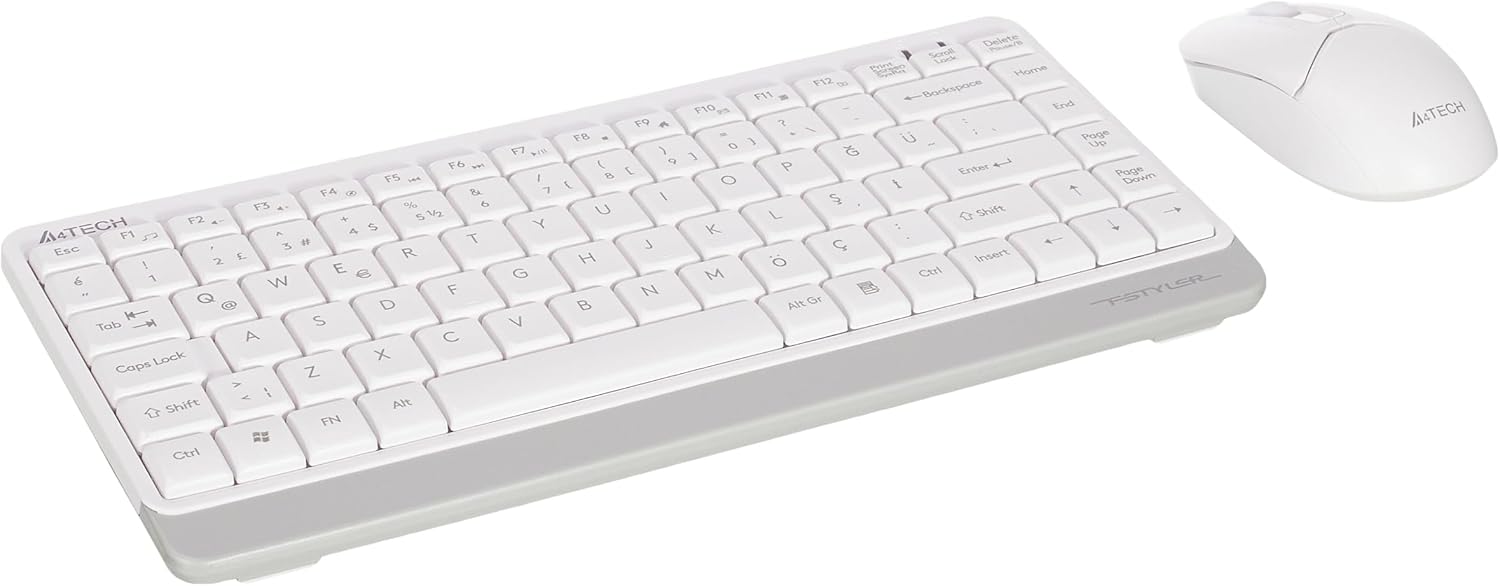
Image 1.1: A4tech FG1112 Fstyler Wireless Keyboard and Mouse Set (White)
2. Kontenut tal-Pakkett
Jekk jogħġbok iċċekkja l-kontenut tal-pakkett biex tiżgura li l-oġġetti kollha huma preżenti:
- 1 x A4tech FG1112 Wireless Keyboard
- 1 x A4tech Fstyler Wireless Mouse
- 1 x USB Nano Riċevitur
- 2 x Batteriji AAA (għat-tastiera)
- 1 x AA Battery (for mouse, typically included)
- 1 x Manwal tal-Utent (dan id-dokument)
3. Istruzzjonijiet ta' Setup
- Daħħal Batteriji:
- For the keyboard: Open the battery compartment cover on the underside of the keyboard. Insert two AAA batteries, ensuring correct polarity (+/-). Close the cover.
- For the mouse: Open the battery compartment cover on the underside of the mouse. Insert one AA battery, ensuring correct polarity (+/-). Close the cover.

Image 3.1: Mouse bottom view showing battery compartment and power switch.
- Qabbad ir-Riċevitur Nano tal-USB: Locate the USB Nano Receiver, typically stored inside the mouse's battery compartment or packaged separately. Plug the receiver into an available USB port on your computer.
- Qawwa Mixgħul:
- For the keyboard: Ensure the keyboard is powered on. There might be a power switch on the top right or underside.
- For the mouse: Slide the power switch on the underside of the mouse to the "ON" position.
- Konnessjoni Awtomatika: Your computer should automatically detect and install the necessary drivers for the keyboard and mouse. This process may take a few moments. Once complete, your devices are ready for use.
Video 3.1: A short demonstration of the A4tech Fstyler Wireless Keyboard and Mouse Set, showing its compact design and wireless connectivity. This video illustrates the product's features and ease of use.
4. Istruzzjonijiet Operattivi
4.1 Użu tat-Tastiera
The A4tech FG1112 keyboard features a compact design with a Q Turkish layout. It is designed for comfortable and quiet typing.

Immaġni 4.1: Fuq view of the A4tech FG1112 Wireless Keyboard, highlighting its Q Turkish layout.
Multimedia and Function Keys:
The keyboard includes 12 multimedia and internet function keys integrated into the F1-F12 keys. To activate these functions, press the FN ċavetta simultanjament mal-F-key mixtieqa.
- FN + F1: Media Player
- FN + F2: Volum 'l isfel
- FN + F3: Volum 'il fuq
- FN + F4: Mut
- FN + F5: Track Preċedenti
- FN + F6: Track li jmiss
- FN + F7: Play/Pawsa
- FN + F8: Waqfa
- FN + F9: Home Page
- FN + F10: Email
- FN + F11: Il-Kompjuter Tiegħi
- FN + F12: Kalkulatur

Image 4.2: Illustration of FN key functionality for multimedia controls.
4.2 Użu tal-Maws
The A4tech Fstyler mouse provides precise 1200 DPI optical tracking for smooth and accurate cursor movement.

Immaġni 4.3: Fuq view of the A4tech Fstyler Wireless Mouse.
Funzjonijiet Bażiċi:
- Ikklikkja Xellug: Primary function, used for selecting items, opening files, eċċ.
- Ikklikkja bil-lemin: Funzjoni sekondarja, tipikament tiftaħ menus tal-kuntest.
- Scroll Wheel: Used for scrolling documents and web pages vertically. Can also function as a middle click button.
5. Manutenzjoni
- Tindif: Uża drapp artab u niexef biex tnaddaf it-tastiera u l-maws. Għal ħmieġ iebes, neħħi ftit drapp.amp cloth can be used, but ensure no liquid enters the devices.
- Sostituzzjoni tal-batterija: When the keyboard or mouse becomes unresponsive or exhibits delayed input, it's time to replace the batteries. Follow the "Insert Batteries" steps in the Setup section.
- Ħażna: When not in use for extended periods, turn off the mouse to conserve battery life. Store the devices in a cool, dry place.
6 Issolvi l-problemi
| Problema | Soluzzjoni Possibbli |
|---|---|
| It-tastiera/maws ma jirrispondix |
|
| Delayed or intermittent response |
|
| Iċ-ċwievet multimedjali ma jaħdmux |
|
7. Speċifikazzjonijiet
| Karatteristika | Dettall |
|---|---|
| Brand | A4tech |
| Mudell | FG1112 |
| Teknoloġija tal-Konnettività | Wireless 2.4GHz |
| Layout tat-Tastiera | Q Turkish |
| Tip ta' Tastiera | Multimedia Membrane |
| DPI tal-ġurdien | 1200 DPI Optical |
| Sors tal-Enerġija tat-Tastiera | 2 x Batteriji AAA |
| Sors tal-Enerġija tal-Maws | 1 x AA Battery (typical) |
| Karatteristiċi Speċjali | Wireless, Mini, Multimedia Keys, Optical Mouse, Laser Printed Keys, Water-resistant design (with drainage channels) |
| Piż tal-Prodott | 0.62 Kilograms (Set) |
| Dimensjonijiet (Tastiera) | Approx. 315mm (Width) x 146mm (Depth) x 25mm (Height) |
| Dimensjonijiet (Maws) | Approx. 64mm (Width) x 108mm (Depth) x 35mm (Height) |

Image 7.1: Dimensions of the A4tech FG1112 Keyboard and Mouse.
8. Garanzija u Appoġġ
This A4tech FG1112 Fstyler Wireless Keyboard and Mouse Set comes with a garanzija ta 'sena mid-data tax-xiri. Jekk jogħġbok żomm il-prova tax-xiri tiegħek għal talbiet ta' garanzija.
For technical support, troubleshooting assistance, or warranty inquiries, please contact A4tech customer service through their official websit jew id-distributur lokali tiegħek.
Tista' ssib aktar informazzjoni u riżorsi ta' appoġġ fuq A4tech Store on Amazon.