
1. Introduzzjoni
This manual provides detailed instructions for the installation, configuration, and operation of your ASUS TUF-AX5400 Dual Band WiFi 6 Gaming Router. Designed for high-performance networking, this router incorporates advanced features such as WiFi 6 (802.11ax) technology, AiMesh support, and dedicated gaming functionalities to enhance your internet experience. Please read this manual thoroughly before using the device.
2. Informazzjoni dwar is-Sigurtà
- Place the router in a well-ventilated area, away from direct sunlight, heat sources, and moisture.
- Use only the power adapter supplied with the device. Using unauthorized adapters may damage the router and void your warranty.
- Tiftaħx ir-router casing. Servicing should only be performed by authorized personnel.
- Żomm l-apparat 'il bogħod mit-tfal.
- Kun żgur li l-kejbils kollha huma konnessi sew qabel ma tixgħel l-apparat.
3. Kontenut tal-Pakkett
Ivverifika li l-pakkett tiegħek fih l-oġġetti li ġejjin:
- ASUS TUF-AX5400 WiFi 6 Gaming Router
- Adapter tal-Enerġija
- Kejbil Ethernet (RJ-45)
- Gwida Quick Start
- Karta ta' Garanzija
Jekk xi oġġetti huma nieqsa jew bil-ħsara, jekk jogħġbok ikkuntattja lill-bejjiegħ tiegħek.
4. Fiżiku Żejjedview
Familiarize yourself with the ports and indicators on your ASUS TUF-AX5400 router.

Immaġni: Wara view of the ASUS TUF-AX5400 router, highlighting its connectivity options. From left to right, the image shows the power port, power switch, USB 3.1 Gen1 port, four LAN ports (one labeled 'Gaming port'), a WPS button, a WAN port, and a reset button. Six fixed antennas are also visible, along with metal port protectors for enhanced durability.
- Port tal-Enerġija: Tqabbad mal-adapter tal-enerġija.
- Swiċċ tal-Enerġija: Jixgħel jew jitfi r-router.
- Port USB 3.1 Ġen 1: Għall-konnessjoni ta' apparati tal-ħażna USB jew dongles 4G/5G.
- Portijiet LAN (1-4): Connect wired devices such as computers, gaming consoles, or network-attached storage (NAS). LAN 1 is a dedicated Gaming Port.
- Buttuna WPS: For quick and easy connection of WPS-compatible devices.
- Port WAN: Jikkonnettja mal-modem jew mat-tagħmir tal-fornitur tas-servizz tal-internet (ISP) tiegħek.
- Buttuna Irrisettja: Agħfas u żomm għal 5-10 sekondi biex tirrestawra s-settings default tal-fabbrika.
- Antenni: Six fixed antennas for optimal wireless signal coverage.
5. Setup
5.1 Konnessjoni tal-Ħardwer
- Pożizzjona r-Router: Place the router in a central location to maximize WiFi coverage.
- Qabbad l-antenni: Ensure all six antennas are securely attached and oriented vertically for best performance.
- Qabbad mal-Modem: Connect one end of the provided Ethernet cable to the WAN port of the TUF-AX5400 router and the other end to your modem's LAN port.
- Qawwa Mixgħul: Connect the power adapter to the router's power port and plug it into an electrical outlet. Press the power switch to turn on the router.
- Stenna għall-Indikaturi: Allow a few minutes for the router to boot up. The Power, 2.4GHz, 5GHz, and WAN LED indicators should illuminate.
5.2 Konfigurazzjoni Inizjali
You can configure your router via a web il-browser jew l-app ASUS Router.
Bl-użu ta' a Web Browser:
- Qabbad mar-router: Connect your computer to the router via an Ethernet cable (to any LAN port) or wirelessly using the default WiFi network name (SSID) and password found on the router's label.
- Aċċess Web Interface: Iftaħ a web browser u naviga għal
router.asus.comor192.168.50.1. - Segwi l-Wizard tas-Setup: The ASUS Setup Wizard will guide you through the initial configuration steps, including setting up your internet connection, WiFi network name (SSID), and password, and creating an administrator username and password for the router.
Bl-użu tal-App tar-Router tal-ASUS:
- Niżżel l-App: Niżżel l-app ASUS Router mill-app store tat-tagħmir mobbli tiegħek.
- Qabbad mar-router: Connect your mobile device to the router's default WiFi network.
- Tnedija App: Open the ASUS Router app and follow the on-screen instructions to set up your router.
6. Istruzzjonijiet Operattivi
6.1 WiFi 6 (802.11ax) Features
The TUF-AX5400 leverages WiFi 6 technology to deliver enhanced performance and efficiency.

Immaġni: Infografika li tagħti dettalji dwar l-avvanztages of WiFi 6 (802.11ax) technology. Key features highlighted are OFDMA, TWT (Target Wake Time), MU-MIMO, and 160MHz channels. It also shows improvements such as 4X efficiency for multi-devices, 2X WiFi speed, 7X battery life for client devices, and an 80% increase in WiFi range, with speeds up to 5400Mbps.
- OFDMA (Aċċess Multiplu b'Diviżjoni tal-Frekwenza Ortogonali): Improves network efficiency, especially in high-density environments, by allowing multiple devices to share a single channel simultaneously.
- MU-MIMO (Utent Multiplu, Input Multiplu, Output Multiplu): Enables the router to communicate with multiple devices simultaneously, increasing overall network capacity and speed.
- 160 MHz Channels: Provides wider bandwidth for compatible devices, resulting in significantly faster wireless speeds.
- Ħin ta' Qawmien fil-Mira (TWT): Reduces power consumption for connected devices by scheduling when they need to transmit or receive data.
6.2 Karatteristiċi tal-Logħob
The TUF-AX5400 is optimized for gaming performance.

Immaġni: A visual representation of the router's three gaming optimization modes. It depicts a user playing on a PC with a 'Dedicated Gaming Port' label, another user playing on a mobile device with a 'Mobile Game Mode' label, and a console controller with an 'Open NAT' label, illustrating how the router optimizes for various gaming scenarios.
- Port tal-Logħob Dedikat: Connect your gaming PC or console to the dedicated LAN port to automatically prioritize its network traffic, ensuring lower latency and stable connections during gameplay.
- Modalità tal-Logħob Mobbli: Activate this mode via the ASUS Router app to prioritize mobile gaming traffic, reducing lag for smartphone and tablet games.
- Open NAT (Network Address Translation): Simplifies port forwarding for online gaming, allowing for easier setup of game servers and improved connectivity for multiplayer games. This feature can be configured in the router's web interface.
6.3 AiMesh Support
Create a seamless whole-home mesh WiFi system with AiMesh-compatible routers.
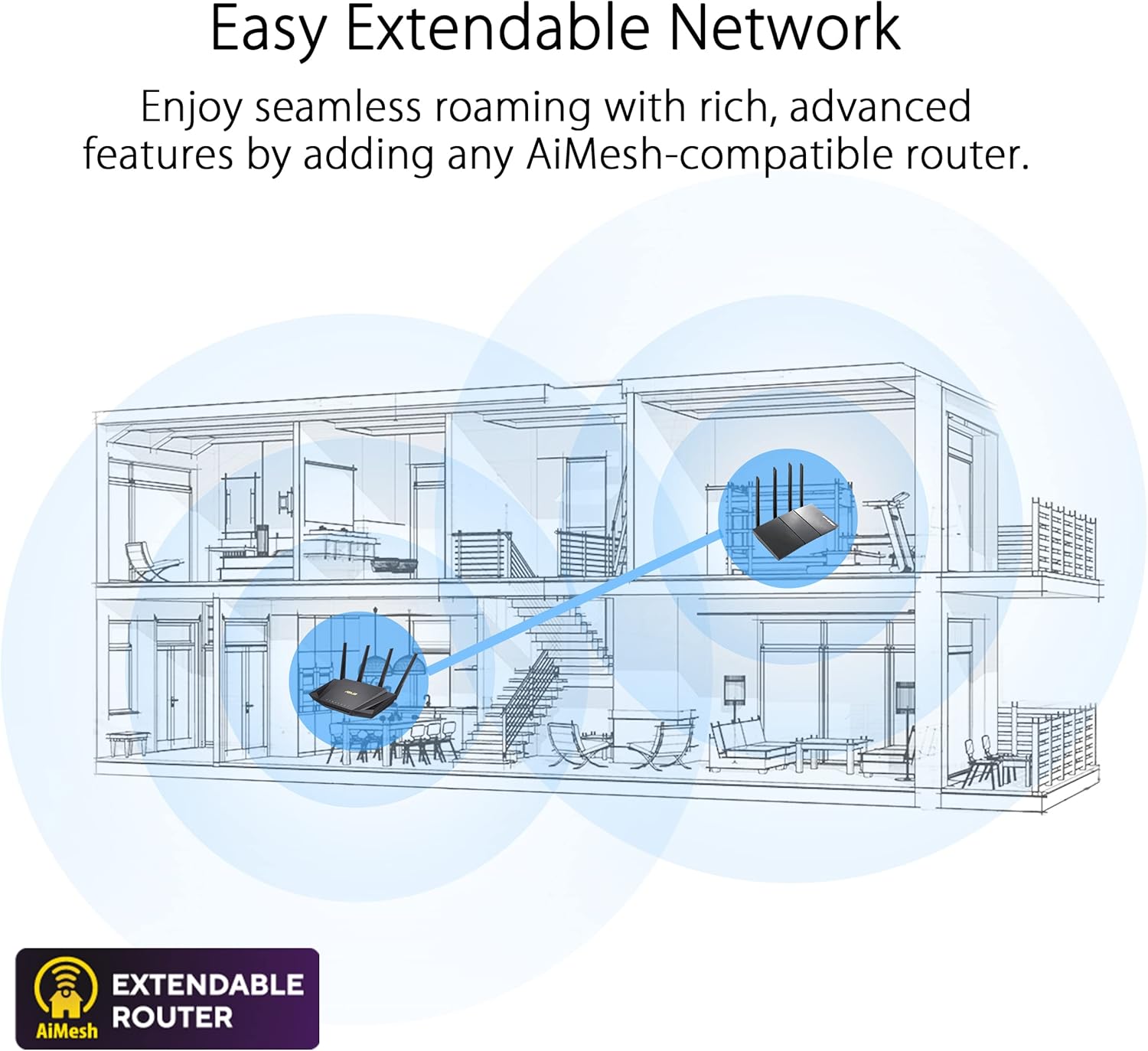
Immaġni: A diagram illustrating an 'Easy Extendable Network' using ASUS AiMesh technology. It shows a multi-story house with a main router on the ground floor and an AiMesh-compatible router on the upper floor, working together to provide seamless WiFi coverage across the entire home, eliminating dead zones.
AiMesh allows you to combine multiple ASUS routers into a single, unified WiFi network, providing extended coverage and eliminating WiFi dead zones. Your devices will automatically switch to the strongest signal as you move around your home.
6.4 Advanced Parental Controls
Manage and monitor internet usage for family members.

Immaġni: A visual representation of 'Advanced Parental Controls' for WiFi management. The image shows a child using a smartphone under a blanket, while an overlay highlights features like 'Timing' (setting internet access schedules), 'Filtering' (blocking inappropriate content), and 'Scheduling' (managing device online times).
Access these features through the router's web interface or the ASUS Router app to set time limits, filter content, and schedule internet access for specific devices.
6.5 Modalità tal-Punt ta' Aċċess (AP)
The TUF-AX5400 can function as an Access Point, extending an existing wired network with wireless capabilities. In AP mode, the router disables its NAT functions and acts as a switch and wireless access point.
7. Manutenzjoni
- Aġġornamenti tal-Firmware: Iċċekkja u installa regolarment aġġornamenti tal-firmware permezz tar-router web interface. Updates often include security patches, performance improvements, and new features.
- Reboot Regolari: Rebooting your router periodically (e.g., once a month) can help maintain optimal performance and resolve minor network issues.
- Tindif: Use a soft, dry cloth to clean the router's exterior. Do not use liquid cleaners or solvents. Ensure ventilation openings are free from dust.
- Konfigurazzjoni tal-Backup: It is recommended to back up your router's configuration settings before performing major changes or firmware updates.
8 Issolvi l-problemi
8.1 Ebda Konnessjoni tal-Internet
- Check if the WAN LED indicator is lit. If not, ensure the Ethernet cable from your modem is securely connected to the router's WAN port.
- Reboot your modem and then your router. Wait for both devices to fully boot up.
- Ivverifika s-settings tal-konnessjoni tal-internet tiegħek fir-router web interface. Contact your ISP if the issue persists.
8.2 Slow WiFi Speed
- Ensure your devices are WiFi 6 compatible to fully utilize the router's capabilities.
- Iċċekkja għal interferenza minn apparati elettroniċi oħra (eż., microwaves, telefowns mingħajr fili).
- Adjust router placement to minimize obstacles and maximize signal strength.
- Update your router's firmware to the latest version.
8.3 Ma nistax naċċessa r-Router Web Interface
- Kun żgur li l-apparat tiegħek huwa konness mar-router (bil-fili jew mingħajr fili).
- Ipprova neħħi l-cache tal-browser tiegħek jew uża browser ieħor.
- Ivverifika li qed tuża l-indirizz IP korrett (
router.asus.comor192.168.50.1). - If you forgot your login credentials, you may need to perform a factory reset (see Physical Overview for Reset Button location).
9. Speċifikazzjonijiet
| Karatteristika | Speċifikazzjoni |
|---|---|
| Isem tal-Mudell | TUF-AX5400 |
| Standard tan-Netwerk | IEEE 802.11a, IEEE 802.11b, IEEE 802.11g, WiFi 4 (802.11n), WiFi 5 (802.11ac), WiFi 6 (802.11ax), IPv4, IPv6 |
| AX Technology | Iva |
| Rata tad-Data | AX5400 ultimate AX performance: 574+4804 Mbps (up to 5400 Mbps total) |
| Antenna | Antenna esterna x 6 |
| Ittrasmetti / Irċievi | 2.4 GHz 2 x 2, 5 GHz 4 x 4 |
| Proċessur | Proċessur bi tliet qlub ta' 1.5 GHz |
| Memorja | 256 MB Flash, 512 MB RAM |
| Boosts Speed | OFDMA, Beamforming, 1024-QAM, 20/40/80/160 MHz bandwidth |
| Frekwenza Operattiva | 2.4G Hz / 5 GHz |
| Portijiet | RJ45 for Gigabits BaseT for WAN x 1, RJ45 for Gigabits BaseT for LAN x 4, USB 3.2 Gen 1 x 1 |
| Buttuni | Buttuna WPS, Buttuna Irrisettja, Buttuna tal-Enerġija |
| Indikatur LED | Power x 1, 2.4GHz x 1, 5GHz x 1, WAN x 1, LAN x 4 |
| Piż tal-Prodott | 600 g |
| Dimensjonijiet tal-Prodott | 29.7 x 33.5 x 6.8 ċm |
| Karatteristiċi Speċjali | Access Point Mode, AiMesh Support, AiProtection Pro |
10. Garanzija u Appoġġ
The ASUS TUF-AX5400 router comes with a manufacturer's warranty. Please refer to the warranty card included in your package for specific terms and conditions. For technical support, driver downloads, and further product information, please visit the official ASUS support websit.
Appoġġ ASUS Websit: www.asus.com/support/