
1. Introduzzjoni
This manual provides comprehensive instructions for the Lenovo ThinkPad P15 Gen 2 20YQ0046US mobile workstation. It covers initial setup, operational guidelines, maintenance procedures, troubleshooting tips, and detailed product specifications. Please read this manual thoroughly to ensure proper use and care of your device.
The ThinkPad P15 Gen 2 is designed for demanding professional tasks, combining the portability of a laptop with the robust performance of a workstation. It features an Intel Xeon W-11855M Hexa-core processor, 32 GB of DDR4 RAM, a 1 TB SSD, and an NVIDIA RTX A2000 discrete graphics card, all housed within a 15.6-inch Full HD display.
2. Setup Inizjali
2.1 Tneħħija tal-kaxxa u Spezzjoni
Carefully remove your ThinkPad P15 Gen 2 and its accessories from the packaging. Verify that all components are present, including the laptop and the AC adapter. Inspect the device for any signs of damage during transit.

Figure 2.1: The Lenovo ThinkPad P15 Gen 2 laptop, showcasinid-displej u t-tastiera tiegħu.
2.2 Konnessjoni tal-Adapter tal-Enerġija
Connect the AC adapter to the power connector on your ThinkPad. Plug the power cord into a suitable electrical outlet. The battery will begin charging automatically.
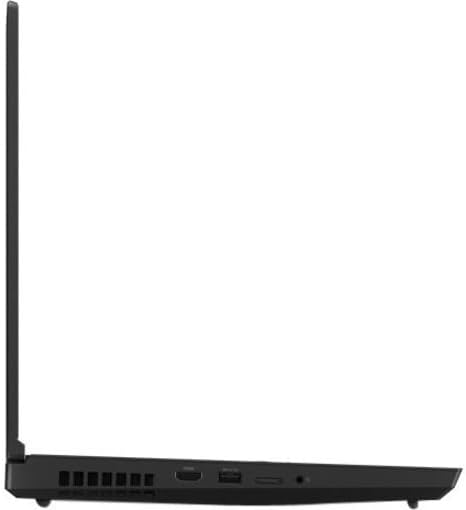
Figure 2.2: Left side ports of the ThinkPad P15 Gen 2, including the power input.
2.3 L-Ewwel Tixgħil u s-Setup tas-Sistema Operattiva
Press the power button to turn on your ThinkPad. Follow the on-screen instructions to complete the initial setup of Windows 10 Pro for Workstations. This process typically involves selecting your region, language, accepting license agreements, and creating a user account.
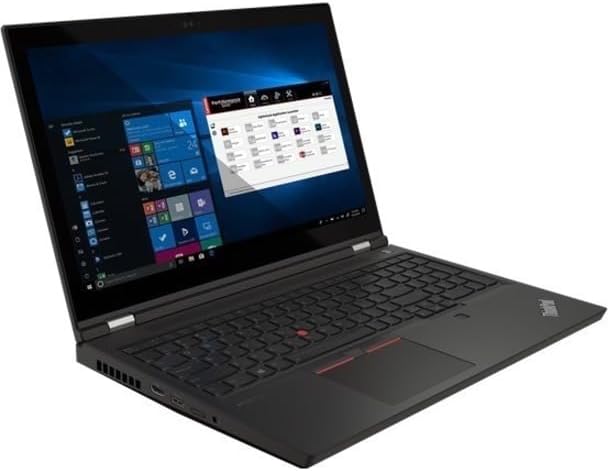
Figure 2.3: The ThinkPad P15 Gen 2 displaying the Windows operating system.
3. Operating Your ThinkPad
3.1 Tastiera u Apparati li Jippontaw
Your ThinkPad P15 Gen 2 features a full-sized keyboard, a TrackPoint pointing device, and a multi-touch touchpad. Use the TrackPoint for precise cursor control and the touchpad for gestures and navigation.
3.2 Konnessjoni ta' Apparati Esterni
Il-laptop huwa mgħammar b'diversi portijiet għall-konnessjoni ta' apparati esterni:
- Portijiet USB: For connecting USB drives, external keyboards, mice, and other peripherals.
- Port HDMI: Għall-konnessjoni ma' displays jew projetturi esterni.
- Port Ethernet: Għal konnessjonijiet tan-netwerk bil-fili.
- Awdjo Jack: Għal headphones jew kelliema esterni.
- SD Card Reader: Għall-qari ta' memory cards.

Figura 3.1: Wara view of the ThinkPad P15 Gen 2, highlighting ventilation and ports.
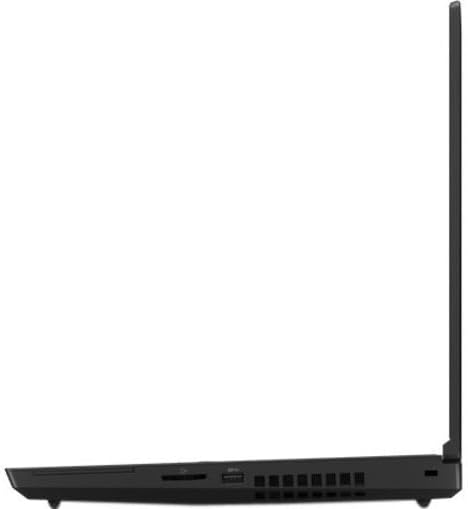
Figure 3.2: Right side ports of the ThinkPad P15 Gen 2.
3.3 Konnettività bla fili
Your ThinkPad supports 802.11ax Wi-Fi for high-speed wireless internet access and Bluetooth for connecting wireless peripherals such as headphones or mice. Access network settings through the Windows operating system to configure these connections.
4. Manutenzjoni
4.1 Tindif tal-Apparat Tiegħek
Biex tnaddaf l-iskrin, uża ċarruta ratba u ħielsa mill-lint dampened with water or a screen-cleaning solution. For the keyboard and chassis, use a soft cloth. Avoid harsh chemicals or abrasive materials.
4.2 Kura tal-Batterija
To maximize battery lifespan, avoid fully discharging the battery frequently. Store the laptop in a cool, dry place when not in use for extended periods. Periodically calibrate the battery if recommended by the operating system.
4.3 Aġġornamenti tas-Software
Iċċekkja u installa regolarment aġġornamenti tas-sistema operattiva (Windows Update) u aġġornamenti tas-sewwieqa (Lenovo Vantage jew Appoġġ Lenovo website) to ensure optimal performance and security.
5 Issolvi l-problemi
This section addresses common issues you might encounter with your ThinkPad P15 Gen 2.
5.1 Kwistjonijiet tal-Enerġija
- Il-laptop ma jixgħelx: Kun żgur li l-adapter tal-AC huwa konness sew u li s-sokit tal-enerġija jaħdem sew. Ipprova żomm il-buttuna tal-qawwa għal 10-15-il sekonda biex tagħmel hard reset.
- Il-batterija mhix qed tiċċarġja: Verify the AC adapter is correctly plugged into both the laptop and the wall outlet. Check for any damage to the adapter or cable.
5.2 Problemi tal-Wiri
- L-ebda immaġni fuq l-iskrin: Connect an external monitor to check if the issue is with the laptop's display. Ensure the display brightness is not set to minimum.
- Skrin li jteptep: Update your graphics drivers. Try adjusting the display refresh rate in Windows settings.
5.3 Kwistjonijiet ta' Konnettività tan-Netwerk
- Ma tistax tikkonnettja mal-Wi-Fi: Ensure Wi-Fi is enabled in Windows settings. Restart your router and the laptop. Verify the Wi-Fi password.
- Apparat Bluetooth mhux qed jikkonnettja: Kun żgur li l-Bluetooth huwa attivat kemm fuq il-laptop kif ukoll fuq l-apparat. Ipprova erġa' qabbad l-apparat.
For more advanced troubleshooting or issues not covered here, please refer to the official Lenovo support websit jew ikkuntattja lis-servizz tal-konsumatur tagħhom.
6. Speċifikazzjonijiet
Below are the key technical specifications for the Lenovo ThinkPad P15 Gen 2 20YQ0046US:
| Karatteristika | Dettall |
|---|---|
| Brand | Lenovo |
| Isem tal-Mudell | ThinkPad P15 Ġen 2 |
| Numru tal-Mudell tal-Oġġett | 20YQ0046US |
| Daqs tal-Iskrin | 15.6 Pulzier |
| Riżoluzzjoni tal-Iskrin | 1920 x 1080 pixels (Full HD) |
| Proċessur | Intel Xeon W-11855M Hexa-core (6 Core) 3.20 GHz |
| RAM | 32 GB DDR4 |
| Hard Drive | 1 TB SSD |
| Koproċessur tal-Grafika | NVIDIA RTX A2000 (4 GB GDDR6) |
| Sistema Operattiva | Windows 10 Pro għal Workstations |
| Tip bla fili | 802.11ax, Bluetooth |
| Kulur | Iswed |
| Piż tal-oġġett | 3.9 liri |
| Dimensjonijiet tal-Prodott | 9.8 x 14.2 x 0.7 pulzieri |
7. Garanzija u Appoġġ
Your Lenovo ThinkPad P15 Gen 2 comes with a standard manufacturer's warranty. For detailed information regarding warranty terms, coverage, and duration, please refer to the warranty card included with your product or visit the official Lenovo support websit.
Għal assistenza teknika, downloads ta' sewwieqa, jew talbiet għal servizz, jekk jogħġbok żur il- Appoġġ Lenovo Websit jew ikkuntattja lis-servizz tal-klijenti ta' Lenovo direttament.