
Introduzzjoni
Thank you for choosing the Bowost Q52 Bluetooth 5.1 Sport Wireless Earbuds. These earbuds are designed to provide a superior audio experience with advanced features such as Bluetooth 5.1 connectivity, CVC 8.0 noise cancellation, enhanced bass, dual microphones, and an IP7 waterproof rating. This manual will guide you through the setup, operation, maintenance, and troubleshooting of your new earbuds.
X'hemm fil-Kaxxa
Jekk jogħġbok iċċekkja l-kontenut tal-pakkett biex tiżgura li l-oġġetti kollha huma preżenti:
- 1 x Kawża tal-Iċċarġjar
- 1 x USB Iċċarġjar Cable
- 1 x Manwal tal-Utent (dan id-dokument)
- 2 x Bluetooth Earbuds (Left and Right)
- 3 x Parijiet ta' Eartips (Żgħar, Medji, Kbar)
Setup
1. Iċċarġjar tal-Earbuds u l-Kaxxa
Before first use, fully charge the earbuds and the charging case. The charging case features an LED power display to indicate the remaining battery level.
- Poġġi l-earbuds fil-kaxxa tal-iċċarġjar. Kun żgur li huma mqiegħda sew biex tibda l-iċċarġjar.
- Qabbad il-kejbil tal-iċċarġjar USB mal-port tal-iċċarġjar fuq il-kaxxa u ma' sors tal-enerġija (eż., adapter tal-ħajt USB, port USB tal-kompjuter).
- The LED display on the charging case will show the charging status. Once fully charged, the display will indicate 100% or stop flashing.

Image: The Bowost Q52 charging case connected to a phone via a USB cable, illustrating the charging process for both the case and the earbuds inside.
2. It-tqabbil mat-Tagħmir Tiegħek
The Bowost Q52 earbuds feature one-step auto-pairing technology for convenience.
- Iftaħ il-kaxxa tal-iċċarġjar u neħħi ż-żewġ earbuds. Dawn jinxtegħlu awtomatikament u jidħlu fil-modalità ta' tqabbil.
- Fuq l-apparat tiegħek (smartphone, tablet, eċċ.), attiva l-Bluetooth u fittex apparati disponibbli.
- Select "Q52" from the list of found devices to connect.
- Once paired, the earbuds will automatically connect to your device whenever you remove them from the charging case.

Image: The Bowost Q52 earbuds in their open charging case next to a smartphone screen showing the Bluetooth pairing menu, with the 'Q52' device highlighted for connection.
Tħaddim tal-Earbuds
1. L-ilbies tal-Earbuds
The Q52 earbuds are designed with ergonomic ear hooks for a secure and comfortable fit, especially during physical activities.
- Choose the correct size of eartips (S/M/L) for optimal comfort and sound quality.
- Place the earbud into your ear canal and gently hook the ear hook over the top of your ear.
- Adjust the earbud and hook until it feels secure and comfortable.

Image: A diagram illustrating the correct way to wear the Bowost Q52 earbuds, highlighting the ergonomic ear hook design and the selection of different eartip sizes (S, M, L).
2. Touch Kontrolli
Each earbud features a multifunction touch panel for easy control of audio playback and calls.
| Azzjoni | Funzjoni (Earbud tax-Xellug) | Funzjoni (Earbud tal-Lemin) |
|---|---|---|
| Tektek Uniku | Play/Pawsa, Wieġeb Sejħa | Play/Pawsa, Wieġeb Sejħa |
| Tektek Doppju | Track Preċedenti | Track li jmiss |
| Agħfas u Żomm (2s) | Volume Down, Reject Call | Volume Up, Reject Call |
| Tektek triplu | Attiva l-Assistent tal-Vuċi (Siri/Google Assistant) | Attiva l-Assistent tal-Vuċi (Siri/Google Assistant) |

Image: A visual guide to the smart touch controls on the Bowost Q52 earbuds, detailing actions like single tap, double tap, press and hold, and triple tap for various functions including music control, call management, and activating voice assistants.
3. Mono/Stereo Modes
The earbuds support both mono (single earbud) and stereo (both earbuds) modes.
- Mod Stereo: Use both earbuds for an immersive stereo sound experience. This is the default mode when both earbuds are removed from the case.
- Modalità Mono: You can use either the left or right earbud independently. Simply remove one earbud from the case, and it will connect to your device. The other earbud can remain in the case or be used by another person (if paired separately).
Manutenzjoni
1. Tindif
Tindif regolari jgħin biex iżomm prestazzjoni u iġjene ottimali.
- Uża drapp artab, niexef u mingħajr suf biex timsaħ il-earbuds u l-kaxxa tal-iċċarġjar.
- Neħħi l-eartips u naddafhom b'sapun ħafif u ilma, imbagħad laħlaħhom sew u nixxefhom kompletament qabel ma terġa' twaħħalhom.
- Tużax prodotti tat-tindif li joborxu, alkoħol, jew solventi kimiċi.
2. Reżistenza għall-Ilma (IP7)
The Bowost Q52 earbuds are IP7 waterproof, meaning they are protected against sweat and rain. This makes them suitable for sports and outdoor activities.
- The IP7 rating protects against immersion in water up to 1 meter for 30 minutes.
- They are not designed for swimming or prolonged submersion in water.
- Kun żgur li l-earbuds ikunu niexfa qabel ma tpoġġihom lura fil-kaxxa tal-iċċarġjar biex tevita li ssirilhom ħsara.
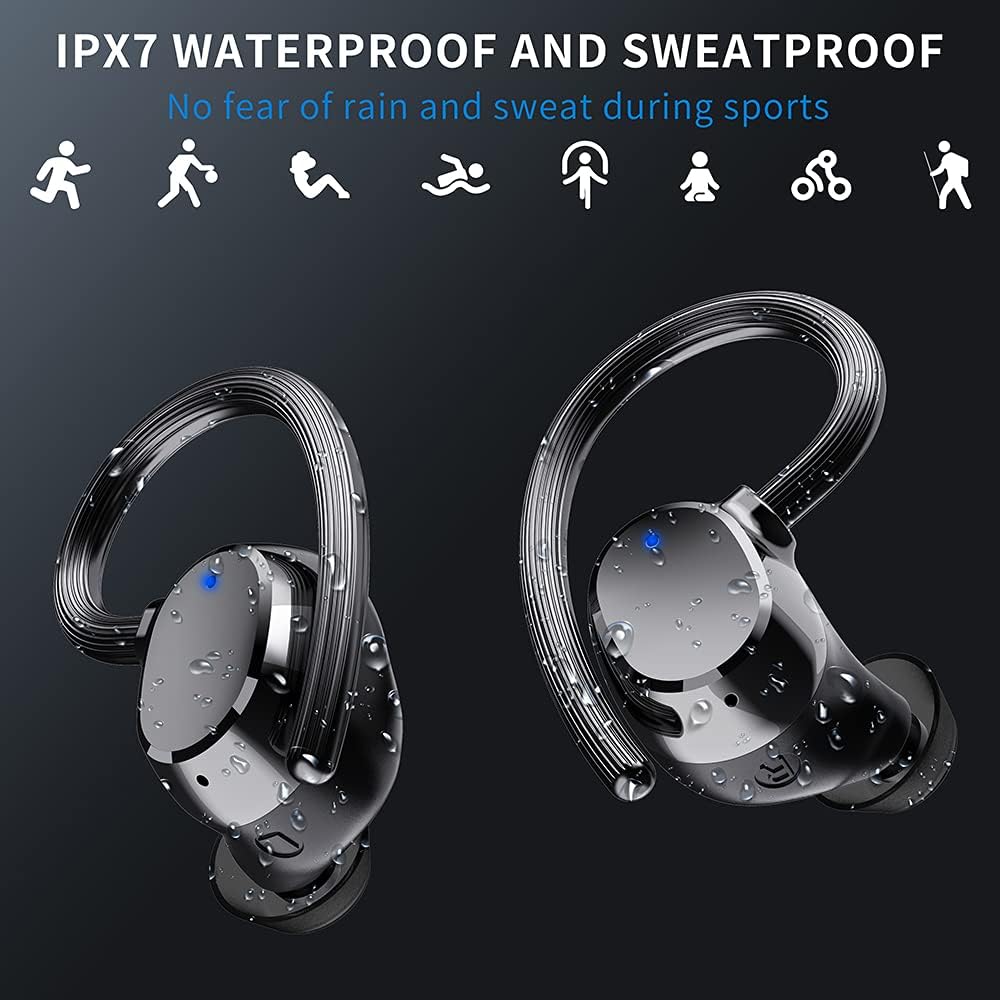
Image: The Bowost Q52 earbuds are shown with water droplets on their surface, visually representing their IPX7 waterproof and sweatproof design, suitable for use during exercise or in light rain.
3. Ħażna
Meta ma tkunx qed tużahom, aħżen il-earbuds fil-kaxxa tal-iċċarġjar tagħhom biex tipproteġihom u żżommhom iċċarġjati.
Issolvi l-problemi
If you encounter any issues with your Bowost Q52 earbuds, please refer to the following common solutions:
- Il-earbuds mhux qed jitqabbdu: Ensure both earbuds are charged. Turn off Bluetooth on your device, then turn it back on. Forget "Q52" from your device's Bluetooth list and try pairing again.
- Earbud wieħed biss jaħdem: Place both earbuds back into the charging case, close the lid, then open it and remove both earbuds simultaneously. This should force them to reconnect in stereo mode.
- Ebda ħoss: Iċċekkja l-livell tal-volum kemm fuq l-apparat tiegħek kif ukoll fuq il-earbuds. Kun żgur li l-earbuds huma konnessi sew mal-apparat tiegħek.
- Kwistjonijiet tal-iċċarġjar: Ensure the charging cable is securely connected to both the case and the power source. Try a different USB cable or power adapter. Clean the charging contacts on the earbuds and inside the case.
- Kwalità tal-ħoss fqira: Ensure the eartips are correctly sized and sealed in your ear canal. Check for any debris blocking the earbud speakers.
Jekk il-problema tippersisti, jekk jogħġbok ikkuntattja l-appoġġ għall-klijenti għal aktar assistenza.
Speċifikazzjonijiet
| Karatteristika | Dettall |
|---|---|
| Numru tal-Mudell | Q52 |
| Verżjoni Bluetooth | 5.1 |
| Medda Bluetooth | Sa 20 metri |
| Ħajja tal-Batterija tal-Earbud | 5-6 sigħat (ċarġ wieħed) |
| Ħin tal-logħob totali | Sa 48 siegħa (b'kaxxa tal-iċċarġjar) |
| Ħin tal-Iċċarġjar (Earbuds) | Madwar 1 siegħa |
| Klassifikazzjoni li ma jgħaddix ilma minnha | IP7 |
| Daqs tas-Sewwieq | 10 mm |
| Tnaqqis tal-Ħoss | CVC 8.0 |
| Teknoloġija tal-Konnettività | Wireless (Bluetooth) |
| Port tal-Iċċarġjar | USB |
| Apparati Kompatibbli | iOS, Android, Tablets, Bluetooth-enabled TVs, etc. |
| Materjal | Plastik |
| Piż tal-oġġett | 4 Grammi (għal kull earbud) |
| Medda ta' Frekwenzi | 20 Hz - 20,000 Hz |
Garanzija u Appoġġ
Your Bowost Q52 earbuds come with a standard manufacturer's warranty. Please refer to the warranty card included in your original packaging for specific terms and conditions.
For technical support, troubleshooting assistance, or warranty claims, please contact Bowost customer service through the retailer where you purchased the product or visit the official Bowost websit għal informazzjoni ta' kuntatt.