
1. Introduzzjoni
This manual provides instructions for the setup, operation, and maintenance of your Crosley C6B-DB Belt-Drive Bluetooth Turntable. The C6B-DB is a fully manual two-speed turntable designed to deliver an authentic analog listening experience. It features a durable MDF plinth, a heavy steel platter, and a low-vibration synchronous motor. The adjustable tonearm with a pre-installed moving magnet cartridge allows for precise tracking. Connectivity options include RCA outputs for wired speakers and built-in Bluetooth for wireless streaming to external speakers. Please read this manual thoroughly before using your turntable.
2. Informazzjoni dwar is-Sigurtà
Please observe the following safety precautions to prevent damage to the unit and ensure safe operation:
- Tesponix l-unità għax-xita jew l-umdità.
- Do not expose the unit to direct sunlight, heat sources, or extreme temperatures.
- Żgura ventilazzjoni xierqa madwar l-unità.
- Uża biss l-adapter tal-enerġija fornut mal-unità.
- Tippruvax tiżżarma jew timmodifika l-unità. Irreferi kull servizz lil persunal kwalifikat.
- Żomm l-unità 'l bogħod minn kampi manjetiċi qawwija.
- Handle the stylus with care to avoid damage and injury.
3. X'hemm fil-Kaxxa
Iċċekkja li l-oġġetti kollha elenkati hawn taħt huma inklużi fil-pakkett tiegħek:
- Crosley C6B-DB Turntable Unit
- Adapter tal-Provvista tal-Enerġija
- Manwal għall-Utent
- Qoxra tat-Trab
- Platter
- Drive Belt
- Feltru Mat
- Kontrapiż
- Piż kontra l-iskate
4. Prodott Aktarview
Familiarize yourself with the components of your Crosley C6B-DB turntable.

Figura 1: Crosley C6B-DB Turntable with its clear dust cover in place. This image shows the overall design of the turntable, including the plinth, platter, tonearm, and the protective dust cover.
4.1 Fuq View Komponenti
- Qoxra tat-Trab: Jipproteġi t-turntable mit-trab meta ma jkunx qed jintuża.
- Platter: The surface on which records are placed. Made of heavy steel for stability.
- Tapit tal-Feltru: Provides a soft surface for records and helps reduce static.
- Magħżel: Holds the record in place on the platter.
- Arma tat-ton: Holds the cartridge and stylus, guiding it across the record grooves.
- Skartoċċ: Converts groove vibrations into electrical signals. The C6B-DB comes with a pre-installed moving magnet cartridge.
- Stilus (Labra): The tip of the cartridge that reads the record grooves.
- Kontrapiż: Adjusts the tracking force of the tonearm.
- Anti-skate Dial: Compensates for the inward force on the tonearm, ensuring even tracking.
- Lieva ta' Skuża: Jgħolli u jbaxxi d-driegħ tat-tone bil-mod.
- Selettur tal-veloċità: Switch between 33 1/3 RPM and 45 RPM.
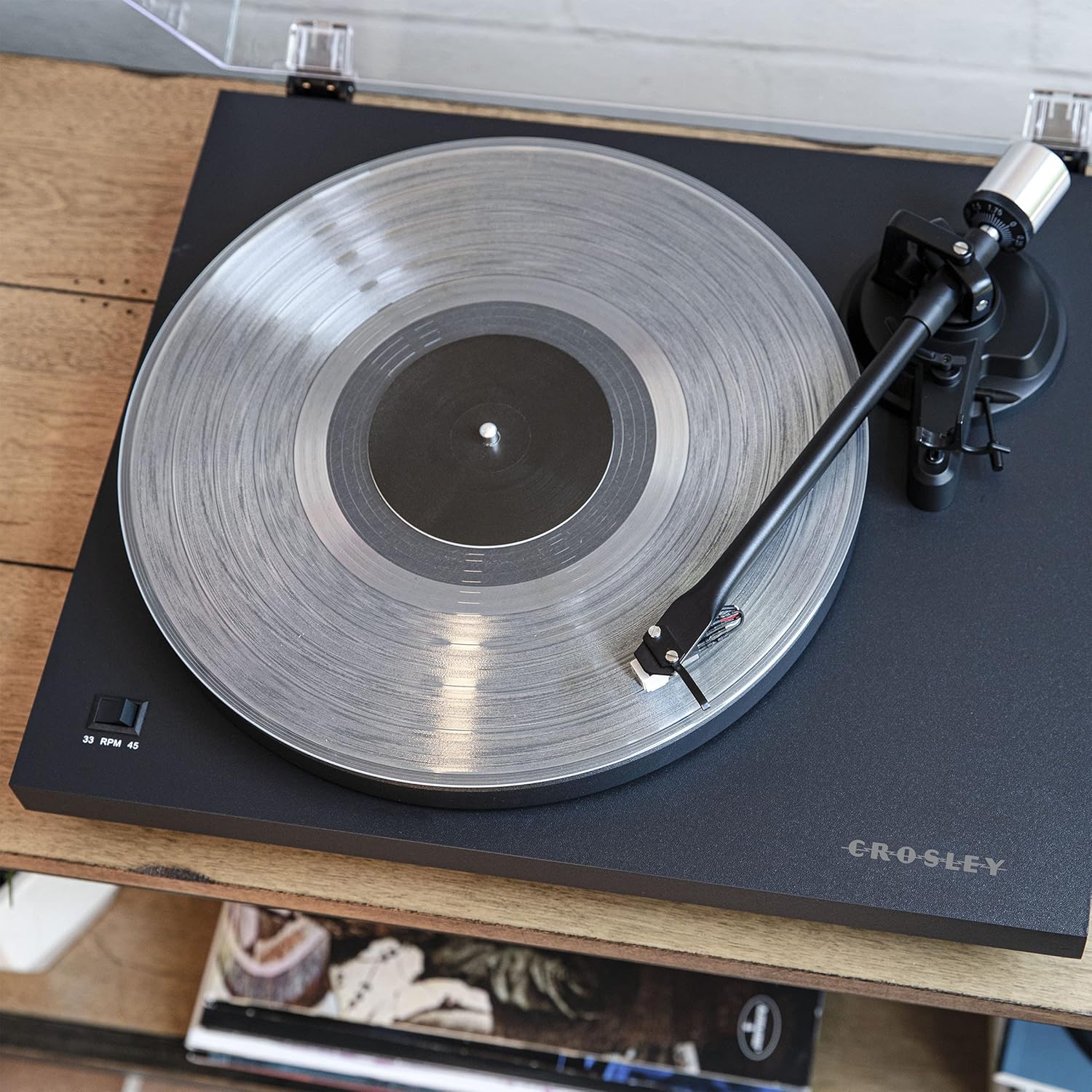
Figura 2: A minn fuq għal isfel view of the turntable, highlighting the platter, felt mat, spindle, and the tonearm assembly. The speed selector switch is visible on the left side of the plinth.

Figura 3: A detailed close-up of the pre-installed moving magnet cartridge and stylus on the tonearm. This component is crucial for converting the physical grooves of a record into an audio signal.
4.2 Konnessjonijiet tal-Panew ta' wara
- Terminal tal-Art: For connecting a ground wire from an amplifier/receiver to reduce hum.
- RCA Output (L/R): Jgħaqqad ma' amplifier jew kelliema powered.
- Swiċċ Phono/Line: Selects between the built-in preamplifier (Line) or an external phono preamplifier (Phono).
- DC FI 12V: Dħul tal-enerġija għall-adapter fornut.
- Indikatur Bluetooth: LED light indicating Bluetooth pairing status.
- Swiċċ tal-Enerġija: Turns the turntable on or off.

Figura 4: The rear panel of the turntable, showing the ground terminal, RCA L/R outputs, Phono/Line switch, DC 12V power input, Bluetooth indicator, and the main power switch.
5. Setup
Follow these steps to set up your turntable for first use.
5.1 Spakkjar u Tqegħid
- Neħħi bir-reqqa l-komponenti kollha mill-imballaġġ.
- Place the turntable on a stable, level surface away from direct sunlight, heat, and vibrations.
- Ensure there is enough space around the turntable for proper ventilation and operation.
5.2 Installazzjoni tal-Platt u ċ-Ċinturin
- Poġġi l-platter fuq il-fus tat-turntable.
- Sib iċ-ċinturin tas-sewqan. Iġġebbed iċ-ċinturin bil-mod madwar it-tarf ta' ġewwa tal-platter u mbagħad madwar il-taljola tal-mutur. Kun żgur li ċ-ċinturin mhux mibrum.
- Poġġi t-tapit tal-feltru fuq il-platter.
5.3 Tonearm Balance and Tracking Force Adjustment
Proper tonearm adjustment is crucial for optimal sound quality and to prevent damage to your records and stylus.
- Neħħi l-protettur tal-istilus.
- Place the counterweight onto the rear of the tonearm. Rotate it clockwise until it is approximately halfway on.
- With the cueing lever in the down position, carefully balance the tonearm by rotating the counterweight until the tonearm floats horizontally. Do not let the stylus touch the platter or record.
- Once balanced, hold the counterweight steady and rotate the numbered ring on the front of the counterweight until "0" aligns with the line on the tonearm.
- Rotate the entire counterweight (both parts) counter-clockwise to the recommended tracking force. For the pre-installed cartridge, a tracking force of 2.0 grams is typically recommended. Refer to your cartridge manufacturer's specifications for precise values.
5.4 Anti-skate Adjustment
The anti-skate mechanism prevents the tonearm from being pulled inward excessively.
- Attach the small loop of the anti-skate weight's thread to the anti-skate post on the tonearm.
- Pass the thread through the wire support.
- Set the anti-skate dial to the same value as your tracking force (e.g., 2.0 for 2.0 grams tracking force).
5.5 Konnessjoni Awdjo
Connect your turntable to an audio system.
- Using Built-in Preamplifier (Line Out): Connect the RCA cables from the turntable's RCA outputs to a Line-level input (AUX, CD, Tuner) on your amplifier or powered speakers. Set the Phono/Line switch on the turntable's rear panel to "Line".
- Using External Preamplifier (Phono Out): Jekk tiegħek amplifier has a dedicated Phono input, connect the RCA cables from the turntable's RCA outputs to the Phono input on your amplifier. Set the Phono/Line switch on the turntable's rear panel to "Phono". Connect the ground wire from the turntable to the ground terminal on your ampaktar ħaj.
5.6 Konnessjoni tal-Enerġija
Connect the power adapter to the DC IN 12V port on the turntable and then plug it into a wall outlet.
6. Operazzjoni
Instructions for playing records and using Bluetooth connectivity.
6.1 Daqq ta' Rekord
- Ensure the turntable is powered on using the switch on the rear panel.
- Select the correct speed (33 1/3 or 45 RPM) using the speed selector switch on the plinth.
- Poġġi rekord fuq it-tapit tal-feltru.
- Erfa' d-driegħ tat-tone billi tuża l-lieva tal-cueing.
- Pożizzjona d-driegħ tat-tone manwalment fuq il-kanal tal-bidu mixtieq tar-rekord.
- Baxxi bil-mod id-driegħ tat-ton billi tuża l-lieva tal-kjuwijiet. L-istilus jibda jdoqq ir-rekord.
- To stop playback, lift the tonearm using the cueing lever and return it to the tonearm rest.
6.2 Bluetooth Out Function
The C6B-DB can stream audio wirelessly to external Bluetooth speakers.
- Kun żgur li l-ispiker Bluetooth estern tiegħek jinsab fil-modalità ta' tqabbil.
- Turn on the turntable. The Bluetooth indicator light on the rear panel will flash, indicating it is searching for a device.
- Ladarba tkun konness, id-dawl indikatur tal-Bluetooth isir blu solidu.
- You can now play records, and the audio will stream to your paired Bluetooth speaker.
- To disconnect, turn off the Bluetooth speaker or the turntable.
Vidjo 1: This video demonstrates the features and operation of the Crosley C6B Turntable, including playing records, speed selection, and Bluetooth connectivity. It highlights the adjustable tonearm, pre-mounted cartridge, steel platter, and belt-driven motor.
7. Manutenzjoni
Regular maintenance helps prolong the life of your turntable and records.
7.1 Tindif tat-Turntable
- Wipe the dust cover and plinth with a soft, dry cloth. Do not use abrasive cleaners or solvents.
- For the stylus, use a soft brush designed for stylus cleaning, brushing gently from back to front.
7.2 Sostituzzjoni tal-Istilus
The stylus is a consumable part and should be replaced after approximately 300-500 hours of playback, or if you notice a degradation in sound quality. The C6B-DB is compatible with NP5 replacement needles.
- Gently pull the old stylus assembly downwards and forwards to remove it from the cartridge.
- Align the new stylus assembly with the cartridge body and push it upwards until it clicks into place.
8 Issolvi l-problemi
If you experience issues with your turntable, refer to the following common problems and solutions.
| Problema | Kawża Possibbli | Soluzzjoni |
|---|---|---|
| Ebda qawwa | L-adapter tal-enerġija mhux imqabbad; Is-sokit tal-enerġija mhux attiv. | Ensure power adapter is securely connected to the turntable and a working outlet. Check the power switch on the rear panel. |
| L-ebda ħoss jew volum baxx | Incorrect Phono/Line switch setting; RCA cables not connected; Amplifier/speakers off or volume low; Stylus damaged. | Set Phono/Line switch correctly (Line for line input, Phono for phono input). Check RCA cable connections. Ensure amplifier/speakers are on and volume is up. Inspect stylus for damage and replace if necessary. |
| Ħoss distort jew jaqbeż | Tracking force incorrect; Anti-skate incorrect; Stylus dirty or damaged; Record dirty or damaged; Turntable not level. | Re-adjust tracking force and anti-skate. Clean stylus. Clean record. Ensure turntable is on a level surface. Replace stylus if damaged. |
| Record speed incorrect | Incorrect speed selected; Drive belt dislodged or worn. | Select the correct speed (33 1/3 or 45 RPM). Check if the drive belt is properly seated around the platter and motor pulley. Replace belt if worn. |
| Bluetooth mhux pairing | External speaker not in pairing mode; Too far from speaker. | Ensure external Bluetooth speaker is in pairing mode. Move turntable closer to the speaker. |
9. Speċifikazzjonijiet
| Karatteristika | Dettall |
|---|---|
| Numru tal-Mudell | C6B-DB |
| Dimensjonijiet tal-Prodott | 16.38 x 14.25 x 5.25 pulzieri |
| Piż tal-oġġett | 12.13 liri |
| Veloċitajiet | 33 1/3, 45 RPM |
| Tip ta' Mutur | AC Motor, Belt-Drive |
| Tip ta 'Skartoċċ | Moving Magnet (NP5 replacement needle compatible) |
| Konnettività | RCA Output (Phono/Line switchable), Bluetooth Out |
| Materjal | Injam Inġinerizzat, Plastik |
| Sors tal-Enerġija | Elettriku bil-Fili (DC 12V) |
10. Garanzija u Appoġġ
Crosley products are manufactured to high-quality standards. For detailed warranty information, please refer to the warranty card included with your product or visit the official Crosley website. If you encounter any issues or require technical assistance, please contact Crosley customer support.
Crosley Support: www.crosleyradio.com/support