
1. Introduzzjoni
This manual provides essential information for setting up, operating, maintaining, and troubleshooting your Lenovo ThinkCentre M90s 11D1000YUS Desktop Computer. Please read this manual thoroughly before using your computer to ensure proper function and safety.
Kontenut tal-Pakkett
- Lenovo ThinkCentre M90s 11D1000YUS Desktop Computer
- Tastiera
- Ġurdien
- Korda tal-Enerġija
- Dokumentazzjoni (dan il-manwal, informazzjoni dwar il-garanzija)
2. Informazzjoni dwar is-Sigurtà
Observe the following safety precautions to prevent damage to your computer and to ensure your personal safety:
- Always connect the power cord to a grounded electrical outlet.
- Do not expose the computer to water or excessive humidity.
- Evita li tpoġġi l-kompjuter fid-dawl tax-xemx dirett jew ħdejn sorsi ta’ sħana.
- Ensure adequate ventilation around the computer to prevent overheating.
- Do not open the computer casing unless instructed by qualified service personnel.
- Keep the computer away from strong magnetic fields.
3. Prodott Aktarview
Familiarize yourself with the components and ports of your ThinkCentre M90s desktop computer.
Quddiem View
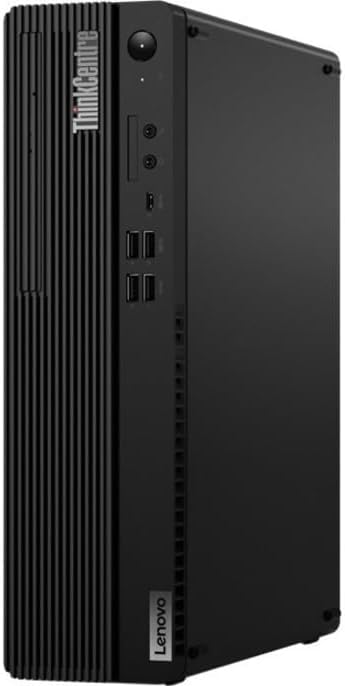
Immaġni: Quddiem view of the Lenovo ThinkCentre M90s desktop computer. This image highlights the vertical orientation of the small form factor chassis, featuring the power button, front USB ports, and the optical drive bay.
Wara View

Immaġni: Wara view of the Lenovo ThinkCentre M90s desktop computer. This image displays the array of connectivity options including video outputs (DisplayPort, VGA), USB ports, Ethernet, and the power input.
Ġenb View
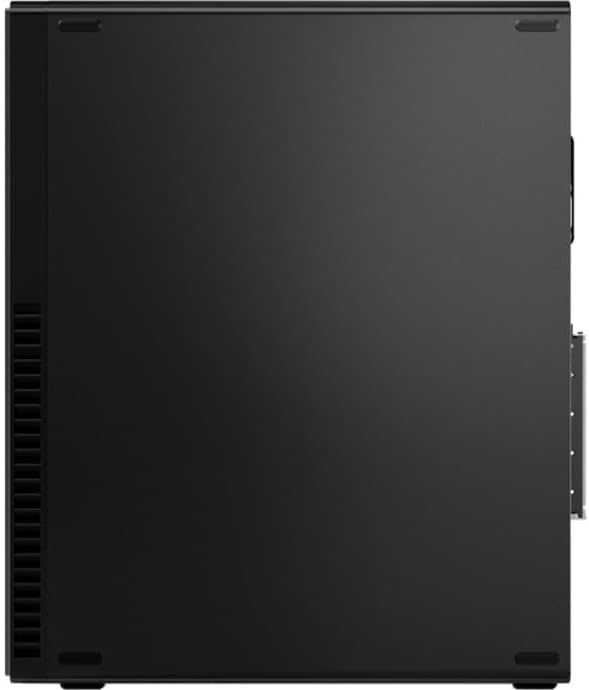
Immaġni: Ġenb view of the Lenovo ThinkCentre M90s desktop computer. This image shows the ventilation grilles along the side panel, designed for optimal airflow and cooling.
4. Istruzzjonijiet ta' Setup
Follow these steps to set up your new Lenovo ThinkCentre M90s desktop computer.
- Iftaħ il-Kompjuter mill-pakkett: Oħroġ il-kompjuter u l-aċċessorji kollha mill-imballaġġ bir-reqqa.
- Ikkonnettja l-Periferali:
- Connect the keyboard to an available USB port.
- Connect the mouse to an available USB port.
- Connect your monitor to a video output port (e.g., DisplayPort, VGA) on the rear of the computer.
- If using an Ethernet cable for internet, connect it to the RJ-45 port.
- Qabbad l-Enerġija: Plug the power cord into the power connector on the rear of the computer, then plug the other end into a grounded electrical outlet.
- Qawwa Mixgħul: Press the power button located on the front of the computer. The system will begin to boot up.
- Initial Windows 10 Pro Setup: Follow the on-screen instructions to complete the initial setup of Windows 10 Pro, including language selection, network connection, and user account creation.
5. It-Tħaddim tal-Kompjuter Tiegħek
This section covers basic operation of your ThinkCentre M90s.
Power On/Off u Nerġgħu
- Qawwa Mixgħul: Agħfas il-buttuna tal-qawwa fuq il-pannell ta 'quddiem.
- Itfi: Ikklikkja l-buttuna Start fil-Windows, imbagħad agħżel Power > Shut down.
- Ibda mill-ġdid: Ikklikkja l-buttuna Start fil-Windows, imbagħad agħżel Power > Restart.
Using the Optical Drive
Your computer is equipped with a DVD-Writer optical drive for reading and writing CDs and DVDs.
- To open the tray, press the eject button on the drive.
- Place the disc label-side up on the tray and gently push the tray back into the computer.
Karatteristiċi tal-Windows 10 Pro
Leverage the multitasking capabilities of Windows 10 Pro:
- Snap Assist: Drag a window to the side of the screen to snap it into place. Windows will suggest other open windows to fill the remaining space.
- Desktops Virtwali: Use Task View (Windows key + Tab) to create and manage multiple virtual desktops for organizing your work.
6. Manutenzjoni
Regular maintenance helps ensure the longevity and optimal performance of your computer.
Tindif
- Uża drapp ratba u mingħajr ħelu ftit dampened with water or a mild cleaning solution to clean the exterior surfaces.
- Tisprejjax likwidi direttament fuq il-kompjuter.
- Uża arja kkompressata biex tneħħi t-trab mill-gradilji tal-ventilazzjoni perjodikament.
Aġġornamenti tas-Software
Keep your operating system and drivers updated:
- Aġġornamenti tal-Windows: Go to Settings > Update & Security > Windows Update to check for and install updates.
- Aġġornamenti tas-sewwieq: Żur l-appoġġ uffiċjali ta' Lenovo website for your model to download the latest drivers.
Backup tad-Data
Agħmel backup tad-dejta importanti tiegħek regolarment fuq drajv estern jew ħażna fil-cloud biex tevita t-telf ta' dejta.
7 Issolvi l-problemi
Din it-taqsima tipprovdi soluzzjonijiet għal kwistjonijiet komuni li tista’ tiltaqa’ magħhom.
Ebda Qawwa
- Ensure the power cord is securely connected to both the computer and the electrical outlet.
- Ivverifika li s-sokit elettriku jaħdem billi tqabbad apparat ieħor.
- Iċċekkja l-fann tal-unità tal-provvista tal-enerġija (PSU) biex jara jekk hux qed jaħdem.
L-ebda Wirja fuq il-Monitor
- Confirm the monitor is powered on and its power indicator light is active.
- Iċċekkja li l-kejbil tal-vidjow huwa konness sew kemm mal-kompjuter kif ukoll mal-monitor.
- Try connecting the monitor to a different video output port on the computer, if available.
- Kun żgur li s-sors tad-dħul korrett huwa magħżul fuq il-monitor tiegħek.
Prestazzjoni Bil-mod
- Agħlaq l-applikazzjonijiet bla bżonn li jkunu qed jaħdmu fl-isfond.
- Iċċekkja u installa kwalunkwe aġġornament pendenti tal-Windows.
- Run a disk cleanup utility to free up storage space.
- Skennja għal malware jew viruses billi tuża softwer antivirus ta’ fama tajba.
8. Speċifikazzjonijiet
Detailed technical specifications for the Lenovo ThinkCentre M90s 11D1000YUS Desktop Computer.
| Karatteristika | Dettall |
|---|---|
| Isem tal-Mudell | ThinkCentre M90s |
| Numru tal-Mudell tal-Oġġett | 11D1000YUS |
| Proċessur | Intel Core i5-10500 Hexa-core (6 Core) 3.10 GHz |
| RAM | 8 GB DDR4 SDRAM |
| Ħażna | 256 GB M.2 PCI Express NVMe 3.0 x4 SSD |
| Sistema Operattiva | Windows 10 Pro |
| Karta Grafika | Grafika Intel UHD |
| Tip ta' Drive ottiku | DVD-Kittieb |
| Pjattaforma tal-Ħardwer | PC |
| Kulur | Raven Iswed |
| Piż tal-oġġett | 11.68 liri |
| Dimensjonijiet tal-Prodott (LxWxH) | 11.72 x 3.64 x 13.37 pulzieri |
| Komponenti Inklużi | Tastiera, ġurdien |
9. Garanzija u Appoġġ
Your Lenovo ThinkCentre M90s desktop computer comes with a standard manufacturer's warranty. For detailed warranty terms and conditions, please refer to the warranty documentation included with your product or visit the official Lenovo support websit.
For technical support, driver downloads, and additional resources, please visit the Lenovo support websit:
When contacting support, please have your model number (11D1000YUS) and serial number ready.