
1. Introduzzjoni
This manual provides essential information for the safe and efficient use of your Lenovo IdeaPad Flex 5 14-inch 2-in-1 Laptop. Please read this manual thoroughly before operating your device and retain it for future reference. This device combines the functionality of a laptop with the versatility of a tablet, featuring a 14-inch Full HD touchscreen display and powered by an Intel Core i5-1135G7 processor.
2. Prodott Aktarview
2.1 Karatteristiċi ewlenin
- Disinn 2-in-1: Seamlessly switch between laptop, tablet, tent, and stand modes.
- Wiri: 14-inch Full HD (1920x1080) IPS Glossy Touchscreen.
- Proċessur: 11th Gen Intel Core i5-1135G7 (2.40 GHz, up to 4.20 GHz with Turbo Boost, 4 Cores, 8 Threads, 8 MB Cache).
- Grafika: Grafika Intel Iris Xe integrata.
- Memorja: 8GB DDR4-3200 SDRAM.
- Ħażna: 512GB PCIe NVMe M.2 SSD.
- Sistema Operattiva: Windows 10 Home.
- Konnettività: Intel Wi-Fi 6 AX 201 (2x2) and Bluetooth 5.
- Sigurtà: Physical camera shutter and fingerprint reader.
- Ħajja tal-batterija: Sa 9 sigħat.
2.2 Komponenti u Portijiet
Familiarize yourself with the various components and ports of your IdeaPad Flex 5.

Immaġni: Minn fuq għal isfel view of the Lenovo IdeaPad Flex 5 in laptop mode, highlighting its sleek design and keyboard layout.

Image: The Lenovo IdeaPad Flex 5 demonstrating its 2-in-1 capability, shown in both traditional laptop and tablet orientations.
- 2 x portijiet USB 3.2 Gen 1
- 1 x USB Type-C 3.2 Gen 1 port with Power Delivery
- 1 x HDMI 1.4b port
- 1 x 4-in-1 card reader
- 1 x Jack kombinat għall-headphones/mikrofonu
3. Setup
3.1 Qawwa Inizjali
- Unpack your laptop and all accessories.
- Connect the power adapter to the laptop's power port and then to an electrical outlet.
- Iftaħ l-għatu tal-laptop u agħfas il-buttuna tal-qawwa, li tipikament tinsab fuq il-ġenb jew fuq il-lemin tat-tastiera.
- Segwi l-istruzzjonijiet fuq l-iskrin biex tlesti s-setup inizjali tal-Windows 10, inkluż l-għażla tal-lingwa, il-konnessjoni tan-netwerk, u l-ħolqien tal-kont tal-utent.

Image: The Lenovo IdeaPad Flex 5 with its screen displaying the Windows 10 operating system desktop, ready for use.
3.2 Konnessjoni mal-Wi-Fi
During initial setup or anytime thereafter, connect to a wireless network:
- Click the Wi-Fi icon in the taskbar (bottom right of the screen).
- Agħżel in-netwerk mixtieq tiegħek mil-lista.
- Daħħal iċ-ċavetta tas-sigurtà tan-netwerk (password) jekk tintalab.
- Ikklikkja fuq 'Qabbad'.
4. Istruzzjonijiet Operattivi
4.1 Modi Konvertibbli
Your IdeaPad Flex 5 features a 360-degree hinge, allowing it to be used in various modes:
- Modalità tal-Laptop: Konfigurazzjoni standard tal-laptop għat-tajping u l-produttività.
- Modalità Tinda: Fold the screen back to form an inverted 'V' shape, ideal for watching videos or presentations in confined spaces.
- Modalità Stand: Fold the keyboard back to act as a stand, positioning the screen for viewing.
- Modalità Pillola: Itwi l-iskrin kompletament lura kontra l-bażi għal esperjenza sħiħa tat-tablet. It-tastiera u t-touchpad jiġu diżattivati awtomatikament f'din il-modalità.
4.2 Użu tat-Touchscreen
The 14-inch Full HD touchscreen supports multi-touch gestures for intuitive interaction with Windows 10.

Image: A user's hand performing a touch gesture on the screen of the Lenovo IdeaPad Flex 5, illustrating its responsive touchscreen functionality.
- Tektek: Ekwivalenti għal klikk tal-maws.
- Tektek u Żomm: Ekwivalenti għal klikk bil-lemin.
- Oqros biex Iżżumja: Uża żewġ swaba' biex tagħmel zoom in jew zoom out.
- Swipe: Navigate through content or open system menus.
4.3 Tastiera u Touchpad
The integrated keyboard and touchpad provide traditional input methods. The keyboard may feature backlighting for use in low-light conditions.
4.4 Using the Included Pen Drive
Your laptop includes a 64GB TW Pen Drive for portable storage. Insert the pen drive into an available USB port to access its contents or store files.
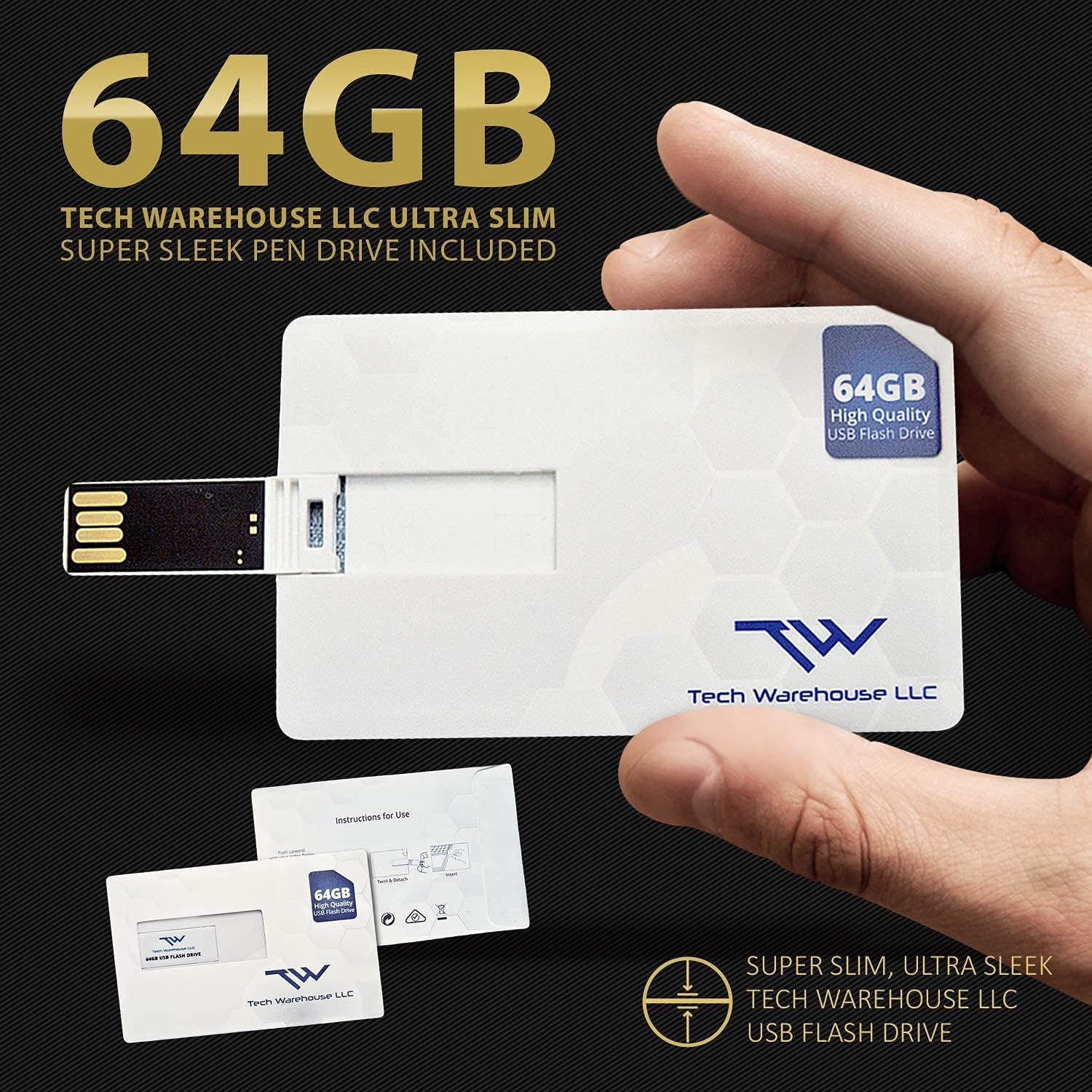
Image: The included 64GB Tech Warehouse LLC USB Flash Drive, designed for convenient data transfer and storage.
4.5 Karatteristiċi tas-Sigurtà
- Physical Camera Shutter: Slide the small cover over the webcam lens to ensure privacy when the camera is not in use.
- Qarrej tal-marki tas-swaba': Configure Windows Hello to use the integrated fingerprint reader for secure and quick login.

Image: Close-up of the Lenovo IdeaPad Flex 5's webcam, showing the physical privacy shutter in place for user security.
5. Manutenzjoni
5.1 Tindif tal-Laptop Tiegħek
- Dejjem itfi u aqla’ l-laptop qabel ma tnaddaf.
- Uża drapp ratba u mingħajr ħelu ftit dampNaddaf bl-ilma jew b'tindif tal-iskrin għall-wiri.
- Għat-tastiera u x-chassis, uża drapp artab u niexef. Evita kimiċi ħarxa jew materjali li joborxu.
5.2 Kura tal-Batterija
- Evita li tiċċarġja l-batterija kompletament ta' spiss.
- Aħżen il-laptop f'post frisk u niexef jekk ma tużahx għal perjodi twal.
- For optimal battery longevity, avoid exposing the laptop to extreme temperatures.
5.3 Aġġornamenti tas-Software
Iċċekkja u installa regolarment aġġornamenti tal-Windows u aġġornamenti tas-sewwieqa Lenovo biex tiżgura prestazzjoni u sigurtà ottimali.
6 Issolvi l-problemi
6.1 Kwistjonijiet Komuni u Soluzzjonijiet
- Il-laptop ma jixgħelx: Kun żgur li l-adapter tal-enerġija huwa konness sew u li l-batterija għandha biżżejjed ċarġ. Ipprova sokit tal-enerġija differenti.
- L-iskrin huwa vojt: Check if the laptop is powered on. Press Fn + F2 (or the display toggle key) to ensure the display is not turned off. Reconnect external monitors if applicable.
- Il-Wi-Fi mhux qed jikkonnettja: Verify Wi-Fi is enabled in Windows settings. Restart your router and laptop. Ensure you have the correct Wi-Fi password.
- Prestazzjoni bil-mod: Close unnecessary applications. Check for background updates. Ensure sufficient free storage space on the SSD.
- L-iskrin tattili ma jirrispondix: Restart the laptop. Ensure no physical obstructions are on the screen. Check for driver updates.
Għal aktar dettalji dwar is-soluzzjoni tal-problemi, irreferi għall-appoġġ ta' Lenovo websit jew ikkuntattja l-appoġġ tal-klijent.
7. Speċifikazzjonijiet
| Karatteristika | Dettall |
|---|---|
| Brand | Lenovo |
| Isem tal-Mudell | IdeaPad Flex 5 |
| Daqs tal-Wiri tal-Iskrin Permanenti | 14 Pulzier |
| Riżoluzzjoni Massima tal-Iskrin | 1920x1080 Pixel (FHD) |
| Proċessur | Intel Core i5-1135G7 (2.4 GHz, 4 Cores) |
| RAM | 8 GB DDR4-3200 SDRAM |
| Hard Drive | 512 GB NVMe SSD |
| Koproċessur tal-Grafika | Intel Xe Graphics |
| Sistema Operattiva | Windows 10 Home |
| Tip bla fili | Intel Wi-Fi 6 AX 201 (2x2), Bluetooth 5 |
| Ħajja Medja tal-Batterija | 9 Sigħat |
| Piż tal-oġġett | 2.96 liri |
| Kulur | Abyss Blue |

Image: Information detailing the capabilities and advantages of Intel Iris Xe Graphics, a key component of the laptop's performance.
8. Garanzija u Appoġġ
8.1 Informazzjoni dwar Garanzija
Your Lenovo IdeaPad Flex 5 comes with a 1-Year On-site Premium 24/7 WarrantyDin il-garanzija tinkludi:
- Repairs performed at your location.
- Front-of-the-queue, VIP access to technicians.
- Getting Started and How-to assistance.
- Support for Hardware, Software and Peripherals.
- Free Annual PC Health Check.

Image: A visual representation of the Lenovo Premium On-site / In-Home 24/7 Warranty, detailing the comprehensive support services provided.
8.2 Appoġġ għall-Klijent
For technical assistance, warranty claims, or product inquiries, please visit the official Lenovo support website or contact their customer service directly. Have your product's serial number ready when contacting support.