
Introduzzjoni
Grazzi tax-xiriasing the Tzumi 7796 GO Theater Wi-Fi LED Cinema Projector. This manual provides essential information for setting up, operating, and maintaining your projector. Please read it thoroughly before use to ensure proper functionality and to maximize your viewing experience. This projector is designed for versatile use, including home entertainment, outdoor movie nights, and business presentations, offering a portable solution with Wi-Fi and multiple connectivity options.
Informazzjoni Importanti dwar is-Sigurtà
- Tħarisx direttament fil-lenti tal-proġettazzjoni meta tkun qed taħdem.amp hija mixgħula.
- Kun żgur li l-ventilazzjoni madwar il-proġettazzjoni hija xierqa biex tevita li ssaħħan iżżejjed. Timblokkax il-fetħiet tal-ventilazzjoni.
- Żomm il-proġettazzjoni 'l bogħod mill-ilma jew likwidi oħra.
- Uża biss l-adapter tal-enerġija li jiġi mal-proġettur.
- Tippruvax issewwi l-proġettur int stess. Irreferi għal kull manutenzjoni f'idejn persunal kwalifikat.
- Place the projector on a stable, level surface to prevent damage from falling.
- Skonnettja l-proġettur waqt maltempati bis-sajjetti jew meta ma jintużax għal perjodi twal.
Kontenut tal-Pakkett
Jekk jogħġbok iċċekkja biex tiżgura li l-oġġetti kollha huma preżenti:
- Tzumi 7796 GO Theater Wi-Fi LED Cinema Projector
- Kontroll mill-bogħod
- Adapter tal-Enerġija
- Manwal għall-Utent (dan id-dokument)
- Kejbil AV (jekk inkluż)
Prodott Overview
Quddiem View

Immaġni: Quddiem view of the Tzumi 7796 projector. This image displays the main projection lens on the left side and ventilation grilles along the front and right side of the device. The overall casing hija bajda.
Ġenb View bil-Portijiet
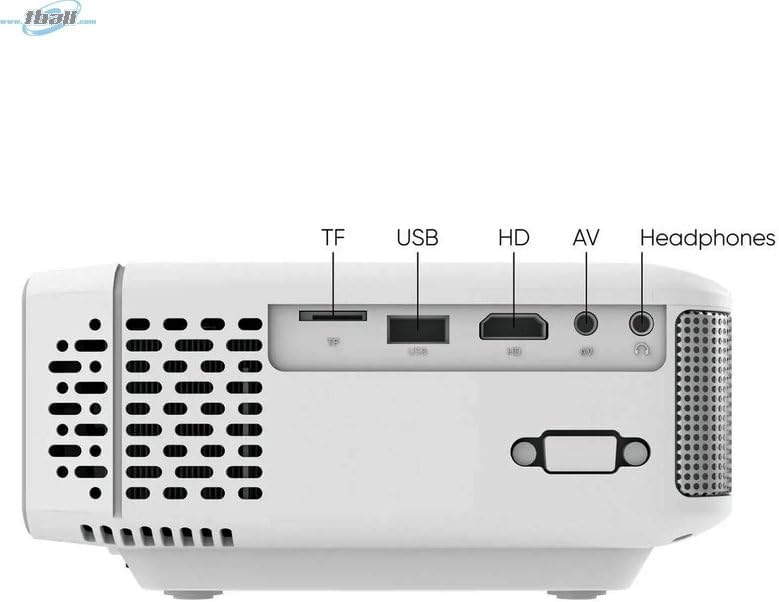
Immaġni: Ġenb view of the Tzumi 7796 projector highlighting its various input ports. From left to right, these include a TF card slot, a USB port, an HD (HDMI) port, an AV input, and a headphone jack. This side also features ventilation grilles.
Fuq View bil-Kontrolli

Immaġni: Fuq view of the Tzumi 7796 projector. This image shows the manual focus and keystone correction dials located near the lens. The central control panel features directional buttons (Up, Down, Left, Right), Home, Option, Back, Power, and Enter buttons for navigation and control.
Wara View b'Input tal-Enerġija

Immaġni: Wara view of the Tzumi 7796 projector. This view primarily shows the power input socket on the left side and additional ventilation grilles on the right side.
Gwida ta' Setup
1 Tqegħid
Poġġi l-proġettur fuq wiċċ stabbli u ċatt. Għal użu ottimali viewing, position the projector directly in front of your screen or wall. The ideal projection distance will vary based on the desired screen size. Ensure there is adequate space around the projector for ventilation.

Immaġni: This image illustrates the versatility of the Tzumi 7796 projector, showing it being used in both an indoor home setting and an outdoor movie night environment. This highlights its suitability for various entertainment scenarios.
2. Konnessjoni tal-Enerġija
- Connect the power adapter to the projector's power input port (refer to "Rear View with Power Input" image).
- Ipplaggja t-tarf l-ieħor tal-adapter tal-enerġija f'iżbokk tal-ħajt.
- Id-dawl indikatur tal-enerġija fuq il-proġettazzjoni għandu jixgħel.
3. Mezzi ta 'Konnessjoni
Il-proġettazzjoni tappoġġja diversi sorsi ta' input:
- HDMI: Connect your laptop, gaming console, or streaming device using an HDMI cable to the HD port.
- USB: Daħħal flash drive tal-USB fil-port tal-USB biex tilgħab il-midja files direttament.
- TA’: Use the provided AV cable to connect older devices like DVD players to the AV port.
- Karta TF: Insert a TF (MicroSD) card into the TF card slot to play media files.
- Wi-Fi: For wireless screen mirroring or streaming, connect the projector to your Wi-Fi network (see "Operating Instructions - Wi-Fi Connectivity").
4. Aġġustament tal-Fokus u l-Keystone
- Fokus: Dawwar il- FOCUS ring near the lens until the projected image is clear and sharp.
- Keystone: Jekk l-immaġni tidher trapeżojdali (usa' fil-parti ta' fuq jew ta' isfel), aġġusta l- KEYSTONE correction dial until the image is rectangular.
Istruzzjonijiet Operattivi
Tixgħel/Jitfi
- Qawwa Mixgħul: Agħfas il- Qawwa buttuna fuq il-pannell tal-kontroll tal-proġettazzjoni jew fuq il-kontroll remot.
- Itfi: Agħfas il- Qawwa button again. Confirm shutdown if prompted.
Għażla tas-Sors tal-Input
After powering on, the projector will display its main menu. To select an input source:
- Use the directional buttons on the projector or remote to navigate to the desired input (e.g., HDMI, USB, AV, TF Card, Wi-Fi).
- Agħfas il- Daħħal buttuna biex tikkonferma l-għażla tiegħek.
Konnettività Wi-Fi
To connect your projector to a Wi-Fi network for screen mirroring or online content:
- From the main menu, navigate to the Wi-Fi or Settings tan-Netwerk għażla.
- Agħżel Setup tal-Wi-Fi and choose your desired network from the list.
- Daħħal il-password tal-Wi-Fi billi tuża t-tastiera fuq l-iskrin u kkonferma.
- Once connected, you can use screen mirroring features (e.g., Miracast, AirPlay) or access built-in smart features if available.
Settings tal-awdjo
The projector features two built-in 3W speakers. You can also connect external audio devices:
- Kelliema Mibnija: Audio will play automatically through the projector's speakers. Adjust volume using the remote or control panel.
- Headphones/External Speakers: Connect headphones or external speakers to the 3.5mm headphone jack on the side of the projector. This will typically mute the built-in speakers.
Manutenzjoni
Tindif tal-Lenti
To maintain optimal image quality, keep the projector lens clean.
- Uża drapp artab u mingħajr suf iddisinjat speċifikament għal lentijiet ottiċi.
- Imsaħ il-lenti bil-mod b'moviment ċirkolari.
- Avoid using abrasive cleaners or excessive pressure, which can scratch the lens.
Kura Ġenerali u Ħażna
- Keep the projector in a cool, dry place when not in use.
- Protect the projector from dust and extreme temperatures.
- Do not expose the projector to direct sunlight for extended periods.
- Naddaf il-parti ta' barraasing b'artab, damp drapp. Evita kimiċi ħarxa.
Issolvi l-problemi
| Problema | Kawża Possibbli | Soluzzjoni |
|---|---|---|
| L-ebda immaġni pproġettata |
|
|
| L-immaġni hija mċajpra |
|
|
| L-immaġni hija trapezojdali |
|
|
| L-ebda ħoss |
|
|
| Kwistjonijiet ta 'konnessjoni Wi-Fi |
|
|
Speċifikazzjonijiet
- Mudell: 7796
- Ditta: Tzumi
- Riżoluzzjoni tal-wiri: 1920 x 1080 (Full HD)
- Luminożità: 1600 Lumens
- Teknoloġija tal-Konnettività: HDMI, Wi-Fi, USB, AV, TF Card
- Karatteristika Speċjali: Portabbli
- Użi Rakkomandati: Home entertainment, Outdoor movie nights, Business presentations
- Piż tal-oġġett: 3 liri
- Dimensjonijiet tal-pakkett: 11 x 9 x 5 pulzieri
- Kelliema Mibnija: Żewġ kelliema ta' 3W
Garanzija u Appoġġ
For warranty information and technical support, please refer to the documentation included with your purchase or visit the official Tzumi websit. Żomm il-prova tax-xiri tiegħek għal talbiet ta' garanzija.
Appoġġ onlajn: Visit the Tzumi Store on Amazon