
Introduzzjoni
The Poly DA75 is a versatile USB-A/USB-C digital adapter designed to connect Poly Quick Disconnect (QD) headsets to computers. It ensures clear audio quality for call center environments, supporting both USB-A and USB-C connections for compatibility with various systems. This adapter is engineered to work seamlessly with platforms such as Avaya, Genesys, and Cisco, providing a reliable audio solution for professionals.
Il-karatteristiċi ewlenin jinkludu:
- Konnettività Universali: Equipped with both USB-A and USB-C connectors on the cable for broad compatibility with new and legacy equipment.
- Intelligent Headset Recognition: Automatically adjusts audio performance to the specific Poly Quick Disconnect headset for optimized call quality.
- Acoustic Protection: Incorporates features to manage safe volume levels, protecting user hearing.
- Integrazzjoni tal-Pjattaforma: Fully compatible with leading call center platforms including Avaya, Genesys, and Cisco.
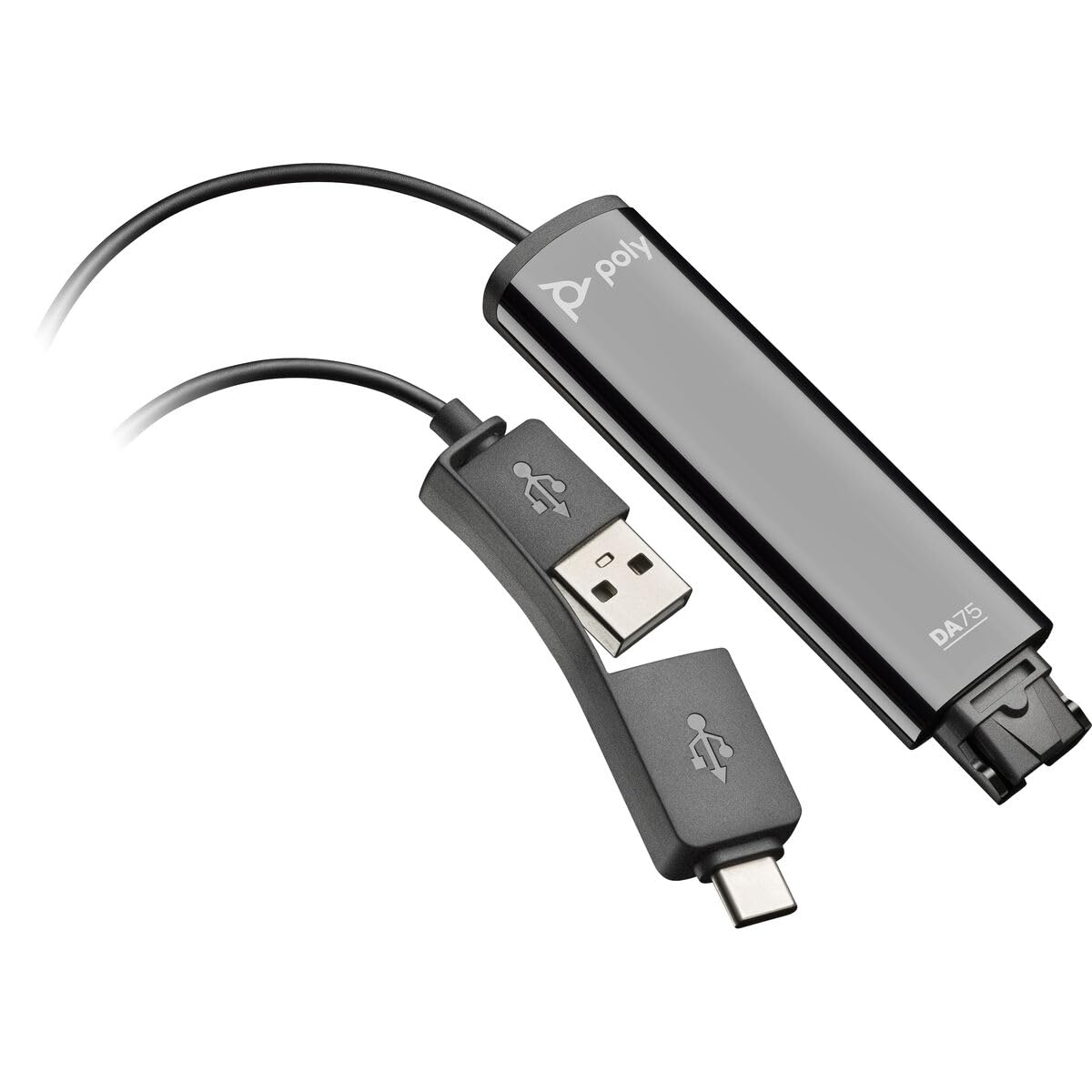
Image: The Poly DA75 USB-A/USB-C Digital Adapter, showing its dual USB-A and USB-C connectors and the Quick Disconnect port for headsets.
X'hemm fil-Kaxxa
The Poly DA75 package typically includes the following items:
- Poly DA75 USB-A/USB-C Digital Adapter
- Dokumentazzjoni (Gwida ta' Bidu Mgħaġġel, Informazzjoni dwar is-Sigurtà)
Note: Headsets are sold separately and are not included with the DA75 adapter.
Setup
Follow these steps to set up your Poly DA75 Digital Adapter:
- Qabbad il-Headset: Connect your Poly Quick Disconnect (QD) headset to the QD port on the Poly DA75 adapter. Ensure the connection is secure.
- Qabbad mal-Kompjuter:
- If your computer has a USB-A port, use the USB-A connector on the DA75 cable.
- If your computer has a USB-C port, use the USB-C connector on the DA75 cable.
Plug the appropriate USB connector into an available USB port on your computer.
- Installazzjoni tas-sewwieq: The DA75 is a plug-and-play device. Your operating system (Windows, macOS) should automatically detect the device and install the necessary drivers. This process may take a few moments.
- Ivverifika r-Rikonoxximent tal-Apparat:
- Windows: Mur fuq Settings > Sistema > Ħoss or Control Panel > Ħoss. The Poly DA75 should appear as an audio input and output device.
- macOS: Mur fuq System Settings > Sound. The Poly DA75 should appear as an input and output device.
Select the Poly DA75 as your default communication device for both playback and recording.
- Konfigurazzjoni tas-Softwer: If you are using communication software (e.g., Avaya, Genesys, Cisco, Microsoft Teams, Zoom), ensure that the Poly DA75 is selected as the audio device within the application's settings.
Istruzzjonijiet Operattivi
The Poly DA75 adapter facilitates audio communication through your connected Poly QD headset. Its operation is primarily managed through your computer's operating system and communication software.
- Tagħmel/Rċeviment Sejħiet: Use your communication software to initiate or answer calls. The audio will be routed through your connected Poly QD headset via the DA75 adapter.
- Kontroll tal-Volum: Adjust the listening volume using your computer's system volume controls or the volume controls within your communication application.
- Mute tal-mikrofonu: Mute and unmute your microphone using the controls provided by your communication software.
- Ottimizzazzjoni tal-Awdjo: The DA75 automatically optimizes audio for your specific Poly QD headset. No manual adjustments are typically required for audio profiles.
Manutenzjoni
To ensure the longevity and optimal performance of your Poly DA75 Digital Adapter, follow these maintenance guidelines:
- Tindif: Gently wipe the adapter with a soft, dry, anti-static cloth. Do not use liquid cleaners or abrasive materials.
- Ħażna: Aħżen l-adapter f'post frisk u niexef 'il bogħod mix-xemx diretta u minn temperaturi estremi.
- Immaniġġjar: Avoid bending or twisting the cable excessively, especially near the connectors, to prevent internal damage.
- Konnettività: Ensure the Quick Disconnect (QD) connection and USB connections are clean and free of debris before connecting.
Issolvi l-problemi
If you encounter issues with your Poly DA75 Digital Adapter, refer to the following troubleshooting steps:
| Problema | Kawża Possibbli | Soluzzjoni |
|---|---|---|
| L-ebda awdjo mill-headset |
|
|
| Mikrofonu mhux qed jaħdem |
|
|
| Adapter not recognized by computer |
|
|
Speċifikazzjonijiet
| Karatteristika | Dettall |
|---|---|
| Numru tal-Mudell | 218266-01 |
| Brand | POLY |
| Tip ta' Konnettur | USB-A, USB-C (dual connector) |
| Apparati Kompatibbli | Poly Quick Disconnect (QD) Headsets |
| Użi Speċifiċi | PC, Call Center Platforms (Avaya, Genesys, Cisco) |
| Kulur | Iswed |
| Dimensjonijiet tal-oġġett (L x W x H) | 0.98 x 0.39 x 2.95 pulzieri |
| Piż tal-oġġett | 30 Gramm |
| Numru ta' Portijiet | 2 (USB-A/USB-C to QD) |
| UPC | 197029650054, 017229175112 |
Garanzija u Appoġġ
Informazzjoni dwar il-garanzija: The Poly DA75 Digital Adapter comes with a Garanzija limitata ta' sentejn mill-manifatturDin il-garanzija tkopri difetti fil-materjali u fix-xogħol taħt użu normali. Jekk jogħġbok żomm il-prova tax-xiri tiegħek għal talbiet ta' garanzija.
Appoġġ Tekniku: For technical assistance, product inquiries, or warranty service, please contact Poly customer support. Visit the official Poly website for the most up-to-date support contact information, FAQs, and additional resources.
Riżorsi onlajn: Appoġġ Poly Websit