
1. Introduzzjoni
This manual provides essential information for the safe and efficient use of your Lenovo ThinkPad X1 Yoga Gen 5. Please read this manual thoroughly before using your device to ensure proper setup and operation. Keep this manual for future reference.

Figure 1: Lenovo ThinkPad X1 Yoga Gen 5 in laptop mode.
2. Setup
2.1 Il-Ftuħ tal-Kaxxa u l-Inizzjali Tixgħel
Carefully remove your ThinkPad X1 Yoga Gen 5 and its accessories from the packaging. The box typically includes the laptop, a power adapter, and a stylus.
- Qabbad l-adapter tal-enerġija mal-laptop u ma' sokit tal-enerġija.
- Agħfas il-buttuna tal-qawwa biex tixgħel l-apparat.
- Follow the on-screen instructions to complete the initial Windows 10 Pro setup.
2.2 Port Overview
The ThinkPad X1 Yoga Gen 5 features a variety of ports for connectivity.

Figure 2: Left side ports including Thunderbolt and HDMI.
- In-naħa tax-xellug: Two Thunderbolt ports (USB-C compatible), one USB-A 3.2 Gen 1 port, and one HDMI 2.0 port.

Figure 3: Right side ports including USB-A and audio jack.
- In-naħa tal-lemin: One USB-A 3.2 Gen 1 port and a combined headphone/microphone jack.
3. Tħaddim tat-Tagħmir Tiegħek
3.1 Modi Konvertibbli
The ThinkPad X1 Yoga Gen 5 is a 2-in-1 convertible laptop, allowing it to be used in various modes:
- Modalità tal-Laptop: Użu standard ta' laptop bit-tastiera u t-touchpad.
- Modalità Tinda: Ideali għal preżentazzjonijiet jew għall-wiri tal-midja.
- Modalità Stand: Screen facing outwards, keyboard tucked away.
- Modalità Pillola: Screen folded back completely for touch-only interaction.
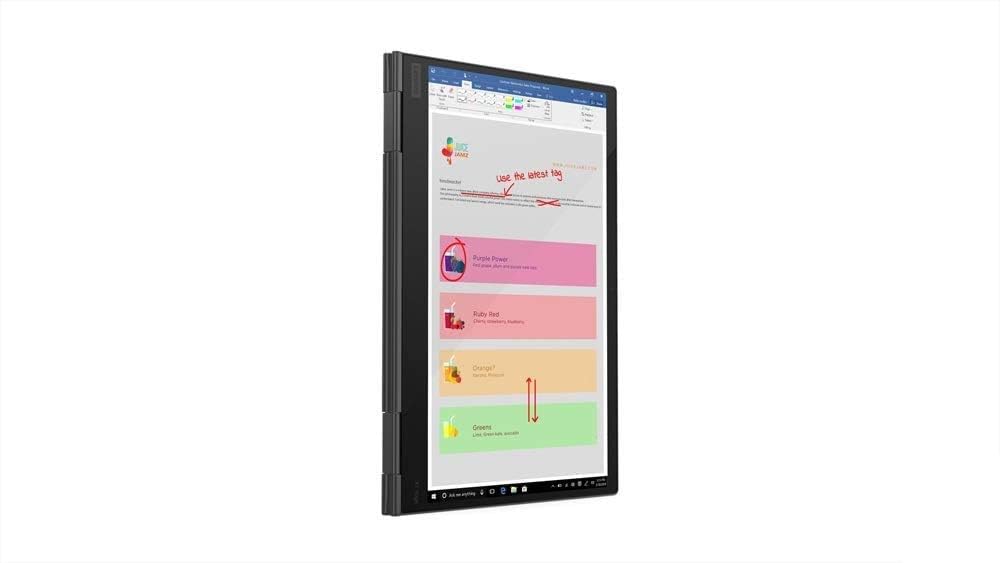
Figure 4: ThinkPad X1 Yoga Gen 5 in tablet mode.
3.2 Touchscreen and PenPro
The 14.0" FHD (1920 x 1080) touchscreen supports multi-touch gestures and input from the included PenPro stylus. The screen features Privacy Guard for enhanced visual security and an IR camera for facial recognition login.
3.3 Keyboard and Fingerprint Reader
The backlit keyboard provides comfortable typing in various lighting conditions. The integrated fingerprint reader allows for secure and quick login.
4. Manutenzjoni
4.1 Tindif
- Uża drapp ratba u mingħajr ħelu ftit dampLaħlaħ bl-ilma jew b'tindif tal-iskrin biex tnaddaf id-displej. Evita kimiċi ħarxa.
- Wipe the keyboard and chassis with a soft, dry cloth.
4.2 Sistema tat-tkessiħ
The laptop is engineered with dual fans and rear venting to maintain optimal operating temperatures. Ensure that the vents are not obstructed to prevent overheating.

Figure 5: Rear ventilation for cooling.
5 Issolvi l-problemi
If you encounter issues with your ThinkPad X1 Yoga Gen 5, consider the following basic troubleshooting steps:
- Ebda Qawwa: Kun żgur li l-adapter tal-enerġija huwa konness sew u li s-sokit jaħdem sew. Ipprova sokit tal-enerġija ieħor.
- Kwistjonijiet tal-Wiri: Restart the laptop. If using an external monitor, check the cable connections.
- Prestazzjoni bil-mod: Close unnecessary applications. Check for system updates.
- L-iskrin tat-touchscreen ma jirrispondix: Erġa' ibda l-apparat. Kun żgur li l-iskrin ikun nadif u ħieles minn debris.
Għal kwistjonijiet aktar kumplessi, irreferi għall-appoġġ ta' Lenovo websit jew ikkuntattja lis-servizz tal-konsumatur.
6. Speċifikazzjonijiet
| Karatteristika | Speċifikazzjoni |
|---|---|
| Isem tal-Mudell | Lenovo ThinkPad X1 Yoga Gen 5 |
| Daqs tal-Iskrin | 14 Pulzier |
| Riżoluzzjoni tal-Iskrin | 1920 x 1080 pixel (FHD) |
| Proċessur | Intel Core i7-10510U (1.8 GHz) |
| RAM | 16 GB DDR4 |
| Hard Drive | SSD ta' 512 GB (PCIE x 4) |
| Koproċessur tal-Grafika | Grafika Intel UHD (Integrata) |
| Sistema Operattiva | Windows 10 Pro |
| Karatteristiċi Speċjali | Backlit Keyboard, Fingerprint Reader, Touchscreen, Privacy Guard |
| Tip bla fili | Bluetooth |
| Piż tal-oġġett | 3.24 liri |
| Kulur | Iswed |
| Portijiet | 2x Thunderbolt, 2x USB-A 3.2 Gen 1, 1x HDMI 2.0, 1x Audio Jack |
7. Garanzija u Appoġġ
7.1 Informazzjoni dwar Garanzija
Għal informazzjoni dettaljata dwar il-garanzija, jekk jogħġbok irreferi għad-dokumentazzjoni inkluża mal-prodott tiegħek jew żur is-sit uffiċjali tal-appoġġ ta' Lenovo. website. Optional protection plans may be available for extended coverage.
7.2 Appoġġ għall-Klijent
If you require further assistance or have questions not covered in this manual, please visit the official Lenovo support website or contact their customer service. You can find contact details and resources at www.lenovo.com/support.