
Introduzzjoni
This manual provides detailed instructions for the installation, operation, and maintenance of your Xigmatek Aquarius Plus Black ATX PC Case. Please read this manual thoroughly before beginning installation to ensure proper setup and safe use of your new PC case.
The Xigmatek Aquarius Plus Black is a mid-tower gaming PC case designed to accommodate ATX, Micro-ATX, and Mini-ITX motherboards. It features excellent cooling potential with support for up to 10 x 120mm fans, including 7 pre-installed ARGB 120mm AY120 fans. The case also offers ample space for a 360mm graphics card, a 158mm CPU cooler, and includes 4 drive bays (2 x 3.5" and 2 x 2.5"/3.5"). Its aesthetic design includes two seamless tempered glass panels and three dust filters for protection.
Informazzjoni dwar is-Sigurtà
- Dejjem skonnettja l-provvista tal-enerġija mis-sokit tal-ħajt qabel ma tinstalla jew tneħħi xi komponenti.
- Immaniġġja l-komponenti kollha b'attenzjoni biex tevita ħsara minn skariku elettrostatiku (ESD). Ikkunsidra li tuża ċinga tal-polz antistatika.
- Avoid placing the PC case in direct sunlight, near heat sources, or in areas with high humidity.
- Kun żgur li jkun hemm ventilazzjoni xierqa madwar il-kaxxa biex tevita li tissaħħan iżżejjed.
- Żomm il-partijiet żgħar u l-materjali tal-ippakkjar 'il bogħod mit-tfal.
- Do not attempt to modify the case structure. Unauthorized modifications may void your warranty and pose safety risks.
Kontenut tal-Pakkett
Ivverifika li l-oġġetti kollha huma preżenti fil-pakkett:
- Xigmatek Aquarius Plus Black ATX PC Case
- 7 x 120mm ARGB AY120 Fans (pre-installed)
- Accessory kit (screws, standoffs, cable ties)
- Manwal għall-Utent (dan id-dokument)
Karatteristiċi
- Disinn ta' Nofs it-Torri: Jappoġġja motherboards ATX, Micro-ATX, u Mini-ITX.
- Tkessiħ Avvanzat: Pre-installed with 7 x 120mm ARGB AY120 fans; supports up to 10 x 120mm fans.
- Pannelli tal-Ħġieġ Ittemprat: Two seamless tempered glass panels for a clear view tal-komponenti interni.
- Ample Ħażna: 4 drive bays (2 x 3.5" HDD, 2 x 2.5"/3.5" SSD/HDD).
- Spazju għall-Komponenti: Jappoġġja karti grafiċi sa 360mm u apparat li jkessaħ is-CPU sa 158mm.
- Filtrazzjoni tat-Trab: Three dust filters included to protect internal components.
- I/O ta' quddiem: 1 x USB 2.0, 3 x USB 3.0 ports.
Setup u Installazzjoni
Follow these steps to install your PC components into the Xigmatek Aquarius Plus case.
1. Ipprepara l-Każ
Carefully remove the tempered glass side panels by unscrewing the thumb screws at the rear of the case. Place the panels on a soft, flat surface to prevent scratches.

Image: The bare chassis of the Xigmatek Aquarius Plus, showing its internal structure before component installation.
2. Install the Motherboard
- Identify the correct standoff positions for your ATX, Micro-ATX, or Mini-ITX motherboard. The case may have pre-installed standoffs or require you to install them using the provided accessory kit.
- Place the motherboard I/O shield into the rear opening of the case.
- Carefully align your motherboard with the standoffs and I/O shield, then gently lower it into place.
- Secure the motherboard with the appropriate screws from the accessory kit. Do not overtighten.

Immaġni: Interna view of the Xigmatek Aquarius Plus case, illustrating the motherboard tray and fan placement.
3. Install Storage Drives
The case supports 2 x 3.5" HDDs and 2 x 2.5"/3.5" SSDs/HDDs.
- Locate the drive bays. Typically, 3.5" bays are found in a cage near the power supply shroud, and 2.5" mounts are on the back of the motherboard tray.
- For 3.5" drives, slide the drive into the bay and secure it with screws.
- For 2.5" drives, mount them to the designated trays or screw points on the motherboard tray.
4. Install the Power Supply Unit (PSU)
The Xigmatek Aquarius Plus supports bottom-mounted PSUs.
- Żerżaq il-PSU fil-kompartiment apposta għalih fil-qiegħ ta' wara tal-kaxxa.
- Waħħal il-PSU mal-kaxxa bil-viti minn wara.
- Għaddi l-kejbils tal-enerġija meħtieġa mill-qtugħ tal-immaniġġjar tal-kejbils sal-motherboard u komponenti oħra.
5. Install Expansion Cards (e.g., Graphics Card)
The case has 4 expansion slots.
- Neħħi l-għata tas-slott ta' espansjoni meħtieġa minn wara tal-kaxxa.
- Insert your graphics card or other expansion card into the appropriate PCIe slot on your motherboard.
- Waħħal il-karta mal-kaxxa b'kamin.
6. Connect Front I/O Cables
Connect the front panel cables (USB 2.0, USB 3.0, HD Audio, Power Switch, Reset Switch, Power LED, HDD LED) to their corresponding headers on your motherboard. Refer to your motherboard manual for exact header locations.
7. Ġestjoni tal-Kejbil
Uża l-qtugħ tal-immaniġġjar tal-kejbil u l-punti ta' rbit wara t-trej tal-motherboard biex tgħaddi u twaħħal il-kejbils. Dan itejjeb il-fluss tal-arja u l-estetika.
8. Reattach Panels
Once all components are installed and cables are managed, carefully reattach the tempered glass side panels and secure them with the thumb screws.
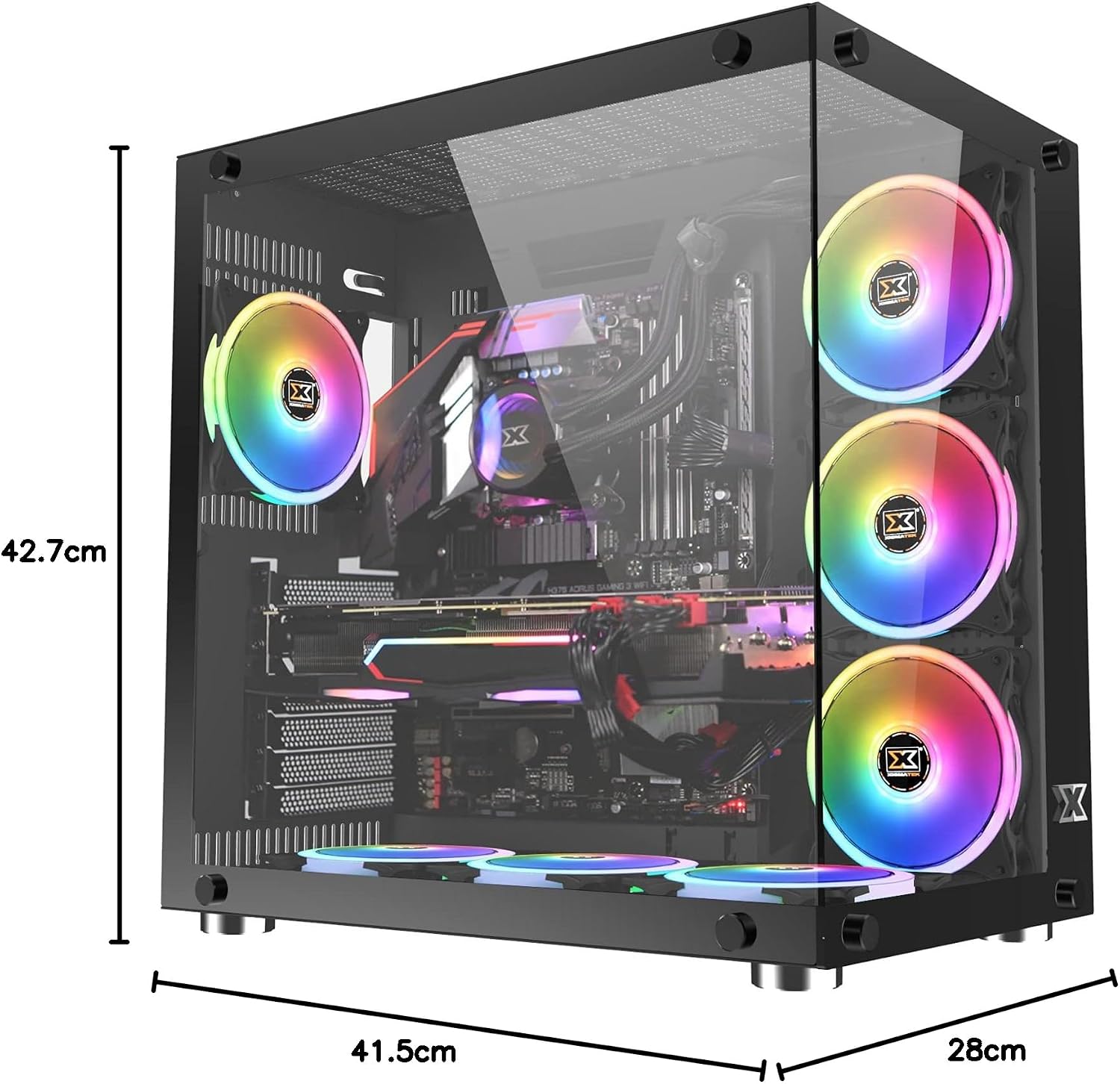
Image: The Xigmatek Aquarius Plus case fully assembled with internal components, showcasing its dimensions (41.5cm D x 28cm W x 42.7cm H).
Istruzzjonijiet Operattivi
After successful installation, connect your peripherals (monitor, keyboard, mouse) and power cable to the PSU. Press the power button on the front panel to start your system.
ARGB Fan Control
The pre-installed ARGB fans are typically connected to a fan controller or directly to an ARGB header on your motherboard. Refer to your motherboard's manual or the fan controller's instructions for details on how to customize the lighting effects and fan speeds.
Manutenzjoni
Manutenzjoni regolari tgħin biex tiżgura prestazzjoni ottimali u lonġevità tal-komponenti tal-PC tiegħek.
- Filtri tat-Trab: The Xigmatek Aquarius Plus includes three dust filters. Regularly remove and clean these filters to prevent dust buildup inside the case. Use compressed air or a soft brush.
- Tindif Intern: Periodically open the case and use compressed air to remove dust from fans, heatsinks, and other components. Ensure the system is powered off and unplugged before cleaning.
- Pannelli tal-Ħġieġ Ittemprat: Clean the tempered glass panels with a soft, lint-free cloth and a glass cleaner designed for electronics. Avoid abrasive materials.
Issolvi l-problemi
Jekk tiltaqa' ma' problemi, ikkunsidra l-passi komuni li ġejjin għas-soluzzjoni tal-problemi:
- Is-Sistema Mhux Tixgħel:
- Iċċekkja jekk il-kejbil tal-enerġija huwiex imqabbad sew mal-PSU u mas-sokit tal-ħajt.
- Kun żgur li s-swiċċ tal-PSU jkun fil-pożizzjoni 'ON'.
- Ivverifika li l-kejbil tas-swiċċ tal-enerġija tal-pannell ta' quddiem huwa konness sew mal-header tal-motherboard.
- Confirm all internal power cables (24-pin ATX, CPU, GPU) are properly seated.
- Il-Fannijiet Mhux Iduru/L-ARGB Mhux Jixgħel:
- Iċċekkja l-konnessjonijiet tal-enerġija tal-fann mal-motherboard jew mal-kontrollur tal-fann.
- Verify ARGB connections to the motherboard or controller.
- Ensure fan controller is powered (if applicable).
- Portijiet USB ma Jaħdmux:
- Confirm the front panel USB cables are correctly connected to the motherboard's USB headers.
For more complex issues, consult the manuals for your individual PC components (motherboard, GPU, PSU) or contact Xigmatek customer support.
Speċifikazzjonijiet
| Isem tal-Mudell | Aquarius Plus Black |
| Numru tal-Mudell | EN46423 |
| Tip ta' Każ | Nofs it-Torri |
| Kompatibbiltà tal-motherboard | ATX, Mikro-ATX, Mini-ITX |
| Dimensjonijiet (D x W x H) | 41.5 ċm x 28 ċm x 42.7 ċm |
| Piż | 7 kg |
| Materjal | Ħġieġ ittemprat, Azzar |
| Slots ta 'Espansjoni | 4 |
| Drive Bays | 2 x 3.5" HDD, 2 x 2.5"/3.5" SSD/HDD |
| Fannijiet installati minn qabel | 7 x 120mm ARGB AY120 Fans |
| Appoġġ Massimu tal-Fann | Sa 10 x 120mm fannijiet |
| Max GPU Tul | 360 mm |
| Max CPU Cooler Għoli | 158 mm |
| Immuntar tal-PSU | Qiegħ |
| Portijiet I / O ta 'quddiem | 1x USB 2.0, 3x USB 3.0 |
| Metodu tat-tkessiħ | Arja |
| Dawl | RGB (on fans) |
Garanzija u Appoġġ
For warranty information and technical support, please refer to the official Xigmatek webis-sit jew ikkuntattja lill-bejjiegħ lokali tiegħek. Żomm il-prova tax-xiri tiegħek għal talbiet ta' garanzija.