
BirdDog BD-BDPF120
BirdDog PF120 Full HD NDI 20x Box Camera User Manual
Model: BD-BDPF120
1. Introduzzjoni
The BirdDog PF120 is a high-performance Full HD NDI box camera designed for professional video production environments. It features an Exmor R back-illuminated sensor, 20x optical zoom, and a full color matrix, all housed within a durable all-metal chassis. This manual provides essential information for the proper setup, operation, and maintenance of your PF120 camera.
2. Kontenut tal-Pakkett
Jekk jogħġbok ivverifika li l-oġġetti kollha elenkati hawn taħt huma inklużi fil-pakkett tiegħek. Jekk xi oġġetti huma nieqsa jew bil-ħsara, ikkuntattja lill-bejjiegħ tiegħek immedjatament.
- BirdDog PF120 Full HD NDI 20x Box Camera
- Adapter tal-Enerġija (DC 12V)
- Kap tal-Lenti
- Dokumentazzjoni (Gwida ta' Bidu Mgħaġġel, Informazzjoni dwar is-Sigurtà)
3. Prodott Aktarview
The BirdDog PF120 is engineered for versatility and robust performance. Key features include:
- Full NDI support for seamless integration into IP workflows.
- 20x optical zoom for detailed close-ups.
- Exmor R back-illuminated sensor for superior low-light performance.
- Durable all-metal housing.
- Multiple connectivity options including HDMI, NDI/PoE, RS-232, and USB2.0.
3.1 Kamera Views u Komponenti

Figura 3.1: In-naħa ta' quddiem view of the BirdDog PF120 camera, showcasing the lens and the BirdDog logo on the side panel.
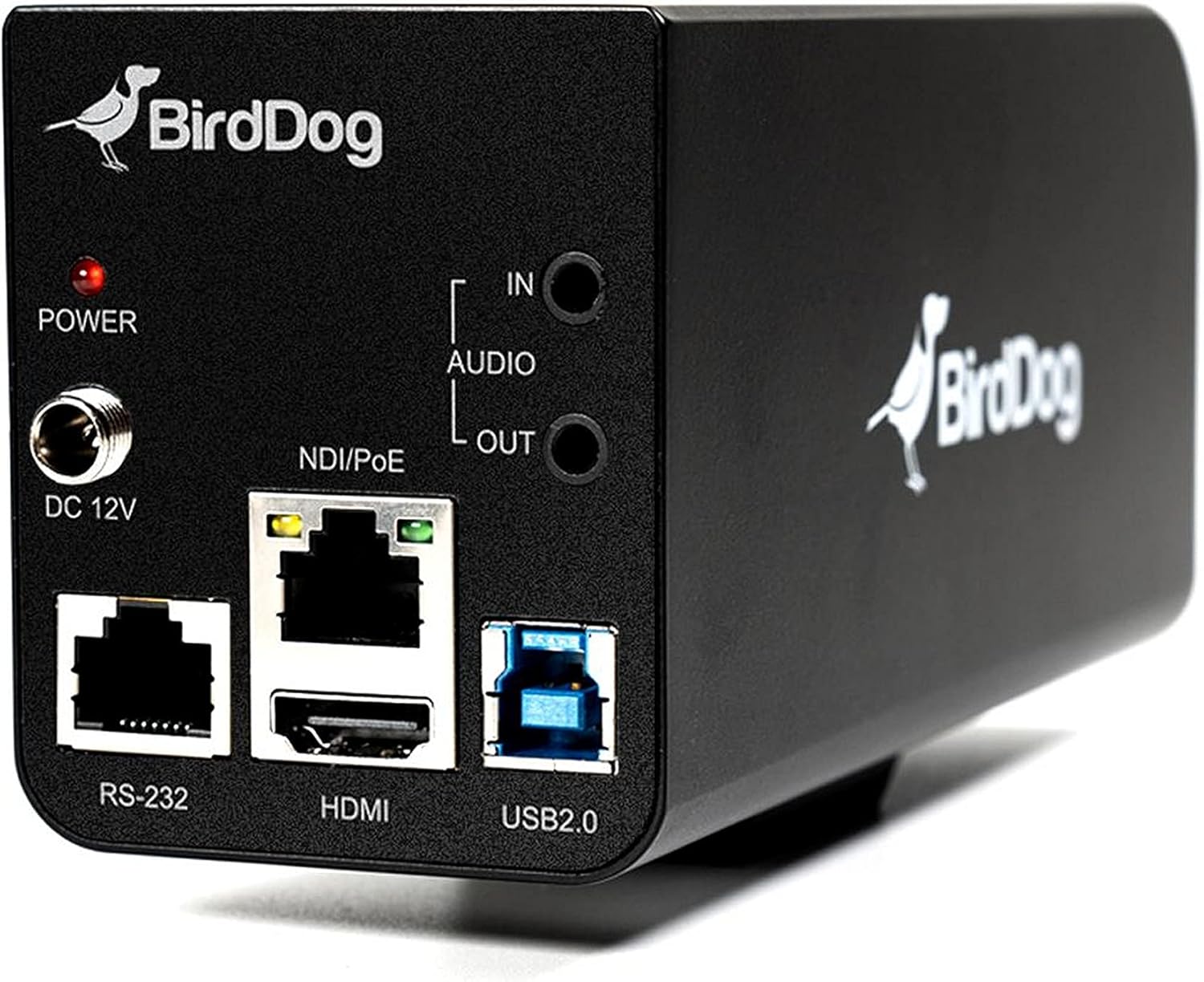
Figura 3.2: Rear panel of the BirdDog PF120, displaying the power input (DC 12V), audio input/output, NDI/PoE port, HDMI output, RS-232 port, and USB2.0 port.
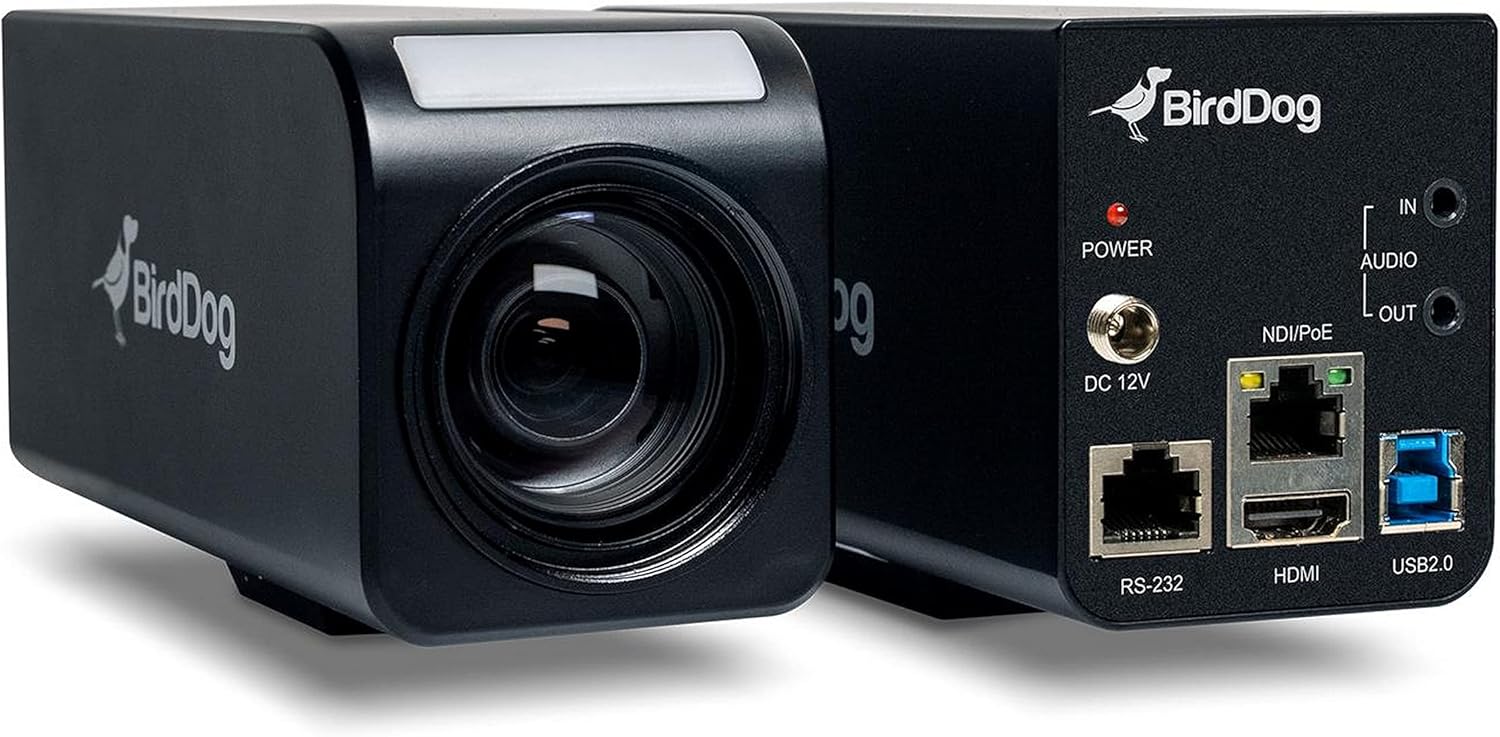
Figura 3.3: Magħquda view of the BirdDog PF120, showing both the front lens assembly and the rear connectivity panel.

Figura 3.4: Fuq view of the BirdDog PF120 camera, highlighting the sleek design and BirdDog branding.
4. Setup
4.1 Tixgħel
- Connect the supplied DC 12V power adapter to the "DC 12V" port on the rear of the camera.
- Ipplaggja l-adapter ta 'l-enerġija fi żbokk ta' l-elettriku adattat.
- Alternatively, if using a PoE-enabled network switch, connect an Ethernet cable to the "NDI/PoE" port. The camera will power on via Power over Ethernet.
4.2 Network Connection (NDI)
- Connect an Ethernet cable from the "NDI/PoE" port on the camera to your network switch or router.
- Ensure your network is configured to support NDI protocols.
- The camera will obtain an IP address automatically via DHCP. For static IP configuration, refer to the BirdDog Central application or web interface.
4.3 Output tal-Vidjo
- NDI Output: The primary video output is via NDI over the Ethernet connection.
- Ħruġ HDMI: Connect an HDMI cable from the "HDMI" port on the camera to a monitor or video switcher for direct video monitoring.
5. It-tħaddim tal-Kamera
5.1 Aċċess għall- Web Interface
- Once connected to the network, use the BirdDog Central application or an IP scanner to discover the camera's IP address.
- Iftaħ a web il-browser u daħħal l-indirizz IP tal-kamera biex taċċessaha web interface.
- Mill- web interface, you can configure video settings, network parameters, and control camera functions.
5.2 Kontroll tal-Kamera
The PF120 can be controlled via:
- NDI Tools: Utilize NewTek NDI Tools (e.g., NDI Studio Monitor) for basic control.
- BirdDog Central / Cam Control: BirdDog's dedicated software provides comprehensive control over camera settings, including zoom, focus, iris, and color matrix.
- RS-232: Connect a compatible serial controller to the RS-232 port for hardware control.
- Kontroll mill-bogħod: The camera supports remote control methods as specified in the product documentation.
5.3 Zoom u Focus
The PF120 features a 20x optical zoom lens. Zoom and focus adjustments are typically made through the web interface or compatible control software.
6. Manutenzjoni
- Tindif: Use a soft, dry cloth to clean the camera body. For the lens, use a specialized lens cleaning solution and microfiber cloth. Avoid abrasive cleaners.
- Aġġornamenti tal-Firmware: Periodically check the BirdDog website for firmware updates. Keeping the firmware updated ensures optimal performance and access to new features.
- Ħażna: When not in use for extended periods, store the camera in a cool, dry place, away from direct sunlight and extreme temperatures.
7 Issolvi l-problemi
7.1 Ebda Qawwa
- Kun żgur li l-adapter tal-enerġija huwa konness sew kemm mal-kamera kif ukoll ma' sokit tal-enerġija li jaħdem.
- If using PoE, verify that the Ethernet cable is connected to a PoE-enabled port on your switch and that the switch is providing power.
7.2 No NDI Signal
- Iċċekkja l-konnessjoni tal-kejbil Ethernet.
- Verify that the camera has obtained an IP address (check your router's DHCP client list or use BirdDog Central).
- Ensure your network firewall is not blocking NDI traffic.
- Confirm that NDI tools or software on your receiving device are correctly configured to discover NDI sources.
7.3 Kwistjonijiet tal-Kwalità tal-Immaġni
- Check lens for smudges or dust and clean if necessary.
- Adjust focus settings via the web interface or control software.
- Review exposure, white balance, and color matrix settings in the camera's web interface.
8. Speċifikazzjonijiet
| Karatteristika | Dettall |
|---|---|
| Numru tal-Mudell | BD-BDPF120 |
| Riżoluzzjoni tal-Qbid tal-Vidjo | 1080p |
| Riżoluzzjoni tal-Vidjo Effettiva | 720 Pixel |
| Zoom ottiku | 20x |
| Zoom Tip | Digital Zoom, Optical Zoom |
| Teknoloġija tal-Konnettività | Bil-fili |
| Protokoll tal-Konnettività | Wi-Fi (for control/management, NDI is primary video) |
| Metodu ta' Kontroll | Remote, Iris, RS-232 |
| Sors tal-Enerġija | AC/DC, PoE |
| Wattage | 5 watt |
| Materjal | Metall |
| Dimensjonijiet tal-oġġett (L x W x H) | 9.9 x 9 x 3.6 pulzieri |
| Piż tal-oġġett | 2.94 liri |
| Tip ta 'Immuntar | Wall Mount (as per spec, but typically box cameras are versatile) |
| Klassifikazzjoni tal-Protezzjoni Internazzjonali | IP65 |
| Teknoloġija tad-Dawl Baxx | Kulur bil-lejl |
9. Garanzija u Appoġġ
For warranty information and technical support, please refer to the official BirdDog website or contact your authorized BirdDog reseller. Keep your proof of purchase for warranty claims.
Uffiċjali ta' BirdDog Websit: www.bird-dog.tv
Ask a question about this manual
Ask about setup, troubleshooting, compatibility, parts, safety, or missing instructions. Manuals+ will review the question and use this page’s manual context to help answer it.