
1. Introduzzjoni
Thank you for choosing the AIYIMA A05 TPA3221 Power Amplifier. This compact 2.0 channel stereo amplifier is designed to deliver high-fidelity audio to passive speakers, featuring both Bluetooth and RCA input options. This manual provides detailed instructions for setup, operation, and maintenance to ensure optimal performance and longevity of your device.
2. Istruzzjonijiet tas-Sigurtà
- Provvista tal-Enerġija: Use only the specified power adapter (DC 12-32V) to prevent damage. Ensure the power outlet voltage hija kompatibbli.
- Ventilazzjoni: Poġġi l- amplifier in a well-ventilated area. Do not block ventilation openings. Avoid placing it on soft surfaces that may obstruct airflow.
- Umdità: Keep the device away from water, humidity, and liquids. Do not operate with wet hands.
- Sħana: Avoid direct sunlight, heat sources, or extreme temperatures.
- Tindif: Skonnettja l-provvista tal-enerġija qabel it-tindif. Uża drapp artab u niexef. Tużax prodotti tat-tindif likwidi jew aerosol.
- Servizzi: Tippruvax issewwi jew tiżżarma l-unità int stess. Irreferi għal kull manutenzjoni f'idejn persunal kwalifikat.
- Tfal: Żomm fejn ma jintlaħaqx mit-tfal.
3. Kontenut tal-Pakkett
Jekk jogħġbok iċċekkja l-pakkett għall-oġġetti li ġejjin:
- AIYIMA A05 Bluetooth 5.0 Amplifier x 1
- Antenna Bluetooth x 1
- Manwal għall-Utent x 1
- Karta tal-garanzija x 1
- Adapter tal-Enerġija DC 32V x 1

Stampa 3.1: Contents of the AIYIMA A05 amppakkett ta' rinnovazzjoni, inkluż il- amplifier unit, Bluetooth antenna, user manual, warranty card, and power adapter.
4. Prodott Aktarview
4.1 Kontrolli ta' Front Panel
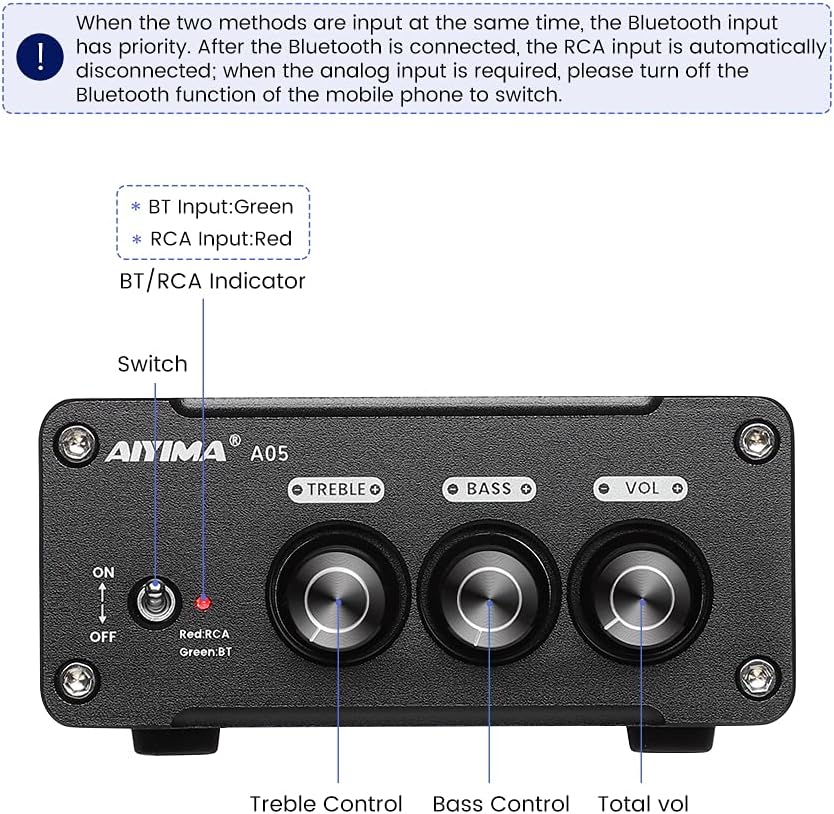
Stampa 4.1: Front panel of the AIYIMA A05 amplifier, showing the power switch, input indicator, treble, bass, and volume controls.
- Swiċċ tal-Enerġija (ON/OFF): Jaqleb il- ampqawwa lifier.
- BT/RCA Indicator: Displays the active input source. Green indicates Bluetooth (BT) input, Red indicates RCA input.
- Kontroll tat-Triple: Jaġġusta l-ħruġ tal-awdjo ta' frekwenza għolja.
- Kontroll tal-bass: Jaġġusta l-ħruġ tal-awdjo ta' frekwenza baxxa.
- Kontroll tal-Volum: Jaġġusta l-livell ġenerali tal-ħruġ tal-awdjo.

Stampa 4.2: Close-up view of the power switch and the BT/RCA input indicator on the front panel.

Stampa 4.3: Close-up view of the Treble, Bass, and Volume control knobs.
4.2 Konnessjonijiet tal-Panew ta' wara

Stampa 4.4: Rear panel of the AIYIMA A05 amplifier, showing the Bluetooth antenna port, RCA audio input, speaker outputs, and DC power input.
- ANT (Bluetooth Antenna Port): Connect the included Bluetooth antenna here for wireless audio reception.
- AUDIO IN (RCA Input): Connect audio sources (e.g., CD player, TV, DAC) using RCA cables.
- SPEAKER (Audio Output): Connect passive speakers using speaker wires. Ensure correct polarity (+ to + and - to -).
- DC 24-32V (Power Input): Connect the provided DC power adapter.
5. Istruzzjonijiet ta' Setup
Follow these steps to set up your AIYIMA A05 ampaktar ħaj:
- Qabbad l-Antenna Bluetooth: Screw the included Bluetooth antenna into the ANT port on the rear panel.
- Qabbad l-Ispeakers: Connect your passive speakers to the SPEAKER output terminals on the rear panel. Ensure the positive (+) terminal of the amplifier connects to the positive (+) terminal of the speaker, and the negative (-) terminal connects to the negative (-).
- Connect Audio Source (RCA): If using a wired audio source, connect it to the AUDIO IN (RCA) ports on the rear panel using appropriate RCA cables.
- Qabbad l-Enerġija: Connect the DC power adapter to the DC 24-32V input port on the rear panel, then plug the adapter into a wall outlet.
- Qawwa Mixgħul: Flip the power switch on the front panel to the "ON" position. The input indicator will light up.

Stampa 5.1: Il-pannell ta' wara tal- amplifier with Bluetooth antenna, RCA cables, speaker wires, and power adapter connected.
6. Istruzzjonijiet Operattivi
6.1 Tixgħel/Jitfi
Biex titħaddem il- amplifier, flip the front panel switch to the "ON" position. To power off, flip the switch to the "OFF" position.
6.2 Konnessjoni Bluetooth
- Tiżgura l- amplifier is powered on and the BT/RCA indicator is green, indicating Bluetooth mode. If it's red, ensure no RCA cable is connected or disconnect it.
- On your mobile device (phone, tablet, etc.), enable Bluetooth and search for available devices.
- Select "AIYIMA A05" from the list of devices to pair.
- Once paired, the indicator light will remain green, and you can play audio from your device through the ampaktar ħaj.
6.3 RCA Input Usage
- Connect your audio source to the RCA input ports on the rear panel.
- Tiżgura l- amplifier is powered on. The BT/RCA indicator should be red, indicating RCA input mode.
- If the indicator is green (Bluetooth mode), ensure Bluetooth is disconnected on any paired device, or turn off Bluetooth on your mobile device to switch to RCA input.
6.4 Adjusting Audio
- Volum: Rotate the "VOL" knob clockwise to increase volume and counter-clockwise to decrease.
- Treble: Rotate the "TREBLE" knob to adjust high-frequency sounds to your preference.
- Bass: Rotate the "BASS" knob to adjust low-frequency sounds to your preference.
7. Manutenzjoni
- Tindif: Disconnect the power adapter before cleaning. Use a soft, dry, lint-free cloth to wipe the surface of the amplifier. Do not use harsh chemicals or abrasive materials.
- Ħażna: If not in use for an extended period, store the amplifier f'post frisk u niexef, 'il bogħod mix-xemx diretta u minn temperaturi estremi.
- Konnessjonijiet: Iċċekkja perjodikament il-konnessjonijiet tal-kejbil kollha biex tiżgura li huma sikuri u ħielsa mill-korrużjoni.
8 Issolvi l-problemi
If you encounter issues with your AIYIMA A05 amplifer, jekk jogħġbok irreferi għall-problemi u s-soluzzjonijiet komuni li ġejjin:
| Problema | Kawża Possibbli | Soluzzjoni |
|---|---|---|
| Ebda output tal-ħoss |
|
|
| Distorted or buzzing sound |
|
|
| Il-Bluetooth mhux qed jgħaqqad |
|
|
| Loud noise/ticking on startup |
|
|
If the problem persists after trying these solutions, please contact AIYIMA customer support for further assistance.
9. Speċifikazzjonijiet

Stampa 9.1: Dimensions of the AIYIMA A05 amplifier: 107mm (4.2in) width, 87mm (3.4in) depth, 36mm (1.4in) height.
| Karatteristika | Speċifikazzjoni |
|---|---|
| Mudell | A05 |
| Qawwa tal-Ħruġ | 105 Watts (at 4 Ω) |
| Numru ta 'Kanali | 2.0 (Stereo) |
| Verżjoni Bluetooth | QCC3034 APTX Bluetooth 5.0 |
| Chipset | TPA3221 |
| Provvista Minima Voltage | 12 Volts (DC) |
| Provvista Massima Voltage | 32 Volts (DC) |
| Piż tal-oġġett | 500 Gramm |
| Dimensjonijiet (Approx.) | 107mm (W) x 87mm (P) x 36mm (H) |
10. Garanzija u Appoġġ
L-AIYIMA A05 amplifier comes with a warranty. Please refer to the included Warranty Card for specific terms and conditions. For technical support, troubleshooting assistance, or warranty claims, please contact AIYIMA customer service through the retailer where the product was purchased or visit the official AIYIMA websit.
Riżorsi onlajn: For additional information and support, you may visit the AIYIMA store page: AIYIMA Official Store