
Introduzzjoni
This manual provides detailed instructions for the operation and maintenance of your CHENFEC C50 16GB MP3 Player. Please read this guide thoroughly to ensure proper use and to maximize your device's functionality.
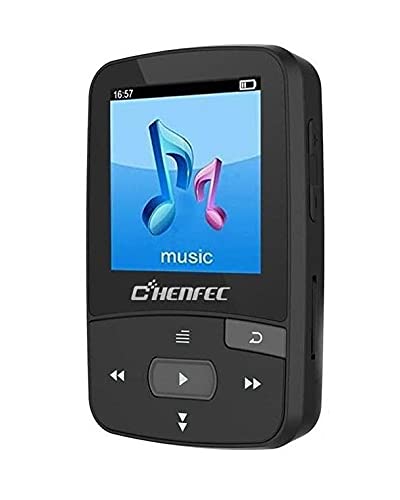
Image: The CHENFEC C50 MP3 Player, showcasing its compact design and rear clip.
Prodott Overview
Familiarize yourself with the various components and controls of your CHENFEC C50 MP3 Player.

Image: A detailed diagram of the CHENFEC C50 MP3 Player, indicating the display, volume controls, Micro SD card slot, return button, navigation buttons (last, play/pause, next, next song, last song).
- Wiri: Shows menus, track information, images, and e-book content.
- Volum 'il fuq/Niżżel: Jaġġusta l-livell tal-ħruġ tal-awdjo.
- Slott tal-Karta Mikro SD: Għall-espansjoni tal-ħażna sa 64GB.
- Buttuna tar-ritorn: Navigates back to the previous menu or screen.
- Navigation Buttons (Last Song, Next Song, Play/Pause): Controls media playback and menu navigation.
Setup
Kontenut tal-Pakkett
Qabel tibda, kun żgur li l-oġġetti kollha huma preżenti fil-pakkett:

Image: The CHENFEC C50 MP3 Player and its accessories, including wired earphones, a USB charging/data cable, and a user manual.
- CHENFEC C50 MP3 Player
- Iċċarġjar USB/Kejbil tad-Data
- Earphones bil-fili
- Manwal għall-Utent (dan id-dokument)
Iċċarġjar tal-Apparat
Connect the MP3 player to a computer's USB port or a compatible USB wall adapter using the provided USB cable. The battery indicator on the screen will show charging status. A full charge typically takes 2-3 hours.
Tixgħel/Jitfi
- To power on, press and hold the Power button (usually located on the side or top) until the screen illuminates.
- To power off, press and hold the Power button until the "Power Off" option appears, then select it.
Loading Music and Files
- Ħażna Interna: Connect the MP3 player to your computer using the USB cable. The device will appear as a removable disk. Drag and drop your music (MP3, WAV) and other supported files (TXT for e-books, images) into the appropriate folders on the device.
- Ħażna Esterna: Insert a Micro SD card (up to 64GB, not included) into the Micro SD card slot. You can then transfer files directly to the card via the player or by inserting the card into a computer's card reader.
Istruzzjonijiet Operattivi
Navigazzjoni Bażika
- Uża l- 'l fuq/' l isfel navigation buttons to scroll through menu options.
- Agħfas il- Play/Pawsa button to select an option or confirm an action.
- Agħfas il- Ritorn buttuna biex tmur lura għall-menu preċedenti.
Daqq tal-Mużika
- Mill-menù prinċipali, agħżel "Mużika".
- Browse your music library by artist, album, or all songs.
- Select a song and press Play/Pawsa biex tibda daqq.
- Użu L-Aħħar Kanzunetta u Kanzunetta li jmiss buttuni biex taqbeż il-binarji.
- Aġġusta l-volum billi tuża l- Volum 'il fuq/'l isfel buttuni.
Konnettività Bluetooth
The CHENFEC C50 supports Bluetooth for wireless audio output to compatible headphones or speakers.
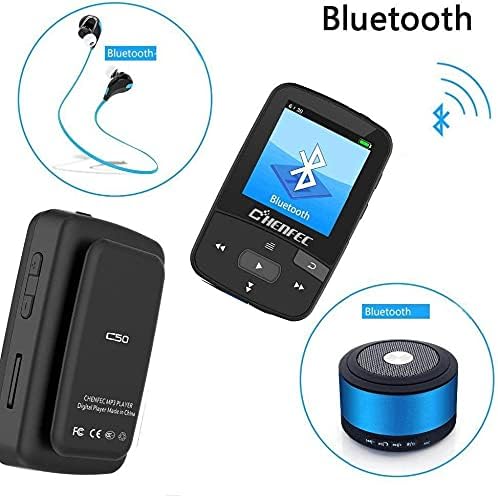
Image: The CHENFEC C50 MP3 Player demonstrating its Bluetooth connectivity with wireless headphones and a portable Bluetooth speaker.
- From the main menu, select "Bluetooth".
- Kun żgur li l-headphones jew l-ispiker Bluetooth tiegħek jinsabu fil-modalità ta' tqabbil.
- The player will scan for available devices. Select your device from the list.
- Once paired, audio will be routed wirelessly.
Radju FM
- Plug in wired earphones (they act as the antenna).
- Mill-menù prinċipali, agħżel "Radju FM".
- Use the navigation buttons to scan for stations or manually tune to a frequency (87.5MHz - 108MHz).
Reġistratur tal-Vuċi
- From the main menu, select "Voice Recorder".
- Choose "Start Recording" to begin.
- Agħfas Play/Pawsa biex tieqaf u tissejvja r-reġistrazzjoni.
- Recordings are saved in WAV or MP3 format.
E-book Reader
- Transfer TXT format e-books to the device's storage.
- From the main menu, select "E-book".
- Select the desired book to open and read.
Immaġni Viewer
- Transfer image files to the device's storage.
- From the main menu, select "Image Viewer".
- Browse and select images to view them on the display.
Settings
Access the "Settings" menu to customize various options:
- Lingwa: Select from 24 supported languages, including English, German, French, Italian, Dutch, Portuguese, Spanish, and Russian.
- Effetti tal-Ħsejjes: Choose from 7 different equalizer presets.
- Issettjar tal-wiri: Adjust brightness and backlight timeout.
- Data u Ħin: Issettja d-data u l-ħin kurrenti.
Manutenzjoni
- Żomm l-apparat niexef. Evita l-espożizzjoni għall-umdità jew likwidi.
- Naddaf l-apparat b'ċarruta ratba u niexfa. Tużax prodotti tat-tindif jew solventi li joborxu.
- Evita li twaqqa 'l-apparat jew suġġett għal impatti qawwija.
- Aħżen l-apparat f'post frisk u niexef meta ma jkunx qed jintuża.
- Tippruvax tiżżarma jew issewwi l-apparat int stess. Dan jannulla l-garanzija.
Issolvi l-problemi
| Problema | Soluzzjoni Possibbli |
|---|---|
| L-apparat ma jixgħelx. | Kun żgur li l-apparat huwa ċċarġjat kompletament. Qabbad ma' sors ta' enerġija u erġa' pprova. |
| L-ebda ħoss mill-earphones. | Check if earphones are properly plugged in. Verify volume level. Test with different earphones. |
| Ma nistax nikkonnettja permezz tal-Bluetooth. | Ensure Bluetooth is enabled on both the player and the receiving device. Make sure the receiving device is in pairing mode and within range. |
| Files not appearing on the device. | Tiżgura files are in supported formats (MP3, WAV for audio; TXT for e-books). Verify files were transferred to the correct folder. Check if the Micro SD card is properly inserted and recognized. |
| L-apparat jiffriża jew ma jibqax jirrispondi. | Press and hold the Power button for 10-15 seconds to force a restart. If the issue persists, try resetting the device (refer to the settings menu for a reset option, if available). |
Speċifikazzjonijiet
| Karatteristika | Dettall |
|---|---|
| Isem tad-Ditta | CHENFEC |
| Isem tal-Mudell | C50 |
| Kapaċità tal-Ħżin tal-Memorja | 16 GB (Intern) |
| Appoġġ għall-Ħażna Esterna | Sa 64 GB Micro SD Card |
| Materjal tal-Korp | Plastik |
| Karatteristiċi Speċjali | FM Radio, Voice Recorder, Image Viewer, E-book Reader, Pedometer, Bluetooth |
| Teknoloġija tal-Konnettività | Bluetooth |
| Kulur | Iswed |
| Daqs tal-Iskrin | 2 pulzieri |
| Apparati Kompatibbli | Laptop, Kompjuter Personali |
| Standards tal-Awdjo Appoġġjati | MP3, WAV (for recording) |
| Supported E-book Format | TXT |
| Frekwenza tar-Radju FM | 87.5MHz ~ 108MHz |
| Effetti tal-Ħsejjes | 7-il tip |
| Lingwi Appoġġjati | 24 languages (e.g., English, German, French, Italian, Dutch, Portuguese, Spanish, Russian) |
Garanzija u Appoġġ
For warranty information and technical support, please refer to the documentation provided with your purchase or contact CHENFEC customer service. Keep your proof of purchase for warranty claims.
Importanti: Any unauthorized attempts to repair or modify the device will void the product warranty.