
1. Introduzzjoni
The Syble K816 is a high-performance, fixed, wired 1D laser barcode reader designed for efficient and accurate data capture in various environments. This manual provides essential information for setting up, operating, maintaining, and troubleshooting your K816 barcode reader.
Il-karatteristiċi ewlenin jinkludu:
- Numru tal-Mudell: K816
- Ditta: Syble
- Konnettività: Bil-fili (USB)
- Kapaċità tal-Iskanjar: Barcodes 1D
- Veloċità tal-Iskanjar: 1500 scan kull sekonda
- Sors tad-Dawl: Laser
- Apparati Kompatibbli: Desktop, Laptop
2. Setup
Follow these steps to set up your Syble K816 Barcode Reader:
- Spakkja l-Apparat: Carefully remove the barcode reader and its cable from the packaging. Ensure all components are present.
- Qabbad il-Cable: Plug the USB cable from the barcode reader into an available USB port on your desktop or laptop computer.
- Qawwa Mixgħul: The device will typically power on automatically once connected to a powered USB port. The laser light may briefly activate, indicating it is ready.
- Installazzjoni tas-sewwieq: The Syble K816 is generally a plug-and-play device and does not require specific driver installation for most operating systems (Windows, macOS, Linux). The system should automatically recognize it as a Human Interface Device (HID) keyboard.
- Ittestja l-Iskaner: Open a text editor (e.g., Notepad, Word) or any application that accepts keyboard input. Aim the scanner at a 1D barcode and press the trigger (if applicable, or wait for automatic scanning). The barcode data should appear in the text editor.
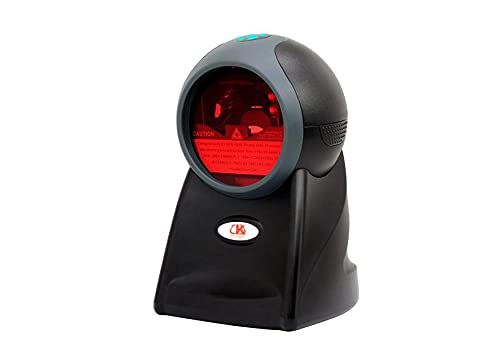
Figura 2.1: Quddiem view of the Syble K816 Barcode Reader, showing the scanning window and indicator light.
3. Istruzzjonijiet Operattivi
The Syble K816 Barcode Reader is designed for straightforward operation:
- Pożizzjonament: Place the fixed barcode reader on a stable surface where barcodes can be easily presented to its scanning window.
- Skennjar ta' Barcode: Hold the 1D barcode within the scanning range of the device. The laser beam will automatically activate and scan the barcode.
- Konferma: A successful scan is typically indicated by an audible beep and/or a visual indicator light. The scanned data will be transmitted to your connected computer as if typed from a keyboard.
- Angolu tal-Iskanjar: For optimal performance, ensure the barcode is presented flat to the scanner window. Avoid extreme angles that may prevent the laser from reading the barcode accurately.

Figura 3.1: Angolat view of the Syble K816 Barcode Reader, highlighting the scanning window and laser output.
4. Manutenzjoni
Proper maintenance ensures the longevity and optimal performance of your barcode reader:
- Tindif tat-Tieqa tal-Iskennjar: Naddaf it-tieqa tal-iskannjar regolarment b'ċarruta ratba u mingħajr suf. Għal ħmieġ iebes, neħħi ftitampLaħlaħ id-drapp bl-ilma jew b'tindif ħafif u mhux abrażiv. Tużax kimiċi ħarxa jew materjali abrażivi.
- Tindif Ġenerali: Wipe the exterior of the device with a dry or slightly damp drapp biex tneħħi t-trab u l-ħmieġ.
- Evita Espożizzjoni Likwida: Tgħaddasx l-apparat fl-ilma jew tesponih għal umdità eċċessiva.
- Ħażna: When not in use, store the barcode reader in a clean, dry environment away from direct sunlight and extreme temperatures.
- Kura tal-Cable: Evita li tgħawweġ jew iddawwar il-kejbil USB b'mod eċċessiv biex tevita ħsara interna.
5 Issolvi l-problemi
If you encounter issues with your Syble K816 Barcode Reader, refer to the following troubleshooting guide:
| Problema | Kawża Possibbli | Soluzzjoni |
|---|---|---|
| L-iskaner ma jixgħelx. | Il-kejbil USB mhux imqabbad sew jew il-port USB huwa difettuż. | Ensure the USB cable is securely connected. Try a different USB port or a different computer. |
| L-iskaner ma jaqrax il-barcodes. | Dirty scanning window, incorrect barcode type, or barcode damage. | Clean the scanning window. Ensure you are scanning a 1D barcode. Try scanning a different, known-good barcode. |
| Id-dejta skennjata mhijiex korretta jew mhux kompluta. | Poor scan quality, damaged barcode, or software conflict. | Ensure the barcode is flat and within optimal scanning range. Try scanning multiple times. Check your computer's keyboard settings. |
| No beep or visual confirmation after scanning. | Scan failed or indicator settings. | Ensure the barcode is properly scanned. Check the device's configuration for sound/light indicators (if programmable). |
Jekk il-problema tippersisti wara li tipprova dawn is-soluzzjonijiet, jekk jogħġbok ikkuntattja l-appoġġ għall-klijenti.
6. Speċifikazzjonijiet
Detailed technical specifications for the Syble K816 Barcode Reader:
| Karatteristika | Deskrizzjoni |
|---|---|
| Numru tal-Mudell | K816 |
| Isem tad-Ditta | Syble |
| Konnettività | Bil-fili (USB) |
| Tip | Fixed Barcode Reader |
| Kapaċità tal-Iskanjar | Skennjar tal-Barcode 1D |
| Scan Rata | 1500 scan kull sekonda |
| Sors tad-Dawl | Laser |
| Apparati Kompatibbli | Desktop, Laptop |
| Sors tal-Enerġija | Elettriku bil-fili (permezz tal-USB) |
| External Product ID | 2724837269333 (EAN-13) |
| ASIN | B096955S3R |
7. Informazzjoni dwar is-Sigurtà
Jekk jogħġbok osserva l-prekawzjonijiet tas-sigurtà li ġejjin:
- Sigurtà tal-Laser: This device uses a laser light source. Do not stare directly into the laser beam or point it at others' eyes.
- Sigurtà Elettrika: Use only the provided USB cable for connection. Do not attempt to open or modify the device, as this may expose you to electrical hazards.
- Ambjentali: Ħaddem l-apparat fil-firxiet rakkomandati tat-temperatura u l-umdità. Evita kundizzjonijiet estremi.
- Tfal: Żomm l-apparat fejn ma jintlaħaqx mit-tfal.
8. Garanzija u Appoġġ
For warranty information, technical support, or service inquiries, please refer to the documentation provided with your purchase or contact your retailer. Keep your proof of purchase for warranty claims.