
Introduzzjoni
This manual provides comprehensive instructions for the safe and efficient use of your BOROFONE BE27 Cool Song Bluetooth Wireless Sports Earphones. Please read this manual thoroughly before using the product and retain it for future reference.
Prodott Overview
The BOROFONE BE27 earphones are designed for wireless audio playback and hands-free calling, featuring a lightweight design suitable for sports and daily use.
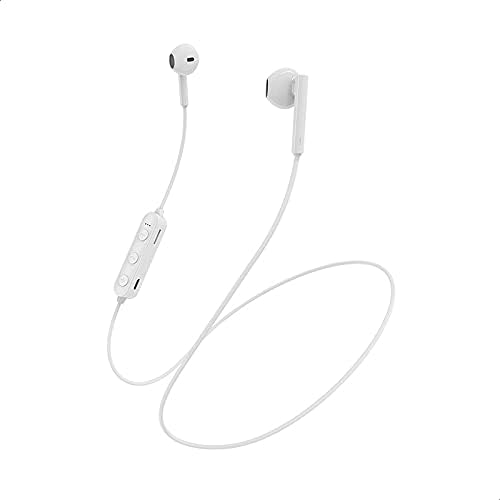
Stampa 1: Fuqview of the BOROFONE BE27 earphones, displaying the white earbuds, the inline control unit with buttons, and the connecting cable.
Key components include the earbuds, the inline control unit, and the charging port.

Stampa 2: Dettaljati view of the inline control unit, highlighting the volume up/next track button, multi-function button (power/play/pause/answer call), volume down/previous track button, and the Micro USB charging port.
Speċifikazzjonijiet
| Karatteristika | Dettall |
|---|---|
| Verżjoni Bluetooth | V4.2 BK |
| Iċċarġjar Voltage | DC 5V |
| Ħin tal-Iċċarġjar | 1.5 sigħat |
| Kapaċità tal-batterija | 70 mAh |
| Tul tal-Kejbil tal-Earphone | 55 ċm |
| Piż | 12 gramma |
| Ħin tax-Xogħol | 4 sigħat |
| Ħin ta' Standby | 120 sigħat |
| Isem tal-Mudell | BE27 |
| Kulur | Abjad |
| Teknoloġija tal-Konnettività | Wireless |
| Tip ta' Konnettur | USB Tip Ċ |
| Materjal | Plastik |
Setup
1. Iċċarġjar tal-Earphones
- Locate the charging port on the inline control unit. (Refer to Image 2).
- Qabbad il-kejbil tal-iċċarġjar USB provdut mal-port tal-iċċarġjar.
- Connect the other end of the USB cable to a DC 5V power source (e.g., computer USB port, USB wall adapter).
- Id-dawl indikatur jixgħel waqt l-iċċarġjar. Ladarba jkun iċċarġjat kompletament (madwar sagħtejn), id-dawl indikatur jinbidel jew jintefa.
- Skonnettja l-kejbil tal-iċċarġjar ladarba l-iċċarġjar ikun komplut.
2. Tqabbil tal-Bluetooth
- Kun żgur li l-earphones huma ċċarġjati kompletament.
- Qawwa Mixgħul: Press and hold the multi-function button (center button on the inline control unit) for approximately 3-5 seconds until the indicator light flashes blue and red alternately, indicating pairing mode.
- Attiva l-Bluetooth: Fuq l-apparat tiegħek (smartphone, tablet, kompjuter), attiva l-Bluetooth.
- Fittex għal Apparati: Fis-settings tal-Bluetooth tat-tagħmir tiegħek, fittex apparati disponibbli.
- Select "BE27": From the list of found devices, select "BE27" to connect.
- Konferma: Once successfully paired, the indicator light on the earphones will flash blue slowly, and you may hear an audible confirmation.
- If pairing fails, turn off the earphones and your device's Bluetooth, then repeat the steps.
Istruzzjonijiet Operattivi
Qawwa mixgħul/mitfi
- Qawwa Mixgħul: Press and hold the multi-function button for 3-5 seconds until the indicator light flashes blue.
- Itfi: Press and hold the multi-function button for 3-5 seconds until the indicator light flashes red and then turns off.
Daqq tal-Mużika
- Play/Pawsa: Agħfas il-buttuna b'diversi funzjonijiet darba.
- Track li jmiss: Press and hold the "+" (Volume Up) button for 2 seconds.
- Track preċedenti: Press and hold the "-" (Volume Down) button for 2 seconds.
- Volum 'il fuq: Agħfas fil-qosor il-buttuna "+".
- Volum 'l isfel: Agħfas fil-qosor il-buttuna "-".
Ġestjoni tas-Sejħiet
- Tweġiba/Tmiem Sejħa: Agħfas il-buttuna b'diversi funzjonijiet darba.
- Irrifjuta Sejħa: Agħfas u żomm il-buttuna multi-funzjoni għal 2 sekondi.
- Isemmi mill-ġdid l-Aħħar Numru: Agħfas darbtejn il-buttuna multi-funzjoni.
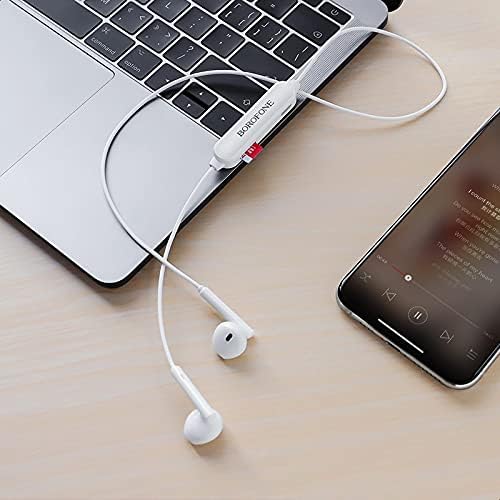
Stampa 3: The BOROFONE BE27 earphones in use, connected to both a laptop and a smartphone, illustrating their wireless connectivity for audio playback.
Manutenzjoni
- Keep the earphones dry. Avoid exposure to moisture, rain, or liquids.
- Clean the earphones with a soft, dry cloth. Do not use abrasive cleaners or solvents.
- Store the earphones in a cool, dry place away from extreme temperatures.
- Evita li twaqqa’ l-earphones jew li tissottomettihom għal impatti qawwija.
- Do not attempt to disassemble or modify the earphones, as this will void the warranty and may cause damage.
Issolvi l-problemi
| Problema | Soluzzjoni |
|---|---|
| Il-earphones ma jixegħlux. | Ensure the earphones are fully charged. Connect to a power source and charge for 1.5 hours. |
| Ma tistax tqabbad mat-tagħmir. | 1. Ensure earphones are in pairing mode (flashing blue and red). 2. Make sure Bluetooth is enabled on your device. 3. Move earphones closer to your device. 4. Turn off and restart both earphones and your device's Bluetooth. |
| L-ebda ħoss jew volum baxx. | 1. Check volume levels on both earphones and your connected device. 2. Ensure earphones are properly paired. 3. Try playing different audio. |
| Konnessjoni intermittenti. | 1. Ensure there are no obstructions between the earphones and your device. 2. Move closer to your device. 3. Avoid strong electromagnetic interference. |
Garanzija u Appoġġ
BOROFONE products are designed and manufactured to the highest quality standards. For warranty information and technical support, please refer to the warranty card included with your purchase or visit the official BOROFONE websit. Jekk jogħġbok żomm il-prova tax-xiri tiegħek għal talbiet ta' garanzija.