
Introduzzjoni
This manual provides essential instructions for the safe and efficient operation of your Miroir M600 1080p Battery-Powered Projector. Please read this manual thoroughly before using the device and retain it for future reference.
X'hemm fil-Kaxxa
Iċċekkja li l-oġġetti kollha elenkati hawn taħt huma inklużi fil-pakkett tiegħek:
- Miroir M600 Projector
- Cable HDMI
- AC Adapter and Charger

Image: Contents of the Miroir M600 Projector package.
Prodott Overview
The Miroir M600 is a compact, portable 1080p projector designed for various projection needs. Familiarize yourself with its components:
Quddiem View

Immaġni: Quddiem view of the Miroir M600 Projector, showing the projection lens and ventilation grille.
Wara View u l-Portijiet

Immaġni: Wara view of the Miroir M600 Projector, highlighting the various input/output ports.
- 3.5mm Awdjo Out: Għall-konnessjoni ta' kelliema esterni jew headphones.
- USB-C Video Port: For video input from compatible USB-C devices.
- Port HDMI: For video input from HDMI-enabled devices.
- Port tal-Ħarġ tal-USB: Għall-iċċarġjar ta' apparati esterni.
- Input ta' Enerġija DC: For connecting the AC adapter to power and charge the projector.
Setup
1. Tixgħil u Iċċarġjar
- Connect the AC adapter to the DC Power Input port on the projector and then to a power outlet. The projector can operate while charging.
- Press and hold the power button (location not specified in data, assume standard placement) for a few seconds until the projector powers on.
- The internal battery provides portable operation. Ensure it is sufficiently charged for use without the AC adapter.
2. Placement and Projection
Position the projector on a stable, flat surface or mount it on a compatible stand. Ensure the lens is unobstructed and pointed towards your desired projection surface (wall or screen).

Image: Miroir M600 Projector positioned on a stand for optimal projection.
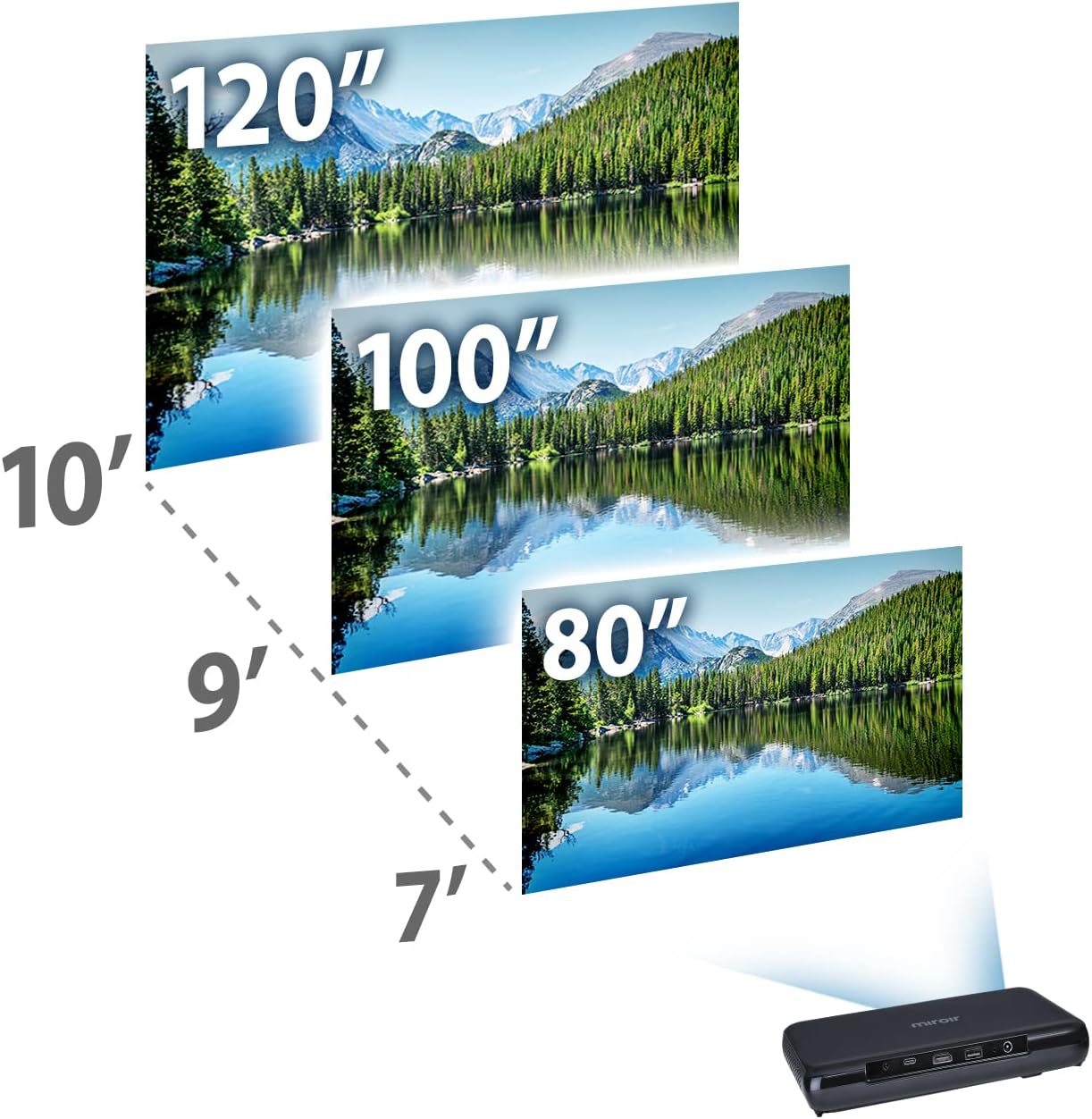
Image: Guide for projection distances to achieve various screen sizes (e.g., 7 feet for 80 inches, 10 feet for 120 inches).
Operazzjoni
1. Konnessjoni ta' Apparati ta' Input
- HDMI: Connect an HDMI cable from your source device (laptop, streaming stick, game console) to the HDMI port on the projector.
- USB-C Video: For compatible devices, connect a USB-C cable from your source to the USB-C Video port on the projector.
2. Adjusting Image and Focus
The Miroir M600 features automatic keystone correction to adjust the image shape. For focus, manual adjustment may be required via a focus wheel (location not specified in data, assume standard placement near lens).
3. Output tal-Awdjo
The projector includes a built-in 5-watt speaker. For enhanced audio, connect external speakers or headphones to the 3.5mm Audio Out jack.
4. Lamp Modi
L-LED lamp offers two modes:
- Modalità Normali: Up to 20,000 hours of lamp ħajja.
- Modalità ECO: Up to 30,000 hours of lamp life, providing extended usage and reduced power consumption.
Manutenzjoni
1. Tindif tal-Proġettur
- Lenti: Uża drapp artab u mingħajr suf iddisinjat speċifikament għal lentijiet ottiċi. Tużax prodotti tat-tindif li joborxu jew forza eċċessiva.
- Barra: Wipe the projector's exterior with a soft, dry cloth. Avoid using liquid cleaners directly on the device.
- Ventilazzjoni: Kun żgur li l-gradilji tal-ventilazzjoni huma nodfa mit-trab u l-fdalijiet biex tevita li jisħnu żżejjed.
2. Kura tal-batterija
- Għal ħajja ottimali tal-batterija, evita li tiċċarġja kompletament il-batterija ta' spiss.
- Aħżen il-proġettur f'post frisk u niexef meta ma jkunx qed jintuża għal perjodi twal.
Issolvi l-problemi
If you encounter issues with your Miroir M600 projector, refer to the following common solutions:
- Ebda Immaġni: Ensure the input source is correctly connected and selected. Check all cable connections.
- Immaġni mċajpra: Adjust the focus manually. Ensure the projection surface is flat and the projector is stable.
- Ebda Ħsejjes: Verify that the volume is not muted on both the projector and the source device. If using external speakers, ensure they are properly connected and powered.
- Is-sħana żejda: Aċċerta ruħek li jkun hemm ventilazzjoni adegwata madwar il-proġettazzjoni. Timblokkax il-ventijiet tal-arja.
For more detailed troubleshooting steps, please consult the full user manual available for download (see Support section).
Speċifikazzjonijiet
| Karatteristika | Dettall |
|---|---|
| Dimensjonijiet tal-Prodott | 9 x 5 x 1 pulzieri |
| Piż tal-oġġett | 1.6 liri |
| Numru tal-Mudell tal-Oġġett | M600 |
| Batteriji | 1 batterija tal-polimer tal-litju (inkluża) |
| Manifattur | Miroir |
| Brand | Miroir |
| Użi Rakkomandati | Negozju |
| Karatteristika Speċjali | Pico, Speakers |
| Teknoloġija tal-Konnettività | USB, HDMI |
| Riżoluzzjoni tal-Wiri | 1920 x 1080 (1080p) |
| Lamp Life (Normal Mode) | Sa 20,000 sigħat |
| Lamp Life (ECO Mode) | Sa 30,000 sigħat |
| Speaker integrat | 5-watt |
| Djagonali tal-Iskrin Viżibbli | 120" / 305 ċm |
Informazzjoni dwar Garanzija
Specific warranty details are not provided in this document. Please refer to the official Miroir website or the warranty card included with your product for comprehensive warranty terms and conditions.
Appoġġ u Kuntatt
For further assistance, detailed instructions, or to contact customer support:
- Manwal tal-Utent sħiħ: A comprehensive PDF user manual is available for download hawn.
- Manifattur Websit: Visit the official Miroir websit għar-reġistrazzjoni tal-prodott, FAQs, u riżorsi ta' appoġġ.