
1. Introduzzjoni
The TechniSat TECHNIVOLT 101-11kW is an advanced electric vehicle charging station designed for fast and secure home charging. This wallbox provides a reliable and efficient solution for charging your electric vehicle, offering significant advantages over conventional power outlets, which typically result in longer charging times and higher safety risks. The TECHNIVOLT 101-11kW features a fixed Type 2 charging cable, widely used in Europe, and delivers 11 kW of power for rapid charging.
This manual provides essential information for the safe and correct installation, operation, and maintenance of your charging station. Please read it thoroughly before using the device.
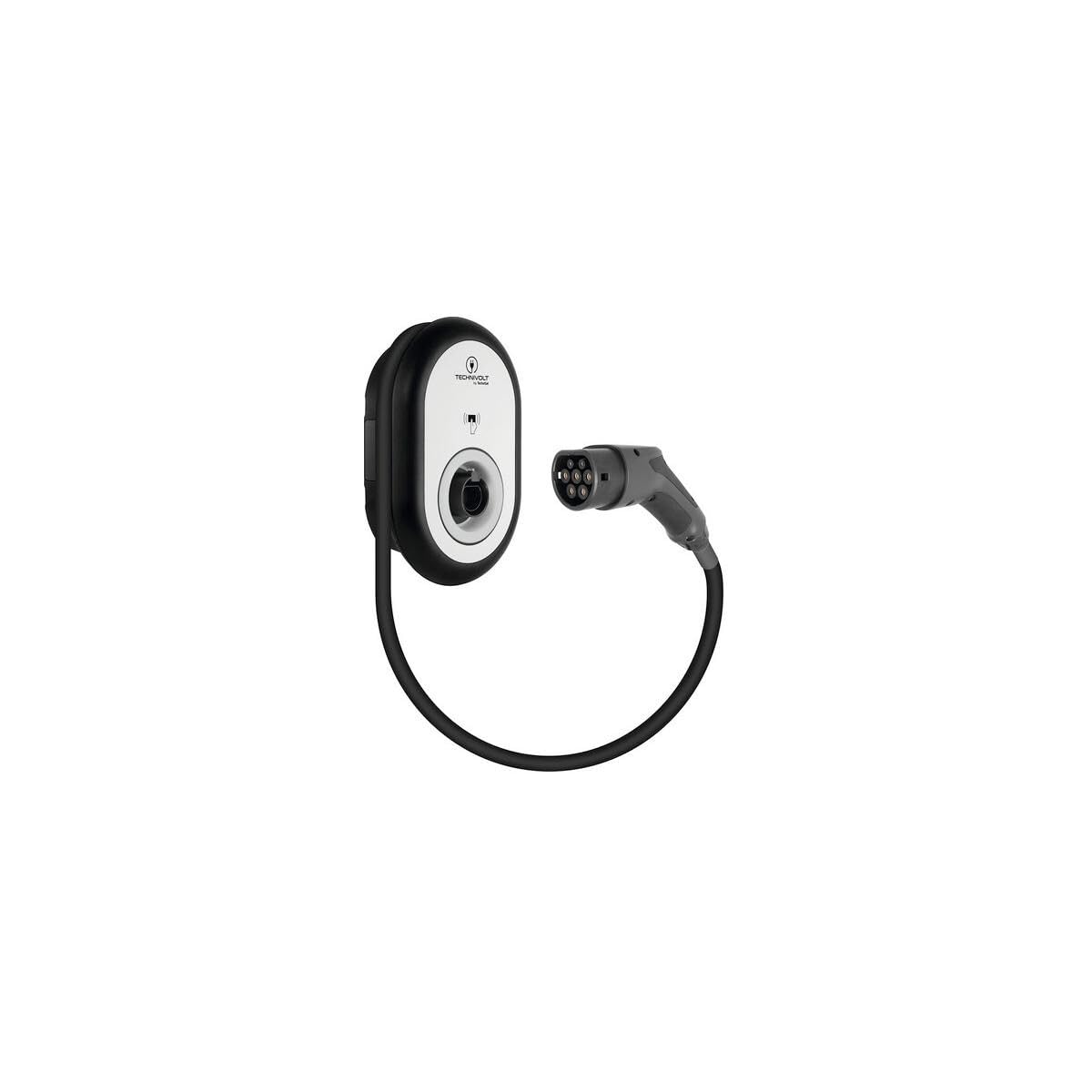
Figura 1: Quddiem view of the TechniSat TECHNIVOLT 101-11kW charging station with the integrated Type 2 charging cable.
2. Informazzjoni dwar is-Sigurtà
Istruzzjonijiet Importanti dwar is-Sigurtà:
- Installazzjoni professjonali: The connection of the Wallbox must be carried out exclusively by a qualified professional electrician or by the electricity grid operator. Improper installation can lead to serious injury or damage to the device and property.
- DC Fault Current Protection: The TECHNIVOLT 101 features an integrated electronic detection system for smooth DC fault currents (IΔn ≥ 6 mA), as required by DIN EN 61851-1 for electric vehicles. This ensures that the vehicle's power supply is safely disconnected if a continuous current exceeding 6 mA is detected. Only a Type A residual current device (RCD) is required for the installation, which is more cost-effective than a Type B RCD.
- Adattat għal barra: The device has an IP54 protection rating, making it suitable for outdoor installation and providing protection against dust and splashing water. However, ensure proper mounting to prevent unauthorized tampering jew ħsara.
- Aċċess Awtorizzat: Utilize the RFID card system to prevent unauthorized use of the charging station, especially if it is installed in an easily accessible location like a driveway or carport.
- Immaniġġjar tal-Cable: Always handle the charging cable and plug with care. Do not use if the cable or plug is damaged.
3. Kontenut tal-Pakkett
Jekk jogħġbok ivverifika li l-oġġetti kollha huma preżenti fil-pakkett:
- TechniSat TECHNIVOLT 101-11kW Charging Station
- Istruzzjonijiet għall-Immuntar
- Manwal għall-Utent (dan id-dokument)
- Mudell tal-Immuntar
- Aċċessorji tal-Immuntar
- 1x Master RFID Card
- 2x User RFID Cards
4. Setup u Installazzjoni
The TECHNIVOLT 101-11kW charging station offers flexible installation options. It can be mounted in various locations, including under a carport, within a garage, in an underground parking facility, or directly in a driveway. For situations where wall mounting is not preferred or feasible, installation on a dedicated support column (available separately) is also possible.
Installation Steps (to be performed by a qualified electrician):
- Għażla tas-Sit: Choose a suitable location that meets safety requirements and provides convenient access for vehicle charging. Consider proximity to the electrical supply and protection from physical damage.
- Immuntar: Use the provided mounting template and accessories to securely attach the charging station to a wall or a support column. Ensure the mounting surface is robust enough to support the unit's weight (6.4 kg).
- Konnessjoni Elettrika: Connect the charging station to the main electrical supply. This involves a 3-phase connection (230 Volts, 16 A per phase) and requires the installation of a Type A residual current device (RCD) as per safety regulations. The integrated DC fault current protection simplifies this requirement.
- Ittestjar: After installation, the electrician must perform thorough testing to ensure the unit is functioning correctly and safely.
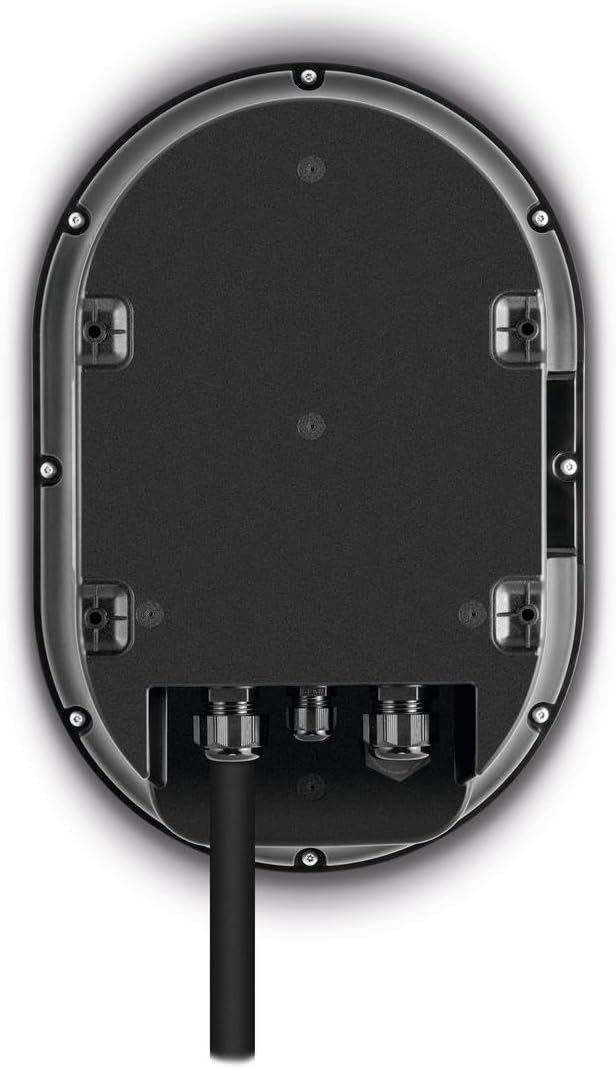
Figura 2: Wara view of the charging station, illustrating the mounting points and electrical cable entry for installation.
5. Istruzzjonijiet Operattivi
The TECHNIVOLT 101-11kW charging station is designed for straightforward operation, primarily controlled via RFID cards.
- Connect the Vehicle: Plug the Type 2 charging cable from the TECHNIVOLT 101-11kW into your electric vehicle's charging port. Ensure a secure connection.
- Activate Charging with RFID: Hold an authorized user RFID card (or the master card) against the designated RFID reader area on the charging station. The station will verify the card, and if authorized, the charging process will begin. An indicator light will typically confirm the active charging status.
- Iċċarġjar tal-Monitorja: Your vehicle's dashboard or infotainment system will display the charging status. The charging station itself may also have indicators.
- Waqqaf l-Iċċarġjar: To stop charging, either present the authorized RFID card to the reader again, or stop the charging process via your vehicle's controls. Once charging is stopped, safely disconnect the cable from your vehicle.
- Ħażna tal-Cable: After charging, coil the cable neatly and store it on the integrated cable management system of the wallbox to prevent damage and keep the area tidy.
6. Ġestjoni tal-Kard RFID
The RFID system provides secure access control, preventing unauthorized use of your charging station.
- Master Card: The included master RFID card is used to register and manage user cards. Keep this card in a safe place.
- User Cards: Two user RFID cards are supplied with the charging station. These cards are used by individuals to initiate and stop charging.
- Registering New User Cards: To register additional user cards (up to 20 in total), follow the instructions provided in the separate mounting instructions or the full user manual. Typically, this involves activating a learning mode on the charging station using the master card, then presenting the new user card to be registered.
- Deleting User Cards: The master card can also be used to delete registered user cards if access needs to be revoked. Refer to the detailed manual for the specific procedure.
7. Manutenzjoni
Regular maintenance ensures the longevity and safe operation of your TECHNIVOLT 101-11kW charging station.
- Tindif: Periodically clean the exterior of the charging station with a soft, damp cloth. Do not use abrasive cleaners or solvents. Ensure the device is powered off before cleaning.
- Spezzjoni tal-Cable: Regularly inspect the charging cable and plug for any signs of wear, cuts, cracks, or damage. If any damage is found, discontinue use immediately and contact a qualified technician for repair or replacement.
- Verifiki Ambjentali: Ensure that the area around the charging station remains clear of debris and obstructions. Verify that the IP54 protection is not compromised by physical damage to the casing.
- Spezzjoni Professjonali: It is recommended to have the charging station inspected by a qualified electrician at regular intervals (e.g., annually) to ensure all electrical connections and safety features are functioning correctly.
8 Issolvi l-problemi
If you encounter issues with your charging station, refer to the following common troubleshooting steps:
- Charging Does Not Start:
- Ensure the charging cable is securely connected to both the vehicle and the charging station.
- Verify that the RFID card used is authorized. Try another authorized card if available.
- Check the main circuit breaker or RCD for the charging station. Reset if tripped.
- Ensure your vehicle is ready to accept a charge (e.g., not fully charged, charging schedule not active).
- Iċċarġjar bil-mod:
- Confirm that the vehicle is capable of accepting 11 kW (3-phase) charging.
- Check for any vehicle settings that might limit charging speed.
- Ensure the electrical supply to the charging station is stable and delivering the expected voltage u kurrenti.
- Dwal Indikaturi Mhux Funzjonarji:
- Iċċekkja l-provvista tal-enerġija għall-unità.
- If the unit has power but lights are off, contact support.
- Messaġġi ta' Żball: If the charging station displays an error code or message, consult the full user manual for specific meanings and solutions.
If the problem persists after attempting these steps, please contact TechniSat customer support or a qualified electrician.
9. Speċifikazzjonijiet
| Brand | TechniSat |
| Numru tal-Mudell | 0000/6401 |
| Tip ta' Konnettur | Fixed 5m charging cable with Type 2 plug (IEC-62196-2) |
| Vetturi Kompatibbli | Electric vehicles with integrated Type 2 charging socket |
| Input Voltage | 230 Volts AC |
| Ampetà | 16 A |
| Output ta 'Qawwa | 11 KW |
| Medda ta' Frekwenzi | 50 Hz |
| Klassi ta' Protezzjoni | IP54 (Protett mit-trab u l-ilma mxerred) |
| Karatteristiċi Speċjali | 3-phase fast charging, RFID protected access, Integrated DC fault current protection (IΔn ≥ 6 mA) |
| Piż | 6400 Gramma (6.4 kg) |
| Dimensjonijiet (LxHxP) | 31.5 x 46 x 13.5 ċm |
10. Garanzija u Appoġġ
Garanzija:
The TechniSat TECHNIVOLT 101-11kW charging station comes with a garanzija ta 'sena from the date of purchase. This warranty covers manufacturing defects and material faults under normal use conditions. Please retain your proof of purchase for warranty claims.
Appoġġ:
For technical assistance, troubleshooting beyond the scope of this manual, or warranty inquiries, please contact TechniSat customer support. You can find contact information on the official TechniSat webis-sit jew fid-dokumentazzjoni inkluża mal-prodott tiegħek.
Disponibbiltà ta' Spare Parts: Spare parts for this product are available for 1 year.


