
1. Introduzzjoni
Thank you for choosing the Liectroux 1-X009A Robot Vacuum Cleaner. This manual provides essential information for the safe operation, maintenance, and troubleshooting of your device. Please read this manual thoroughly before using the product and retain it for future reference.
Istruzzjonijiet Importanti dwar is-Sigurtà
- Always operate the robot vacuum on dry surfaces.
- Do not allow children to operate the robot vacuum.
- Żomm ix-xagħar, il-ħwejjeġ laxki, is-swaba’, u l-partijiet kollha tal-ġisem 'il bogħod minn fetħiet u partijiet li jiċċaqilqu.
- Do not pick up large objects, liquids, burning or smoking materials.
- Ensure the charging dock is placed against a wall on a level surface.
- Unplug the charging dock when not in use for extended periods.
- Uża biss l-adapter tal-enerġija u d-dock tal-iċċarġjar oriġinali pprovduti mat-tagħmir.
2. Prodott Aktarview
Familiarize yourself with the components of your Liectroux 1-X009A Robot Vacuum Cleaner.
Fuq View
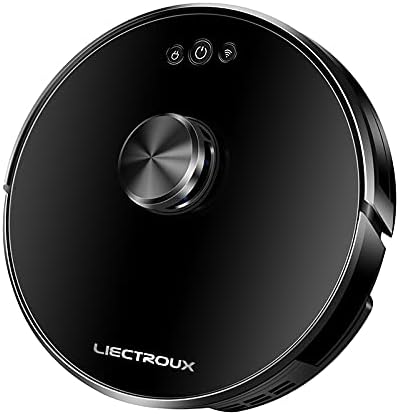
Stampa 2.1: Fuq view of the Liectroux 1-X009A Robot Vacuum Cleaner. It features a sleek black circular design with a central metallic knob (likely a navigation sensor) and three touch-sensitive buttons: Power, Start/Pause, and Wi-Fi indicator.
- Central Navigation Module: For intelligent mapping and navigation.
- Buttuna tal-Qawwa: Agħfas biex tixgħel/itfi.
- Buttuna Bidu/Pawża: Agħfas biex tibda jew twaqqaf it-tindif.
- Indikatur Wi-Fi: Juri l-istatus tal-konnessjoni.
Qiegħ View

Stampa 2.2: Qiegħ view of the Liectroux 1-X009A Robot Vacuum Cleaner, showing the cleaning mechanisms. This includes two rotating side brushes, a central main roller brush, large drive wheels, and a removable mopping pad attachment at the rear.
- Side Brushes (L & R): Knes il-fdalijiet fil-mogħdija prinċipali tal-pinzell.
- Xkupilja tar-Romblu Prinċipali: Collects dirt and dust from the floor.
- Roti tas-sewqan: Ħalli r-robot jiċċaqlaq fuq diversi uċuħ.
- Kuntatti tal-Iċċarġjar: Connects to the charging dock.
- Sensuri tal-irdum: Jidentifika l-waqgħat biex jipprevjeni l-waqgħat.
- Mopping Pad Attachment: Għat-tindif bl-imxarrab.
Dustbin u Tank tal-Ilma

Stampa 2.3: Ġenb view of the Liectroux 1-X009A, illustrating the integrated dustbin and water tank. The transparent blue tank shows volume markings (100ml, 200ml, 300ml) for water, indicating its mopping capability.
- Trab tat-trab: Collects dry debris. Capacity: 0.6 Litre.
- Tank tal-Ilma: Iżomm l-ilma għall-funzjoni tal-mopping.
- Iffiltra: Traps fine dust particles.
3. Setup
3.1 Tneħħija tal-kaxxa u Tħejjija Inizjali
- Neħħi bir-reqqa l-komponenti kollha mill-imballaġġ.
- Neħħi kwalunkwe film jew stiker protettiv mir-robot u mid-dock tal-iċċarġjar.
- Attach the side brushes by pressing them onto their respective posts on the bottom of the robot until they click into place.
3.2 Tqegħid tal-Baċir tal-Iċċarġjar
- Place the charging dock against a wall in an open area, ensuring at least 0.5 meters (1.6 feet) of clear space on either side and 1.5 meters (5 feet) in front.
- Qabbad l-adapter tal-enerġija mad-dock tal-iċċarġjar u pplaggjah f'sokit tal-ħajt.
- Ensure the power indicator on the charging dock illuminates.
3.3 Iċċarġjar inizjali
Place the robot vacuum onto the charging dock, aligning its charging contacts with those on the dock. The robot will begin charging automatically. For first-time use, allow the robot to charge completely (approximately 4-6 hours) before its initial cleaning cycle.
3.4 Connecting to Wi-Fi (App Control)
To utilize advanced features and remote control, download the Liectroux app from your smartphone's app store. Follow the in-app instructions to connect your robot vacuum to your home Wi-Fi network. This typically involves:
- Creating an account.
- Selecting your robot model.
- Putting the robot into pairing mode (usually by pressing and holding the Wi-Fi button).
- Connecting your phone to the robot's temporary Wi-Fi hotspot, then selecting your home Wi-Fi network.
4. It-tħaddim tal-Vacuum cleaner robotiku
4.1 Tibda Ċiklu ta' Tindif
- Bidu Manwali: Press the Start/Pause button on the robot's top panel. The robot will begin cleaning in Auto mode.
- Bidu tal-App: Open the Liectroux app and select the desired cleaning mode (Auto, Spot, Edge) or initiate a full cleaning cycle.
4.2 Pausing and Resuming
Press the Start/Pause button on the robot or in the app to pause a cleaning cycle. Press it again to resume.
4.3 Returning to Charging Dock
The robot will automatically return to its charging dock when its battery is low or when a cleaning cycle is complete. You can also manually send it back via the app or by pressing and holding the Start/Pause button on the robot (refer to specific model instructions for button functions).
4.4 Funzjoni ta 'mopping
Biex tuża l-funzjoni tat-tindif:
- Remove the combined dustbin/water tank.
- Fill the water tank with clean water (do not use cleaning solutions unless specified by the manufacturer).
- Attach a clean mopping pad to the designated slot on the bottom of the water tank.
- Reinsert the combined unit into the robot.
- Ibda ċiklu ta' tindif. Ir-robot se jnaddaf bil-vacuum cleaner u jimsaħ simultanjament.
Nota: Remove the mopping pad and empty the water tank after each mopping session to prevent mildew and odors.
5. Manutenzjoni
Manutenzjoni regolari tiżgura prestazzjoni ottimali u testendi l-ħajja tal-vacuum cleaner robot tiegħek.
5.1 Tbattil tal-landa taż-żibel
- Press the dustbin release button (refer to your robot's specific design) and pull out the combined dustbin/water tank.
- Iftaħ l-għatu tal-kontenitur tat-trab u vojta l-kontenut tiegħu ġo kontenitur taż-żibel.
- Tap the dustbin gently to dislodge any stuck debris.
- Reinsert the dustbin/water tank until it clicks into place.
Frekwenza: After each cleaning cycle or when full.
5.2 Tindif tal-Filtri
- Neħħi l-dustbin.
- Take out the primary filter and HEPA filter.
- Brush off dust from the filters using a cleaning tool or a soft brush. Do not wash HEPA filters with water unless explicitly stated in the product documentation.
- Ensure filters are completely dry before reinserting.
Frekwenza: Weekly, or more often if used frequently or in dusty environments. Replace filters every 3-6 months.
5.3 Cleaning the Main Roller Brush
- Dawwar ir-robot.
- Remove the brush guard by pressing the release tabs.
- Lift out the main roller brush.
- Use the provided cleaning tool (if available) or scissors to cut and remove any hair or debris tangled around the brush.
- Reinsert the main brush and secure the brush guard.
Frekwenza: Kull ġimgħa.
5.4 Tindif tal-Pniezel tal-Ġenb
- Iġbed bil-mod il-pniezel tal-ġenb 'il fuq biex tneħħihom.
- Remove any tangled hair or debris.
- If brushes are bent or damaged, replace them.
- Press the clean brushes back onto their posts.
Frekwenza: Bi-weekly. Replace every 3-6 months.
5.5 Tindif tas-Sensuri u l-Kuntatti tal-Iċċarġjar
Wipe the cliff sensors (located on the bottom of the robot) and the charging contacts (on both the robot and the charging dock) with a clean, dry cloth. This ensures proper navigation and charging.
Frekwenza: Kull xahar.
5.6 Kura tal-Mopping Pad
Remove the mopping pad after each use. Wash it with water and mild detergent, then allow it to air dry completely before storing or reusing.
6 Issolvi l-problemi
If your robot vacuum encounters an issue, refer to the following common problems and solutions.
| Problema | Kawża Possibbli | Soluzzjoni |
|---|---|---|
| Robot ma jixgħelx. | Batterija baxxa; Il-buttuna tal-qawwa mhux ippressata. | Place robot on charging dock; Press and hold the Power button for 3 seconds. |
| Ir-robot ma jiċċarġjax. | Kuntatti tal-iċċarġjar maħmuġin; Id-dock tal-iċċarġjar mhux imħaddem. | Clean charging contacts on robot and dock; Ensure charging dock is plugged in and powered. |
| Ir-robot jeħel spiss. | Obstacles (cables, rugs); Sensors dirty. | Neħħi l-ostakli mill-mogħdija tat-tindif; Naddaf is-sensuri tal-irdum. |
| Prestazzjoni fqira tat-tindif. | Dustbin full; Brushes tangled; Filters clogged. | Empty dustbin; Clean main and side brushes; Clean/replace filters. |
| Ma tistax tikkonnettja mal-Wi-Fi. | Incorrect Wi-Fi password; Router issues; Robot not in pairing mode. | Verify password; Restart router; Put robot in pairing mode as per app instructions. |
If the problem persists, please refer to the warranty and support section for further assistance.
7. Speċifikazzjonijiet
| Karatteristika | Dettall |
|---|---|
| Mudell | 1-X009A |
| Brand | Liectroux |
| Kulur | Iswed |
| Kapaċità ta 'Dustbin | 0.6 Litru |
| Sors tal-Enerġija | Rechargeable Battery (Wired Charging Dock) |
| Tip ta' Navigazzjoni | Intelligent Mapping |
| Modi tat-Tindif | Vacuum, Mop, Vacuum & Mop |
| Konnettività | Wi-Fi (for App Control) |
8. Garanzija u Appoġġ
For warranty information, please refer to the warranty card included with your product packaging or visit the official Liectroux website. For technical support, troubleshooting assistance beyond this manual, or to order replacement parts, please contact Liectroux customer service through their official channels.
Żomm l-irċevuta tax-xiri tiegħek bħala prova tax-xiri għal talbiet ta' garanzija.