
Introduzzjoni
Thank you for choosing the Mahli Smart Robotic 3-in-1 Vacuum Cleaner. This manual provides important information on the safe use, operation, and maintenance of your device. Please read it thoroughly before first use and keep it for future reference.

Figure 1: Mahli Smart Robotic 3-in-1 Vacuum Cleaner and Remote Control
This image displays the Mahli Smart Robotic 3-in-1 Vacuum Cleaner in white, accompanied by its remote control. The vacuum cleaner is round with a power button on top, and the remote control is rectangular with navigation and function buttons.
Istruzzjonijiet tas-Sigurtà
- Aqra l-istruzzjonijiet kollha qabel tuża l-apparat.
- Do not operate the vacuum cleaner in wet environments or near water.
- Żomm ix-xagħar, il-ħwejjeġ laxki, is-swaba’, u l-partijiet kollha tal-ġisem 'il bogħod minn fetħiet u partijiet li jiċċaqilqu.
- Uża biss kif deskritt f'dan il-manwal. Uża biss l-aċċessorji rakkomandati mill-manifattur.
- Tużax b'korda jew plagg bil-ħsara. Jekk l-apparat mhux qed jaħdem kif suppost, jekk waqa', ġarrab ħsara, tħalla barra, jew waqa' fl-ilma, irritornah f'ċentru tas-servizz.
- Tiġbedx jew iġorrux bil-korda, uża korda bħala manku, agħlaq bieb fuq korda, jew iġbed korda madwar truf jew kantunieri li jaqtgħu. Tmexxix l-apparat fuq il-korda. Żomm il-korda 'l bogħod minn uċuħ imsaħħna.
- Tneħħix il-plagg billi tiġbed il-korda. Biex tneħħi l-plagg, aqbad il-plagg, mhux il-korda.
- M'għandekx timmaniġġja l-plagg jew l-apparat b'idejhom imxarrbin.
- Tpoġġi l-ebda oġġett fil-fetħiet. Tużax b'xi ftuħ imblukkat; żomm ħieles minn trab, lint, xagħar, u kull ħaġa li tista 'tnaqqas il-fluss ta' l-arja.
- Itfi l-kontrolli kollha qabel ma splaggja.
- Uża attenzjoni żejda meta tnaddaf it-taraġ.
- Tużax biex tiġbor likwidi li jaqbdu jew kombustibbli, bħall-gażolina, jew tuża f'żoni fejn jistgħu jkunu preżenti.
- Tiġborx xi ħaġa li tkun qed taħraq jew tpejjep, bħal sigaretti, lofarini, jew irmied jaħraq.
- Tużax mingħajr borża tat-trab u/jew filtri f'posthom.
- Prevenzjoni tal-bidu mhux intenzjonat. Kun żgur li l-iswiċċ ikun fil-pożizzjoni mitfi qabel ma tikkonnettja mal-pakkett tal-batterija, tieħu jew iġorr l-apparat.
- Iċċarġja mill-ġdid biss bil-ċarġer speċifikat mill-manifattur.
- Timodifikax jew tipprova ssewwi l-apparat jew il-pakkett tal-batterija.
Komponenti tal-Prodott
The Mahli Smart Robotic 3-in-1 Vacuum Cleaner comes with the following components:
- Main Robotic Vacuum Unit
- Kontroll mill-bogħod
- Cable tal-Iċċarġjar tal-USB
- Xkupilji tal-ġenb (2x)
- Drapp tal-mopp (1x)
- Cleaning Brush (1x)
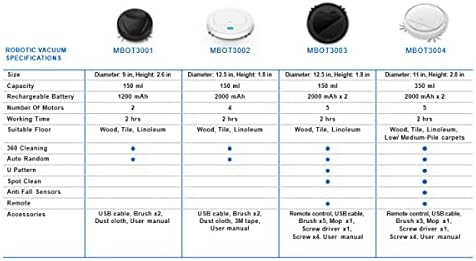
Figura 2: Komponenti Inklużi
This image shows the Mahli Smart Robotic 3-in-1 Vacuum Cleaner along with its accessories: two side brushes, a mop cloth, a USB charging cable, and a small cleaning brush.
Setup
1. Iċċarġjar tal-Vacuum Cleaner
- Connect the USB charging cable to the charging port on the vacuum cleaner.
- Ipplaggja t-tarf l-ieħor tal-kejbil USB ma' adapter tal-enerġija USB kompatibbli (mhux inkluż) jew ma' port USB tal-kompjuter.
- Id-dawl indikatur tal-iċċarġjar jixgħel. Iċċarġjar sħiħ jieħu madwar 3 sigħat.
- Once fully charged, the indicator light may change or turn off. Disconnect the vacuum cleaner from the power source.
2. Attaching Side Brushes
Gently press the side brushes onto the designated posts on the underside of the vacuum cleaner until they click into place.
3. Attaching the Mop Cloth (Optional)
If using the mopping function, attach the mop cloth to the designated area on the bottom of the vacuum cleaner. Ensure it is securely fastened.
Istruzzjonijiet Operattivi
1. Tixgħil / Mitfi
- To power on, press the power switch on the side or bottom of the vacuum cleaner. Alternatively, for some models, simply touch the power button on the top surface after ensuring the main power switch is on.
- To power off, press the power switch again or hold the power button on the top surface.
2. Modi ta 'tindif
The vacuum cleaner features intelligent omni-directional and auto-route technology for efficient cleaning.
- Tindif Awtomatiku: Once powered on, the vacuum cleaner will automatically begin cleaning, navigating around obstacles and covering the floor area.
- Operazzjoni tal-Kontroll mill-bogħod: Use the provided remote control for manual direction changes or to start/stop cleaning.
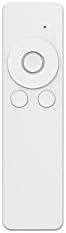
Figura 3: Kontroll mill-bogħod
This image shows the white remote control for the Mahli Smart Robotic 3-in-1 Vacuum Cleaner. It features a circular directional pad at the top, with two smaller circular buttons below it.
3. Funzjoni tat-Tqaxxir
If the mop cloth is attached, the vacuum cleaner will perform mopping simultaneously with sweeping and vacuuming. Ensure the mop cloth is clean and slightly damp għall-aħjar riżultati.
Manutenzjoni
1. Tbattil tal-landa taż-żibel
Regularly empty the dustbin to maintain optimal cleaning performance. Locate the dustbin compartment, open it, and dispose of collected debris. Clean the dustbin with the provided cleaning brush or a soft cloth.
2. Tindif ta 'Xkupilji tal-Ġenb
Check the side brushes for tangled hair or debris. Remove any obstructions carefully. If brushes are worn, they may need replacement.
3. Cleaning the Mop Cloth
After each use, remove the mop cloth and wash it thoroughly. Allow it to air dry completely before reattaching.
4. Sensuri tat-Tindif
Wipe the anti-fall sensors and other optical sensors on the bottom and front of the vacuum cleaner with a clean, dry cloth to ensure proper navigation.
Issolvi l-problemi
| Problema | Kawża Possibbli | Soluzzjoni |
|---|---|---|
| Vacuum cleaner ma jixgħelx. | Battery is low or depleted. Main power switch is off. | Charge the vacuum cleaner. Ensure the main power switch is in the ON position. |
| Vacuum cleaner stops unexpectedly. | Dustbin is full. Obstruction detected. Battery is low. | Empty the dustbin. Remove any obstructions. Recharge the vacuum cleaner. |
| Prestazzjoni fqira tat-tindif. | Dustbin is full. Side brushes are tangled or worn. Sensors are dirty. | Empty the dustbin. Clean or replace side brushes. Clean all sensors. |
| Vacuum cleaner gets stuck frequently. | Too many obstacles in the cleaning area. Sensors are dirty. | Clear the cleaning area of excessive clutter. Clean all sensors. |
Speċifikazzjonijiet
| Karatteristika | Dettall |
|---|---|
| Mudell | MBOT3002 |
| Funzjoni | Sweeping, Vacuuming, Mopping (3-in-1) |
| Kapaċità tal-batterija | 2000mAh |
| Ħin tal-Iċċarġjar | Appross. 3 sigħat |
| Ħin tax-Xogħol | Appross. 2 sigħat |
| Vol ikklassifikattage | 3.7V |
| Ħoss tax-Xogħol | 55dB |
| Dimensjonijiet | Dijametru: 12.5 pulzieri, Għoli: 1.8 pulzieri |
| Suitable Floor Types | Wood, Tile, Linoleum |
| Karatteristiċi Speċjali | Intelligent Omni-Directional, Auto Route Technology, Smart Navigation, 360 Motion, Advanced Sensors, Anti-Fall Sensors |
| Komponenti Inklużi | Sweeper, 2x Brush, 1x Mop, 1x USB Charging Cable, 1x Cleaning Brush, Remote Control |
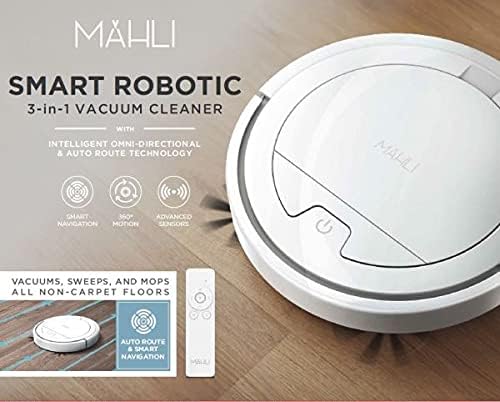
Figure 4: Robotic Vacuum Specifications Overview
This image displays a table comparing specifications for various Mahli robotic vacuum models (MBOT3001, MBOT3002, MBOT3003, MBOT3004). Key specifications include size, capacity, battery, motors, working time, suitable floor, cleaning patterns, sensors, remote, and accessories.
Garanzija u Appoġġ
For warranty information and customer support, please refer to the contact details provided on the product packaging or the official Mahli websit. Żomm l-irċevuta tax-xiri tiegħek bħala prova tax-xiri.
For technical assistance or troubleshooting beyond this manual, please contact Mahli customer service.