
1. Introduzzjoni
This manual provides detailed instructions for the installation, operation, and maintenance of your PGST PG107 4G Alarm System. This advanced security system is designed to provide comprehensive protection for your home or property, featuring 4G connectivity, a touch screen interface, and compatibility with various wireless sensors.

Figure 1.1: PGST PG107 4G Alarm System Control Panel
The system includes a main control panel, various wireless sensors (such as door/window contacts and PIR motion detectors), remote controls, and an SOS button. It supports two-way voice intercom, voice control integration with smart assistants, and mobile app control for convenient management.
2. Informazzjoni dwar is-Sigurtà
- Ensure the system is installed in a dry, stable environment, away from direct sunlight, extreme temperatures, and high humidity.
- Tippruvax tiżżarma jew issewwi l-apparat int stess. Irreferi għal kull manutenzjoni f'idejn persunal kwalifikat.
- Use only the specified power adapter and batteries. Incorrect power sources can damage the device and void the warranty.
- Żomm l-apparat u l-komponenti tiegħu fejn ma jintlaħqux mit-tfal.
- Regularly test the system and its sensors to ensure proper functionality.
3. Kontenut tal-Pakkett
Please check the package contents upon receipt to ensure all items are present and undamaged. Typical components include:
- PGST PG107 4G Alarm Control Panel (Main Unit)
- Sensuri tal-Bieb/Twieqi bla Fili
- Ditekters tal-Moviment PIR
- Kontrolli mill-bogħod
- Buttuna SOS
- Adapter tal-Enerġija
- Manwal għall-Utent
Figure 3.1: Typical PGST Alarm System Components
4. Prodott Aktarview
4.1 Main Panel Features
- Touch Screen Interface: Intuitive display for easy navigation and control.
- Konnettività 4G: Ensures reliable communication for alerts and remote control.
- Interkom bil-Vuċi f'Żewġ Direzzjonijiet: Communicate directly through the panel.
- Buttuna SOS: Dedicated emergency button for immediate assistance.
- Kompatibbiltà tal-Assistent tal-Vuċi: Works with Amazon Alexa and Google Assistant for convenient voice control.
- Batterija tal-Backup: Jipprovdi enerġija waqt li tkun qed taħdemtages (approx. 8.5 hours).

Figure 4.1: Backup Battery Feature
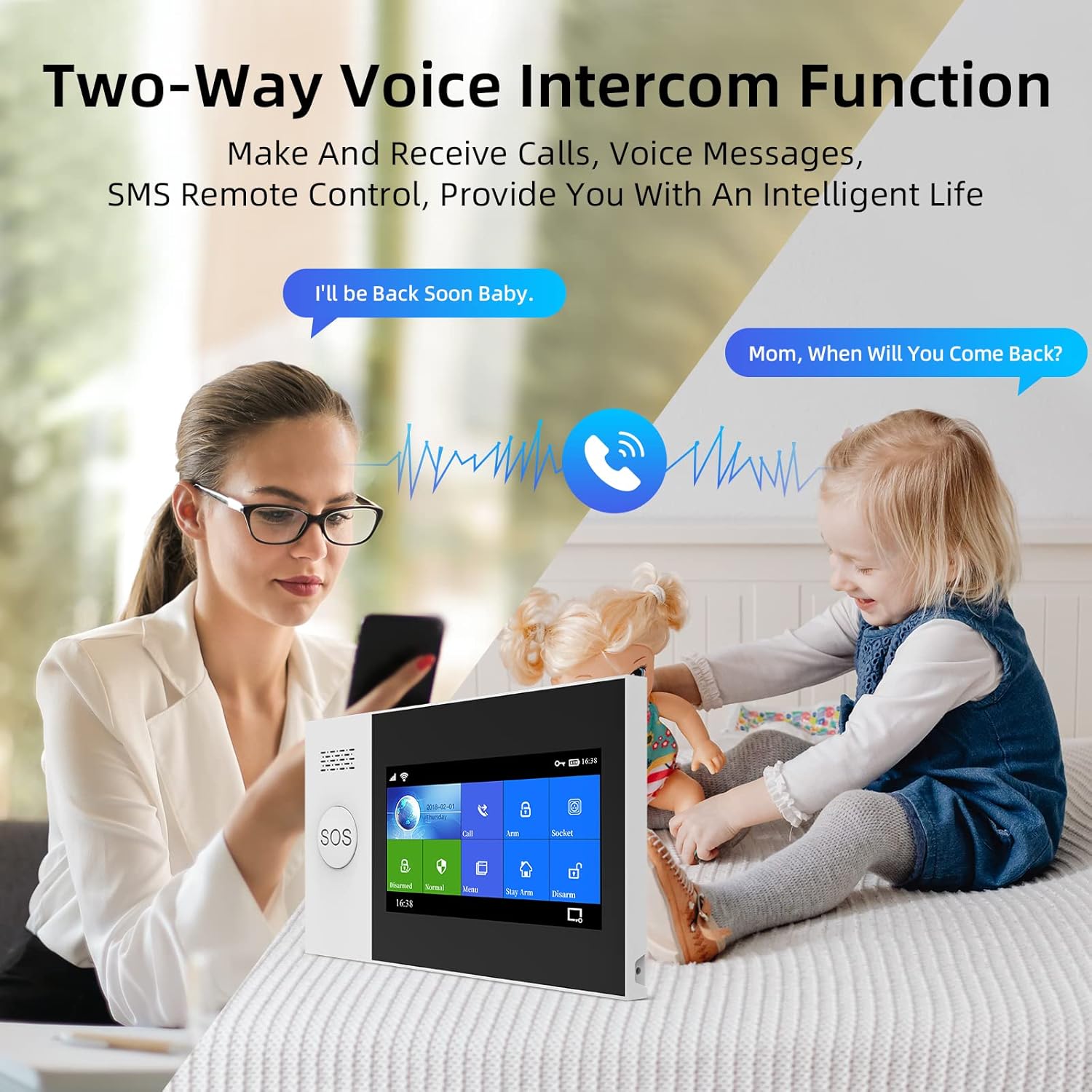
Figure 4.2: Two-Way Voice Intercom Function
4.2 Tipi ta 'Sensor
- Sensuri tal-Bieb/Twieqi: Sejbien tal-ftuħ u l-għeluq tal-punti tad-dħul.
- Ditekters tal-Mozzjoni PIR: Sense movement within a designated area.
- Buttuna SOS: For immediate emergency alerts.

Figure 4.3: Main Unit Dimensions and Parts
5. Setup
5.1 Setup Inizjali
- Konnessjoni tal-Enerġija: Connect the main control panel to a power outlet using the provided adapter.
- Installazzjoni tal-batterija: Ensure the internal lithium polymer battery is properly connected.
- SIM Card (for 4G models): Insert a valid 4G SIM card into the designated slot on the main panel if you intend to use cellular communication features.
5.2 Konnessjoni tas-Sensuri
The PGST system uses wireless sensors for easy installation. Follow these general steps to pair new sensors:
- Access the 'Add Device' or 'Sensor Pairing' menu on the main control panel's touch screen.
- Activate the sensor (e.g., open a door for a door sensor, or trigger a motion detector). The panel will detect the sensor.
- Confirm the pairing on the panel and assign a zone or name to the sensor for easy identification.

Figure 5.1: Wireless Sensor Pairing and Low Battery Indication
5.3 Installazzjoni u Konfigurazzjoni tal-App
Download the official PGST alarm system mobile application from your smartphone's app store. Follow the in-app instructions to register an account and connect your alarm system. This app allows for remote arming/disarming, status checks, and receiving alerts.

Figura 5.2: Eżample of Sensor Placement in a Home
6. Tħaddim tas-Sistema
6.1 Armar u Diżarm
- Driegħ 'il bogħod: Activates all sensors. Use when leaving the property.
- Id-Dar: Activates perimeter sensors (e.g., door/window contacts) while allowing free movement inside.
- Iddiżarma: Jiddiżattiva s-sensuri kollha.
You can arm or disarm the system using the control panel's touch screen, the remote control, or the mobile application.

Figure 6.1: Voice Prompts for System States
6.2 Two-Way Intercom Function
The main panel supports two-way voice communication. You can make and receive calls directly through the system, allowing for communication with family members or visitors.
6.3 Integrazzjoni tal-Kontroll tal-Vuċi
Integrate your PGST alarm system with Amazon Alexa or Google Assistant for hands-free control. Follow the instructions in your smart assistant's app to link the PGST system. Common commands include "Alexa, arm my home" or "Hey Google, disarm the alarm."

Figure 6.2: Alexa Voice Control Integration
6.4 Funzjoni SOS
In case of an emergency, press the SOS button on the main panel or the dedicated SOS remote. This will immediately trigger an alarm and send alerts to pre-programmed emergency contacts.

Figure 6.3: SOS Button for Emergency Situations

Figure 6.4: SOS Function for Elderly Assistance
6.5 Funzjoni tal-Qanpiena tal-Bieb
The main unit can also function as a doorbell. When a compatible doorbell button is pressed, the main unit will emit a chime.

Figure 6.5: Doorbell Functionality
7. Manutenzjoni
7.1 Sostituzzjoni tal-batterija
Sensors and the main unit's backup battery will indicate low power. Replace batteries promptly to ensure continuous protection. Refer to individual sensor manuals for specific battery types and replacement procedures. The main unit uses a Lithium Polymer battery.
7.2 Tindif
Wipe the main panel and sensors with a soft, dry cloth. Do not use abrasive cleaners or solvents, as these can damage the surfaces.
8 Issolvi l-problemi
If you encounter issues with your PGST PG107 4G Alarm System, refer to the table below for common problems and their solutions.
| Problema | Kawża Possibbli | Soluzzjoni |
|---|---|---|
| Is-sistema ma tirrispondix | No power, low battery, or system crash. | Check power connection. Recharge or replace backup battery. Restart the system. |
| Is-senser mhux qed jattiva l-allarm | Sensor battery low, sensor out of range, or not properly paired. | Replace sensor battery. Relocate sensor closer to main unit. Re-pair the sensor. |
| No mobile alerts | No 4G signal, incorrect app settings, or SIM card issue. | Check 4G signal strength. Verify app notification settings. Ensure SIM card is active and has credit. |
| Allarmi foloz | Improper sensor placement, environmental factors, or faulty sensor. | Adjust sensor sensitivity or placement. Ensure PIR sensors are not facing heat sources or direct sunlight. Test or replace faulty sensor. |

Figure 8.1: LED Indicator States
9. Speċifikazzjonijiet
| Karatteristika | Dettall |
|---|---|
| Numru tal-Mudell | PG107-4G-0 |
| Brand | PGST |
| Manifattur | PGST |
| Dimensjonijiet (Unità Prinċipali) | 10 x 3 x 3 ċm |
| Piż (Unità Prinċipali) | 370 g |
| Materjal | ABS |
| Sors tal-Enerġija | Mħaddma bil-batterija |
| Tip ta 'batterija | Polimeru tal-Litju (1 meħtieġ) |
| Average Battery Life (Main Unit) | 10 Hours (backup) |
| Apparati Kompatibbli | Home Security System components |
| Konnettività | 4G, Wi-Fi |
10. Garanzija u Appoġġ
10.1 Informazzjoni dwar Garanzija
PGST products typically come with a limited manufacturer's warranty. Please refer to the warranty card included with your product or visit the official PGST websit għal termini u kundizzjonijiet speċifiċi tal-garanzija. Żomm il-prova tax-xiri tiegħek għal talbiet ta' garanzija.
10.2 Appoġġ għall-Klijent
For technical assistance, troubleshooting, or any questions regarding your PGST PG107 4G Alarm System, please contact PGST customer support. Contact details can usually be found on the product packaging, the official PGST webis-sit, jew permezz tal-bejjiegħ bl-imnut tiegħek.