
1. Introduzzjoni
The thinkcar ThinkEASY is a 12V car battery tester designed to analyze the health of various lead-acid batteries, including those found in cars, trucks, motorcycles, ATVs, SUVs, boats, and golf carts. This device connects via Bluetooth 5.0 to a mobile application, providing detailed reports on battery health, cranking system performance, and charging system efficiency. It supports a wide range of battery types and CCA values, making it a versatile tool for both professionals and DIY enthusiasts.

Image: The ThinkEASY tester is compatible with various 12V vehicles including ATVs, trucks, motorcycles, boats, and cars.
2. Informazzjoni dwar is-Sigurtà
Please read and understand all safety instructions before using the thinkcar ThinkEASY battery tester. Failure to follow these instructions may result in electric shock, fire, or serious injury.
- Always wear eye protection and protective clothing when working near batteries.
- Kun żgur li l-vettura tkun f'żona b'ventilazzjoni tajba.
- Avoid sparks and open flames near the battery. Batteries can produce explosive gases.
- Do not touch battery terminals or clamps with bare hands while connected to a power source.
- Żomm it-tester 'il bogħod mit-tfal.
- Jekk l-aċidu tal-batterija jiġi f'kuntatt mal-ġilda jew mal-għajnejn, laħlaħ immedjatament b'ħafna ilma u fittex attenzjoni medika.
- Żgura li l-clamps are connected correctly: red to positive (+), black to negative (-).
3. Kontenut tal-Pakkett
Ivverifika li l-oġġetti kollha huma preżenti fil-pakkett tiegħek:
- thinkcar ThinkEASY 12V Car Battery Tester unit with integrated clamps.
- User Manual (this document).
4. Prodott Aktarview
The thinkcar ThinkEASY battery tester consists of a compact main unit with integrated red (positive) and black (negative) clamps. The device communicates wirelessly via Bluetooth to a dedicated mobile application, displaying test results and analysis on your smartphone or tablet.

Image: The thinkcar ThinkEASY battery tester features robust red and black clamps for secure connection to a 12V battery.
5. Setup
5.1 App Download u Installazzjoni
- Għal apparati Android: Fittex għal and download the "Thinkdiag+" App from the Google Play Store.
- Għal apparati iOS: Fittex għal and download the "Thinkdiag" App from the Apple App Store.
- Installa l-applikazzjoni fuq l-ismartphone jew it-tablet tiegħek.
5.2 Konnessjoni Bluetooth
- Kun żgur li l-Bluetooth huwa attivat fuq it-tagħmir mobbli tiegħek.
- Connect the ThinkEASY tester to your vehicle's 12V battery (red clamp għal terminal pożittiv, iswed clamp to negative terminal). The device will power on automatically.
- Open the Thinkdiag/Thinkdiag+ app. Navigate to the 'Gadget' menu within the app.
- The app should automatically detect the ThinkEASY device. Select it to establish a Bluetooth connection.

Image: The ThinkEASY app interface on a smartphone, demonstrating Bluetooth connectivity to the battery tester.
6. Istruzzjonijiet Operattivi
The ThinkEASY tester performs various tests to assess your battery and vehicle's electrical system. Ensure the tester is properly connected to the battery and the app is connected via Bluetooth before proceeding.

Image: The ThinkEASY app displays results for Battery Health, Start System, and Charging Health tests.
6.1 Battery Health Test
This test evaluates the overall condition of your battery, including its capacity and internal resistance. Select "Battery Health Test" in the app. The app will guide you through the process and display results such as State of Health (SOH) and State of Charge (SOC).
6.2 Start System Test (Cranking Test)
This test assesses the vehicle's starting system, including the starter motor and battery's ability to deliver sufficient current during engine cranking. Follow the app's instructions to start the engine. The app will display cranking voltage and duration, indicating if the starting system is performing normally.
6.3 Charging System Test (Alternator Test)
This test checks the vehicle's charging system, primarily the alternator, to ensure it is properly charging the battery. The app will measure on-load and no-load voltages, as well as ripple voltage, to determine the charging system's efficiency.
6.4 Additional Tests and Features
The ThinkEASY app also provides access to other diagnostic functions:
- Voltage Test: Juri l-volum kurrenti tal-batterijatage.
- Ripple Analysis: Measures the AC ripple voltage from the alternator, indicating potential issues with the rectifier diodes.
- Test tar-reżistenza: Measures the internal resistance of the battery.
- Test tat-Tagħbija: Simulates a load on the battery to assess its performance under demand.
- Monitoraġġ tat-temperatura: With a built-in temperature sensor, the device can monitor the engine bay temperature in real-time via the app.

Image: The ThinkEASY app offers multiple test options including State of Health (SOH), State of Charge (SOC), Charging Test, Cranking Test, Voltage Test, Ripple Analysis, Resistance Test, and Load Test.

Image: The ThinkEASY tester includes a temperature sensor to monitor engine bay temperature, operating within a range of -20°C to 50°C.
6.5 Supported Battery Types and CCA Range
The ThinkEASY supports various 12V lead-acid battery types and a CCA (Cold Cranking Amps) range of 100-2000.
- Batteriji tal-ġel
- Regular-flooded batteries
- Batteriji AGM Flat Plate
- Batteriji spirali AGM

Image: The ThinkEASY tester supports various 12V battery types including GEL, Regular-flooded, AGM Flat Plate, and AGM Spiral, with a CCA range of 100-2000.
7. Manutenzjoni
- Clean the tester's clamps after each use to prevent corrosion and ensure good electrical contact. Use a dry cloth.
- Aħżen l-apparat f'post niexef u frisk, 'il bogħod mix-xemx diretta u minn temperaturi estremi.
- Do not attempt to disassemble or modify the tester. This will void the warranty and may cause damage.
8 Issolvi l-problemi
- App Not Found: Ensure you are searching for "Thinkdiag+" for Android or "Thinkdiag" for iOS. If issues persist, contact thinkcar support for alternative app recommendations.
- Bluetooth Connection Failure:
- Iċċekkja li l-Bluetooth huwa attivat fuq l-apparat mobbli tiegħek.
- Ensure the ThinkEASY tester is properly connected to a 12V battery and powered on.
- Ibda mill-ġdid l-app u erġa' pprova ikkonnettja.
- Check if the battery has enough charge to power the Bluetooth module. If the battery is completely dead, the tester may not be able to establish a connection.
- Qari mhux eżatt:
- Kun żgur li t-terminali tal-batterija huma nodfa u li l-clamps għandhom konnessjoni soda.
- Verify the battery type and CCA input in the app match your battery's specifications.
9. Speċifikazzjonijiet
| Karatteristika | Speċifikazzjoni |
|---|---|
| Brand | thinkcar |
| Mudell | ThinkEasy |
| Sors tal-Enerġija | Imħaddem bil-batterija (mill-batterija tal-vettura) |
| Modalità ta' Konnessjoni | Bluetooth + APP |
| Measuring CCA Range | 100-2000 CCA |
| Measuring Capacity Range | 30-80Ah |
| Vol. tal-kejltage Firxa | 11-16V |
| Temperatura tax-Xogħol | -20°C sa 50°C (-4°F sa 122°F) |
| Dimensjonijiet tal-Prodott (L x W x H) | 6.3 x 3.94 x 1.18 pulzieri |
| Piż tal-oġġett | 11.3 uqija |
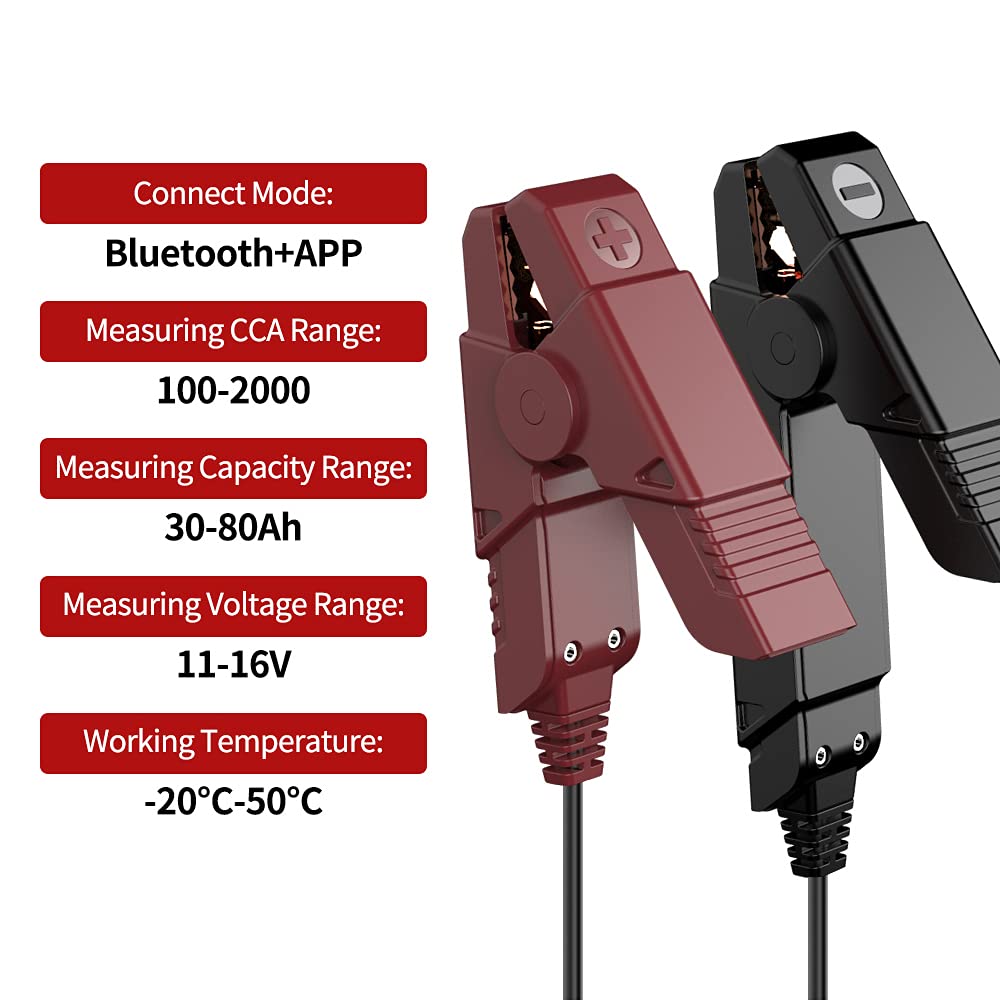
Image: Key specifications of the thinkcar ThinkEASY battery tester, including connection mode, measurement ranges, and operating temperature.
10. Garanzija u Appoġġ
thinkcar products are designed for reliability and performance. For warranty information, technical support, or service inquiries, please refer to the official thinkcar webis-sit jew ikkuntattja lis-servizz tal-konsumatur tagħhom direttament. Żomm l-irċevuta tax-xiri tiegħek bħala prova tax-xiri għal talbiet ta' garanzija.
Uffiċjali Websit: www.thinkcar.com